
On this page
Start here
Quick answer
First separate a completely blank Samsung oven from an oven whose display works but will not start a cycle. If there is smoke, a burning smell, visible arcing, a hot or damaged cord or outlet, repeated breaker trips, water near electrical parts, or a gas odor, stop and do not keep testing it. For a normal, dry appliance, check the dedicated power supply and visible breaker position, then check the model-specific control lock, Demo mode, Sabbath or delay setting, clock, door closure, selected mode, and required Start/Set control. Samsung documents that Demo mode can prevent an oven from heating, the oven lock can disable oven functions, and some models shut off or refuse operation when the door is open or a safety state is active. A gas-range branch may require professional attention if the burners or oven do not ignite; never relight repeatedly, open a gas fitting, or use a flame to investigate. If the display remains blank, a code returns, the door or latch is damaged, the oven still will not respond after one safe reset allowed by the manual, or any hazard is present, keep it off and request qualified service.
Before you begin
Safety first
- This article covers only ordinary-access observation and model-documented controls. Do not remove panels, probe live wiring, bypass a door switch or lock, open gas fittings, relight to test, or energize a wet or damaged oven.
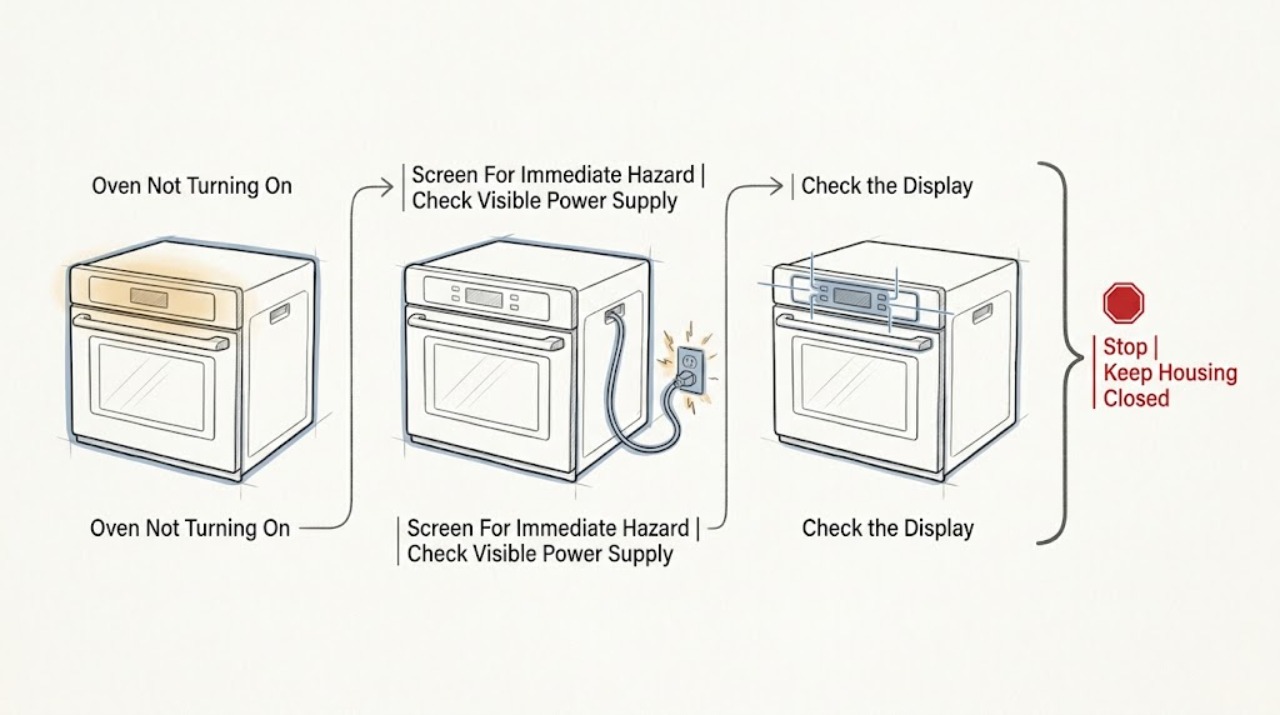
Work through in order
Diagnostic checks
Use only checks that match the exact appliance or system and its official guide.
-
Check 1
From a safe position, stop pressing controls and classify the symptom: blank display, lit display with no response, a code or lock icon, smoke, burning odor, visible spark or arc, water near the appliance, hot cord or outlet, repeated breaker trip, or fuel-like odor.
Expected result: Record which controls or lights work and whether there is smoke, flame outside a normal burner, arcing, a gas smell or hissing, water at electrical areas, heat damage, or a breaker that trips again.
Next step: If any hazard is present, keep the oven off and follow the relevant stop condition. If the appliance is dry and there is no hazard, continue by checking the visible operating state without removing panels.
Stop if: Stop immediately for fuel odor or hissing, smoke, fire, sparks or arcing, burning or plastic odor, water near a cord, outlet, control, or wiring, a hot/damaged plug or outlet, or repeated breaker trips.
Why this matters
Why: A no-response symptom without a hazard can follow a low-risk power or control-state path. Smoke, burning, arcing, water near electrics, repeated trips, and gas symptoms are safety events rather than ordinary start problems.
-
Check 2
If the appliance is cool and dry, check only the visible plug or cord condition where accessible and the household breaker or disconnect label for the oven; do not pull out a built-in oven, open the electrical panel, or use an extension cord.
Expected result: The display and other functions remain completely blank; the breaker appears off or was recently interrupted; or the breaker is on but the oven remains blank, the cord or outlet is damaged, or the breaker trips when power is restored.
Next step: If the breaker is clearly off and there is no hazard, restore it once according to household practice and observe from a safe position. If it trips, the outlet or cord is damaged, or the display stays blank, leave the oven off and request qualified electrical or appliance service.
Stop if: Stop for a tripped breaker that repeats, buzzing, heat, discoloration, exposed conductors, water, a damaged cord or outlet, or any need to access the panel or appliance wiring.
Why this matters
Why: A blank display is consistent with a supply or control-power problem, but a breaker that trips again or visible heat/water damage indicates a fault that should not be challenged with more resets. A lit display moves the diagnosis toward controls, door safety, or a selected mode.
-
Check 3
With the display responsive, read the complete model manual and check for Control/Oven Lock, Child Lock, Demo mode, Sabbath mode, Delay Start, Timer, an unset clock, and the required Start/Set confirmation; use only the model's stated control sequence.
Expected result: A lock icon or lock message is present, Demo or Sabbath is shown, a delayed start or timer is active, the clock is missing after an outage, or the selected cooking mode accepts settings only after Start/Set; alternatively, no state changes and a code appears.
Next step: Clear only the lock, Demo, Sabbath, delay, timer, or clock state that the exact manual identifies, then make one normal start attempt. If the state cannot be cleared or the code returns, stop and arrange service with the code and model recorded.
Stop if: Stop when the panel is hot, wet, damaged, unresponsive after the documented control sequence, or shows a recurring code, smoke, burning odor, or unexpected heating.
Why this matters
Why: A control state can make a working panel appear unable to start. Samsung's model guidance shows that Start/Set begins a function and that Oven Lock disables functions, while Demo and Sabbath controls vary by model. An unknown or recurring code needs model-specific interpretation rather than a cross-model guess.
-
Check 4
With the oven cool, inspect the door closure from the outside and confirm that racks or a divider are fully seated and not blocking it; select a normal mode listed for the model and confirm the door closes without force.
Expected result: The door closes evenly and the panel responds; or a rack/divider blocks it, the door was recently removed, the latch is stuck, the hinge or frame is bent, the glass or gasket is damaged, or the oven reports a door condition.
Next step: Correct only a clearly mis-seated cool rack or divider as the manual permits, then try the normal Start/Set control once. Do not force, bend, remove, or bypass the door or latch; request service for damage or persistent failure.
Stop if: Stop for broken glass, a loose or bent hinge, damaged gasket, a latch that will not move normally, a door that will not close, hot steam, or a need to remove door hardware.
Why this matters
Why: Samsung identifies rack or divider position, door reattachment, latch position, and physical damage as separate reasons a door may not close. A safety switch may prevent a cycle when the door is not recognized as closed.
-
Check 5
Only when the model documentation confirms a gas range and there is no gas odor, observe the normal external status of the cooktop burners and record whether the oven fails to ignite at all; do not open a gas connection or repeatedly relight anything.
Expected result: There is a fuel-like smell, hissing, delayed ignition, a burst or abnormal flame, soot, an alarm, or the cooktop burners and oven both fail; or there is no fuel warning and the electric-control path is the symptom.
Next step: For any gas warning, leave immediately and contact emergency or fuel-gas help from a safe location. If there is no gas warning but burners or oven ignition fail, keep the appliance off and request qualified gas-appliance service rather than testing again.
Stop if: Stop for any fuel odor, hissing, delayed ignition, burst flame, abnormal flame, soot, smoke, alarm, or repeated failed ignition; do not find a leak with a flame or relight to confirm a fault.
Why this matters
Why: Samsung notes that gas ovens cycle ignition to maintain temperature and provides a separate gas-pressure path for gas ranges. The presence of an odor, abnormal flame, or repeated failed ignition is not a user repair; it requires immediate safety escalation.
-
Check 6
If the oven is cool, dry, free of hazards, and the exact manual permits it, perform at most one model-appropriate power reset from the appliance's normal disconnect or breaker, then observe the display without starting a risky cycle.
Expected result: The display returns and the oven accepts the documented normal mode; or the display remains blank, the same code or lock returns, the panel remains frozen, the door remains locked, or the breaker trips again.
Next step: If it does not recover cleanly, keep the oven off and request qualified service. Provide the model, fuel type, display behavior, code/icon, breaker result, door condition, and any odor or smoke history; do not remove panels or perform live tests.
Stop if: Stop immediately if the reset causes a trip, smoke, odor, heat, spark, unexpected heating, or any sign of water or electrical damage.
Why this matters
Why: A single safe reset can clear a transient control state, but a repeated failure points to supply, control, door-safety, ignition, heating, or another fault that requires diagnosis. Resetting cannot make a wet or damaged appliance safe.
Use your observations
Decision map
Find the observation that best matches what you see, then follow the next safe action.
-
PATH 01Next step
What you see
The Samsung oven display and visible functions are completely blank.
Do this next
Check the visible breaker or disconnect once if safe and dry. If the display remains blank, the breaker trips, or any cord/outlet damage exists, leave it off and request qualified service; do not access the panel.
-
PATH 02Next step
What you see
The display responds but the oven does not start.
Do this next
Check the model-specific lock, Demo, Sabbath, delay, timer, clock, mode, and Start/Set state. Clear only documented settings and make one normal attempt; a recurring code or frozen panel needs service.
-
PATH 03Next step
What you see
The door does not close evenly, a door or latch icon appears, or a rack/divider blocks closure.
Do this next
With the oven cool, correct only a clearly mis-seated rack or divider. Do not force, bypass, or disassemble the door; request service for damage or persistent closure failure.
-
PATH 04Next step
What you see
There is fuel odor, hissing, delayed ignition, a burst or abnormal flame, soot, smoke, or a fuel-gas alarm.
Do this next
Do not operate switches, appliances, phones, or flames in the area. Leave immediately and contact emergency or fuel-gas help from a safe location; do not return or restore gas until professionals clear it.
-
PATH 05Next step
What you see
A breaker trips again, water reaches electrical parts, the cord or outlet is hot/damaged, smoke or arcing occurs, or one safe reset does not restore operation.
Do this next
Stop using the oven and do not repeat the reset or run a test cycle. Obtain qualified electrical or appliance service, using emergency help for smoke, fire, or arcing.
Helpful context
Understand the symptom
Start by defining what not turning on means
A blank display and a lit display that ignores Start are different faults. A blank display points first to the appliance supply, breaker, wiring, or control power. A lit display with no heating or movement can be a selected delay, lock, Demo or Sabbath state, a door-safety input, a missing Start confirmation, or a model-specific error. Record whether the clock, oven light, fan, cooktop, and buttons respond, but do not use a risky load or repeated cycle to prove that the oven is working.
Check the settings before assuming a failed part
Samsung controls vary by model. Some panels show an Oven Lock or padlock state; some have a control or child lock, Demo mode, Delay Start, Sabbath feature, or a clock that must be set after an interruption. Demo mode is especially easy to mistake for a dead oven because the panel can appear normal while the oven will not heat. Use the instructions for the complete model number instead of applying button combinations from another Samsung range or wall oven.
Keep door and fuel differences explicit
The oven must be able to recognize a safe, closed door. A rack or divider that is not seated, a recently removed door, a stuck latch, or physical damage can prevent closure and can require service. Gas ranges add a separate supply and ignition path: Samsung's guidance treats burner and oven ignition behavior differently from an electric range. If there is any fuel-like smell, hissing, delayed ignition, burst flame, or alarm, do not try another ignition attempt. Leave and use the gas-emergency path from a safe location.
When a reset is reasonable—and when it is not
If the appliance is dry, cool, free of smoke or odor, and the breaker has not repeatedly tripped, one power reset exactly as the model manual allows can clear a control glitch. Samsung's support pages describe cycling the circuit for a short interval for certain control or locked-door symptoms. A reset is not a repair for a damaged cord, water intrusion, a hot outlet, arcing, a recurring code, or a breaker that trips again. Do not remove the control panel or test live wiring.
A useful service handoff avoids guesswork
If the safe checks do not restore operation, leave the oven off. Give the technician the complete model number, fuel type, whether the display was blank or responsive, the exact code or icon, the selected mode, the last normal use, breaker behavior, door condition, and any smell, smoke, water, spark, or unusual sound. This distinguishes an installation or control-state issue from a supply, door-safety, ignition, heating, or control fault without asking you to open the appliance.
Safety boundary
Stop conditions
- Fuel-like odor, hissing, delayed ignition, burst or abnormal flame, soot, smoke, or a fuel-gas alarm: leave without operating nearby switches, appliances, phones, or flames and contact emergency or fuel-gas help from a safe location.
- Smoke, fire, visible sparks or electrical arcing, burning or plastic odor, unexpected heating, or a hot/damaged cord or outlet: stop using the oven and obtain emergency or qualified service help as appropriate.
- Water near the cord, plug, outlet, control panel, wiring, or floor around the appliance, or a wet appliance: do not energize, move, open, or test it.
- A breaker that trips again, a recurring code, a blank display after one safe supply check, a frozen panel, or a door that remains locked or will not close: keep the oven off and request qualified service.
- Do not remove panels, perform live electrical or gas work, bypass the door switch or lock, open a gas fitting, use a flame for leak detection, or repeatedly relight or cycle the oven.
Only after diagnosis
Potential parts
- oven door latch or door switch
Only consider this category if the exact model and a technician confirm that the door is not being recognized as closed or the latch/switch is damaged.
Confirm the complete Samsung model number and approved fit information before ordering; do not bypass the safety switch. - oven control or power component
Only applicable after the supply, settings, door, and hazard checks are clear and a qualified diagnosis identifies a control or power fault.
Do not infer compatibility from appearance or a generic Samsung label; a technician must confirm the model and repair path. - gas ignition or heating component
Only applicable to the confirmed fuel configuration and only after a qualified technician rules out gas-safety, supply, control, and door conditions.
Do not order or install a gas or heating component without exact model verification and professional service.
When checks do not resolve it
Need a professional?
Request qualified appliance service when the Samsung oven remains blank or unresponsive after the visible supply check and one permitted reset, when a code or lock returns, when the door or latch is damaged, when a gas range will not ignite normally, or when any internal or concealed fault is suspected. Use emergency or fuel-gas help from a safe location for gas odor, hissing, smoke, fire, or abnormal combustion.
Safety scope: This article covers only ordinary-access observation and model-documented controls. Do not remove panels, probe live wiring, bypass a door switch or lock, open gas fittings, relight to test, or energize a wet or damaged oven.
Common questions
FAQ
Why is my Samsung oven display blank?
Start with the visible breaker or disconnect only if the appliance is dry and there is no heat or damage. If the breaker trips again, the outlet or cord is hot or damaged, or the display remains blank, leave the oven off and request qualified service rather than opening the appliance.
Can Demo mode make a Samsung oven seem not to turn on?
Yes, on applicable models the panel can respond while Demo mode prevents normal heating. Check the exact model manual for its Demo indicator and exit sequence; do not copy a control sequence from another model family.
What does a lock icon mean on a Samsung oven?
It can indicate an Oven or Control Lock, a child-safety state, or a heat-related door lock depending on the model. Allow a hot oven to cool and use only the exact manual's unlock procedure. Never force or bypass the door lock.
What if my Samsung gas oven will not ignite?
If there is any gas odor, hissing, delayed ignition, abnormal flame, smoke, or alarm, stop immediately, leave, and contact emergency or fuel-gas help from a safe location. Without those warnings, keep the appliance off and arrange qualified gas-appliance service instead of repeatedly relighting it.
Should I reset the breaker if my Samsung oven will not turn on?
Only when the oven is cool, dry, free of smoke or odor, and the model guidance permits a reset. Make one safe reset attempt; a repeat trip, blank display, code, or no response is a service boundary, not a reason to keep cycling power.
Read the exact guide
Official sources
- Samsung oven door is lockedSamsung · Samsung's official guidance for heat-related door locking, control response, a brief power cycle, and service
- Door will not close on Samsung ovenSamsung · Samsung's official troubleshooting guidance for racks, dividers, reattached doors, latches, physical damage, and service
- The oven control panel, Setting the clock, Temp Adjust, Demo mode, and Using the Sabbath feature: NE63*811***Samsung · An opened Samsung model-family control guide used for model-dependent Start/Set, Oven Lock, Demo, clock, and Sabbath examples; other models may differ
- Samsung oven temperature issuesSamsung · Samsung's official troubleshooting guidance for an oven that does not heat, including door, Demo mode, gas-range, breaker, and service paths
- Educational Messages Desk ReferenceNational Fire Protection Association · NFPA fuel-gas safety guidance for suspected leaks, alarms, evacuation, and professional clearance
Community feedback
Share a repair observation
Share a plain-text repair observation. Accepted observations are published automatically; this page may take a moment to update.