
On this page
Start here
Quick answer
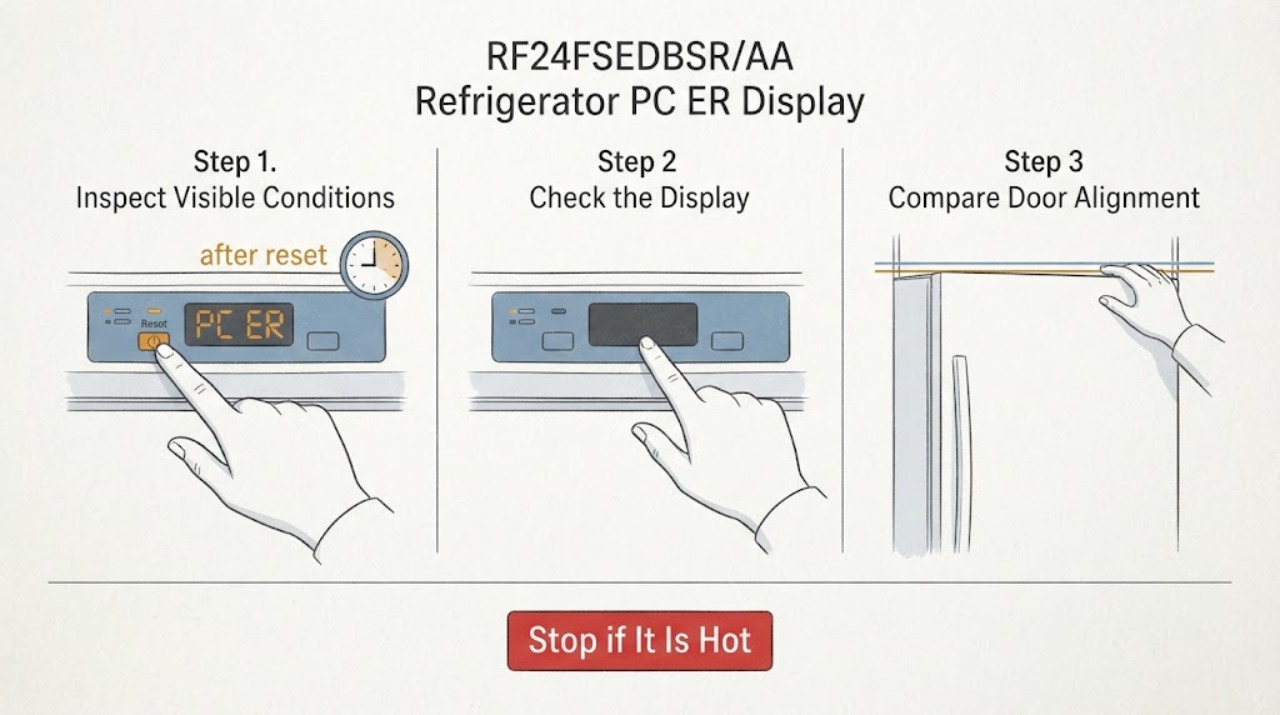
Samsung identifies PC ER/PC CH on refrigerators as a communication error between refrigerator components. Samsung says a recent power event or doors that are not properly connected can be involved, and its code guidance points to the wire harness above the door before service. Because this user has already attempted a reset, do not repeat generic power cycles or button combinations to make the code disappear. Preserve the exact display and cooling symptoms, check the doors and visible external conditions, and use the RF24FSEDBSR/AA manual before any harness work. If PC ER returns or the refrigerator is not cooling, stop troubleshooting and request model-specific service; the code does not identify a board, wire, or other replaceable part by itself.
Work through in order
Diagnostic checks
Use only checks that match the exact appliance or system and its official guide.
-
Check 1
Leave the displayed code as observed and record whether it reads PC ER or PC CH, whether the panel is otherwise blank or usable, whether the refrigerator and freezer are still cooling, and whether the code appeared after an outage, surge, door removal, or door reinstallation. Do not repeat the reset that has already been attempted.
Expected result: The code is persistent, returns after the previous reset, changes to a blank or different display, or appears together with loss of cooling or a recent power/door event.
Next step: Photograph the display if safe, retain the model and serial information, and continue only with the external checks below. If cooling is failing, protect perishable food and arrange service promptly.
Why this matters
Why: The official code page warns that unnecessary unplugging or panel interaction can make diagnosis harder. A persistent PC ER display supports a service record; a changed display after a reset does not establish that the communication fault is repaired.
-
Check 2
Compare the display with Samsung's PC ER/PC CH entry for refrigerator error codes. Do not substitute OF OF, a temperature alarm, or another code merely because the panel is blinking or partly blank.
Expected result: The display matches PC ER or PC CH, or the characters cannot be distinguished from another code.
Next step: For a confirmed PC ER/PC CH, use the door and harness context check. For an uncertain display, stop code-specific troubleshooting and give the photo, model and history to Samsung service.
Why this matters
Why: Samsung defines PC ER/PC CH as a communication error between refrigerator components. If the characters are uncertain, a photo and the exact model are more reliable than a guessed code interpretation.
-
Check 3
With the refrigerator in its normal safe state, inspect both French-door seals and the visible door edges. Remove only an obvious food or shelf obstruction, confirm the doors close fully without force, and note whether the doors were recently removed or reattached. Do not loosen hinges or remove a door as a first response.
Expected result: A door is obstructed, a gasket is warped or damaged, the doors do not close squarely, or the code began after door work; alternatively, both doors close normally and no visible obstruction is present.
Next step: Correct only a simple visible obstruction and document any gasket or alignment defect. If the issue followed door work, use the exact RF24FSEDBSR/AA manual or qualified service for the connector path; do not improvise a door-removal procedure.
Why this matters
Why: Samsung lists improperly connected doors as one circumstance associated with PC ER and separately says blocked, damaged or incorrectly reattached doors can affect operation. A normal exterior door check does not prove the internal communication path is sound.
-
Check 4
Do not repeat button combinations. If the exact RF24FSEDBSR/AA manual identifies the door harness and the user is qualified to access it, follow that manual only after the refrigerator is safely powered down; otherwise stop at the visible inspection and request service. Do not pull on wires, remove a door, or disconnect a connector by guesswork.
Expected result: The code appeared after door removal/reinstallation and the exact model instructions clearly identify the connector, or the manual is unavailable/unclear or the connector requires door or hinge disassembly.
Next step: Perform no connector work unless the exact model manual and safe power-off conditions make the step clear. If those conditions are absent, leave the refrigerator intact and arrange Samsung or qualified appliance service.
Stop if: Stop for a loose or damaged wire, exposed conductor, water near electrical connectors, a door that could fall, or any need to work on an energized refrigerator.
Why this matters
Why: Samsung's PC ER guidance points to the wire harness above the door, while Samsung's door guide warns that door and connector work is model-dependent and requires caution. The generic page does not authorize an improvised repair or prove that a harness is the failed part.
-
Check 5
Record whether the display began after a power surge, brownout, outage, or breaker event, and whether other appliances were affected. Do not run another reset cycle solely to test that history, and do not treat a normal outlet or a cleared display as proof of a repaired communication path.
Expected result: A recent power event preceded PC ER, or no power event is known and the code persists after the earlier reset attempt.
Next step: Give the event history, exact model, code photo and door findings to Samsung service. If the refrigerator is warm, leaking, sparking, or repeatedly trips protection, keep it out of service and seek prompt qualified help.
Stop if: Stop immediately for smoke, sparking, burning odor, a hot or damaged cord/outlet, water entering electrical areas, or loss of safe cooling.
Why this matters
Why: Samsung says PC ER can occur after a recent power surge, but the same code can be associated with improperly connected doors. The history helps service triage; it does not isolate a board, harness, or power component.
Use your observations
Decision map
Find the observation that best matches what you see, then follow the next safe action.
-
PATH 01Next step
What you see
PC ER began after a door was removed, reinstalled, adjusted, or otherwise disturbed, or a door no longer closes normally.
Do this next
Do not repeat the reset. Check only obvious external closure issues; then use the exact RF24FSEDBSR/AA manual or arrange service for the harness path. Do not remove the door by guesswork.
Why this path and its safety boundary
Why it matters: Samsung identifies improperly connected doors as a possible context for PC ER, and its door guide treats harness and door work as model-dependent.
-
PATH 02Next step
What you see
PC ER appeared after a surge, brownout, outage, or breaker event, with no known door work.
Do this next
Record the event and the earlier reset attempt, avoid more generic reset cycles, and request model-specific service if the code remains or returns.
Why this path and its safety boundary
Why it matters: Samsung says a recent power surge can be associated with PC ER, but that association does not identify a failed electrical part.
-
PATH 03Next step
What you see
The code is confirmed, both doors close normally, no obstruction or visible wire/door damage is found, and there is no clear initiating event.
Do this next
Keep the model, code photo and cooling status together for Samsung service. Do not order a board, harness, sensor, or other part based only on PC ER.
Why this path and its safety boundary
Why it matters: Normal external observations do not clear a communication error or prove that the refrigerator is repaired.
-
PATH 04Next step
What you see
The refrigerator is not cooling safely, food is warming, the display or wiring area shows damage, there is sparking or burning odor, or protection trips again.
Do this next
Stop using the refrigerator as appropriate, keep clear of damaged electrical areas, protect food, and arrange prompt qualified service. Do not perform live tests or repeat resets.
Why this path and its safety boundary
Why it matters: The display code is accompanied by an operating or electrical safety problem that cannot be resolved by external code interpretation.
Helpful context
Understand the symptom
The assigned appliance is the Samsung RF24FSEDBSR/AA French Door refrigerator. The exact PC ER display matters: Samsung groups PC ER and PC CH under Communication Error. That label describes a communication fault between refrigerator components; it is not proof that a particular board, cable, or sensor has failed.
The user has already tried to reset the unit. Do not keep pressing combinations or repeatedly unplugging the refrigerator just to clear the display. Use the remaining observations to separate a door or harness context from a persistent fault, and keep all connector work within the exact model manual and a safe power-off boundary.
When checks do not resolve it
Need a professional?
Give service the RF24FSEDBSR/AA model, exact PC ER/PC CH text, a display photo, whether cooling continues, whether the problem followed a power event or door work, whether the doors close normally, and the fact that a reset was already attempted.
Common questions
FAQ
What does PC ER mean on the Samsung RF24FSEDBSR/AA refrigerator?
Samsung defines PC ER and PC CH as a communication error between refrigerator components. Samsung associates the code with a recent power surge or doors that are not properly connected, but the code alone does not identify a failed board or wire.
Should I repeat the reset or hold a button combination after PC ER appears?
No. This case already includes a reset attempt, and Samsung warns against unplugging or interacting with the panel merely to make an error disappear because it can make diagnosis harder. Preserve the display and history, then use the exact model manual or service route.
Can I reconnect the wire harness myself?
Samsung points to the wire harness above the door in its PC ER guidance, but door and connector work is model-dependent. Use only the exact RF24FSEDBSR/AA manual with the refrigerator safely powered down; if the connector or door must be disassembled, arrange qualified service.
Read the exact guide
Official sources
- RF24FSEDBSR French Door Refrigerator with Twin Cooling Plus, 22.6 cu.ft | Samsung Support CASamsung Support · Opened Samsung's exact model support page. It identifies RF24FSEDBSR/AA and RF24FSEDBSR and exposes the model's manual/support area; it is used to scope the assigned identity, not to infer an unseen repair step.
- Samsung refrigerator: Remove or install door and connect wiring harnessSamsung Support · Opened Samsung's official door/harness guide. It warns about door handling, shows that connector positions and procedures vary by model, and documents connector disconnection/reconnection in the relevant door sections; it is used only to set a model-manual and safety boundary, not as a substitute for the RF24FSEDBSR/AA manual.
- Samsung refrigerator or freezer doors will not closeSamsung Support · Opened Samsung's official door-closure troubleshooting page. It supports inspecting seals, visible obstructions and shelf/drawer alignment, and requesting service when the door remains abnormal; it does not diagnose PC ER internals.
- Samsung refrigerator error codesSamsung Support · Opened Samsung's official refrigerator error-code page. Its PC ER/PC CH entry defines a communication error, notes power-surge or improperly connected door context, points to the wire harness above the door, and directs service if the code returns.
Community feedback
Share a repair observation
Share a plain-text repair observation. Accepted observations are published automatically; this page may take a moment to update.