
On this page
Start here
Quick answer
A Samsung refrigerator may run for a long time after warm food is loaded, a door is opened often, the room or nearby cooking area is hot, or Power Cool or Power Freeze is active. First identify whether the sound is the compressor or a circulation fan, confirm that the compartments are actually reaching temperature, turn off any temporary high-cooling setting using the model instructions, and check the doors, seals, vents, and clearance. If the refrigerator is cooling normally with no error code, extended running can be normal. If food is warming or spoiling, the display shows an error, a fan is striking ice, the compressor is unusually loud, or the unit runs continuously after these checks, arrange qualified Samsung service. Do not open the sealed system or repeatedly unplug the refrigerator as a test.
Work through in order
Diagnostic checks
Use only checks that match the exact appliance or system and its official guide.
-
Check 1
Listen from outside the refrigerator and note whether the sound is a low compressor hum, moving air from a circulation fan, ice-maker or water-valve activity, or an unusual grinding, scraping, or loud vibration. Close the doors and observe whether the sound changes speed, pauses, or stops when the refrigerator reaches its set temperature; do not reach behind covers or into a moving fan.
Expected result: The sound changes speed or pauses and the food is cold; a fan is scraping or hitting ice; the compressor is unusually loud; or one compartment is warming while the sound continues.
Next step: Continue with the cooling-mode, door-seal, and airflow checks for a normal-sounding long run. For scraping, grinding, very loud compressor noise, or warming food, avoid repeated testing and prepare the model and symptom details for service.
Why this matters
Why: A compressor can start, change speed, and slow to a stop, and circulation-fan sounds can be normal. Scraping or fan-on-ice noise points to an airflow or frost condition, while warming food with continuous operation means the cooling system is not achieving its target and needs further checks.
-
Check 2
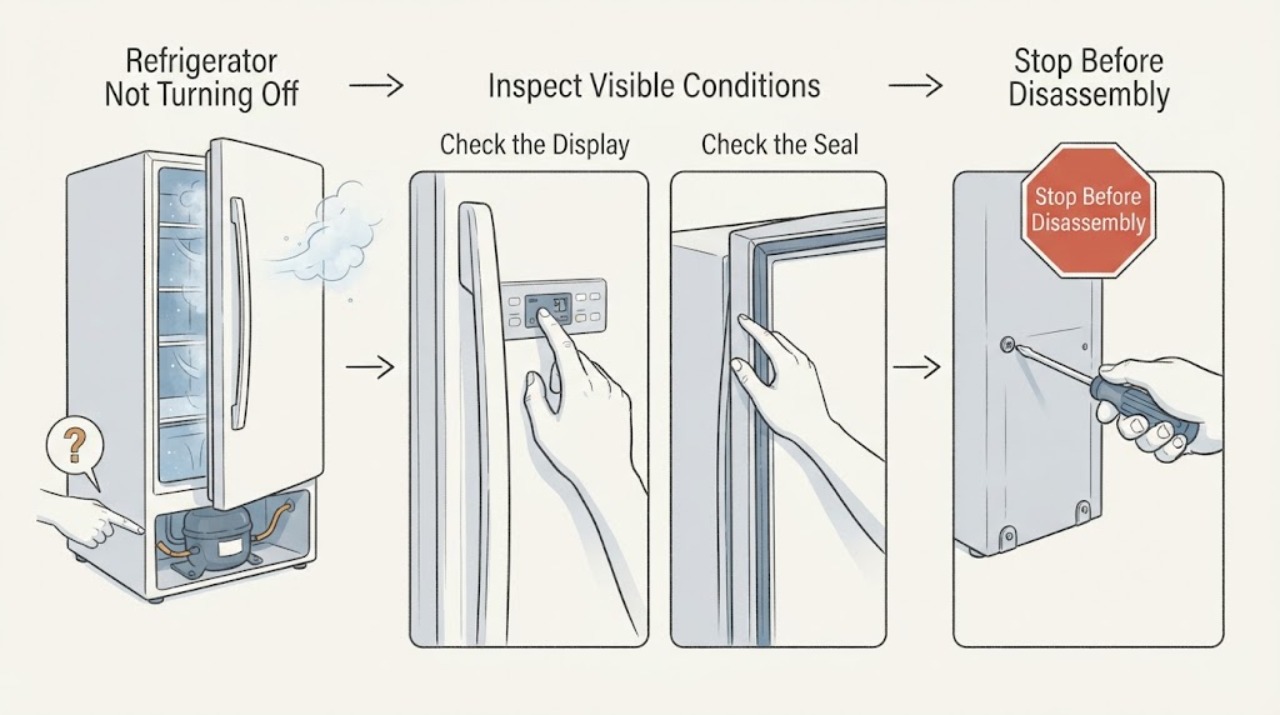
Inspect the refrigerator display and app, if your model supports SmartThings, for Power Cool, Power Freeze, a temperature change, Cooling Off mode, or an error code. Turn off Power Cool or Power Freeze using the exact model control or app instruction, and do not guess a button combination from another Samsung model.
Expected result: Power Cool or Power Freeze is active; the display shows OF OF, O FF, or another Cooling Off indication; a code is present; or no temporary mode or code is shown.
Next step: End a temporary mode only through the model's documented controls and give the refrigerator time to stabilize. Record any code instead of trying to make it disappear; follow the model guidance and request service if it returns.
Why this matters
Why: Power Freeze can keep the freezer cooling at its coldest for an extended period on some models, and a Cooling Off indication has model-specific behavior. An error code may identify a fan, compressor, voltage, or communication problem. If no mode or code is present, the continuous run is more likely related to heat loss, airflow, temperature recovery, or a cooling fault.
-
Check 3
Check every refrigerator and freezer door for a container, drawer, shelf, or frost patch that prevents full closure. Wipe the rubber seals with a damp cloth, then close a piece of paper halfway in the door and pull it out at several points around the seal.
Expected result: The paper has slight resistance around the seal; it slips out easily in one area; frost or a shelf blocks the door; or the door will not align or close.
Next step: Remove only an accessible obstruction, clean the seal, and repeat the paper check once the door is correctly closed. If the seal is damaged, frost keeps returning, or the door will not close, arrange service and do not force the door or remove hinges.
Why this matters
Why: A clean, continuous seal keeps warm air out. An easy-to-pull paper or door gap lets warm air enter, which can make the refrigerator run harder and can create frost that worsens the seal. A warped seal, persistent misalignment, or door obstruction is not a compressor diagnosis.
-
Check 4
Inspect the space around the refrigerator and the interior air vents without moving the appliance or removing a panel. Keep the exterior top, sides, and rear clear enough for the model's ventilation guidance, leave food away from interior vents, and move hot cookware or direct heat sources away from the refrigerator.
Expected result: Clearance is tight; an interior vent is covered by food; the refrigerator is beside a hot appliance or in direct sun; or the airflow paths are clear.
Next step: Restore accessible airflow and keep the doors closed while the refrigerator recovers. If it still runs continuously while food warms or the compressor is excessively loud, stop treating it as a placement issue and request qualified service.
Why this matters
Why: Restricted external or internal airflow and nearby heat make the refrigerator work harder to remove heat. If the clearances and vents are normal, the continuous run is less likely to be explained by the surrounding installation and should be judged with the actual food temperature and any codes.
-
Check 5
Review the set temperatures and recent changes, then leave the settings alone while monitoring whether the food and compartments become cold. Avoid opening the doors repeatedly; note whether the problem began after a power interruption, a large warm load, a move, or a temperature adjustment. Do not unplug the refrigerator just to silence a sound when an error code is displayed.
Expected result: The refrigerator reaches temperature after recovery time; it remains warm while running; the display blinks or shows a code; or cooling is normal but the sound remains unusually loud.
Next step: If cooling is normal and no code or abnormal noise is present, continue normal monitoring. If food is warming or spoiling, a code returns, or abnormal noise continues, arrange qualified Samsung service and provide the recorded timeline and model information.
Why this matters
Why: A refrigerator can run longer while recovering from warm food, open doors, heat exposure, or a setting change. Persistent warming, a blinking temperature display, a recurring code, or loud abnormal operation points to a condition that basic settings cannot resolve.
Use your observations
Decision map
Find the observation that best matches what you see, then follow the next safe action.
-
PATH 01Next step
What you see
The compressor or circulation fan is audible for a long period, but the food is cold, the display has no error, and the sound changes speed or pauses.
Do this next
Keep the doors closed, leave the set temperatures unchanged, and monitor the actual food temperature. Request service if cooling degrades, an error appears, or the noise becomes unusually loud or mechanical.
Why this path and its safety boundary
Why it matters: This pattern is compatible with normal cooling operation or recovery after heat entered the compartments. The duration alone does not prove the refrigerator is failing.
-
PATH 02Next step
What you see
Power Freeze or another high-cooling mode is active, or the refrigerator was recently loaded with warm food or exposed to frequent door openings.
Do this next
End the temporary setting with the exact model control when appropriate, keep doors closed, and allow the refrigerator to stabilize. If it remains warm after recovery or the setting will not clear, request service.
Why this path and its safety boundary
Why it matters: The cooling system has a reason to run longer while it removes the added heat. On some Samsung models, Power Freeze can remain active for an extended period unless it is turned off.
-
PATH 03Next step
What you see
A door does not close fully, the seal fails the paper test, frost blocks a vent or fan, or the refrigerator has restricted clearance or nearby heat.
Do this next
Correct only an accessible obstruction or clean seal, then monitor one recovery period. For a damaged seal, recurring frost, fan-on-ice noise, or persistent warm compartments, arrange qualified service rather than forcing doors or using a heat source to defrost.
Why this path and its safety boundary
Why it matters: Warm-air leakage or restricted heat removal can make the compressor run continuously while it tries to reach temperature. Frost around a fan can also create scraping noise and needs service to correct the underlying cause when it returns.
-
PATH 04Next step
What you see
The refrigerator remains warm or food is spoiling while the compressor or fan keeps running, an error code returns, or the compressor is very loud or the fan scrapes.
Do this next
Arrange qualified Samsung appliance service, preserve any displayed code, and avoid opening the sealed system or repeatedly power-cycling the refrigerator. Protect perishable food according to current food-safety guidance.
Why this path and its safety boundary
Why it matters: This is a service boundary. The symptom can involve a fan, defrost condition, control, compressor, or sealed cooling system, and the sound alone cannot identify the part.
Helpful context
Understand the symptom
“Not turning off” can mean a steady compressor hum, a circulation fan that continues after the doors close, or a sound that is mistaken for the refrigerator. The useful distinction is whether cooling is stable and the sound changes or pauses, versus whether the compartments stay warm while the compressor or fan keeps working. A long run by itself does not identify a failed compressor, thermostat, fan motor, or control board.
Samsung refrigerator controls and cooling modes vary by model. Use the exact model manual for button combinations, display meanings, and any Family Hub or SmartThings steps. Keep checks at the controls, food compartments, doors, seals, and accessible clearance; sealed-system and live electrical work require a qualified technician.
When checks do not resolve it
Need a professional?
Request qualified Samsung refrigerator service when the appliance remains warm or food is spoiling while it runs, an error code returns, a fan scrapes or hits ice, a door seal is damaged, or the compressor remains unusually loud after the accessible checks. Provide the model and serial information, the exact sound, whether it changes or pauses, recent power or temperature changes, displayed codes, door and seal observations, and food-temperature symptoms. Do not open the sealed system, access live wiring, or repeatedly unplug the refrigerator to silence it. Protect perishable food if cooling is inadequate.
Common questions
FAQ
Is it normal for a Samsung refrigerator to run for hours without stopping?
It can be normal after warm food is loaded, doors are opened often, the room is hot, or a high-cooling mode is active. Judge the food temperature, display, door seal, airflow, and sound pattern. If the refrigerator stays cold with no code and the compressor or fan changes speed or pauses, the run may be normal; warming food or abnormal noise calls for service.
Can Power Freeze make a Samsung refrigerator seem like it will not turn off?
Yes. Samsung says Power Freeze makes the freezer as cold as possible and can remain active for an extended period on some models. Check the display or app and turn the setting off using the exact model instructions, then allow the refrigerator to stabilize before judging the run time.
Should I unplug my Samsung refrigerator if the compressor keeps running?
Do not unplug it simply to silence a sound or erase a code. First check the mode, doors, seals, vents, clearance, and actual cooling. Follow a model-specific reset only when Samsung's guidance directs it; if the refrigerator is warm, a code returns, or the compressor or fan is abnormal, arrange service and protect perishable food.
Read the exact guide
Official sources
- Samsung refrigerator error codesSamsung Support · Samsung refrigerator fan, compressor, voltage, communication, Cooling Off, and other error-code meanings and service instructions.
- Samsung refrigerator or freezer doors will not closeSamsung Support · Samsung refrigerator door obstruction, seal, frost, alignment, and service guidance.
- How to fix a noisy Samsung refrigerator compressorSamsung Gulf · Samsung refrigerator compressor activity related to doors, airflow, temperature changes, heat exposure, and service for persistent abnormal operation.
- Freezer too cold on Samsung refrigeratorSamsung Support · Samsung refrigerator Power Freeze behavior, extended cooling operation, temperature settings, and service routing.
- Understanding the different noises coming from your Samsung refrigeratorSamsung Support · Samsung refrigerator compressor, circulation-fan, ice, and frost-related sound behavior and service boundaries.
- Cooling issues with Samsung refrigerator or freezerSamsung Support · Samsung refrigerator cooling, door seals, clearance, temperature recovery, Power Cool, and service guidance when food warms or spoils.
- Samsung Refrigerator FAQsSamsung · Samsung refrigerator support, SmartThings troubleshooting, model information, error and setting checks, and professional service routing.
- Samsung refrigerator shows OF OF, O FF, or scrolling barsSamsung Support · Samsung refrigerator Cooling Off or Demo mode display meanings and model-specific exit instructions.
Community feedback
Share a repair observation
Share a plain-text repair observation. Accepted observations are published automatically; this page may take a moment to update.