
On this page
Start here
Quick answer
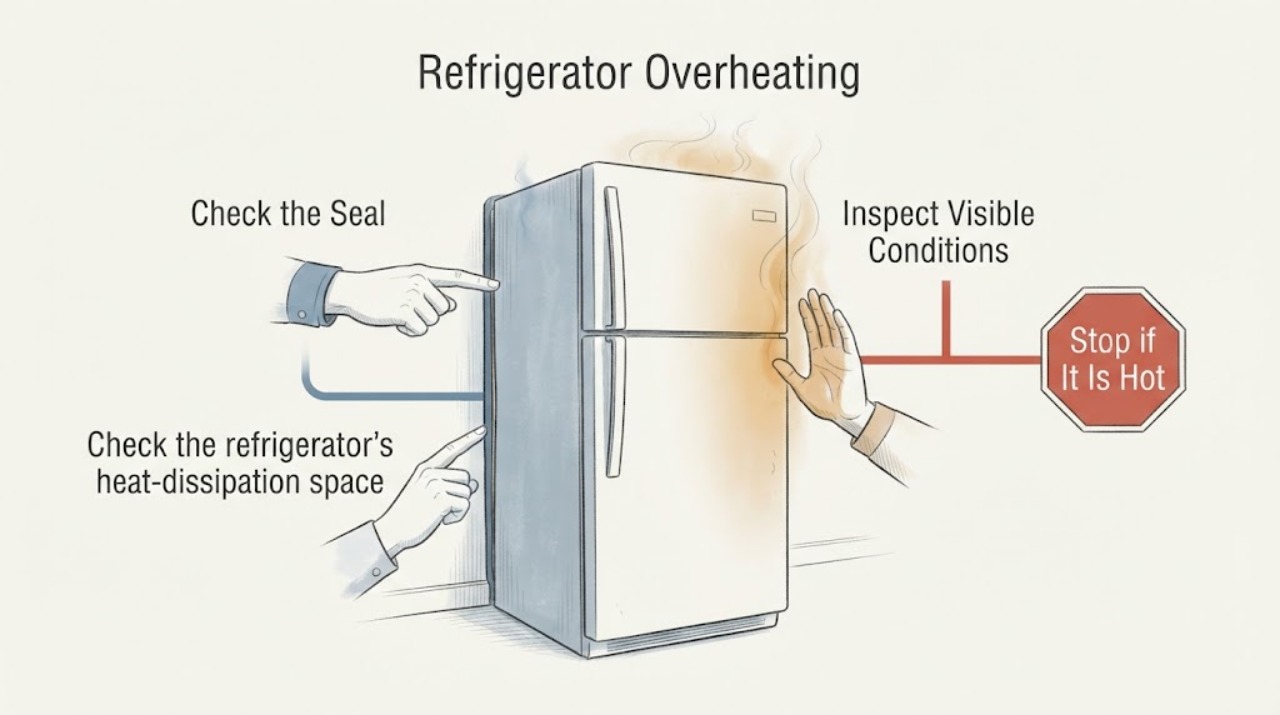
Warm Samsung refrigerator side walls can be normal because the cooling system releases heat through the cabinet. Treat the refrigerator as overheating when the sides remain extremely hot together with poor cooling, food spoiling, continuous hard running, unusual noise, or an error message. First check the clearance around the cabinet, nearby heat sources, blocked interior vents, door seals, and accessible dust around the condenser area. If cooling does not recover after those checks, an error code returns, the compressor or fan is unusually noisy, or you smell burning or see damaged wiring, stop using the refrigerator and arrange qualified Samsung service.
Work through in order
Diagnostic checks
Use only checks that match the exact appliance or system and its official guide.
-
Check 1
Separate normal cabinet warmth from an actual cooling problem: Check whether food or sealed containers inside the refrigerator are staying cold, and note whether food is spoiling, the temperature display is blinking, or the unit is running continuously.
Expected result: The side walls feel warm but food remains cold and there is no fault display; or the cabinet is very hot together with warm food, spoilage, a blinking temperature display, or unusually long running.
Next step: If cooling is normal, monitor the temperature and continue to the clearance check only if the heat is extreme. If cooling is poor, keep the doors closed and continue with the external airflow and seal checks.
Why this matters
Why: Warm side walls with stable food temperature can reflect normal heat dissipation. Warm food or spoilage alongside excessive heat indicates that the refrigerator is not rejecting or removing heat effectively and needs the following checks.
-
Check 2
Check the refrigerator's heat-dissipation space and surroundings: Look behind, above, and beside the cabinet for the clearance Samsung specifies, and move the unit away from direct sun, an oven, cooktop, or another heat source.
Expected result: The refrigerator is tightly boxed in, its top or sides are covered, or a heat source is warming the cabinet; or the recommended space is clear and the room is climate controlled.
Next step: Restore the specified clearance and remove nearby heat sources without tilting or moving the loaded appliance unsafely. Allow the refrigerator to stabilize, then reassess the food temperature and cabinet heat.
Why this matters
Why: Restricted clearance or added heat leaves less opportunity for the cooling system to release heat and can reduce cooling performance. Clear space and a suitable environment make an installation cause less likely, so persistent overheating then points toward airflow, controls, or the sealed cooling system.
-
Check 3
Inspect internal air circulation and the door seals: Keep food away from the rear interior vents, look for ice or frost covering a vent, clean the door gasket with a damp cloth and mild dish soap, then close a sheet of paper halfway in the door to test for slight resistance.
Expected result: Food or ice blocks a vent, the paper slips out easily after the gasket is clean, or frost or condensation appears along the door edge; alternatively, vents are open and the paper has slight resistance around the seal.
Next step: Rearrange food to leave the vents open and clean the gasket. If heavy frost returns, the gasket remains warped, or the paper test still fails, arrange service rather than forcing the door or removing panels.
Why this matters
Why: Blocked vents prevent cold air from circulating, while a poor door seal lets warm room air enter. Either condition can make the refrigerator work harder and produce more cabinet heat. Clear vents and a sealing gasket make those causes less likely.
-
Check 4
Clean only an accessible condenser area safely: Disconnect power, check the model manual for the approved condenser location, and remove loose dust from an exposed coil or rear panel without taking off service covers or touching wiring.
Expected result: A visible condenser area is heavily dusty and the refrigerator has been running almost constantly; or the accessible area is clean and the compressor still runs abnormally or the sides remain extremely hot.
Next step: Restore power and allow the refrigerator to stabilize. If the compressor remains unusually hot or noisy, cooling is poor, or the fan does not operate normally, stop further testing and contact qualified service.
Why this matters
Why: Samsung explains that condenser coils dissipate heat and that accumulated dust can contribute to poor cooling or an overheated compressor. If cleaning an accessible area does not change the symptom, the fault may involve the condenser fan, compressor circuit, refrigerant system, or another service-only part.
-
Check 5
Check the display for Cooling Off mode or a fault code: Record any code or blinking pattern before changing settings, and compare it with Samsung's refrigerator error-code guidance for the exact model.
Expected result: The display shows OF OF, O FF, scrolling bars, a compressor or fan code, or another code; or there is no code and the refrigerator is still cooling poorly after the external checks.
Next step: Use the exact model manual for a Cooling Off mode change. Do not repeatedly clear a returning code or open the sealed system; request Samsung service when a code returns or poor cooling persists.
Why this matters
Why: Cooling Off mode can stop cooling without a component failure, while compressor, voltage, communication, or fan codes can identify a condition that needs service. An absent code does not rule out a mechanical or sealed-system fault.
Use your observations
Decision map
Find the observation that best matches what you see, then follow the next safe action.
-
PATH 01Next step
What you see
The side walls feel warm, but the refrigerator and freezer keep food cold, there is no error message, and the warmth is not extreme.
Do this next
Keep the specified space around the cabinet and monitor food temperature. Escalate if cooling performance changes or the side becomes extremely hot.
Why this path and its safety boundary
Why it matters: This pattern is more consistent with Samsung's normal heat-dissipation design than with an overheating failure.
-
PATH 02Next step
What you see
The sides are very hot and cooling is poor, while the refrigerator is crowded tightly against cabinets or sits beside an oven, cooktop, or direct sun.
Do this next
Restore the required clearance and remove the heat exposure. Keep the doors closed while it stabilizes, then seek service if food remains warm or spoils.
Why this path and its safety boundary
Why it matters: The environment is a likely contributor because the refrigerator cannot release heat efficiently. This makes a compressor or refrigerant diagnosis premature.
-
PATH 03Next step
What you see
Cooling is uneven, food is near a rear vent, frost covers a vent, or the door-seal paper test fails.
Do this next
Rearrange food, clear only loose obstructions, clean the gasket, and retest the seal. Arrange service for recurring frost, a damaged gasket, or continued poor cooling.
Why this path and its safety boundary
Why it matters: Restricted internal circulation or warm air entering through the gasket can make the cooling system run harder and raise cabinet heat.
-
PATH 04Next step
What you see
An accessible condenser area is dusty and the compressor runs almost constantly, or the refrigerator remains extremely hot after clearance and cleaning checks.
Do this next
Stop opening panels or testing electrical parts. Arrange qualified Samsung service, especially if an error code, unusual noise, burning smell, or food spoilage is present.
Why this path and its safety boundary
Why it matters: Dust may be restricting heat dissipation, but persistent heat after cleaning makes a condenser fan, compressor circuit, or sealed-system problem more likely than a user-cleaning issue.
-
PATH 05Next step
What you see
The display shows OF OF, O FF, a compressor or fan code, or another code that returns after the model-specific correction.
Do this next
Record the code and request Samsung service if it returns. Do not bypass protections or continue operating when there is electrical damage or a burning odor.
Why this path and its safety boundary
Why it matters: The refrigerator may be in a control mode or reporting a component, voltage, or communication problem. The code is more useful to a technician than repeatedly resetting the appliance.
Helpful context
Understand the symptom
A refrigerator cabinet is part of the heat-rejection system, so a warm side panel by itself does not prove a fault. The useful distinction is whether the food is staying cold and whether the warmth settles after the refrigerator has had time to cool. A side that is extremely hot while the compartments are warm, the compressor runs unusually long, or the display reports a fault needs closer attention.
Keep the diagnosis external. Do not pierce refrigerant tubing, remove sealed system covers, bypass a protector, or work on live wiring. Unplug the refrigerator before cleaning an accessible condenser area, and use the model's manual when a check depends on its cabinet design.
Only after diagnosis
Potential parts
- refrigerator door gasket
Only consider this after the gasket is clean and the paper test still slips out easily or the gasket is visibly warped or torn.
Confirm the exact refrigerator model and the manufacturer's fit information before ordering.
When checks do not resolve it
Need a professional?
Arrange qualified Samsung refrigerator service when food remains warm or spoils after the clearance, airflow, seal, and accessible dust checks; the sides remain extremely hot; a compressor or fan is unusually noisy; an error code returns; or the refrigerator shows burning odor, smoke, damaged wiring, or repeated power trips. Do not open the sealed cooling system or bypass an electrical protector.
Common questions
FAQ
Are warm sides on a Samsung refrigerator always a failure?
No. Samsung says heat from the cooling process can be released through the outer walls, so warm sides can be normal when the compartments keep food cold. Extreme heat together with poor cooling, unusual noise, an error message, or spoilage needs service-level troubleshooting.
How much space does a Samsung refrigerator need to avoid overheating?
Samsung's cooling guide specifies 2 inches of clearance at the back, top, and sides for the refrigerator to release heat. Check the exact installation instructions for your model if the cabinet is built into a tight enclosure.
Can dust make a Samsung refrigerator compressor overheat?
It can contribute to poor cooling when dust accumulates on condenser coils because those coils dissipate heat. Unplug the refrigerator before cleaning an accessible area, and leave covered service components and electrical testing to a qualified technician.
When should I stop using the refrigerator and call service?
Call when cooling remains poor after the safe external checks, a fault code returns, the compressor or fan is unusually noisy, or the refrigerator has extreme heat with spoilage. Stop immediately for smoke, burning odor, sparking, damaged wiring, or repeated power trips.
Read the exact guide
Official sources
- Cooling issues with Samsung refrigerator or freezerSamsung · Samsung refrigerators and freezers; model-specific settings may vary
- Samsung refrigerator error codesSamsung · Samsung refrigerators; displayed codes and control steps vary by model
- Why Refrigerator starts and stops frequently?Samsung · Samsung refrigerator frequent start-stop and overheating symptoms
- Why Are Samsung Refrigerator Side Walls Heating Up?Samsung · Modern Samsung refrigerator models
Community feedback
Share a repair observation
Share a plain-text repair observation. Accepted observations are published automatically; this page may take a moment to update.