
On this page
Start here
Quick answer
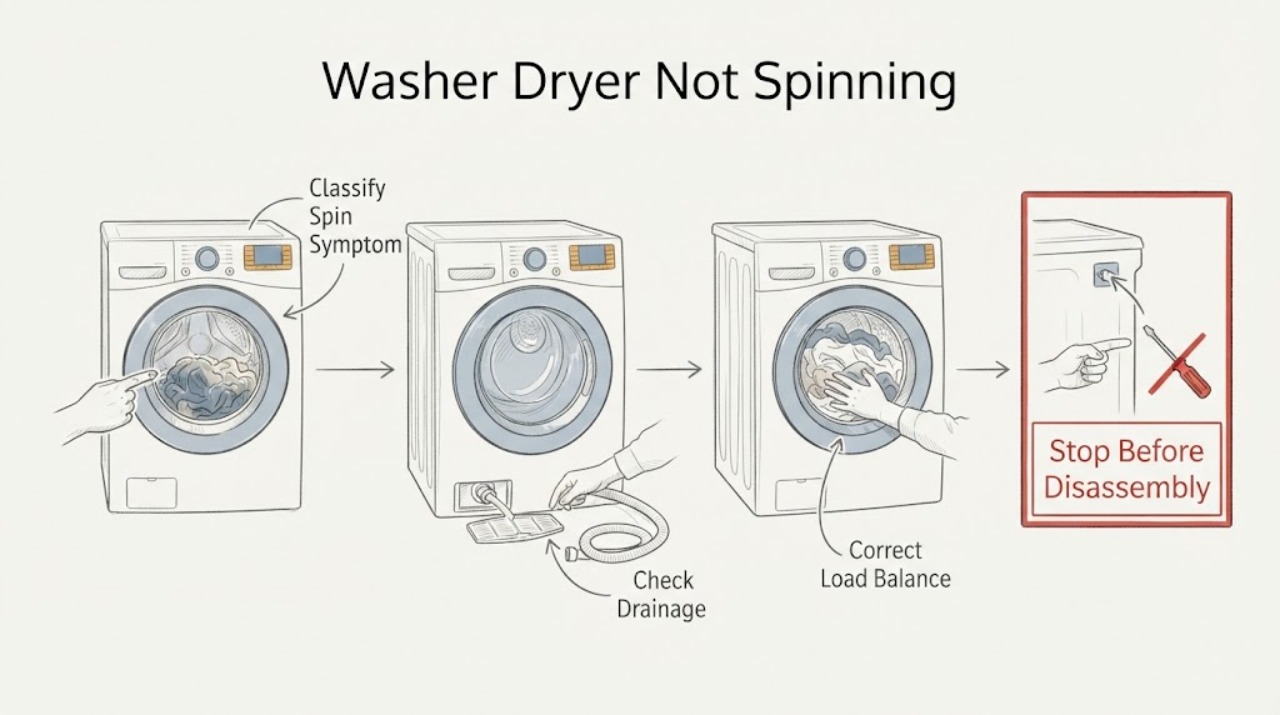
A Samsung washer-dryer may refuse to spin because it cannot drain, the load is unbalanced, the unit is not level, shipping bolts remain after installation, or a door or motor condition needs service. First determine whether the wash tub never starts, stops mid-cycle, or spins slowly. For a front-load model, follow Samsung's model-specific pump-filter and emergency-drain procedure if water remains; then check the drain hose, load distribution, floor, leveling, and shipping materials. Use calibration or Smart Install only when the exact model manual allows it and no displayed error tells you to use another procedure. If the tub still will not spin empty, the washer does not drain, the door will not safely unlock, or there is smoke, a burning smell, a leak near electrical parts, or a repeated breaker trip, stop using it and arrange qualified service. Do not remove panels or make live electrical measurements.
Work through in order
Diagnostic checks
Use only checks that match the exact appliance or system and its official guide.
-
Check 1
Record whether the wash tub never rotates, starts and stops, rotates slowly, or finishes with wet clothes. Note whether water remains, the door or lid is locked, a display code is present, and whether the dryer drum or only the washer tub is affected; do not force any locked door or reach into the appliance while it is moving.
Expected result: The tub never starts, water remains inside, the tub stops mid-cycle, the washer spins slowly with an unbalanced load, or the dryer drum is the only part that does not rotate.
Next step: For a wash-tub symptom, continue with drain and load checks. If water remains or the door cannot safely unlock, follow the model's safe drain procedure. If only the dryer drum is affected, stop using it and use the model-specific dryer guidance rather than applying washer checks.
Why this matters
Why: Samsung says a washer that cannot drain may never reach spin, while imbalance can cause slow or interrupted spinning. A dryer-drum-only symptom is a different path from a washer-tub spin problem and should be matched to the exact model support guide.
-
Check 2
If water remains, turn the washer off and follow the exact Samsung manual for a front-load emergency drain and pump-filter check. Use a towel and a suitable container, drain only as the manual describes, then inspect the accessible filter for lint or debris and reinstall it securely. Do not open a filter on an actively running machine or remove panels.
Expected result: The front-load filter is blocked, water drains after the filter is cleaned, the drain hose is kinked or installed incorrectly, or water still will not drain after the accessible checks.
Next step: Clear only accessible debris and confirm the filter and hose are positioned as the manual specifies. If water remains, the hose is damaged, or the washer still will not drain, keep it off and arrange service.
Why this matters
Why: Samsung states that the washer tries to drain before spinning, so a blocked pump filter or drain-path problem can prevent spin. A remaining drain failure after the documented checks points to a pump, hose, or control issue that is not safely identified by more spin attempts.
-
Check 3
After the tub is safe and empty of standing water, redistribute the laundry evenly. Untangle sheets or other large items; avoid testing with a single heavy item or a very small load, and select a lower spin speed when the exact manual recommends it.
Expected result: The washer spins after the load is redistributed, the issue occurs with a small or tangled load, or it still stops or shakes with a reasonably distributed load.
Next step: Run one small, evenly distributed load only if there are no safety symptoms. If the tub still cannot reach spin or shakes severely, stop the cycle and check level and shipping materials rather than repeatedly restarting.
Why this matters
Why: Samsung says small loads can collect on one side and large absorbent items can tangle, causing imbalance and slow or interrupted spin. Continued failure with a balanced load makes installation, drain, door-lock, or mechanical causes more likely.
-
Check 4
With the appliance empty and stationary, check that the floor is stable, the washer has the model-required clearance, all adjustable feet contact the floor, and the cabinet does not rock. If it is a recent front-load installation, use the exact installation instructions to confirm shipping bolts were removed; do not move a heavy stacked unit alone.
Expected result: One corner wobbles, the floor is slippery or soft, the washer is not level, shipping bolts remain, or the installation is stable and the spin problem persists.
Next step: Follow Samsung's model-specific leveling and shipping-material instructions with appropriate help, then run one documented test cycle. If the unit remains unstable, requires moving a stacked appliance, or still will not spin, arrange service.
Why this matters
Why: Samsung identifies an unlevel or unstable washer and retained shipping bolts as causes of excessive vibration and spin problems. A stable installation with the shipping hardware removed means the problem is less likely to be only cabinet balance.
-
Check 5
If the washer is empty, has no active error code, and the exact manual provides Calibration or Smart Install, use only that documented routine and record the displayed result. Do not reset away an error before recording it, and do not open the cabinet or make live electrical measurements.
Expected result: The documented routine completes and the tub spins, the routine reports a drain, door, or motor-related error, the model has no such routine, or the tub still does not spin after the routine.
Next step: If the routine resolves the issue, monitor one normal load. If it reports an error or the tub remains still, stop using the washer and arrange qualified service with the exact code, model, and prior drain, load, and installation observations.
Why this matters
Why: Samsung says calibration can address weight detection on supported models and its diagnostic routine checks door lock, drain, and spin behavior. A failed routine or a model without that feature requires model-specific service rather than an invented button sequence.
Use your observations
Decision map
Find the observation that best matches what you see, then follow the next safe action.
-
PATH 01Next step
What you see
The washer never starts spin and water remains in the tub, especially on a front-load model.
Do this next
Use Samsung's model-specific emergency-drain and pump-filter procedure, then check the accessible drain hose. Keep the appliance off and request service if it still cannot drain.
-
PATH 02Next step
What you see
The tub spins slowly or stops with a small, tangled, or uneven load but improves after redistribution.
Do this next
Use evenly distributed loads and the model's appropriate spin setting. If the same symptom occurs with a balanced load, check leveling and shipping materials.
-
PATH 03Next step
What you see
The washer rocks, one foot is not planted, the floor is unstable, or shipping bolts remain after installation.
Do this next
Follow the exact Samsung leveling or installation instructions with help and run one documented test cycle. Request service if the unit cannot be stabilized safely.
-
PATH 04Next step
What you see
A supported, empty Samsung washer completes its documented calibration or diagnostic routine and the tub spins normally.
Do this next
Run one normal, evenly distributed load and monitor it. Keep the routine model-specific and do not repeat it to erase a returning error.
-
PATH 05Next step
What you see
Calibration or Smart Install reports an error, the washer already displays an error, or the tub remains still after the documented checks.
Do this next
Record the code and stop repeated resets or diagnostics. Arrange qualified Samsung or appliance service with the model and observations.
-
PATH 06Next step
What you see
There is smoke, a burning odor, exposed or damaged wiring, a leak near electrical parts, repeated breaker operation, severe uncontrolled movement, or a door that cannot safely unlock.
Do this next
Stop immediately, disconnect power and water only when safe, keep clear of the appliance, and arrange qualified service. Do not force the door, remove panels, or make live electrical measurements.
Helpful context
Understand the symptom
First define what not spinning means
A Samsung washer-dryer can fail to start the wash tub at all, begin and stop during spin, or complete a cycle with soaking-wet clothes because the spin speed is limited. Samsung separates a tub that never starts from poor or interrupted spinning. The distinction matters: a no-spin symptom often follows a drain problem, while intermittent or slow spinning often follows an unbalanced load or unstable installation.
Drain and balance checks come before parts
The washer normally attempts to drain before it enters high-speed spin. A front-load model may keep its door locked while water is detected inside. Check only the filter, emergency drain, hose, load, and installation points described for the exact model. Do not force the door, reach into a moving tub, or remove a rear panel to look for a motor fault.
Calibration is model-specific
Some Samsung washers have calibration or Smart Install routines, but button combinations and available tests vary by model. Samsung says Smart Install is for checking an error code and should not be run when an error is already displayed. Use the exact manual and preserve the original code for service rather than repeatedly resetting or calibrating.
Only after diagnosis
Potential parts
- drain pump or pump filter assembly
Consider this category only if qualified service confirms that the washer cannot drain after the accessible filter and hose checks, and the drain failure is preventing spin.
Confirm the complete Samsung model information and authorized fitment before ordering or installing any pump component. - door lock assembly
Consider this category only if qualified service confirms that a door-lock or lid-lock feedback fault prevents the wash tub from entering spin after the machine is empty and the drain path is clear.
Lock assemblies are model-specific and require qualified diagnosis; never bypass the safety lock to force a spin cycle. - drive motor or suspension components
Consider this category only if service confirms a motor or suspension fault after balanced-load, leveling, shipping-material, and drain causes are excluded.
Verify the exact Samsung model and washer design before selecting any motor or suspension component; installation should be performed by a qualified technician.
When checks do not resolve it
Need a professional?
Arrange qualified service when a Samsung washer-dryer still will not spin after the model-specific drain, load, leveling, shipping-material, and documented diagnostic checks, or when it cannot drain or safely unlock. Stop immediately for smoke, burning odor, damaged wiring or cord, a leak near electrical parts, repeated breaker operation, or severe movement. Disconnect power and water only when safe; do not force the door, remove panels, bypass a lock, or make live electrical measurements.
Common questions
FAQ
Why does my Samsung washer dryer not spin?
The wash tub may be unable to drain, the load may be unbalanced, the unit may be unstable or still have shipping bolts, or a door-lock or motor condition may need service. Check the model-specific drain, load, and installation points before considering a part.
Can a drain problem stop a Samsung washer from spinning?
Yes. Samsung says the washer attempts to drain before spinning, so standing water, a blocked front-load pump filter, or an incorrect drain path can prevent the spin step. Follow the exact model's safe drain procedure and request service if it still will not drain.
Why does my Samsung washer spin slowly or stop during spin?
An uneven load, tangled large items, an unstable floor, or incorrect leveling can limit spin. Redistribute the load and check the installation; persistent failure with a balanced load needs service.
Should I reset or calibrate a Samsung washer that will not spin?
Only use a calibration or diagnostic routine when the exact model manual supports it and there is no active error that directs another procedure. Record returning codes instead of repeatedly resetting them; a failed routine or continued no-spin symptom needs qualified service.
Read the exact guide
Official sources
- Samsung washing machine will not start or fill with waterSamsung Support US · Samsung washer door lock, residual water, safe unlocking, and service guidance
- How to reset your Samsung washing machineSamsung Support US · Samsung washer reset limitations, error preservation, and support escalation
- Samsung washing machine is shaking too muchSamsung Support US · Samsung washer shipping bolts, load distribution, leveling, stability, and test-cycle guidance
- Samsung washing machine does not spin at allSamsung Support US · Samsung washer no-spin, pump-filter, drain, and service troubleshooting
- Samsung washing machine spins poorlySamsung Support US · Samsung washer slow, interrupted, or poor spinning, load balance, cycle, and leveling guidance
- Run diagnostics on your Samsung washer or dryerSamsung Support US · Samsung washer Smart Install diagnostics, door, fill, drain, and spin checks
Community feedback
Share a repair observation
Share a plain-text repair observation. Accepted observations are published automatically; this page may take a moment to update.