
On this page
Start here
Quick answer
When a Samsung washer-dryer is not working, first separate a dead appliance from a powered appliance that will not start or has stopped mid-cycle. Check the correct Power control, direct power connection and breaker, displayed code, door and Child Lock state, water supply, drain condition, load, and any model-specific filter or software message. A combo can pause because sensors are managing water, load balance, drainage, or the wash-to-dry transition, but a recurring code or failure after one safe restart needs service. Do not force the door, open panels, bypass a lock, work on wiring, or continue using the unit after smoke, burning odor, flooding, a hot cord, or repeated breaker trips.
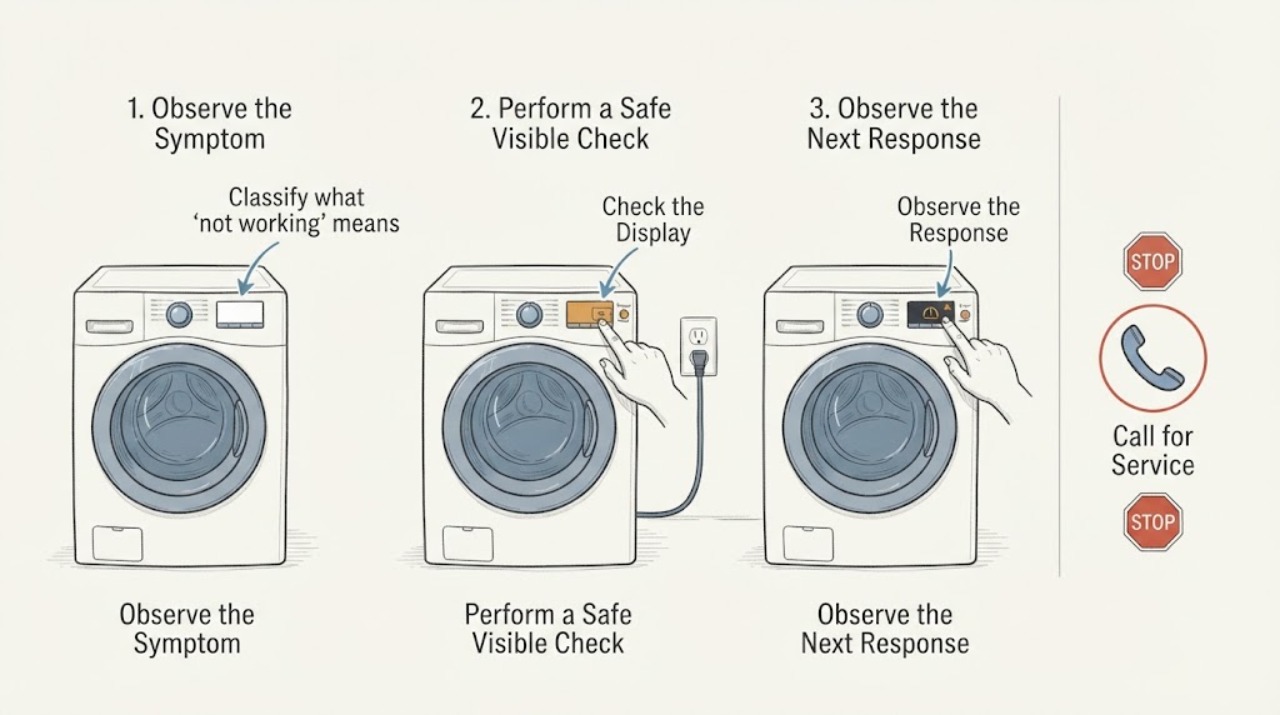
Work through in order
Diagnostic checks
Use only checks that match the exact appliance or system and its official guide.
-
Classify what 'not working' means
Without opening any panel, note whether the display or control lights are on, whether the drum contains water, whether the door is locked, whether the drum moves, and whether the unit stopped during wash, spin, drying, or the wash-to-dry transition. Record every code, blinking-light pattern, or status message before pressing reset.
Expected result: The appliance is completely dark, powered but ignores controls, stopped with water inside, paused with a message, or stopped without a clear message.
Next step: If there is smoke, burning odor, flooding, a hot or damaged cord, exposed electricity, or repeated breaker trips, stop and arrange appropriate emergency or qualified service. Otherwise continue with the external power and control check.
Why this matters
Why: A dark unit points first to power or control supply; a powered unit that will not start points toward controls, door, water, or a code; water and a lock can be a protective state; and a transition pause may be sensor or drain related. The exact stage changes the next check.
-
Verify the correct power control and safe household supply
If there is no hazard, confirm that the correct Power button for the washer-dryer or combo is being used, the plug is fully seated in the intended outlet, the cord and plug show no damage, and the breaker has not tripped. Do not use a surge protector or extension cord. Restore a tripped breaker only once if there is no visible fault, then try the normal Power and Start/Pause sequence.
Expected result: The display remains dark, the breaker trips again, the unit powers on, or it powers on but immediately stops or shows a code.
Next step: Leave electrical repairs to a qualified professional. If the unit powers up normally, continue to check the code, door/lock, water, and drain state; do not keep cycling power to hide the code.
Why this matters
Why: A dead display or repeated trip indicates a supply or appliance fault, not a wash-cycle setting. Power that returns but does not start shifts the diagnosis to the door, water, drain, load, controls, or error condition.
-
Check the display, door lock, water supply, and drain state
Read the displayed code or blinking-light pattern in the exact model manual. Confirm Child Lock is not active, no clothing is caught in the door seal, the door closes firmly without slamming, and the water taps are open with visible hoses not kinked. Look for standing water or a drain-related message. If water remains, keep the door closed and use only the model's documented emergency-drain method.
Expected result: The door is not recognized, Child Lock is active, water is not entering, water remains in the drum, a hose is visibly kinked, or the external conditions look normal.
Next step: Correct only the accessible condition, then make one appropriate test. If the door remains locked, water cannot drain or fill, or the code returns, stop and arrange service rather than opening the cabinet.
Why this matters
Why: The control may be waiting for a secure door, water fill, or completed drain before moving on. Samsung notes that the door remains locked while water is detected and that Child Lock can also affect access. Normal-looking hoses do not rule out an internal valve, pump, sensor, lock, or control fault.
-
Separate load, balance, and filter-related pauses
If there is no standing water or hazard and the model instructions permit it, pause safely, redistribute an uneven load, remove an obviously oversized item, and select a cycle appropriate for the load. Check only the accessible lint, debris, or drain filter indicated by the exact combo manual, unplugging first and protecting the area from residual water. Do not remove covers or reach into moving parts.
Expected result: The unit resumes or completes after the load is corrected, a filter alert clears after the documented cleaning, it repeatedly retries or stops with the same message, or no load/filter issue is present.
Next step: If the correction works, use the load size and cycle recommended by the model. If the condition returns, preserve the code and stage and continue to the one-restart and model-specific service decision.
Why this matters
Why: Combos use sensors and drainage checks that can pause or prevent progression when load balance, filter, or water conditions are not acceptable. A repeat failure with a balanced load and clean accessible filter is not evidence that more rearranging will repair an internal fault.
-
Use the one model-specific software branch, then stop at service
If the unit is a Samsung Bespoke Laundry Combo and the drying stage is specifically stuck on load sensing after the wash stage, compare the complete model on the rating label with WD53DBA900HZA1. Only if it matches, use Samsung's on-screen Wi-Fi and Software Update procedure and restart drying once. For every other model, stage, or code, perform at most one safe power cycle after recording the condition, then run one controlled test cycle.
Expected result: The exact affected model accepts an update and completes, the model is different or already current, or the unit again fails to start, drain, spin, dry, or complete with the same code or symptom.
Next step: If the controlled test fails, stop using the appliance as appropriate and arrange qualified Samsung appliance service. Provide the model, code, cycle stage, water state, power behavior, and external checks completed.
Why this matters
Why: Samsung's published update is limited to one named combo model and symptom. A repeat failure on another model or after a current update requires model-specific service diagnosis; another reset will not establish the cause.
Use your observations
Decision map
Find the observation that best matches what you see, then follow the next safe action.
-
PATH 01Safety boundary
What you see
The display is dark, the power connection is damaged, the breaker trips again, or there is smoke, burning odor, flooding, or exposed electricity.
Do this next
Stop using the appliance and arrange qualified electrical/appliance service or emergency help as appropriate. Do not reset the breaker repeatedly or open panels.
Why this path and its safety boundary
Safety stop: True
-
PATH 02Next step
What you see
The unit powers on but will not start because Child Lock, the door, water supply, or a displayed code is preventing progression.
Do this next
Use the exact model's Child Lock, door, fill, and code instructions. If water remains or the door stays locked, keep it closed and arrange service rather than forcing it.
-
PATH 03Next step
What you see
The combo pauses for load balance, a filter alert, or an accessible drainage condition and there is no hazard.
Do this next
Correct only the documented accessible condition, allow a normal pause to finish, and make one appropriate test. Repeated retries or a recurring code require service.
-
PATH 04Next step
What you see
A Samsung Bespoke Laundry Combo model WD53DBA900HZA1 stops on drying load sensing after washing and the software is not current.
Do this next
Follow Samsung's model-specific software-update procedure and restart drying once. If the model differs, the software is current, or the symptom persists, request qualified service.
-
PATH 05Safety boundary
What you see
The same no-work, no-start, no-drain, no-spin, or incomplete-cycle symptom returns after safe external checks and one controlled restart.
Do this next
Stop troubleshooting and arrange qualified Samsung appliance service. Give the technician the full model, code, cycle stage, water state, power behavior, and checks already completed.
Why this path and its safety boundary
Safety stop: True
Helpful context
Understand the symptom
Start with the failure state
A dark display, a powered display that ignores Start, a cycle that stops with water inside, and a combo that pauses during wash-to-dry are different states. Record the exact message, whether the drum contains water, and whether the failure affects washing, drying, or both. Samsung's combo guidance says sensors, load, drainage, water, and cycle selection can make a unit appear faulty while it is waiting for a condition to clear.
Use one deliberate restart, not repeated resets
A reset is not a repair. Samsung says a power cycle can occasionally clear a temporary issue, but an error normally needs its underlying condition corrected and repeated resets can remove error history. Record the code before any restart, perform only the model's safe restart procedure, and stop when the same condition returns.
Water and the door are safety interlocks
A Samsung front-load door may remain locked while water is detected, and Child Lock can also prevent normal access. Do not pull the door open. If the exact model provides an emergency drain procedure, follow only that procedure; otherwise leave the appliance closed and arrange service when water, a lock, or a drain fault remains.
Combo-specific behavior needs the exact model
All-in-One combos integrate wash and dry functions in one drum, so a wash-to-dry transition, filter alert, or drying-sensor behavior may not match a separate dryer. Samsung publishes a software update for one named Bespoke Laundry Combo model whose drying phase can stick on load sensing. Use that page only when the full model and symptom match; otherwise use the model manual and service path.
Only after diagnosis
Potential parts
- door-lock assembly
Consider a door-lock assembly only after the door is cleanly closed, Child Lock and water state are checked, and qualified diagnosis links the repeated no-start or locked-door symptom to the lock circuit.
Confirm the complete Samsung model and manufacturer fit information before ordering; never bypass the lock. - drain pump or inlet valve
A pump or valve is conditional on a qualified diagnosis after visible hose, fill, drain, door, and code checks show a persistent transition failure.
Confirm the complete Samsung model and exact manufacturer-compatible part information; internal water and electrical work belongs to qualified service. - control, motor, heater, or drying-sensor component
Consider an internal control, motor, heater, or sensor only when the same failure returns after safe external checks and qualified diagnosis identifies the component.
Do not infer a part or fitment from a generic no-work symptom; verify the complete model and manufacturer service information.
When checks do not resolve it
Need a professional?
Call qualified appliance service for a recurring Samsung washer-dryer no-work condition, persistent code, failed fill or drain, locked door, no-spin or no-dry transition, or failure after one controlled restart and the exact model checks.
Common questions
FAQ
Why is my Samsung washer-dryer not working?
First determine whether it has no power, ignores Start, stops with water, or pauses at a wash-to-dry stage. Check power, codes, Child Lock, door closure, water, drain, load, and model-specific filters. A recurring failure after one controlled restart needs service.
Should I keep resetting my Samsung washer-dryer?
No. Record the code first, troubleshoot the matching condition, and use at most the model's safe power-cycle procedure. Samsung says repeated resets can clear error history without repairing the cause and make diagnosis harder.
Why is my Samsung washer-dryer door locked when it is not working?
The lock can remain engaged while water is detected or while a cycle is still completing, and Child Lock can also affect access. Keep the door closed, use only the exact model's safe drain instructions, and request service if it remains locked.
When should I stop troubleshooting a Samsung washer-dryer?
Stop for smoke, burning odor, flooding, exposed electricity, a hot or damaged cord, or repeated breaker trips. Also stop after the safe external checks and one controlled restart fail; provide the full model, stage, code, water state, and power behavior to qualified service.
Read the exact guide
Official sources
- Samsung Laundry Combo FAQ | Product, Shipping & SupportSamsung USA · Samsung FAQ guidance for combo power, water, load, drainage, filters, sensors, cycle behavior, troubleshooting, and when professional service is needed.
- Power issues with Samsung washing machineSamsung Support · Samsung external checks for correct Power control, direct outlet, cord, breaker, surge protector, error code, door, restart, and service when a washer will not turn on or stops.
- Samsung washing machine will not start or fill with waterSamsung Support · Samsung guidance on Child Lock, door-lock timing, water remaining in the drum, emergency drain use, and service when the door stays locked.
- How to reset your Samsung washing machineSamsung Support · Samsung guidance that power cycling may clear a temporary issue, does not repair the underlying error, and should not be repeated after a code returns.
- Washer Dryer Combo drying cycle gets stuck on load sensingSamsung Support · Samsung's model-specific software-update and restart guidance for a drying phase stuck on load sensing after a wash cycle.
Community feedback
Share a repair observation
Share a plain-text repair observation. Accepted observations are published automatically; this page may take a moment to update.