
On this page
Start here
Quick answer
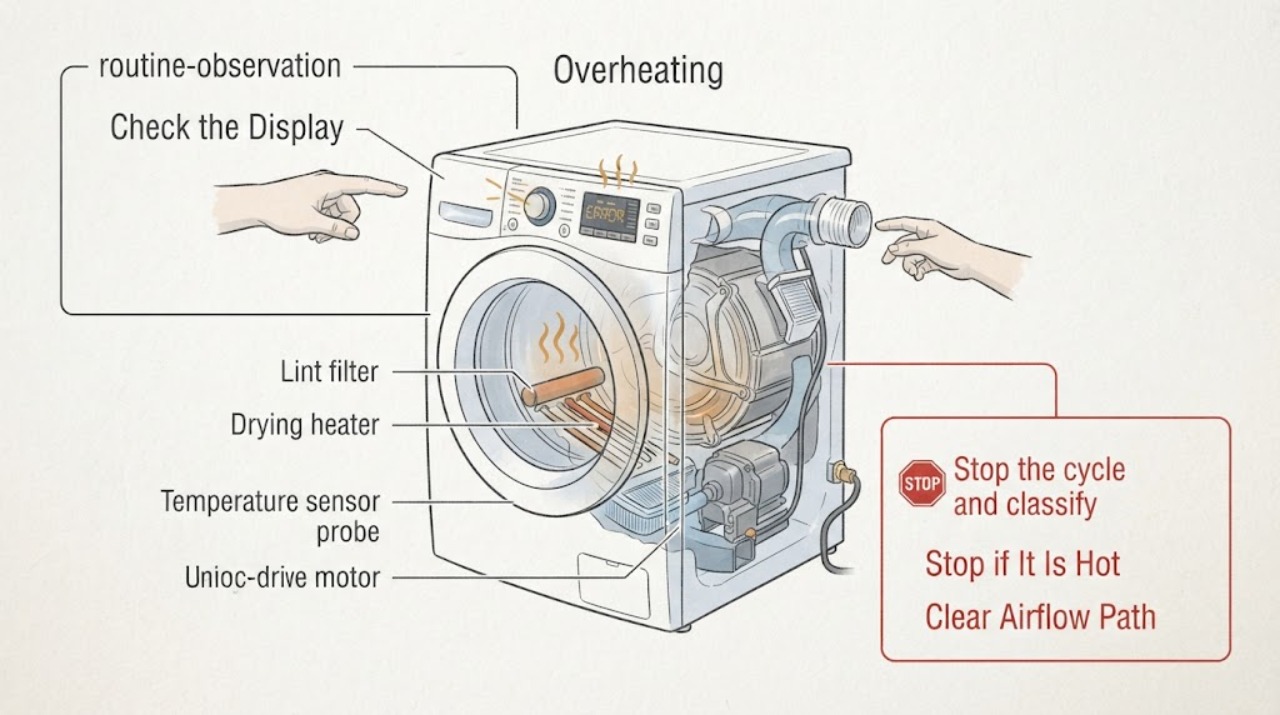
Treat a Samsung washer-dryer that feels excessively hot, shows a heating or temperature alert, smells of burning, or produces smoke as a safety issue first. Stop the cycle, keep clear of smoke or fire, and disconnect power only when it is safe; never continue a hot or smoking appliance to see whether it cools. Once fully cool and free of hazard, record the stage and code, clean only the model-approved lint or filter areas, inspect accessible airflow or vent conditions, verify the load and cycle, and make at most one controlled retest. A ventless Laundry Combo has different airflow and filter instructions from a vented dryer, so use the exact model manual. Persistent overheating, a returning code, burning odor, electrical smell, damaged cord, or a hot appliance after the external checks requires qualified Samsung service.
Work through in order
Diagnostic checks
Use only checks that match the exact appliance or system and its official guide.
-
Stop the cycle and classify the heat or odor safely
Stop the washer-dryer from the controls if that can be done without approaching smoke or exposed electricity. Note whether overheating occurs during wash, spin, drying, or the wash-to-dry transition; whether the display shows a code or heating alert; and whether the cabinet, door, cord, outlet, laundry, or surrounding area is unusually hot. Do not touch the drum, heater area, or hot laundry to measure temperature.
Expected result: There is smoke, a persistent burning or electrical odor, scorching, a hot or damaged cord or outlet, a leak near electricity, a gas odor on a model that uses gas, or only a warm surface with no alert or odor.
Next step: For smoke, fire, gas odor, or electrical danger, leave the area as appropriate, do not operate switches in a gas-smell situation, and contact emergency or qualified help from a safe location. Otherwise let the appliance cool completely before any external check.
Why this matters
Why: Smoke, electrical or gas odor, scorching, damaged power equipment, or water near electricity is an immediate hazard. A warm surface alone may be normal, but a code, abrupt stop, excessive heat, or heat concentrated in one area changes the diagnosis to a fault or airflow problem.
-
Check power and preserve the overheating code
After the appliance is cool and there is no hazard, photograph or write down the exact code, blinking-light pattern, and cycle stage. Inspect the accessible plug and cord for damage without handling a hot connection, and confirm the breaker has not tripped. Do not repeatedly reset the breaker or clear the code; use only the model's documented power-cycle procedure once if Samsung directs it for that condition.
Expected result: The breaker has tripped or trips again, the cord or outlet is damaged or hot, the code returns immediately, or the appliance powers on normally with no recurring code.
Next step: Stop using the appliance and arrange qualified electrical/appliance service for a power hazard or recurring code. If power is stable, continue without opening panels.
Why this matters
Why: A repeated trip, damaged cord, or hot outlet points to an electrical fault requiring qualified service. A recurring temperature or heating code after one safe restart is evidence that the underlying condition remains; a clean restart permits only the model-specific airflow and load checks.
-
Clean the model-approved filter and airflow path
Identify whether the Samsung unit is a vented dryer-style combo or a ventless Laundry Combo. Once cool and unplugged where the manual requires it, clean only the accessible lint screen, filter compartment, heat-exchanger area, or exhaust duct that the exact model instructions name. Check a visible duct for kinks, crushing, gaps, or an obstructed outside hood on vented models; do not remove internal covers or operate without the required filters.
Expected result: Lint or a visible obstruction is present, a vent or filter alert clears after the documented cleaning, the model has no user-serviceable exhaust duct, or the same overheating symptom remains with the approved path clean.
Next step: Correct the accessible airflow condition and allow the appliance to cool fully. If the alert or overheating returns, stop using it and request qualified service instead of cleaning deeper or bypassing a sensor.
Why this matters
Why: Samsung says lint and restricted exhaust can trap heat and moisture, reduce or alter heater output, and trigger heating or temperature errors. A ventless combo must not be judged by a vented-dryer procedure; persistent heat after its model-approved filter and airflow checks points beyond routine cleaning.
-
Check the load, cycle, and installation clearance
With the appliance cool, remove an excessive or tightly packed load and select the cycle and fabric setting appropriate to the model. Confirm the unit is not pressed against an installation opening or obstructing a required intake or exhaust area, and that the door, lint filter, dispenser, and accessible vents are correctly closed or installed. Do not add heat, disable Eco or safety features, or change a ventless combo's settings by guesswork.
Expected result: The appliance overheated only with a large load or high-heat setting, the airflow or filter area was obstructed by installation or loading, or the same heat and alert occur with a small correct load and clear external space.
Next step: Correct only the matching load or clearance condition and make one supervised, low-risk test when the manual permits. Stop immediately if the cabinet becomes excessively hot, an odor returns, or a code appears.
Why this matters
Why: Load size, fabric setting, and restricted airflow can increase drying time and retained heat. A repeat with the correct load and clear installation conditions makes a mechanical, sensor, heater, control, or wiring fault more likely.
-
Make one controlled retest, then use the service boundary
After the appliance is fully cool and the exact model-approved external checks are complete, run one short supervised cycle using a suitable load and normal setting. Observe whether the drum turns, heat is controlled, airflow is present where the model exposes it, and the cycle proceeds without an alert or odor. Do not reproduce smoke, burning, gas, electrical, or extreme heat to obtain more evidence.
Expected result: The cycle completes without abnormal heat, the alert returns, the cabinet or cord becomes hot, a burning/electrical odor returns, or the unit stops again during drying or wash-to-dry transition.
Next step: Stop using the washer-dryer and arrange qualified Samsung appliance service. Provide the full model, code, stage, load, filter/vent result, heat and odor observations, and whether the appliance is vented or ventless.
Why this matters
Why: A normal controlled test supports a corrected external condition but does not rule out an intermittent fault. Any returning alert, odor, extreme heat, or stop after the airflow and load checks requires service diagnosis of heater, sensor, motor, control, or wiring.
Use your observations
Decision map
Find the observation that best matches what you see, then follow the next safe action.
-
PATH 01Safety boundary
What you see
There is smoke, fire, a persistent burning or electrical odor, gas odor, scorching, a hot or damaged cord or outlet, or water near electricity.
Do this next
Stop using the appliance immediately. Leave the area and contact emergency help for fire or gas danger, or arrange qualified electrical/appliance service from a safe location. Do not restart to test it.
Why this path and its safety boundary
Safety stop: True
-
PATH 02Next step
What you see
A heating or temperature alert appears and the model-approved lint, filter, or vent path is visibly blocked.
Do this next
Let the appliance cool, unplug when the model instructions require it, clean the approved path, reinstall every required filter, and make one supervised retest. If the alert returns, request service.
-
PATH 03Next step
What you see
The unit is a ventless Laundry Combo or the exact airflow path differs from a separate vented dryer.
Do this next
Use only the exact combo manual's filter, heat-exchanger, clearance, and cleaning procedure. Do not disconnect or invent an exhaust test; persistent overheating requires qualified service.
-
PATH 04Next step
What you see
Overheating occurs only with an excessive load, unsuitable setting, or blocked external clearance and does not recur after correction.
Do this next
Use the model's recommended load and cycle, keep the required intake/exhaust area clear, and monitor the next use. Stop if heat, odor, or an alert returns.
-
PATH 05Safety boundary
What you see
The same overheating, code, odor, abrupt stop, or excessive heat returns after the approved filter, airflow, load, and one controlled retest.
Do this next
Stop using the appliance and arrange qualified Samsung appliance service. Provide the model, stage, code, airflow result, load, power behavior, and odor or heat observations.
Why this path and its safety boundary
Safety stop: True
Helpful context
Understand the symptom
Overheating is different from normal warmth
A drying appliance can feel warm during normal operation, but a hot cabinet, smoke, burning or electrical odor, a heating alert, or an abrupt shutdown is not a condition to keep testing. Record whether the problem occurs during wash, spin, drying, or the wash-to-dry transition. Samsung's combo guidance notes that sensors can pause operation, while its dryer guidance treats trapped heat and recurring temperature errors as reasons for cleaning or service.
Use the correct airflow path for the exact model
A vented dryer has an exhaust duct and lint screen; a ventless combo may have a heat exchanger, lint filter, or other model-specific serviceable areas. Do not disconnect a duct, remove a filter, or clean an internal area unless the exact manual authorizes it. Never operate the combo without required filters installed.
Do not let a reset hide a temperature fault
Power cycling can clear a temporary control state, but it does not repair a blocked airflow path, sensor, heater, motor, or wiring fault. Preserve the code and the stage before resetting, and do not repeat the reset when the same overheating symptom returns.
Burning and electrical odors are stop conditions
Samsung distinguishes a limited first-use odor from a continuing burning or electrical smell. For an established appliance, a persistent odor, smoke, scorching, or gas smell takes priority over cleaning. Keep people clear and use qualified service or emergency help from a safe location.
Only after diagnosis
Potential parts
- temperature sensor or thermal safety component
Consider an internal temperature or thermal-safety component only after approved filter and airflow checks and qualified diagnosis link the recurring overheating code or heat behavior to that component.
Confirm the complete Samsung model and manufacturer service information; do not bypass a thermal safety device. - drying heater or heat-exchanger component
A heater or heat-exchanger component is conditional on qualified diagnosis after the correct model-specific airflow and load checks, especially when the alert returns with a clear path.
Vented and ventless systems differ; verify the exact model and approved part information and leave internal work to qualified service. - motor or electronic control component
Consider an internal motor or control only when qualified diagnosis identifies it after safe power, airflow, filter, load, and code checks are complete.
Do not infer the failed component or fitment from overheating alone; confirm the complete Samsung model and manufacturer service information.
When checks do not resolve it
Need a professional?
Call qualified appliance service for persistent Samsung washer-dryer overheating, recurring temperature or heating code, burning/electrical odor, failed airflow test after approved cleaning, or heat that returns with a correct load and clear installation conditions.
Common questions
FAQ
Why is my Samsung washer-dryer overheating?
First determine whether the heat occurs during washing or drying and record any code. During drying, blocked lint or airflow, an incorrect load or setting, or a model-specific filter issue can trap heat; a recurring alert after the approved cleaning checks needs service.
Can I keep running a Samsung washer-dryer that smells hot?
No if the smell is persistent, electrical, or accompanied by smoke, scorching, or excessive heat. Stop, let it cool only when safe, and request qualified service. Do not keep running it to see whether the odor disappears.
Does a ventless Samsung Laundry Combo use the same overheating checks as a dryer?
Not necessarily. A ventless combo has model-specific filters, heat-exchanger, clearance, and sensor behavior. Follow the exact combo manual and do not disconnect or invent a vent test intended for a separate vented dryer.
When should I stop troubleshooting Samsung washer-dryer overheating?
Stop for smoke, burning or electrical odor, gas odor, scorching, a hot or damaged cord or outlet, repeated breaker trips, or any returning heating alert after the model-approved filter and airflow checks. Arrange qualified service and do not bypass sensors or open panels.
Read the exact guide
Official sources
- Samsung dryer displays an error codeSamsung Support · Samsung guidance for temperature and heating errors, trapped heat from lint or vent blockage, safe restart limits, and service when the condition returns.
- Clothes are not dry after using Samsung dryerSamsung Support · Samsung guidance on vent blockage, lint filter, exhaust requirements, heat reduction to prevent overheating, and service after airflow checks.
- Samsung dryer smells or smokesSamsung Support · Samsung safety guidance for visible smoke, gas odor, burning smell, electrical smell, lint and exhaust checks, and stopping for continued odor.
- Samsung Laundry Combo FAQ | Product, Shipping & SupportSamsung USA · Samsung FAQ guidance for combo sensor-controlled cycles, power, water, drainage, filters, wash-to-dry behavior, and service decisions.
- Samsung washing machine or laundry smells badSamsung Support · Samsung guidance distinguishing a first-use motor odor from a continuing burning smell that requires service and describing safe washer maintenance boundaries.
Community feedback
Share a repair observation
Share a plain-text repair observation. Accepted observations are published automatically; this page may take a moment to update.