
On this page
Start here
Quick answer
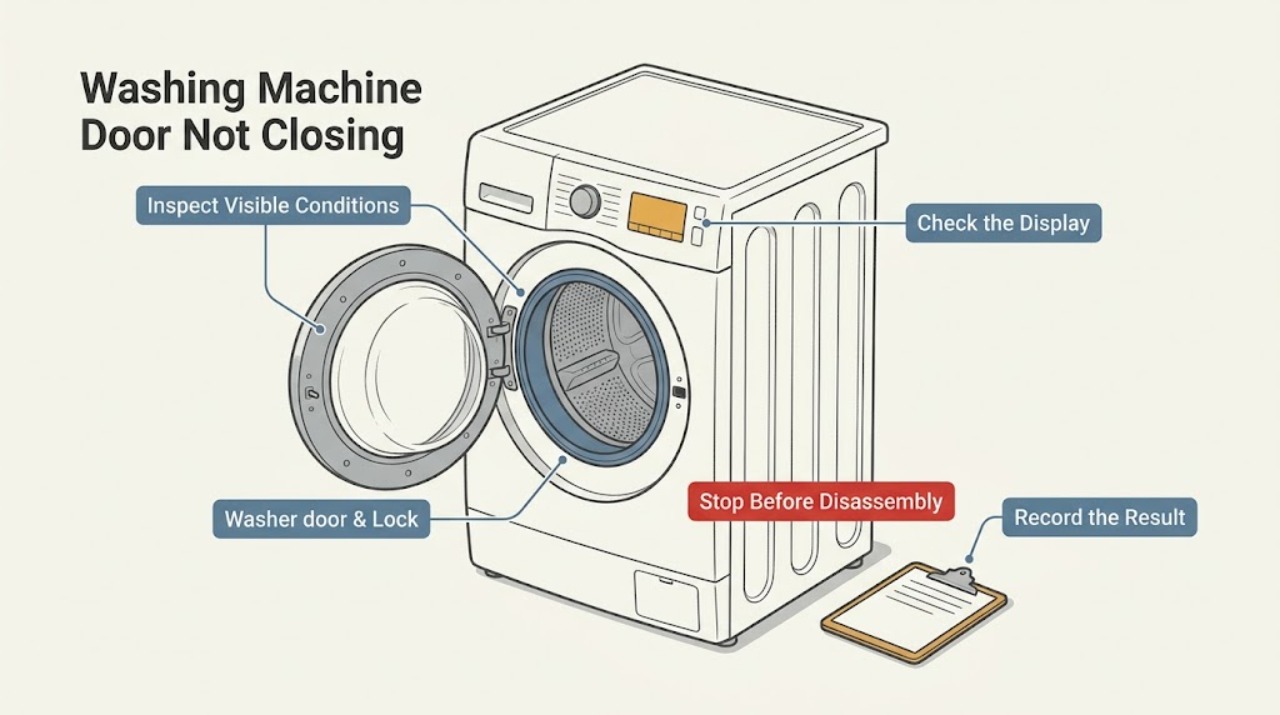
Do not force a Samsung washer door closed. First stop for water near electricity, broken glass, a damaged hinge or latch, smoke, burning smell, or a repeated power trip. If the machine is a front loader, check that clothing is not caught in the opening, the rubber seal has no foreign object or damage, and the door closes without pressure; on a top loader, check the lid area and the model-specific lid lock instead. If a cycle is still running or water remains, let the safe cycle state finish and do not bypass the lock. Record any door error and use the exact model guide. A door that remains misaligned, damaged, or unable to latch needs Samsung service.
Work through in order
Diagnostic checks
Use only checks that match the exact appliance or system and its official guide.
-
Check 1
Stop and screen for hazards before touching the door: look for broken glass, an active leak, water near the plug or outlet, smoke, a burning smell, damaged wiring, or a breaker that trips again. If water is near electrical parts, do not touch the washer or water; use a safe external water or power shutoff only when it can be reached without exposure.
Expected result: A flood, electrical, fire, glass, or other injury hazard is present, or the washer is dry and physically intact.
Next step: For a hazard, keep the washer out of service and arrange the appropriate qualified appliance, electrical, or water professional. Continue only when the area and appliance are safe.
Why this matters
Why: A hazard takes priority over a door adjustment and can make a normal closure check unsafe.
-
Check 2
Identify whether the washer is front-load or top-load, then check the control display and cycle state without forcing the door or lid. Note whether a cycle is running, water remains, a lock or key icon is lit, Child Lock is active, or a door-related indication appears.
Expected result: The opening is physically blocked or misaligned, or the door is closed but the control system will not accept it as closed and locked.
Next step: If the cycle or water state is active, follow Samsung's safe wait or drain guidance for the exact model. If the door cannot close physically, continue with the cool, stopped inspection.
Why this matters
Why: A physical obstruction needs an external inspection, while a locked or water-present state may be normal protection or a door-detection fault.
-
Check 3
For a front loader that is cool and stopped, inspect the opening and inner lip without reaching into a moving drum: look for a sleeve, sock, detergent residue, hair, or other item caught between the door and gasket. Carefully look at the rubber gasket for a cut, fold, or foreign material. For a top loader, inspect the lid rim and strike area for an item or visible damage without bypassing the lid lock.
Expected result: Laundry or debris prevents the door from sitting flush, the gasket or lid area is damaged, or the opening is clear and intact.
Next step: Remove only a loose, clearly accessible item after the machine is stopped and cool. Do not cut, stretch, glue, or replace a seal or latch as a quick test; damage requires service.
Why this matters
Why: Samsung identifies trapped items and damaged seals or latches as reasons a door may not close or lock; a clear, intact opening makes a hidden mechanical or control fault more likely.
-
Check 4
With the washer stopped, gently bring the door or lid toward the latch without force and observe alignment. Check whether the hinge side sags, the latch or strike is bent, the door glass is cracked, or the opening closes evenly. Do not slam the door, press on the glass, or remove the hinge or lock.
Expected result: The door aligns and latches lightly, or it remains crooked, springs back, catches on the cabinet, or shows physical damage.
Next step: If alignment or damage is abnormal, stop using the washer and request Samsung service. If it latches normally, continue to the display and one controlled confirmation only.
Why this matters
Why: A door that cannot align or latch without force points to a mechanical or installation problem rather than a setting that can be cleared.
-
Check 5
Record the exact error code, lock icon, or flashing-light pattern and the stage when it appears. Compare it with Samsung's washer information and error-code guide for the exact model; if the guide authorizes a single power cycle, perform only that documented reset after confirming there is no water or electrical hazard.
Expected result: The guide identifies a permitted external correction, or the indication is unlisted, returns, or appears with a damaged door or latch.
Next step: For an unlisted or returning indication, keep the washer out of use and contact Samsung support. Do not clear the evidence with repeated resets or bypass the lock.
Why this matters
Why: Samsung notes that code meanings can vary by model and that a persistent door indication or damaged latch requires service.
-
Check 6
If a front-load washer has water inside and its exact manual provides an emergency drain procedure, first disconnect power from a dry, safe position and follow that manual's container and filter instructions. Do not open a filter with hot water, force a locked door, or use this procedure on a model that does not provide it.
Expected result: Water drains through the model-authorized path and the lock later releases, or water remains, the door stays locked, or the model procedure is unclear.
Next step: If water remains or the model procedure is unclear, stop and request service. Do not tilt the washer, pry the door, or dismantle the pump area.
Why this matters
Why: Samsung says front-load doors remain locked when water is detected, but not all older models have the same filter or emergency hose.
Use your observations
Decision map
Find the observation that best matches what you see, then follow the next safe action.
-
PATH 01Next step
What you see
Broken glass, damaged latch or hinge, active leak, water near electricity, smoke, burning smell, or repeated power trip
Do this next
Stop immediately, keep the washer out of use, use only a safe external shutoff, and arrange qualified service. Do not force the door or reset power repeatedly.
-
PATH 02Next step
What you see
Laundry, debris, or gasket material is visibly caught in a cool front-load opening, or an item blocks a top-load lid
Do this next
Remove only the loose, accessible obstruction with the washer stopped. If the seal, lid, latch, or glass is damaged, stop and request service.
-
PATH 03Next step
What you see
The door is closed but a cycle, water, lock icon, or Child Lock state prevents opening or normal operation
Do this next
Wait for the safe cycle state or follow the exact model's cancellation and drain guidance. Never pry or bypass the lock.
-
PATH 04Next step
What you see
A Samsung door-related code appears
Do this next
Record the full code and stage, inspect closure and trapped laundry, and use the exact Samsung code guide. A code that returns or a damaged latch requires service.
-
PATH 05Next step
What you see
The opening is clear and intact but the door will not align or latch lightly
Do this next
Keep the washer out of use and request Samsung service for the hinge, latch, strike, frame, or control system. Do not force or slam the door.
-
PATH 06Next step
What you see
A model-authorized external check restores light closure and no leak or electrical symptom appears
Do this next
Run at most one short supervised confirmation using the exact manual. Stop if the door opens, leaks, shows a code, or cannot remain latched.
Helpful context
Understand the symptom
First separate a door that will not close from one that will not unlock
A door that physically springs back, catches clothing, or sits crooked is a closure problem. A door that is shut but locked is a cycle, water, temperature, or control-state problem. Front-load and top-load Samsung models use different openings and hardware, so identify the washer style before following a guide.
Inspect only from a safe, cool position
Do not push harder on a door that is misaligned, and do not bypass a latch. On a front loader, small items in the opening or a damaged gasket can prevent closure and cause leaks. On a top loader, keep hands clear of the lid lock and follow the model manual for lid alignment.
A code is a clue, not a universal diagnosis
Samsung uses different displays and code meanings across models. Record every letter, number, icon, and flashing light, then use the exact model guide. A door-looking code can also be affected by Child Lock, water in the tub, or a model-specific feature, so do not borrow a meaning from another washer.
Know when the door needs service
If the latch, hinge, door glass, gasket, lid, or control does not look intact, or the door will not close after the safe external checks, keep the washer out of use and request Samsung service. A persistent leak or a recurring door indication is not fixed by repeated slamming or resetting.
Safety boundary
Stop conditions
- Stop for broken glass, a bent or damaged hinge or latch, an active leak, water near electrical parts, smoke, burning smell, damaged wiring, or a repeated breaker trip.
- Do not force, slam, pry, tape shut, or bypass the washer door or lid lock.
- Do not reach into a moving drum, touch standing water near electricity, or handle a hot load or hot water while checking the door.
- Do not open a pump or filter area unless the exact model manual authorizes a safe drain procedure and the machine is disconnected from power in a dry position.
- Stop after one model-authorized reset if the door indication returns or the door still will not close.
Only after diagnosis
Potential parts
- door gasket or seal
Consider this only when inspection and qualified diagnosis confirm a damaged front-load seal that prevents closure or causes a leak.
Confirm the full Samsung model and exact seal fit before ordering; do not infer a fit from the washer family or door appearance. - door latch or lock assembly
Consider this only when the door aligns, the opening is clear, and qualified diagnosis confirms that the latch or lock does not detect closure.
Latch and lock designs vary by model. Do not bypass or replace the assembly without the exact model procedure and qualified guidance. - door hinge or strike
Consider this only when visible sag, misalignment, or a damaged strike is confirmed and a technician identifies the failed component.
Confirm model-specific fit and repair procedure; do not force the door to compensate for a bent or loose part.
When checks do not resolve it
Need a professional?
Request Samsung support or qualified appliance service when the door or lid is damaged, misaligned, unable to latch without force, leaking, or still rejected after the safe external checks and exact model guidance. Treat water near electrical parts, smoke, burning smell, broken glass, or repeated power trips as an immediate stop condition.
Have this ready
- Provide the full model number, front-load or top-load style, display code or icon, cycle stage, water level, door and gasket observations, recent move or service, and a photo of the safe visible condition.
Common questions
FAQ
Why will my Samsung washer door not close?
Check for clothing or debris in the opening, a folded or damaged front-load gasket, a bent latch or strike, and door alignment. Do not force the door; visible damage or persistent failure requires service.
Can a Samsung washer door stay locked because of water?
Yes. Samsung says the door can stay locked when water is detected or a cycle is not complete. Wait for the safe state and use only the exact model's drain guidance; never pry the door.
What does a Samsung washer door error mean?
It means the washer does not detect the door as closed and locked, but the same-looking display can vary by model. Check the latch, trapped laundry, and closure, then use the exact model guide.
Should I press harder to close the washer door?
No. Force can damage the glass, gasket, hinge, latch, or frame. Remove only a loose obstruction with the washer stopped and cool; misalignment or damage needs service.
Can Child Lock prevent a Samsung washer from starting?
Yes, Samsung says Child Lock can disable controls and can lock the door on some models. Follow the model-specific instructions to change it and do not bypass the physical lock.
When does a door closure problem need service?
Request service when the door is damaged, misaligned, leaking, unable to latch lightly, remains rejected after safe checks, or is paired with water near electricity, smoke, burning smell, or a repeated power fault.
Read the exact guide
Official sources
- Samsung washing machine is leakingSamsung Support · Samsung washing-machine leaks, front-load gasket checks, and door closure
- Home Appliance Terms and ConditionsSamsung Support · Samsung home appliances; product manual and local safety rules also apply
- Samsung Washer FAQ | Product, Shipping & SupportSamsung US · Samsung washing machines; features and steps vary by model
- Samsung washing machine information and error codesSamsung Support · Samsung washing machines; code meanings and steps vary by model
- Samsung washer door is lockedSamsung Support · Samsung front-load and top-load washer door-lock behavior; exact model instructions take precedence
Community feedback
Share a repair observation
Share a plain-text repair observation. Accepted observations are published automatically; this page may take a moment to update.