
On this page
Start here
Quick answer
Stop trying random button combinations and record the complete code exactly as shown, including letters, numbers, punctuation, alternating displays, or flashing lights. Also record the model, whether the washer is front-load or top-load, and the point in the cycle when the code appeared. Samsung code meanings and diagnostic steps can vary by model. Use the matching Samsung manual or support guide, then make only the low-risk check that fits that code. Do not bypass a door or lid lock, run a diagnostic while an error is already displayed, or continue if there is a leak, smoke, burning smell, arcing, a hot outlet, repeated breaker trips, or violent movement.
Before you begin
Safety first
- Do not open the cabinet, defeat an interlock, work around wet electrics, or perform energized electrical checks. Smoke, arcing, gas-like odor from another nearby source, major water release, or immediate danger requires emergency safety action before appliance service.
Work through in order
Diagnostic checks
Use only checks that match the exact appliance or system and its official guide.
-
Check 1
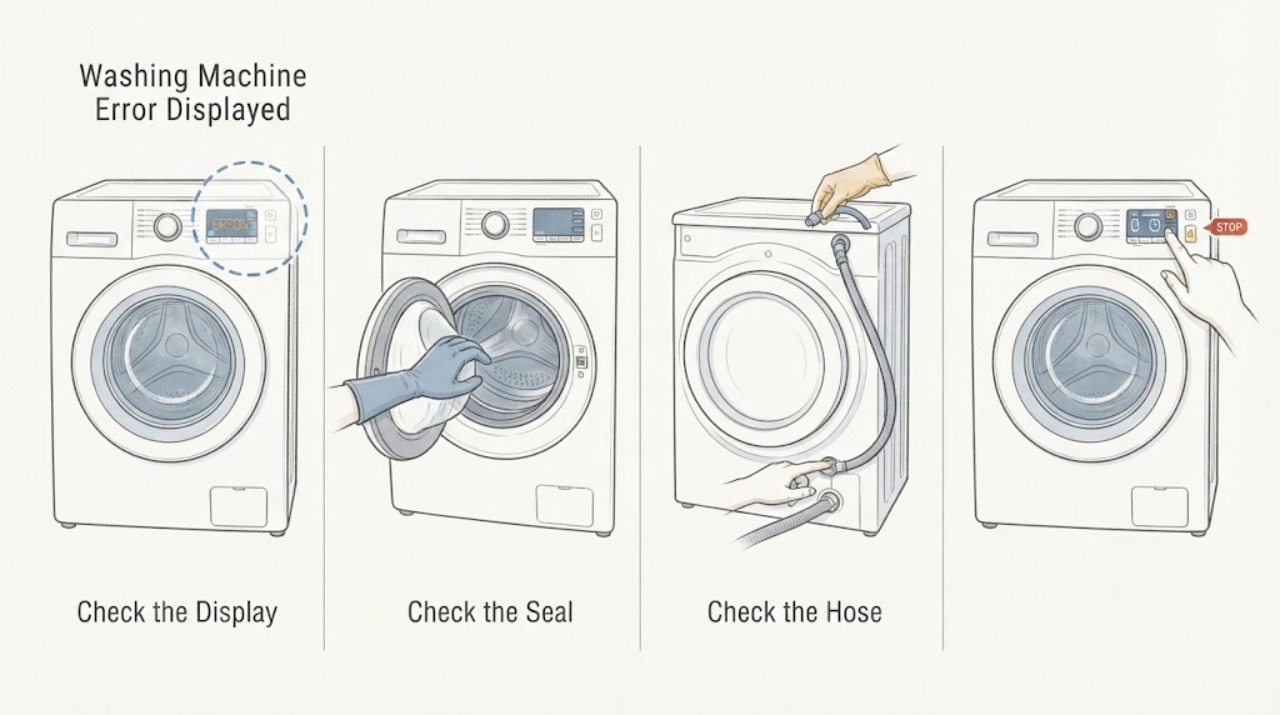
Stop the cycle if it is safe to do so, then copy every character on the display exactly; include any alternating code, decimal point, flashing pattern, and the model identifier from the washer label or manual.
Expected result: You have either a complete code and model, or only a partial/uncertain display, plus the stage at which it appeared: start, fill, wash, drain, spin, or end.
Next step: Use the exact Samsung support page or manual for that model. If the code cannot be read, photograph the display and continue only with the safety checks below; do not guess its meaning.
Why this matters
Why: A complete model-and-code pair is the minimum needed to avoid applying the wrong Samsung interpretation. A partial code is not enough to identify a part or authorize a repair.
-
Check 2
If the code appears before a cycle starts or mentions a door or lid, confirm that the door or lid is fully closed and that no clothing is caught in the visible seal or opening; check whether a lock or Child Lock indicator is active according to the model manual.
Expected result: The lock closes and the code clears, the lock indicator remains with a clean unobstructed closure, or the door/lid will not latch.
Next step: Run the model's normal start procedure once if the closure is secure. If the code returns or the lock cannot engage, leave the washer unused and request service for the exact model.
Why this matters
Why: A closure, control-lock, or interlock condition can prevent the washer from starting. A latch that will not engage is not a reason to hold it shut or bypass it.
-
Check 3
For a fill-related display such as a model-confirmed 4C, 4E, or nF-family code, verify from a dry, safe location that the selected water faucet is open and the inlet hoses are not visibly kinked; do not loosen pressurized connections.
Expected result: Water is available and the hose path looks clear, or the supply is closed/weak, visibly damaged, leaking, or connected differently from the model instructions.
Next step: Correct only a plainly closed faucet or visible routing issue if the manual allows it, then try the affected cycle once. If the code returns with water available, stop and request model-specific service.
Why this matters
Why: The code may reflect a supply, hose, inlet-screen, valve, or water-sensing condition, but the display alone cannot select a replacement part. A leak or damaged hose changes this from a troubleshooting check to a stop condition.
-
Check 4
For a drain or overflow display such as a model-confirmed 5C, 5E, OE, or OC-family code, stop the cycle and look at the visible drain hose for a kink, crushing, an incorrect insertion depth, or an obvious obstruction; keep hands away from hot water and wet electrical areas.
Expected result: Water drains normally and the hose route matches the manual, the hose is visibly restricted, or water remains in the tub and the area is wet or unsafe.
Next step: Make only a dry, external routing correction allowed by the manual. For a front-load model, access a pump filter only when the exact manual authorizes it and the water is cool; never remove a drain-hose screw. If the code returns, stop using the washer and arrange service.
Why this matters
Why: Samsung identifies drain routing and model-specific pump-filter access as relevant checks. A visible routing problem may explain the code; standing water, a leak, or a hot tub requires a safer stop and possible technician handling.
-
Check 5
For a balance or spin-related display, wait until the drum or tub is fully still, then inspect whether a small, heavy, or tangled load has collected on one side; redistribute the load only after the washer is stopped and the model manual permits it.
Expected result: The load is visibly bunched or the washer is level and quiet, or the washer is banging, walking, scraping, or still trying to accelerate.
Next step: Run a suitable low-risk cycle once after a permitted redistribution. If the code or violent movement returns, stop the washer and request service; do not remove panels or test the drive system.
Why this matters
Why: An uneven load or installation condition can inhibit spin, but violent movement or metal scraping can indicate a mechanical or installation fault that should not be chased with repeated high-speed tests.
-
Check 6
Do not start Samsung Smart Install while an error code is currently displayed. Only if the washer is empty, has no active error, and the exact manual supports the feature, follow the model's Smart Install sequence and note the diagnostic result.
Expected result: On supported front-load models the diagnostic sequence can report door lock, water valve, drain, and high-spin results; supported top-load models use different lock and spin indications.
Next step: Match the result only to the same model's instructions. If the sequence is unavailable, fails, or reports a fault, stop experimenting and provide the result to service.
Why this matters
Why: Smart Install is a model- and state-dependent diagnostic, not a universal code reset. Samsung specifically says not to run it when an error code is already shown, and the front-load and top-load result labels differ.
-
Check 7
After the safe external checks, perform at most one model-authorized power cycle: use the normal controls, and only when the floor and plug area are dry, disconnect power for the interval stated by the Samsung guide, then restore power and observe the same cycle without bypassing any lock.
Expected result: The code clears and the washer completes a controlled test, or the same code returns, the washer will not unlock normally, or the symptom changes to a leak, heat, smoke, odor, arcing, or repeated trip.
Next step: If the code returns or any safety symptom appears, leave the washer isolated and request model-specific service. Do not keep power-cycling to make a persistent code disappear.
Why this matters
Why: A single reset can clear a transient control state, but recurrence is evidence that the underlying condition remains. A new safety symptom overrides further testing.
Use your observations
Decision map
Find the observation that best matches what you see, then follow the next safe action.
-
PATH 01Next step
What you see
The display is partial, unreadable, alternating, or not listed for the exact model.
Do this next
Arrange qualified service and follow the exact model guidance.
Why this path and its safety boundary
Why it matters: Do not assign a code meaning or part. Preserve a photo, model identifier, stage, and indicator pattern, then use the model manual or request service.
-
PATH 02Next step
What you see
A door or lid does not latch, the lock indicator remains, or the code returns at startup.
Do this next
Arrange qualified service and follow the exact model guidance.
Why this path and its safety boundary
Why it matters: Check only the visible closure and model-documented Child Lock state. Never force or bypass the interlock; recurring failure needs service.
-
PATH 03Next step
What you see
The exact manual identifies a fill code and the faucet and visible hose route are normal.
Do this next
Arrange qualified service and follow the exact model guidance.
Why this path and its safety boundary
Why it matters: Do not assume the valve or sensor is defective. Stop after the safe external check and arrange service if the code returns.
-
PATH 04Next step
What you see
A drain or overflow code appears with standing water, a leak, or a hot tub.
Do this next
Arrange qualified service and follow the exact model guidance.
Why this path and its safety boundary
Why it matters: Stop the cycle and keep clear of wet electrical areas. Allow hot water to cool as directed by the model guidance; do not open fittings under pressure or continue testing.
-
PATH 05Next step
What you see
A balance or spin code clears after the stopped load is safely redistributed.
Do this next
Arrange qualified service and follow the exact model guidance.
Why this path and its safety boundary
Why it matters: Use one appropriate cycle observation. If the code, walking, impact, or scraping returns, stop rather than repeating high-speed tests.
-
PATH 06Next step
What you see
Smart Install is requested while an error is on the display.
Do this next
Arrange qualified service and follow the exact model guidance.
Why this path and its safety boundary
Why it matters: Do not run it. Resolve the code through the exact model guide or service path first; Smart Install is only for the supported no-error state.
-
PATH 07Next step
What you see
One model-authorized reset does not clear the code, or the code returns.
Do this next
Arrange qualified service and follow the exact model guidance.
Why this path and its safety boundary
Why it matters: Treat the condition as unresolved and give service the complete display, model, stage, and checks already performed.
-
PATH 08Next step
What you see
There is smoke, a burning smell, arcing, a hot outlet, repeated breaker operation, a significant leak, exposed wet electrics, or violent movement.
Do this next
Arrange qualified service and follow the exact model guidance.
Why this path and its safety boundary
Why it matters: Stop immediately, keep people away, and use the safest normal isolation available without touching wet electrical equipment. Escalate from a safe location.
Helpful context
Understand the symptom
Why the exact display matters
A code is a symptom, not permission to replace a part. Similar-looking displays can refer to different checks on different Samsung models, and a code may appear alongside a door, fill, drain, balance, temperature, or control problem. Write down what the display does before cycling power. If the display alternates between two values, preserve both values and the order in which they appear.
Safe scope
The checks below stay outside the cabinet and avoid defeating an interlock. Disconnect the washer only by the normal control or plug method when the area and plug are dry and it is safe to reach them. Do not open a wet electrical area, perform energized electrical checks, remove a hose fitting under pressure, or repeatedly restart a washer that is filling, leaking, overheating, or moving violently.
What a service technician needs
Keep the exact display, model identifier, washer style, cycle and option settings, load condition, water temperature selection, and the point at which the problem occurred. A photo of the display and a short description of what happened immediately before the code can prevent a wrong model-specific diagnosis.
Safety boundary
Stop conditions
- Stop immediately for smoke, a burning or electrical smell, arcing, a hot plug or outlet, repeated breaker trips, or abnormal heating.
- Stop for active leaking, standing water near electrical parts, a hot tub that cannot be safely managed, or a damaged pressurized hose.
- Stop for violent movement, walking, impact, or metal scraping; do not repeat spin tests or remove panels.
- Never force, tape, or bypass a door or lid lock, and never continue testing when the exact code or model meaning is uncertain.
Only after diagnosis
Potential parts
- door or lid lock assembly
Consider only when the exact model code and a safe closure check indicate that the lock does not engage or report closed.
Confirm the complete washer model and the manufacturer's fit information before selecting any part. - inlet valve or water-level sensor
Consider only after the exact model's fill-code procedure confirms normal faucets and hose routing but a fill fault persists.
Do not select a valve or sensor from a code alone; confirm model-specific documentation and fit. - drain pump or drain hose
Consider only after the exact model's drain procedure rules out safe visible hose routing and the drain fault remains.
Confirm the model, washer style, and approved service procedure before any replacement.
When checks do not resolve it
Need a professional?
Use service for a recurring or model-uncertain code, failed lock, persistent fill or drain problem, failed supported diagnostic, or any internal electrical, mechanical, or control fault.
Safety scope: Do not open the cabinet, defeat an interlock, work around wet electrics, or perform energized electrical checks. Smoke, arcing, gas-like odor from another nearby source, major water release, or immediate danger requires emergency safety action before appliance service.
Common questions
FAQ
Should I reset a Samsung washer when an error code appears?
Record the complete code and model first. After the matching guide's safe external checks, one model-authorized power cycle may be reasonable when the floor and plug area are dry. If the code returns, stop repeating resets and request service.
Can I run Smart Install while the code is on the display?
No. Samsung's diagnostic instructions say not to run Smart Install when an error code is already displayed. Use the exact model troubleshooting path first.
What information should I record before asking for help?
Record every display character and flashing pattern, the full model identifier, front-load or top-load style, cycle and options, load condition, water status, and the stage when the code appeared.
Is a fill or drain code enough to identify a replacement part?
No. A code directs a model-specific check; it does not prove that a valve, sensor, pump, or hose is defective. Use the exact manual and stop when the fault persists or the area is unsafe.
Read the exact guide
Official sources
- Samsung washing machine will not drainSamsung · Samsung washer no-drain and overflow troubleshooting, hose routing, and hot-water caution
- Water fill issues with Samsung washing machinesSamsung · Samsung washing machine water-fill troubleshooting and fill-code families
- Samsung washing machine will not start or fill with waterSamsung · Samsung washer start, Child Lock, door or lid, and fill troubleshooting
- Washers | Samsung Support USSamsung · Samsung washer model lookup, manuals, downloads, and support routing
- Samsung washing machine does not spin at allSamsung · Samsung washer drain-before-spin, hose routing, pump-filter and calibration guidance
- Samsung Washer FAQSamsung · Samsung washer power-cycle, model information, settings, and support guidance
- Run diagnostics on your Samsung washer or dryerSamsung · Samsung washer Smart Install diagnostic requirements and result indications
- Samsung washing machine information and error codesSamsung · Samsung washing machine error codes and troubleshooting entry points
Community feedback
Share a repair observation
Share a plain-text repair observation. Accepted observations are published automatically; this page may take a moment to update.