
On this page
Start here
Quick answer
A Samsung washer can refuse to spin because it has not drained, the door or lid is not locked, the load is unbalanced, the machine is not level, or a model-specific fault is present. First note whether there is standing water and whether the drum ever begins to turn. A washer normally drains before high-speed spin, so a drain hose, pump filter or drain restriction can block the spin stage. Redistribute a bulky or one-sided load, check that the washer is stable, and confirm that shipping bolts were removed on a recently installed front-load model. Use the exact Samsung manual before opening a pump filter or starting calibration because access and button sequences vary by model. Stop for water near electrics, a leak, violent walking, metal scraping, burning or electrical odor, smoke, arcing, a hot outlet or repeated breaker operation. If the drum still will not spin after one set of model-authorized checks, keep the appliance out of use and request qualified Samsung appliance service.
Before you begin
Safety first
- Owner checks are limited to stopped-machine observations, load arrangement, dry external hose and floor checks, model-authorized leveling, and the exact manual's safe filter or calibration procedure. Do not bypass a lock, tilt the washer, open panels, test energized circuits or continue with water or electrical damage.
Work through in order
Diagnostic checks
Use only checks that match the exact appliance or system and its official guide.
-
Check 1
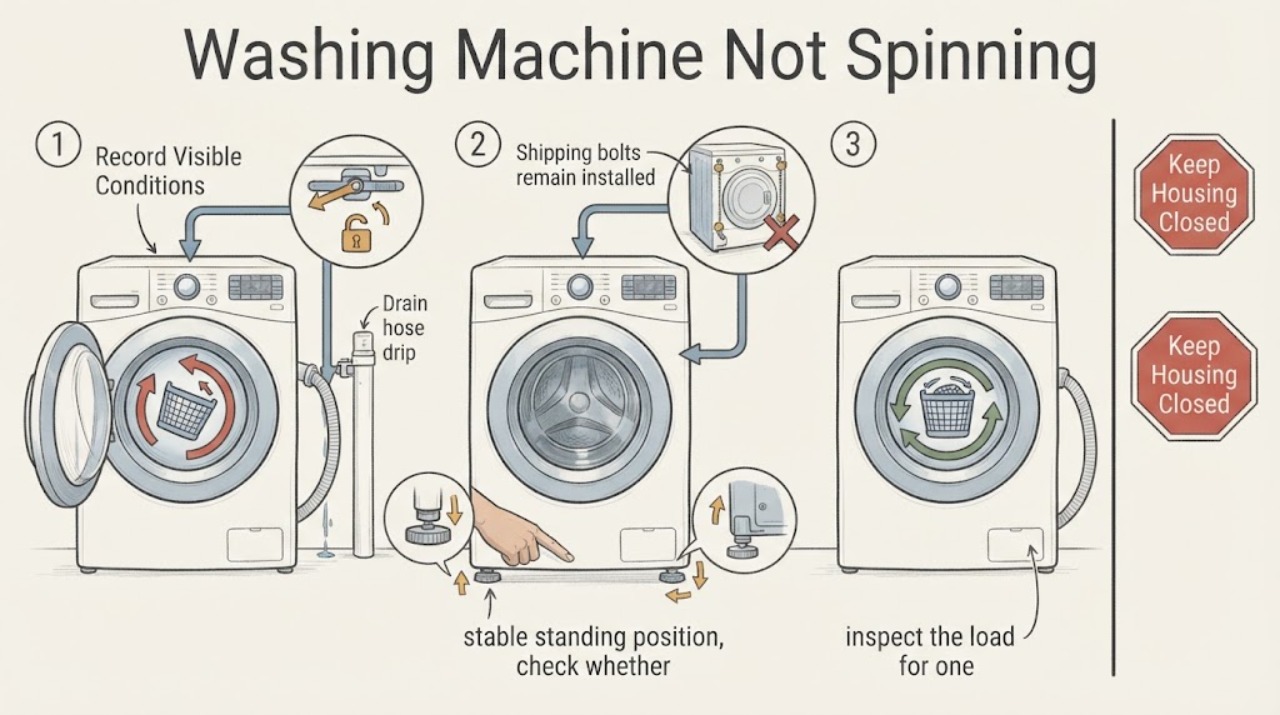
Stop the programme and record whether the tub contains water, whether the door or lid is locked, whether the drum ever turns, and any code or unbalanced-load message; do not force the door or reach into a moving drum.
Expected result: There is standing water, the lock remains engaged, the drum never moves, or the washer drains but stops before spin.
Next step: Keep the appliance stopped for a locked door, hot water, leak, smoke, burning odor or electrical symptom. Otherwise continue with the manual-authorized drain, lock and load checks without repeating the full cycle.
Why this matters
Why: Standing water points first to a drain or pump condition because Samsung washers generally drain before spinning. A lock or control condition can block spin even when the tub is empty; a drained tub with no rotation moves the investigation toward load, installation or drive service.
-
Check 2
With the drum stopped, inspect the load for one heavy or waterproof item, tangled sheets or blankets, excessive weight, or a small load gathered to one side; redistribute or reduce it according to the Samsung manual and select a suitable spin setting.
Expected result: The washer spins normally after the load is balanced, or it still refuses spin, pauses, throws an imbalance message or shakes violently.
Next step: Stop and arrange service if the machine walks, bangs or will not spin after one balanced-load check. Do not keep adding or removing items while the tub is rotating.
Why this matters
Why: An uneven load can cause the control to slow, pause or prevent high-speed spin to protect the washer. A persistent no-spin or violent movement with a reasonable load is not explained by balance alone.
-
Check 3
From a dry, stable standing position, check whether all visible feet contact a firm level floor and whether the cabinet rocks, slides or contacts a wall, pedestal, drip pan or nearby appliance.
Expected result: The washer rocks, a foot is not planted, the floor is slippery or damaged, or an external object is touching the cabinet during spin.
Next step: If the exact manual permits, level the washer and secure the applicable feet or locking nuts. Do not drag a heavy washer through water or a confined space; arrange installation help if safe access is not available.
Why this matters
Why: An unstable installation can make the washer stop or suppress spin as vibration increases. External contact can imitate a mechanical fault but must be corrected only with the model's installation guidance.
-
Check 4
If the washer is a recently installed or moved front-load model, use its exact manual or installation record to confirm that the rear shipping bolts and spacers were removed; do not pull the appliance out solely for an unsafe inspection.
Expected result: Shipping hardware remains or its status is unknown, or the hardware was removed and the drum has the normal spring movement described by the manual.
Next step: Keep the washer off and have the installation corrected using the exact manual if hardware remains or the drum behavior is abnormal. Do not remove hardware from an unstable or inaccessible appliance without safe assistance.
Why this matters
Why: Shipping bolts left in a front-load washer can cause severe vibration and prevent normal spin. Their status is an installation issue, not a reason to run another high-speed cycle.
-
Check 5
Check the displayed programme and spin option against the manual, including any rinse-hold, no-spin or low-speed selection; confirm that the door or lid closes and locks without forcing it.
Expected result: The cycle intentionally holds water or disables spin, the lock indicator never completes, or the settings are correct but the drum remains still.
Next step: Select only a manual-authorized drain or spin option with the appliance safe and empty if appropriate. Do not bypass, force or defeat a door or lid lock; request service if it will not engage.
Why this matters
Why: A selected programme or speed can make a washer appear not to spin, while a door or lid lock is a safety interlock for the spin stage. A correct setting with an unresolved lock points to service rather than a bypass.
-
Check 6
Inspect the visible drain hose route and waste connection for a kink, pinched section, displaced outlet or backup, and compare the timing with the drain stage; do not detach the hose or remove a rear retaining screw to make it reach.
Expected result: The washer hums but leaves water, the waste backs up, the hose is kinked or displaced, or the external drain route is clear and the washer drains normally.
Next step: Correct only a plainly visible routing issue allowed by the exact manual. Keep power isolated for water or leaks; damaged hose, persistent backup or no-spin after normal draining requires service.
Why this matters
Why: A restricted, displaced or incorrectly installed drain route can leave water in the tub and prevent spin. A clear route with normal draining shifts attention to the pump filter, lock, control or drive system.
-
Check 7
For an applicable front-load model, use the exact manual to determine whether the pump filter is owner-accessible; before opening it, confirm the washer is stopped, isolated, cool enough to handle and able to contain residual water.
Expected result: The manual authorizes filter access and the area is safe, or water is present, the cover is damaged or blocked, the model lacks the feature, or the washer still will not spin after the documented procedure.
Next step: Follow only the model-specific filter and drain procedure. Stop for hot water, uncontrolled flow, damaged access, water near electrics or uncertainty; never tilt the washer or open the cabinet.
Why this matters
Why: A clogged pump filter can prevent draining and therefore spin, but residual water can flood the floor and the feature is not universal. A recurring no-spin after a permitted filter check needs professional diagnosis.
-
Check 8
If the manual supports Calibration mode, record the exact model procedure and use it only after the washer is empty, stable, dry and free of safety symptoms; otherwise record the result without trying an unlisted button combination.
Expected result: Calibration completes and the tub moves, or the mode is unavailable, the tub does not move, the no-spin fault returns, or the machine makes grinding or violent movement.
Next step: Stop for grinding, scraping, walking, water, burning odor or electrical signs. If calibration fails or the problem returns, keep the washer out of use and request qualified Samsung service.
Why this matters
Why: Calibration can address a model-supported sensing or balance state, but it does not repair a blocked drain, lock, motor or mechanical fault. Failure to move or a returning symptom is a service clue.
Use your observations
Decision map
Find the observation that best matches what you see, then follow the next safe action.
-
PATH 01Safety boundary
What you see
The tub contains water when the washer should spin
Do this next
Treat drain as the first branch: inspect the visible hose and waste route, then use only the exact manual's applicable pump-filter procedure. Stop for hot or uncontrolled water, leaks or electrical risk.
Why this path and its safety boundary
Safety stop: Check lock, programme, load, level and installation conditions.
-
PATH 02Safety boundary
What you see
The door or lid does not close and lock normally
Do this next
Do not force or bypass it. Remove only a plainly visible obstruction when safe, then request service if the lock or hinge remains abnormal.
Why this path and its safety boundary
Safety stop: Continue with load and drain checks.
-
PATH 03Safety boundary
What you see
The washer displays an imbalance state or shakes only with a one-sided, bulky or overloaded load
Do this next
Stop, redistribute or reduce the load and use the appropriate cycle or spin setting. Escalate if the washer still walks or bangs.
Why this path and its safety boundary
Safety stop: Check stability, level and front-load shipping hardware.
-
PATH 04Safety boundary
What you see
The cabinet rocks, slides, contacts another surface or has shipping bolts remaining on a front-load installation
Do this next
Keep it stopped and correct only the documented installation issue with safe access or professional help.
Why this path and its safety boundary
Safety stop: Continue with the control, drain and pump-filter branches.
-
PATH 05Safety boundary
What you see
The visible drain route is kinked, displaced, backed up or the pump makes recurring noise
Do this next
Keep power isolated for water or leakage, follow only model-authorized drain checks and request service for a damaged route or recurring pump problem.
Why this path and its safety boundary
Safety stop: A normally draining washer with no spin moves toward lock, control or drive diagnosis.
-
PATH 06Safety boundary
What you see
The washer spins after one documented load, level or drain correction
Do this next
Monitor the next normal cycle without overloading; stop if the symptom returns with a reasonable load or any safety sign.
Why this path and its safety boundary
Safety stop: Keep it out of use and request qualified Samsung appliance service.
-
PATH 07Safety boundary
What you see
There is walking, violent movement, metal scraping, water near electrics, a leak, burning or electrical odor, smoke, arcing, a hot outlet or repeated breaker operation
Do this next
Stop immediately, keep away from the hazard and obtain qualified appliance or electrical help. Do not run another spin or calibration test.
Why this path and its safety boundary
Safety stop: Complete the model-specific checks once and document the result.
Helpful context
Understand the symptom
Determine whether drain or spin is the blocked stage
A washer that finishes washing but leaves water in the tub has a different next step from one that drains and then refuses to accelerate. Check the display and look through the door only from a safe position; do not open a locked door or reach into a moving drum. The cycle name, residual water and any unbalanced-load message are useful evidence.
Balance and installation checks are model-sensitive
A single heavy garment, tangled bedding, an overloaded drum or a very small load can shift weight to one side. A washer that rocks or was installed with shipping bolts still in place can also stop or limit spin. Front-load and top-load designs do not share every step, so use the exact Samsung manual before adjusting feet or checking shipping hardware.
Do not turn a spin fault into a water or electrical fault
Pump filters and drain hoses may hold water, and a filter is not present or owner-accessible on every model. Isolate the appliance and contain residual water only when the manual permits it and the area is safe. Persistent no-spin, internal sounds, leaks, walking or electrical symptoms are service boundaries, not reasons to keep running calibration or test cycles.
Safety boundary
Stop conditions
- Stop for water near the plug, socket, controls or other electrics; do not enter uncertain standing water or touch wet electrical parts.
- Stop for violent walking, severe shaking, metal scraping, a damaged door or lid, a leak, hot residual water, burning or electrical odor, smoke, arcing, a hot outlet or repeated breaker operation.
- Do not force or bypass a door or lid lock, reach into a moving drum, open panels, probe energized circuits, tilt the washer or remove a rear hose retainer to troubleshoot spin.
- Do not force a pump filter or service cover; use it only when the exact manual authorizes the procedure and residual water can be safely contained.
- Keep the washer out of use when it will not spin after one balanced-load, level, drain and model-authorized control check, or when an internal motor, bearing, suspension or drive fault is suspected.
Only after diagnosis
Potential parts
- drain pump or pump filter housing
Consider this category only when the exact manual and a qualified diagnosis link residual water or recurring drain-stage noise to the pump path on the exact model.
Confirm the exact model and front-load or top-load configuration; do not order or open the pump path based on no-spin alone. - door or lid lock assembly
Consider this category only when the lock fails to engage with correct settings and a qualified diagnosis confirms an interlock fault.
Match the exact model and door or lid configuration; never bypass the safety interlock. - suspension, drive or motor component
Consider this category only after drain, lock, load, leveling and shipping-hardware conditions are ruled out and a qualified technician confirms an internal fault.
Verify exact model fitment and professional diagnosis; do not replace internal parts from sound or no-spin symptoms alone.
When checks do not resolve it
Need a professional?
Use Samsung Support and the exact model manual for door or lid lock behavior, drain and pump-filter access, calibration, programme settings and error-code interpretation. Request qualified appliance service for a washer that will not spin after one set of model-authorized checks, a returning code, a lock that will not engage, persistent drain failure, internal grinding, walking, suspected motor or drum-support faults, or a leak. Use qualified electrical help for water near electrics, a wet or damaged outlet, arcing, burning odor or repeated breaker operation.
Safety scope: Owner checks are limited to stopped-machine observations, load arrangement, dry external hose and floor checks, model-authorized leveling, and the exact manual's safe filter or calibration procedure. Do not bypass a lock, tilt the washer, open panels, test energized circuits or continue with water or electrical damage.
Common questions
FAQ
Why does my Samsung washer fill and wash but not spin?
Check for standing water first because the washer normally drains before spin. Then check the lock, programme setting, load balance, leveling and front-load shipping bolts using the exact model manual.
Can an unbalanced load stop a Samsung washer from spinning?
Yes. A single heavy item, tangled bedding, an overloaded drum or a very small load can cause imbalance and make the washer pause or avoid high-speed spin. Redistribute it once the drum is stopped.
Should I clean the pump filter when my Samsung washer will not spin?
Only if the exact manual identifies an owner-accessible filter and the washer is stopped, isolated, cool and able to contain residual water. Front-load and top-load models do not share every filter procedure.
Can a door lock cause a Samsung washer not to spin?
Yes. The spin stage depends on the door or lid safety lock. Do not force or bypass it; request service if the lock will not engage with the correct programme and an unobstructed door or lid.
Should I run Calibration mode to fix no spin?
Use Calibration only when the exact model manual supports it and the empty washer is stable and free of safety symptoms. If the tub does not move or the fault returns, stop and request service.
When is a Samsung no-spin problem unsafe to test?
Stop for water near electrics, leaks, hot residual water, violent walking, metal scraping, smoke, burning or electrical odor, arcing, a hot outlet or repeated breaker operation. Do not run another spin test.
Read the exact guide
Official sources
- Install a Samsung washing machine in your homeSamsung · Samsung US installation guidance; dimensions and exact procedures vary by model.
- Samsung washing machine does not spin at allSamsung · Samsung US washer guidance; filter access and button sequences are model-specific.
- Samsung Washer FAQSamsung · General Samsung washer FAQ; controls, features and lock behavior vary by model.
- Samsung washing machine is shakingSamsung · Samsung washer vibration guidance; front-load shipping-bolt checks are model-specific.
- Samsung washing machine is leakingSamsung · Samsung US washer leak guidance; access and drain requirements vary by model.
- Washers and Dryers SupportSamsung · Samsung support entry point; use model lookup for the applicable manual and service route.
- Samsung washing machine spins poorlySamsung · Samsung US spin-performance guidance; procedures vary by model and washer type.
Community feedback
Share a repair observation
Share a plain-text repair observation. Accepted observations are published automatically; this page may take a moment to update.