
On this page
Start here
Quick answer
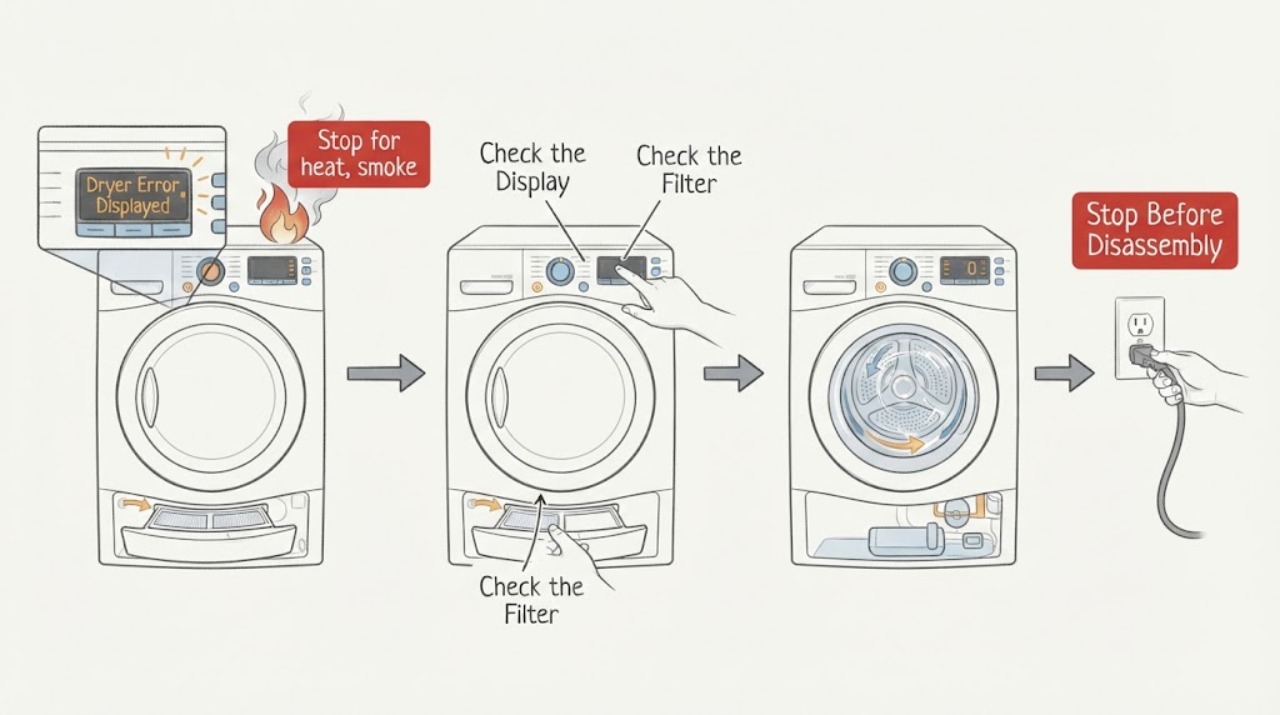
Do not diagnose a Sharp dryer code from the letters alone. Photograph the complete display, record the full model number, programme, load condition, and the moment the code appeared, then match that combination to the exact Sharp manual. Sharp dryer manuals show that codes and responses are model-specific: one model may associate a water-container prompt with condensate drainage, a filter prompt with airflow or motor protection, or a voltage message with supply conditions, while other codes require authorised service. After the dryer is cool and safe, perform only the manual-approved external check, such as emptying the water container, cleaning and correctly reseating the filter, or checking that the door is closed. A single reset is appropriate only when the manual permits it and there is no smoke, burning smell, abnormal heat, spark, damaged cord, or repeated trip. If the code returns, the dryer will not stop, or the cause points to a motor, heater, sensor, pump, or control, keep it out of service and arrange qualified repair.
Work through in order
Diagnostic checks
Use only checks that match the exact appliance or system and its official guide.
-
Stop for heat, smoke, or electrical danger
Stop the dryer and do not restart it if the display is accompanied by smoke, a burning or plastic smell, abnormal heat, sparks, a hot or damaged cord, a water leak near power, or a breaker that trips again. Disconnect power only from a dry, safe location and only when doing so does not put you near a hazard.
Expected result: There is smoke, fire, sparking, heat damage, a strong odor, water near electrical equipment, repeated trips, or the dryer is cool and free of immediate danger.
Next step: Keep clear and obtain emergency or qualified help for smoke, fire, sparks, flooding, or dangerous electrical symptoms. Otherwise keep the dryer off until the code is matched to the exact manual.
Why this matters
Why: A safety symptom overrides code interpretation. The error may be a result of an internal fault or a hazardous operating condition that cannot be cleared by cleaning or resetting.
-
Capture the exact code, model, and programme stage
Before pressing Reset or Power, photograph the whole display and write the complete Sharp model number, serial or product label details if available, selected programme, load type, door condition, and whether the error appeared at startup, after heat, during condensate handling, or near the end. Do not replace a flashing sequence with a guessed code.
Expected result: The display is a stable code, a flashing icon or lamp combination, a water-container or filter prompt, a door indication, or a message that appears only at a specific stage.
Next step: Open the exact model manual or Sharp support page and search the recorded code and programme. If the model cannot be identified, do not guess; arrange service with the photograph and label information.
Why this matters
Why: Sharp's official guidance says display formats and meanings vary by model. The exact code and stage determine whether a permitted external check exists or service is required.
-
Apply only the matching water, filter, or door check
When the manual for the exact model maps the indication to a user check, turn the dryer off and let it cool before emptying the water container, cleaning and correctly reseating the specified filter, or checking that the door closes without clothing caught in the seal. Do not use the dryer without its filter, spray water into it, or open the cabinet.
Expected result: The relevant container was full, the filter was blocked or missing, the door was not closed, or the permitted external condition was already correct.
Next step: Restore the permitted external condition and perform one manual-approved restart only if the manual allows it. If the code returns or the dryer remains unsafe, keep it off and arrange service.
Why this matters
Why: Sharp manuals associate these prompts with condensate handling, filtration, and door state on specific models. A clean filter, empty container, or closed door does not rule out a motor, heater, sensor, pump, or control fault.
-
Separate supply and environment messages from appliance faults
Use the exact manual to check whether the code is associated with a supply interruption, voltage message, door state, ambient condition, or condensate path. Inspect only the visible plug, dry outlet area, room conditions, and accessible drain or container specified by the manual; do not measure mains power, alter wiring, or change a refrigerant or heat-pump circuit.
Expected result: The code appeared after a power event, only in an unsuitable environment, with a full container or blocked drain, or under normal dry conditions with a stable supply.
Next step: Correct only the manual-approved external condition and observe once. If the indication returns, the supply is uncertain, or the installation is hardwired, stop and use qualified electrical or appliance service.
Why this matters
Why: A supply or environmental message may clear after the documented condition is safe and corrected, but a code that appears under ordinary conditions points toward a model-specific fault. The code alone cannot identify the component.
-
Treat sensor, heater, motor, and communication codes as service paths
If the manual maps the code to a temperature or humidity sensor, heater, motor, motor communication, pump, compressor, or main control, record it and stop rather than opening the dryer. Do not bypass a thermal protector, force a motor, access a refrigerant circuit, or test internal wiring.
Expected result: The exact model manual calls for authorised service, the code returns after its permitted reset, the dryer will not heat or tumble, or the error occurs with abnormal noise or heat.
Next step: Keep the dryer out of service and arrange qualified repair. Provide the exact code, model, programme stage, load, filter and container state, supply history, and any odor, heat, noise, or trip details.
Why this matters
Why: These indications involve internal electrical, thermal, mechanical, or condensate systems that cannot be confirmed by a user-level visual check. Repeated operation can increase damage or fire risk.
-
Use one documented reset only, then verify recurrence
If the exact manual permits a reset, the dryer is cool and dry, and there are no safety symptoms, perform that reset once as directed. Observe whether the display clears in standby and whether it returns immediately, at the same programme stage, or only after heat or condensate operation. Do not run repeated loads to prove that a code is gone.
Expected result: The code clears and does not return, returns immediately, returns at the same stage, or returns with heat, moisture, noise, or a protection symptom.
Next step: Stop using the dryer for any recurring code or safety symptom and arrange qualified service. If it remains clear, follow the manual's normal use limits and stop at the first recurrence.
Why this matters
Why: A one-time transient state may clear, but recurrence is evidence that the underlying condition remains. Stage-specific recurrence helps the technician without justifying a user component replacement.
Use your observations
Decision map
Find the observation that best matches what you see, then follow the next safe action.
-
PATH 01Next step
What you see
The displayed code or icon is not fully legible, or the complete model cannot be identified.
Do this next
Do not guess its meaning or use another model's code table. Photograph the display and label, keep the dryer off if it is not operating normally, and arrange model-specific support.
-
PATH 02Next step
What you see
The exact manual maps the indication to a full water container, filter condition, or door state and there are no safety symptoms.
Do this next
After the dryer cools, perform only that manual-approved external check and one permitted restart. Call service if the indication returns.
-
PATH 03Next step
What you see
The indication is associated with voltage, supply, or environment, or appears after an installation or power event.
Do this next
Check only the visible, safe conditions named by the exact manual. Do not measure or alter wiring; use a qualified electrician or appliance technician if the supply is uncertain or the code returns.
-
PATH 04Next step
What you see
The exact manual identifies a motor, heater, temperature or humidity sensor, pump, compressor, communication, or main-control fault.
Do this next
Keep the dryer out of service and arrange authorised or qualified repair. Do not open the cabinet, bypass protection, or select a part from the code alone.
-
PATH 05Next step
What you see
A single manual-approved reset clears the code and it does not return during the documented observation.
Do this next
Return to normal use only within the manual's limits and stop at the first recurrence. Preserve the code photograph and model details for service if it returns.
-
PATH 06Next step
What you see
Smoke, burning smell, abnormal heat, sparks, a damaged cord, water near power, a breaker trip, or a dryer that cannot be stopped is present.
Do this next
Stop immediately, keep clear, isolate power only when dry and safe, and obtain emergency or qualified help. Do not restart to test the code.
Helpful context
Understand the symptom
The model and complete display are part of the diagnosis
A Sharp dryer may show a number, letters, a flashing indicator, or an icon. Similar-looking displays can mean different things on different models. Record the exact characters, any icon, the model label, selected programme, door state, load, and whether the code appeared at start, during heat, during drain, or at the end. Do not copy a code meaning from another Sharp dryer.
Keep external maintenance separate from internal faults
Some Sharp manuals allow low-risk care such as emptying a condensate container, cleaning a filter, checking the door, or confirming the appliance is in the specified environment. Those checks do not confirm a failed motor, heater, sensor, pump, or control. Stop for smoke, burning smell, abnormal heat, sparks, a damaged cord, or a returning error.
Safety boundary
Stop conditions
- Stop immediately for smoke, fire, a burning or plastic smell, abnormal heat, sparks, a hot or damaged cord, water near electrical equipment, repeated breaker trips, or a dryer that cannot be stopped.
- Stop when an exact manual maps the code to a heater, motor, sensor, pump, compressor, communication, or main-control fault; do not continue test cycles.
- Do not open the cabinet, bypass thermal protection, test live wiring, access refrigerant, or use the dryer without its specified filter or safe condensate setup.
- Do not guess a code meaning across Sharp models, repeatedly reset a returning error, or order a part from a code without model-specific diagnosis.
Only after diagnosis
Potential parts
- lint filter or filter housing
Relevant only when the exact model manual and qualified diagnosis identify a damaged or missing filter or housing rather than a deeper airflow or motor fault.
Confirm the complete model and manufacturer fit information; do not infer fit from a filter icon alone. - water-level sensor or condensate pump
Relevant only when model-specific diagnosis confirms a recurring water-container, drain, or pump indication after safe container and hose checks.
Condensate and electrical work require qualified service and exact model confirmation. - temperature or humidity sensor
Relevant only when the exact model code and qualified testing identify a sensor fault affecting heat, drying time, or protection behavior.
Do not choose a sensor from a generic code; confirm model fitment through qualified service. - heater, motor, or electronic control assembly
Relevant only when qualified diagnosis identifies the specific internal component after the model code and safe external causes are confirmed.
Internal electrical and thermal repair requires qualified service and exact model confirmation.
When checks do not resolve it
Need a professional?
Arrange qualified Sharp appliance service when the complete model-specific code is not covered by a permitted external check, the code returns after one documented reset, the dryer will not tumble or heat, the door or container condition is correct but the indication remains, or diagnosis would require internal electrical, thermal, motor, pump, compressor, sensor, or control work. Use an emergency route for smoke, fire, sparks, severe heat, flooding, or dangerous electrical symptoms.
Common questions
FAQ
What should I do when my Sharp dryer displays an error?
Photograph the exact display, record the complete model and programme stage, and use the matching Sharp manual. Do not apply another model's code table. Stop for smoke, burning smell, abnormal heat, sparks, water near power, or a returning trip.
Can I reset a Sharp dryer error code?
Only if the exact manual permits a reset and the dryer is cool, dry, and free of safety symptoms. Perform it once. If the code returns, keep the dryer off and arrange qualified service rather than repeating resets.
What does a Sharp dryer filter or water-container icon mean?
On some Sharp models it points to a filter or condensate condition, but displays and meanings vary. Use the exact manual for the model, perform only its external check, and call service if the indication remains or returns.
What if the code mentions a motor, heater, or sensor?
Treat it as a service path. Record the exact code and model, stop using the dryer, and do not open the cabinet, bypass protection, test live wiring, or order a part from the code alone.
Why does the exact model matter for Sharp dryer errors?
Sharp uses different display formats and code meanings across models and dryer designs. A code from one model may not have the same meaning on another, so the model label and complete display are part of the diagnosis.
Read the exact guide
Official sources
- Error Display Information for Drum-Type Washer-DryersSharp Corporation · Sharp laundry-appliance error-display variation by model and model-specific manual or support lookup
- Home Appliances - Sharp KD-HD9S7GW-B Tumble Dryer ManualSharp · Sharp KD-HD9S7GW-B tumble-dryer fault detection, error display, voltage indication, water container, and authorised-service guidance
- Operation Manual - Sharp KD-HT9JP-G Clothes DryerSharp · Sharp KD-HT9JP-G dryer operation, safety, filters, water container, sensors, maintenance, error codes, and troubleshooting
Community feedback
Share a repair observation
Share a plain-text repair observation. Accepted observations are published automatically; this page may take a moment to update.