
On this page
Start here
Quick answer
For a Sharp microwave that is not turning on, first separate a completely blank display from a display that works but will not start. Check the wall outlet, plug, circuit breaker, door closure, control lock, and any model-specific Demo mode or power-failure message. If the cord is damaged, the breaker trips again, there is smoke or arcing, or the unit still will not operate after these external checks, stop and use a Sharp Authorized Servicer; do not open the microwave cabinet.
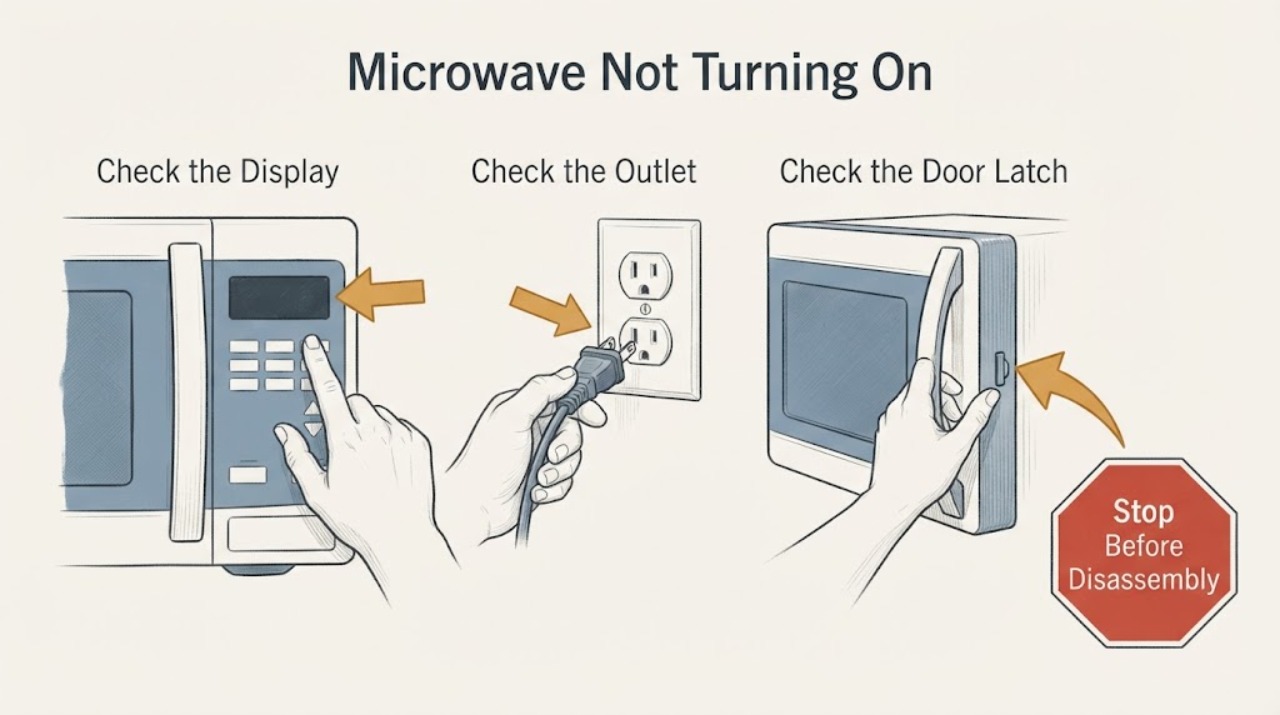
Work through in order
Diagnostic checks
Use only checks that match the exact appliance or system and its official guide.
-
Check 1
Check whether the Sharp microwave display, interior light, and control sounds work before trying to start a cycle again.
Expected result: The display and light are completely blank, the display is on but the panel is unresponsive, or the timer runs but the microwave does not heat.
Next step: Follow the branch that matches the observed pattern and record the display message or timer behavior for the model manual or service call.
Why this matters
Why: A blank unit points first toward supply or power-loss checks; an on but locked or unresponsive panel points toward Control Lock or controls; a running timer with no heat needs the model's service checks rather than a guessed part.
-
Check 2
Test the wall outlet with another appliance and inspect the Sharp microwave plug and power cord from outside the unit.
Expected result: The outlet is dead, the breaker or fuse has opened, the plug is loose, or the cord is cut, hot, scorched, or otherwise damaged.
Next step: If the cord and plug are intact, restore power at the outlet or reset the breaker once when safe. Do not use an extension cord or continue resetting a breaker that trips; arrange qualified service for cord damage or a repeat trip.
Why this matters
Why: A failed supply can leave the display blank, while visible cord damage is an electrical hazard that should not be tested by continued operation.
-
Check 3
Close the microwave door or drawer fully and inspect the visible latch and sealing area for an obstruction or misalignment without bypassing the safety interlock.
Expected result: The door or drawer does not close flush, the latch area is obstructed, or the controls work only when the door is moved or held.
Next step: Remove only a loose external obstruction and close the door normally. If the latch, hinge, seal, or interlock appears damaged or operation depends on pressure or movement, stop and contact an authorised servicer.
Why this matters
Why: Sharp explains that door switches are part of the safety system and that the appliance is intended to operate only when the door is securely closed; an alignment-dependent start is not a safe user repair.
-
Check 4
Check the display for Control Lock, Demo mode, or a power-failure prompt and use the exact Sharp model manual for the documented control sequence.
Expected result: A lock indicator is shown, the panel ignores touches, the timer counts down unusually fast, or the display asks for the clock or program to be reset.
Next step: Apply only the model-specific unlock, Demo-mode cancellation, or clock-reset procedure. If the display remains unresponsive or the symptom returns, stop and arrange service.
Why this matters
Why: A Control Lock can disable the panel, Demo mode can simulate operation without normal heating, and a power interruption can erase the clock or cooking program; these are different from a failed heating component.
-
Check 5
If the display responds and the door closes normally, run one model-approved service check with a microwave-safe cup of water and observe the light, fan, turntable, and water temperature.
Expected result: The light, fan, turntable, or heating result is absent, or all functions operate normally for the test.
Next step: If any expected function fails, stop repeating tests and contact an authorised servicer after checking the outlet and breaker. If the test is normal, use the exact model instructions for the original symptom and monitor rather than opening the unit.
Why this matters
Why: Sharp's service-call check uses these observations to distinguish a supply or control problem from a unit that starts but fails one operating function; a failed observation does not identify a replacement part for every model.
Use your observations
Decision map
Find the observation that best matches what you see, then follow the next safe action.
-
PATH 01Next step
What you see
The display and interior light are both blank, and the outlet does not power another appliance or the breaker has tripped.
Do this next
Restore the supply or have an electrician check it when safe. If the outlet works but the microwave remains blank, contact Sharp service and do not open the cabinet.
Why this path and its safety boundary
Why it matters: A household supply or power-cord problem is more likely than a control-setting problem.
-
PATH 02Next step
What you see
The display is on, but a lock indicator is present, the panel ignores touches, or the timer behavior matches the model's Demo mode description.
Do this next
Use only the exact model manual to clear the lock or Demo mode and reset the clock or program. If the panel still will not operate, arrange authorised service.
Why this path and its safety boundary
Why it matters: A lock, Demo mode, or post-power-failure state is more likely than total loss of power.
-
PATH 03Next step
What you see
The display is on, but the door or drawer does not close normally or the microwave starts only when the door is moved or pressed.
Do this next
Stop using the microwave and contact an authorised servicer. Do not tape, hold, or bypass the door switches.
Why this path and its safety boundary
Why it matters: A door alignment, latch, hinge, seal, or safety-interlock problem is more likely, and bypassing it would create a safety risk.
-
PATH 04Next step
What you see
The outlet works, the cord is intact, the controls are unlocked, and the microwave still fails one or more light, fan, turntable, or water-heating observations.
Do this next
Stop testing and contact Sharp or an authorised microwave servicer with the model number and the failed observations. Do not attempt internal repair.
Why this path and its safety boundary
Why it matters: An internal electrical, control, motor, or heating fault is more likely, but the symptom does not safely identify which component has failed.
-
PATH 05Next step
What you see
There is smoke, arcing, a burning smell, scorching, a hot or damaged cord, or a breaker trips again during use.
Do this next
Stop using it immediately and disconnect power only if the plug can be reached safely. Keep the unit out of service and arrange qualified repair or emergency help as appropriate.
Why this path and its safety boundary
Why it matters: The microwave presents an electrical or fire hazard rather than a routine start-setting problem.
Helpful context
Understand the symptom
Start with the display and the symptom
A blank display, a display that is lit but ignores controls, and a microwave that counts down without heating are different failure patterns. Sharp's operation manual groups no operation with an incompletely connected cord, a power outage, a fuse or breaker problem, and Demo mode; it separately lists an active Control Lock and incorrectly set controls. Record which lights, display segments, sounds, and buttons still work before repeating a start attempt.
Use only external checks
Sharp's published manuals direct owners to check the supply, controls, and door-related operation, then contact an authorised servicer when the problem remains. Do not remove the cover, bypass door switches, probe the fuse, or attempt a component repair. Microwave circuits can remain hazardous even when the unit appears to be off.
Check the exact model guidance for locks and modes
Sharp sells countertop, drawer, over-the-range, and convection microwaves, so button combinations are not universal. The opened drawer manual shows that Control Lock disables the panel and that a power interruption requires clearing the display and resetting the clock; the countertop manual's service check also says a rapidly counting timer can indicate Demo mode. Use the model's own manual for the unlock or Demo-mode sequence instead of guessing a key combination.
Stop when the external path is exhausted
If a known-good outlet, intact cord, closed door, unlocked controls, and the model's documented settings do not restore operation, the remaining fault cannot be identified safely from the symptom alone. Sharp's service-call guidance says to contact an authorised servicer when the basic checks do not resolve the problem, and warns against do-it-yourself microwave service.
When checks do not resolve it
Need a professional?
Contact a Sharp Authorized Servicer when the outlet and breaker are good but the microwave remains blank, when a door or safety interlock is damaged or alignment-dependent, when a model-approved service check fails, or when the unit needs any internal electrical or microwave-circuit work. Provide the model number, display state, door type, outlet result, and each observed light, fan, turntable, and heating result.
Common questions
FAQ
Why is my Sharp microwave completely blank?
Start with the outlet, breaker or fuse, plug, and power cord. Sharp's manual lists an incomplete cord connection, power outage, and fuse or breaker trouble among causes of a unit that does not operate. A working outlet with a blank display needs service rather than cabinet disassembly.
What if the display works but the microwave will not start?
Check that the door or drawer closes fully, then check for Control Lock, Demo mode, a power-failure prompt, or incorrectly set controls using the exact model manual. Do not bypass door switches or keep forcing the latch.
Can I replace the fuse or door switch myself?
Do not choose or replace an internal fuse, door switch, magnetron, or other component from the symptom alone. Sharp's published material directs owners to an authorised servicer when the basic checks fail, and the door switches are part of the microwave safety interlock.
Read the exact guide
Official sources
- SMD2443JSC Operation ManualSharp · Opened Sharp's official operation manual for a Microwave Drawer model. Used for symptom-level causes of no operation, Control Lock, power-failure recovery, Demo mode, and the instruction to use authorised service; exact buttons and construction vary by model.
- Sharp Canada Service LocatorSharp · Opened Sharp's official service locator to support the escalation path after external checks fail.
- Microwave Support & Frequently Asked QuestionsSharp · Opened Sharp's official microwave FAQ. Used to explain why secure door closure and intact interlocks matter, and why control or installation details must follow the exact model.
- SMC1585BS Operation ManualSharp · Opened Sharp's official countertop/convection microwave manual. Used for one model's external service-call observations and its explicit warning against do-it-yourself microwave service; test instructions and modes are not assumed universal.
Community feedback
Share a repair observation
Share a plain-text repair observation. Accepted observations are published automatically; this page may take a moment to update.