
On this page
Start here
Quick answer
Some frost is expected in Siemens lowFrost or manual-defrost freezers, but a noFrost model is designed to prevent routine frost buildup. First protect the food and identify the model's system from its E-Nr manual or product page. Check that the door closes and seals, packages are not blocking airflow, and warm or damp air is not entering. For lowFrost or manual-defrost models, use only the manual's safe defrost procedure; switch off or unplug only from a dry, safe position, let ice melt naturally, and never chip ice or use a sharp tool or direct heat. Frost that returns quickly, covers the rear wall, blocks drawers, or appears in a noFrost model needs qualified service rather than panel removal.
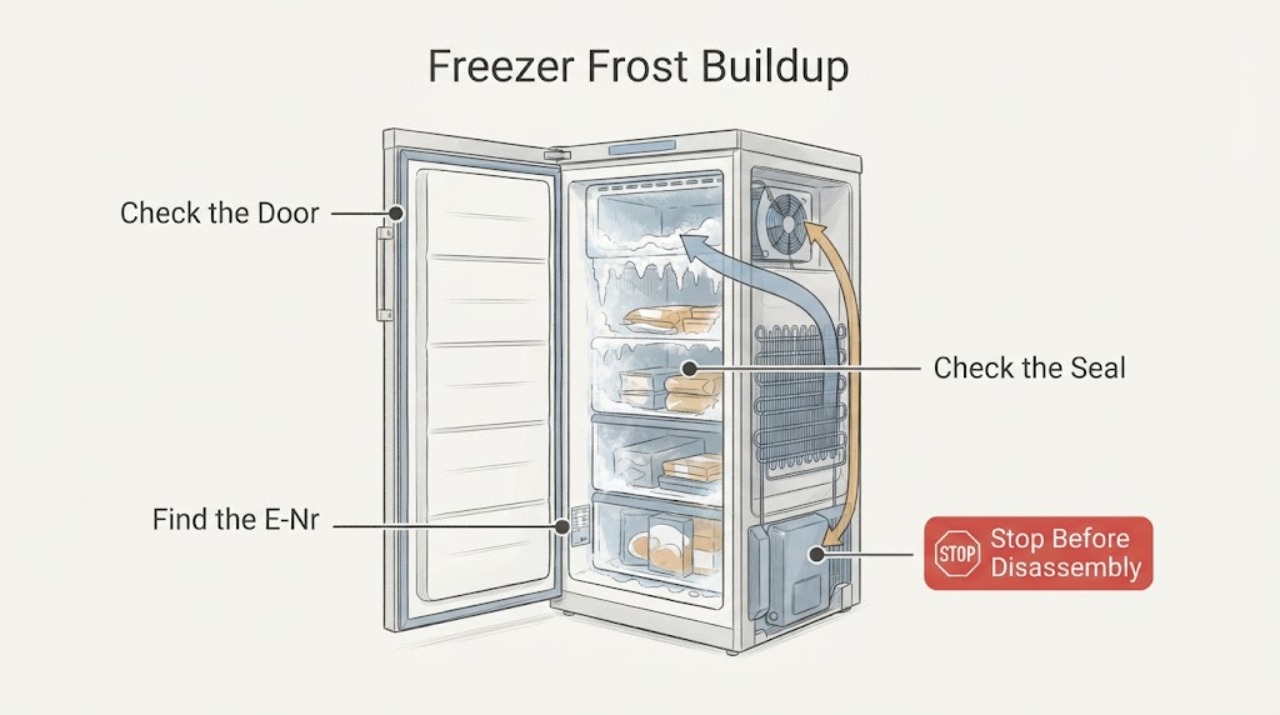
Work through in order
Diagnostic checks
Use only checks that match the exact appliance or system and its official guide.
-
Check 1
Check the freezer temperature warning, food condition and frost extent without forcing drawers or the door; move food to another cold storage only if it can be done safely.
Expected result: Food is still solidly frozen, partly thawed, or soft and warming, and frost is thin, localized or blocking the compartment.
Next step: Limit door opening and protect food first. If food has warmed substantially, follow local food-safety guidance and do not use the freezer as a test appliance until the cause is addressed.
Why this matters
Why: Food condition determines urgency, while the frost extent distinguishes a maintenance layer from a possible cooling or defrost fault.
-
Check 2
Find the Siemens E-Nr and consult the exact product page or user manual to determine whether the freezer is noFrost, lowFrost or manual-defrost; do not assume every Siemens freezer uses the same procedure.
Expected result: The documentation identifies automatic noFrost, reduced-frost lowFrost, or a manual-defrost design.
Next step: Follow only the branch for the identified system. If the E-Nr cannot be read, use Siemens support before attempting a defrost procedure.
Why this matters
Why: The same amount of frost has different significance by system: noFrost should not routinely form a thick layer, while lowFrost and manual models may require planned defrosting.
-
Check 3
Inspect the closed door and accessible gasket all the way around for a gap, dirt, ice, torn rubber or a package preventing full closure; wipe accessible surfaces with a suitable cloth after the appliance is safe.
Expected result: The gasket seals evenly, or there is a visible gap, obstruction, residue or damage at one section.
Next step: Remove only a loose package or surface residue. Do not use the freezer with a torn gasket or persistent gap; arrange a model-specific seal or service assessment.
Why this matters
Why: Warm humid room air entering through a poor seal can condense and freeze at the door edge and increase frost. A damaged or distorted gasket is not a reason to force the door.
-
Check 4
Check that food packages are not pressed against the rear air outlets or blocking drawers and that the door is not being held open by an overfilled compartment; do not scrape ice from an outlet.
Expected result: Air outlets and drawers are clear, or food and ice obstruct circulation or closure.
Next step: Rearrange only movable food after the compartment is safe. If ice blocks an outlet or returns after a permitted defrost, stop and arrange service.
Why this matters
Why: Blocked circulation or a door that cannot close can create warm zones and more condensation; ice that is already blocking the air path may indicate a deeper noFrost problem.
-
Check 5
Look at the frost pattern and location without removing an interior panel: compare the door edge, shelves, rear wall and floor of the compartment, and note whether it returns soon after a complete safe defrost.
Expected result: Frost is mainly at the door edge, evenly distributed, concentrated on the rear wall, or rapidly returns after defrosting.
Next step: Photograph or record the pattern for service. Never remove panels or probe a hidden drain, fan or sensor.
Why this matters
Why: Door-edge frost supports a sealing or closure check; a heavy rear-wall or rapidly recurring pattern in noFrost mode needs defrost-system diagnosis rather than repeated scraping.
-
Check 6
For a lowFrost or manual-defrost model, follow the exact manual to switch the appliance off or unplug it from a dry, safe position, remove food, protect the floor, and let ice melt naturally; do not chip, pry or heat the ice.
Expected result: Ice melts without damage, or it remains bonded, meltwater approaches electrical parts, or the compartment cannot be safely emptied.
Next step: Stop the defrost if water approaches wiring, controls or an outlet, if the appliance is damaged, or if ice will not release naturally; arrange qualified service.
Why this matters
Why: A planned natural defrost is the appropriate maintenance path only when the manual permits it. Force, sharp tools and direct heat can damage the liner or hidden components and create an electrical hazard.
-
Check 7
After a permitted defrost, dry the compartment, restore the settings exactly as the manual describes, close the door fully and observe temperature and frost without opening it repeatedly.
Expected result: The freezer returns to its expected operation, shows a continuing temperature warning, or frost begins rebuilding quickly.
Next step: Transfer the observation, E-Nr, frost pattern and time-to-return to Siemens service. Do not repeat defrost cycles as a substitute for diagnosis.
Why this matters
Why: A stable restart after a complete low-risk defrost supports routine frost maintenance. A continuing warning or rapid recurrence suggests a seal, cooling, sensor or automatic-defrost fault.
-
Check 8
For a noFrost model with persistent frost, check only the external door, load and setting conditions, then leave the appliance off if frost blocks airflow or the unit is not maintaining temperature; do not open the rear cover.
Expected result: The noFrost compartment clears and holds temperature after a documented safe reset or defrost, or frost and temperature problems return.
Next step: Arrange qualified Siemens service and provide the model, warning indicators, frost location and whether the fan or cooling behavior changed.
Why this matters
Why: A noFrost model is intended to manage its defrost cycles automatically. Recurring frost can involve an internal defrost, airflow or sensor system that is not a consumer panel repair.
Use your observations
Decision map
Find the observation that best matches what you see, then follow the next safe action.
-
PATH 01Safety boundary
What you see
Food is warming or a temperature warning remains active.
Do this next
Protect the food, minimize door opening and arrange prompt appliance service; do not repeatedly power-cycle a warming freezer.
Why this path and its safety boundary
Safety stop: Continue with model identification and frost-pattern checks.
-
PATH 02Safety boundary
What you see
The documentation identifies a noFrost model.
Do this next
Treat thick or returning frost as abnormal after external checks and use qualified service rather than manual scraping or panel removal.
Why this path and its safety boundary
Safety stop: Check the lowFrost or manual-defrost branch.
-
PATH 03Safety boundary
What you see
The documentation identifies lowFrost or manual defrost.
Do this next
Use only the exact manual's natural defrost procedure with the appliance safely off and food protected.
Why this path and its safety boundary
Safety stop: Do not guess the system; obtain the E-Nr manual or Siemens support.
-
PATH 04Safety boundary
What you see
Frost is concentrated around the door edge or a gap is visible.
Do this next
Remove only a loose obstruction or surface residue and arrange service for a damaged or distorted gasket.
Why this path and its safety boundary
Safety stop: Continue with airflow and rear-wall pattern checks.
-
PATH 05Safety boundary
What you see
Packages, drawers or ice block the air outlets or prevent full door closure.
Do this next
Rearrange movable food only when safe; do not scrape a blocked outlet or force a drawer.
Why this path and its safety boundary
Safety stop: Continue to identify whether frost is evenly distributed or rapidly recurring.
-
PATH 06Safety boundary
What you see
A permitted lowFrost or manual defrost melts naturally and the compartment can be dried safely.
Do this next
Dry it, restore settings per the manual and observe the closed appliance for normal temperature.
Why this path and its safety boundary
Safety stop: Stop if water approaches electrical parts or ice will not release naturally, then call service.
-
PATH 07Safety boundary
What you see
Frost returns quickly after a complete safe defrost or persists in noFrost mode.
Do this next
Record the E-Nr, pattern and warning, leave the unit off if temperature or airflow is compromised, and arrange qualified service.
Why this path and its safety boundary
Safety stop: Continue normal monitoring without repeated unnecessary defrosting.
-
PATH 08Safety boundary
What you see
The task would require removing a panel, probing a hidden drain or fan, using heat, or chipping ice.
Do this next
Stop; those are not safe consumer checks and need qualified service.
Why this path and its safety boundary
Safety stop: Keep the diagnosis to the documented external checks and approved defrost procedure.
Helpful context
Understand the symptom
Protect food and power first
Do not leave frozen food warming while repeatedly testing the appliance. If frost has blocked the door or drawers, do not force them. For any electrical work, moisture, damaged cord, smoke, burning smell, unusual heat or repeated breaker trip, keep clear and arrange qualified service. If a manual permits defrosting, plan a safe food transfer and use towels for meltwater; the appliance must be off and dry before it is returned to service.
NoFrost is different from lowFrost
Siemens noFrost models use automatic defrosting to reduce frost formation, so a persistent thick layer is a symptom to investigate. Siemens lowFrost models reduce frost but do not eliminate the need for defrosting. Older or manual-defrost models may accumulate frost as part of normal operation. Do not infer the system from appearance alone: check the E-Nr and the exact manual.
The frost pattern is evidence
A thin, even layer on a manual-defrost model is different from a solid block on the rear wall or frost concentrated around the door edge. Door-edge frost points toward warm humid air entering. Frost returning in a noFrost compartment, or frost that blocks airflow and drawers, points beyond a simple cleaning task. Record the pattern, temperature warning and time since the last defrost before service.
Only after diagnosis
Potential parts
- freezer door gasket
Only consider this class if a safe external inspection shows a torn, distorted or persistently gapped gasket after the door and load are correctly positioned.
Confirm the complete Siemens E-Nr and manufacturer fit information before ordering; do not force the door to compensate for a poor seal. - automatic defrost system component
Only consider this class after qualified diagnosis confirms recurring frost in a noFrost model is caused by an internal defrost, sensor or airflow fault.
Confirm the exact E-Nr and leave internal diagnosis and replacement to qualified service. - freezer temperature sensor
Only consider this class if a qualified technician links the frost and temperature symptoms to a sensor fault.
Confirm model-specific fitment and diagnostic evidence; frost alone does not identify a sensor.
When checks do not resolve it
Need a professional?
Arrange qualified Siemens service when a noFrost freezer develops persistent or rapidly returning frost, when frost blocks airflow or drawers, when a lowFrost or manual-defrost unit will not clear naturally, when a door gasket is torn or cannot seal, or when the freezer does not maintain temperature after a documented safe defrost. Stop immediately for water near electrical parts, a damaged cord, smoke, burning smell, unusual heat, repeated breaker trips, a forced or jammed door, or any need to remove panels, probe hidden parts, chip ice or apply direct heat. Protect food and follow applicable food-safety guidance if it has warmed.
Common questions
FAQ
Is frost normal in a Siemens freezer?
It depends on the model. Siemens noFrost appliances are designed to prevent routine frost with automatic defrost cycles, while lowFrost and manual-defrost appliances can require planned defrosting.
How do I know whether my Siemens freezer is noFrost or lowFrost?
Use the E-Nr on the appliance to open the exact Siemens product page or manual. Do not infer the defrost method from the amount of frost alone.
Why is frost forming around the freezer door?
Check for a package preventing closure, residue or ice on the accessible gasket, and a visible gap. A torn gasket or persistent gap needs service rather than a forced door.
Can I scrape ice from a Siemens freezer?
Do not chip, pry or use sharp tools. For lowFrost or manual models, follow the exact manual and let ice melt naturally with the appliance safely off.
What if frost returns quickly after defrosting?
Rapid recurrence, especially in a noFrost model, can indicate a seal, airflow, sensor or automatic-defrost problem. Record the pattern and arrange qualified service.
What should I do if the freezer is warming as frost builds up?
Protect the food and minimize door opening. A temperature warning or warming compartment needs prompt service; do not repeatedly cycle the appliance as a test.
Can I use a hair dryer or heat to remove freezer ice?
Do not apply direct heat or work around water and electrical parts. Use only the documented natural defrost procedure or qualified service.
Read the exact guide
Official sources
- Customer support for your home appliance | Siemens Home AppliancesSiemens Home Appliances · Siemens appliance support, instruction manuals, troubleshooting and repair service
- GI11VAFE0 built-in freezer | SIEMENS GBSiemens Home Appliances · A Siemens lowFrost freezer product specification and model-dependent manual access
- Service Page - free-standing freezer | GS32NX77/01Siemens Home Appliances · Siemens freezer model identification, manuals, self-help and professional repair boundary
- Freestanding Fridges and FreezersSiemens Home Appliances · Siemens freezer product categories and model feature identification
- No frost fridge-freezers with sensor-controlled freshness | Siemens HomeSiemens Home Appliances · Siemens noFrost automatic defrosting and prevention of frost and ice buildup
Community feedback
Share a repair observation
Share a plain-text repair observation. Accepted observations are published automatically; this page may take a moment to update.