
On this page
Start here
Quick answer
If a Smeg oven is not heating, first record the exact model, fuel type, display message, cooking function, target temperature, and whether the preheat indicator responds. A wrong function such as defrost or keep-warm, an unset clock or delayed program, an open or locked door, a tripped supply, or a mode-specific control state can look like failed heating. Select a documented cooking function and temperature, close the door normally, and allow the oven to complete its normal preheat indication. Use the exact Smeg manual for the model because Smeg ovens vary by cooking method and features. Do not continue testing if there is gas odour, delayed ignition, an abnormal flame, smoke, an electrical burning smell, arcing, uncontrolled heat, or a hot connection; isolate the appliance only when safe and arrange qualified service.
Before you begin
Safety first
- Do not remove covers, bypass a door interlock, probe a gas path, use a flame to search for leaks, perform energized electrical checks, or continue operating after gas odour, smoke, arcing, severe overheating, or a hot connection.
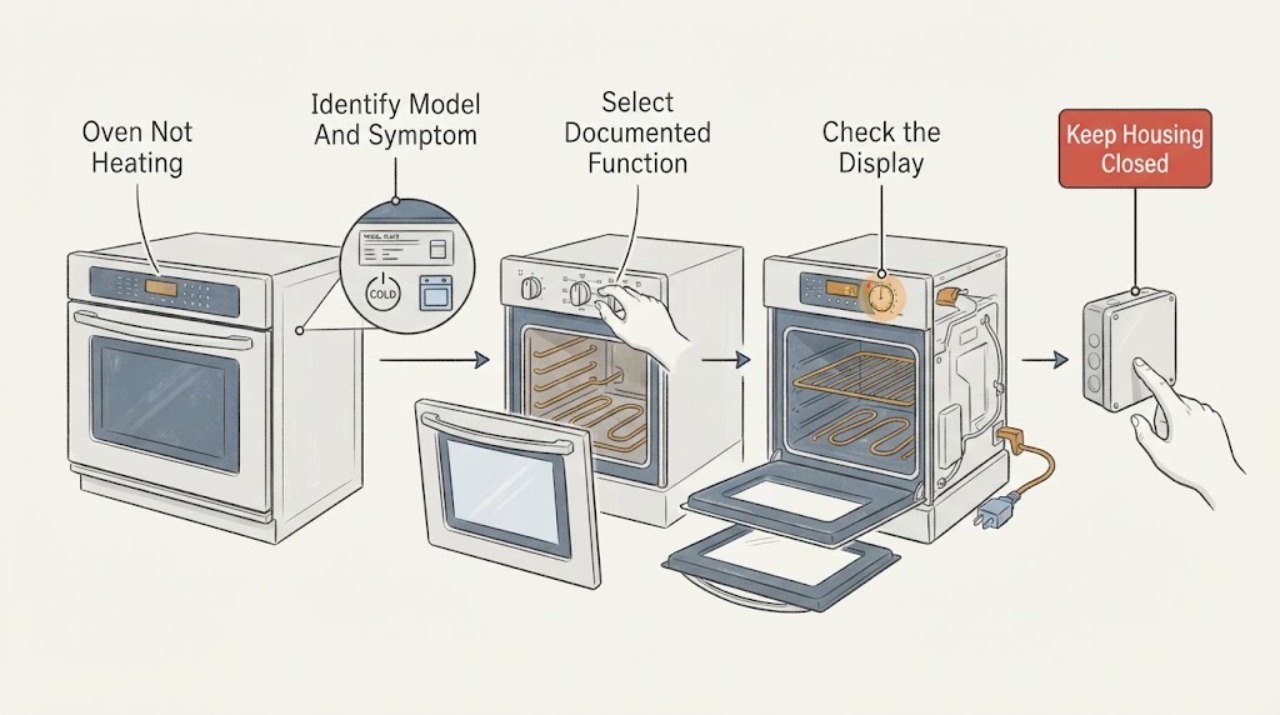
Work through in order
Diagnostic checks
Use only checks that match the exact appliance or system and its official guide.
-
Check 1
From a dry, cool exterior, record the Smeg product code, fuel type, cavity or oven type, display text, selected function, target temperature, timer state, and whether the thermostat or preheat indicator changes after Start.
Expected result: Classify the symptom as no display, display but no response, a normal preheat indication with a cold cavity, heat in one mode only, a code or lock message, or heat that will not stop; note whether the model is electric, gas, dual-fuel, steam, or combination if the label and manual say so.
Next step: Use the recorded product code in Smeg's manual finder, then follow the control and cooking-function instructions for that model before arranging parts or service.
Stop if: Stop immediately for gas odour, smoke, an electrical burning smell, arcing, a hot plug or connection, uncontrolled heating, or a damaged label or cabinet that makes the appliance unsafe to operate.
Why this matters
Why: This separates a supply or control problem from a mode-specific heating problem and prevents an electric-element explanation from being applied to a gas or combination model. A missing or uncertain identity means the exact manual must be found before any model-specific step.
-
Check 2
With the oven empty of loose items and the door closed normally, select a documented bake or conventional heating function and a moderate target temperature from the exact manual; cancel defrost, keep-warm, demo, delayed-start, or other non-heating states unless the manual says they heat.
Expected result: Observe whether Start is accepted, the preheat indicator flashes or changes, a preheat completion signal occurs, and the cavity becomes warm after the documented interval; record if only one function fails.
Next step: Keep the exact function and indicator behavior for the service record; do not repeatedly cycle a function that produces smoke, a burning smell, a gas smell, or uncontrolled heat.
Stop if: Do not use self-cleaning or a high-temperature cycle as a diagnostic test, and stop for smoke, strong odour, abnormal flame, electrical noise, arcing, or heat that continues after cancellation.
Why this matters
Why: A response in one documented heating function but not another points to a function selection, setting, or mode-specific circuit issue. No response in every heating function points toward control, supply, interlock, or heating-system service rather than a rack or recipe issue.
-
Check 3
Check that the door closes against its seal without an object in the opening and that the display is not showing a control lock, child lock, timer, delayed-start, Sabbath, demo, pyrolytic, or cooling state; use only the exact manual's normal cancellation or unlock sequence.
Expected result: Record whether the door closes and latches normally, whether Start becomes available, and whether the display changes after the documented setting is cancelled; do not press, lift, or force a hot or locked door.
Next step: Remove only a visible obstruction that can be lifted without force, then repeat one normal start attempt; otherwise save the display message and manual section for qualified service.
Stop if: Never pry, bypass, or defeat a door lock or interlock. Stop if the door is hot and locked, the seal is damaged, the glass is cracked, or the oven remains locked with smoke or abnormal heat.
Why this matters
Why: A door or control state can prevent a cycle from starting or can make a normal cooling or cleaning lock appear to be a heating failure. A door that will not close or a lock that remains after the documented cool-down needs service rather than bypassing an interlock.
-
Check 4
From a dry position and without opening the appliance, check whether the display and interior light have power and whether the dedicated breaker or isolator has visibly tripped; restore a tripped breaker only once if there is no sign of damage and the circuit can be safely reached.
Expected result: Record whether the display is completely blank, whether other oven functions have power, whether the breaker trips again, and whether the plug, isolator, or nearby connection feels hot or shows discolouration; do not perform energized electrical checks.
Next step: Leave the breaker or isolator off when it trips again or any connection is hot or damaged, and arrange qualified appliance or electrical service with the model and circuit symptoms.
Stop if: Stop for repeated tripping, sparks, a hot or scorched connection, water near electrical parts, smoke, or any need to remove a cover or access live wiring.
Why this matters
Why: A blank display or repeat trip points to supply, wiring, or an internal fault and cannot be solved by changing a heating setting. A powered display with no heat keeps the control, interlock, sensor, and heating system in scope.
-
Check 5
Only if the exact Smeg manual identifies a gas or dual-fuel oven, note whether the problem is no ignition, delayed ignition, an extinguished flame, or no heat after a normal documented start; do not remove a burner, probe a gas path, or repeatedly relight it.
Expected result: Record only safe external symptoms such as a normal single ignition attempt, no ignition sound, a delayed whoosh, an abnormal flame, or a gas smell; never lean into the cavity to inspect a flame or use a flame to search for a leak.
Next step: If there is any gas smell or abnormal flame, stop using the oven, leave the area if needed, and contact the local gas utility or emergency service from a safe location; otherwise provide the exact model and recorded symptom to qualified appliance service.
Stop if: For strong or persistent gas odour, delayed ignition, a pop or explosion-like sound, soot, yellow or unstable flame, suspected carbon-monoxide symptoms, or smoke, stop, avoid switches and ignition sources, and move to a safe location.
Why this matters
Why: No gas or abnormal ignition symptoms require gas-appliance service and cannot be diagnosed as an electric-element failure. Any gas smell or delayed ignition is a safety event, not a reason for another test cycle.
-
Check 6
After the oven is switched off and fully cool, inspect only the visible cavity, racks, door seal, and accessible vents for foil, a pan, heavy spill residue, displaced rack material, or an obstruction that prevents the door from closing; follow the manual for cleaning and rack placement.
Expected result: Record whether the door seal is intact, the door closes evenly, vents are visibly clear, and the cavity has residue or damage; do not remove an element cover, insulation, burner, fan guard, or control panel.
Next step: Remove only a loose, cool item that is clearly safe to lift, then make one normal test; record photos of any damaged seal, glass, element cover, or cabinet for service.
Stop if: Stop for cracked glass, a torn seal, exposed wiring or element, sharp metal, liquid near electrical areas, smoke residue, or any item that cannot be removed without force.
Why this matters
Why: A blocked door or heavy residue can affect heat retention or the selected cycle, while a clean cavity with a sealed door and no heat keeps the heating circuit, sensor, or control fault in scope. Visible damage needs service rather than force or improvised repair.
-
Check 7
If there is no hazard and the exact manual permits a reset, switch the oven off using its normal control, isolate it from the supply for the manual's stated interval, restore power once, and run one documented heating function while observing the indicator.
Expected result: Record whether the display returns normally, the code clears, the preheat indicator responds, and the oven warms; note if the breaker trips, the code returns, or heat remains absent.
Next step: Stop further resets and arrange service with the model, fuel type, function, code, indicator behavior, and all prior observations.
Stop if: Do not reset after smoke, gas odour, arcing, severe overheating, water ingress, or a damaged power connection, and do not open the appliance to continue diagnosis.
Why this matters
Why: A single successful reset suggests a transient control state but does not prove a failing part. A repeat code, no heat, repeat trip, or abnormal heating after reset needs qualified diagnosis.
Use your observations
Decision map
Find the observation that best matches what you see, then follow the next safe action.
-
PATH 01Next step
What you see
There is gas odour, delayed ignition, an abnormal flame, smoke, an electrical burning smell, arcing, uncontrolled heat, or a hot or scorched connection.
Do this next
Stop using the oven and move to a safe location when needed. Avoid ignition sources and electrical switches for a gas event; isolate the appliance only when safe, then contact the local gas utility, emergency service, or qualified appliance service from safety.
-
PATH 02Next step
What you see
The display and controls are blank.
Do this next
Check only the visible supply state and breaker or isolator from a dry, safe position. A repeat trip, hot connection, or damage requires electrical or appliance service; do not remove covers.
-
PATH 03Next step
What you see
The oven has power but is in defrost, keep-warm, delayed-start, demo, lock, or another mode that the manual says does not start normal heating.
Do this next
Cancel the state with the documented control sequence, select a documented heating function and temperature, and observe one normal preheat cycle.
-
PATH 04Next step
What you see
The door does not close normally or a lock remains after the documented cool-down or unlock sequence.
Do this next
Do not force or bypass the door. Leave the oven unused and arrange service with the door, seal, lock display, and temperature state recorded.
-
PATH 05Next step
What you see
One documented heating function warms but another does not.
Do this next
Record the working and failed functions and use the exact manual to identify the elements or burner arrangement; arrange qualified service rather than swapping parts by appearance.
-
PATH 06Next step
What you see
The display and controls work but no documented heating function warms the cavity.
Do this next
Stop repeated test cycles and arrange qualified appliance service. Provide the model, fuel type, function, target temperature, preheat behavior, error message, and safe power observations.
-
PATH 07Next step
What you see
The oven stops heating but its cooling fan runs for a period after switch-off and the cavity is no longer heating.
Do this next
Allow the documented cooling period and do not treat the fan alone as a no-heat failure. Escalate if the fan persists beyond the model's instructions or if heating remains active after cancellation.
-
PATH 08Next step
What you see
The exact manual identifies a gas or dual-fuel model and the oven has no ignition, delayed ignition, an unstable flame, or no heat.
Do this next
Do not repeat ignition or inspect the gas path. Record the safe external symptom and arrange qualified gas-appliance service; any gas odour or abnormal flame follows the hazard-stop path.
Helpful context
Understand the symptom
Confirm that the oven is actually in a heating cycle
A display, interior light, or cooling fan does not by itself prove that a heating element or burner is active. Record the selected function, temperature, timer or delayed-start state, preheat indicator, and the point at which the cavity stays cool. Smeg's catalog shows that oven ranges can include different cooking methods and functions, so an exact model and manual matter before interpreting a control or symbol.
Treat electric and gas or dual-fuel models as different cases
Do not assume an unidentified Smeg oven uses the same heating system as another model. An electric model may use one or more elements, while a gas or dual-fuel model has a burner and ignition path; combination models can add microwave or steam functions. Use only the fuel and function information for the exact appliance. If a gas-related smell or delayed ignition is present, stop rather than repeating an ignition attempt.
A fan running after switch-off is not proof of failed heating
Smeg's oven FAQ says the fan can continue for about 20 minutes after the oven is switched off to cool the appliance. That is different from a cavity that never warms, an element that remains energized after cancellation, or a burner that will not shut down. Observe the mode and the heat behavior, not the fan alone, and stop if heating appears uncontrolled.
Only after diagnosis
Potential parts
- heating element or burner assembly
Consider only after the exact model, fuel type, failed function, and safe service diagnosis show that the heating source is faulty; a no-heat symptom alone does not identify the part.
Confirm the product code, fuel system, cavity, and Smeg fit information with qualified service before ordering or fitting any part. - temperature sensor or thermostat
Consider only when a qualified diagnosis links incorrect temperature sensing or regulation to the documented symptom after settings, supply, door, and heating mode checks.
Match the exact product code and control system; do not assume a sensor or thermostat from another Smeg oven is compatible. - control board, relay, or door interlock
Consider only if qualified service confirms that the control, relay, or door interlock prevents a documented heating cycle from starting or stopping correctly.
Electrical and interlock parts require exact model matching and safe service procedures; do not bypass an interlock or access live wiring.
When checks do not resolve it
Need a professional?
Call qualified appliance service when the oven remains cold in a documented heating function after safe setting, door, and visible supply checks; when a code returns; when a breaker trips again; when a door lock or seal fault remains; or whenever a gas, smoke, arcing, burning-smell, or uncontrolled-heat condition appears.
Safety scope: Do not remove covers, bypass a door interlock, probe a gas path, use a flame to search for leaks, perform energized electrical checks, or continue operating after gas odour, smoke, arcing, severe overheating, or a hot connection.
Common questions
FAQ
Why is my Smeg oven warm in one function but not another?
Different functions can use different heating arrangements or controls. Record the working and failed functions, confirm the exact manual, and arrange qualified service if a documented heating function remains cold.
Is a Smeg oven fan running after switch-off a sign that heating is broken?
Not by itself. Smeg says the cooling fan can continue for about 20 minutes after switch-off. Escalate if heating remains active after cancellation, the fan behavior conflicts with the exact manual, or a hazard appears.
What should I do if I do not know the Smeg oven model?
Find the product code on the appliance label and use Smeg's manual-download page to retrieve the matching instructions. Do not apply a gas, steam, combination, or cleaning-cycle procedure from a different model.
When should I stop using a Smeg oven that is not heating?
Stop for gas odour, delayed ignition, an abnormal flame, smoke, an electrical burning smell, arcing, uncontrolled heat, a hot connection, repeated breaker trips, water near electrical parts, or damaged glass, wiring, seal, or cabinet. Arrange qualified service from a safe position.
Read the exact guide
Official sources
- Oven FAQSmeg · Smeg oven operating behavior, preheat indication, cooking functions, door locking, and cooling fan behavior
- OvensSmeg · Smeg oven product range, cooking methods, and model feature variation
- Customer ServiceSmeg · Smeg support, FAQ, service, and country-specific assistance routing
- Download ManualsSmeg · Smeg product-code-based user manual lookup and model-specific operating instructions
Community feedback
Share a repair observation
Share a plain-text repair observation. Accepted observations are published automatically; this page may take a moment to update.