
On this page
Start here
Quick answer
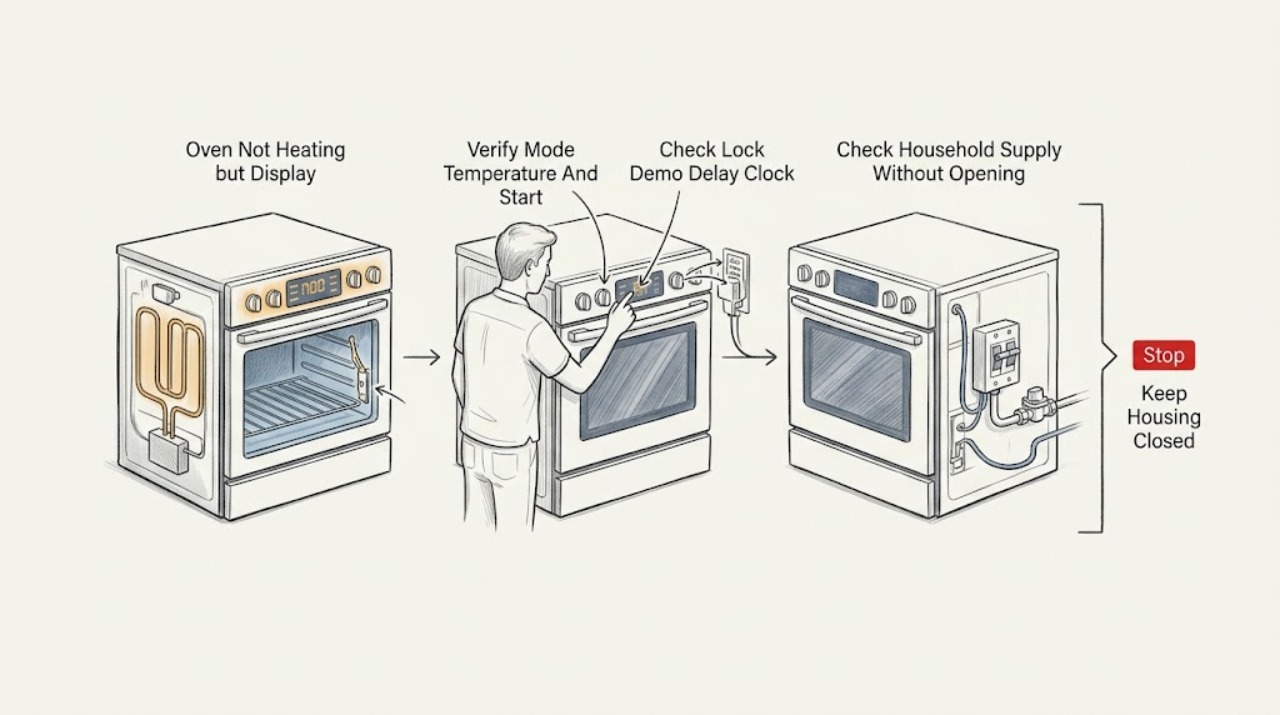
A lit display only proves that some oven controls have power; it does not prove that the heating circuit, igniter, sensor, door switch, or full electrical or gas supply is working. Confirm the correct cooking mode and temperature, press Start, cancel any delayed start, and check that control lock or demo mode is not active and the door is fully closed. Whirlpool and Samsung both list settings, lock or demo states, door position, and model-specific instructions among the first checks. If an electric oven has a clean setting but no heat, a gas oven does not ignite, a breaker trips, an error returns, or the oven smells of gas, burns, smokes, or heats uncontrollably, stop using it and arrange qualified appliance service. Do not remove panels, touch elements or wiring, relight gas, or choose a replacement part from the display symptom alone.
Before you begin
Safety first
- This article supports ordinary control checks, model-manual setup checks, a safe visual supply check, and one attended normal preheat observation. It does not authorize live electrical testing, gas work, panel removal, hot-element handling, appliance movement, or safety-control bypass.
Work through in order
Diagnostic checks
Use only checks that match the exact appliance or system and its official guide.
-
Check 1
Using the normal oven controls, select the intended Bake or Broil function, set a temperature allowed by the model, close the door fully, and press Start; do not enter service diagnostics or repeatedly change modes.
Expected result: Record whether the display shows the selected cooking function, an active preheat or temperature indication, a delayed-start message, a lock or demo indication, or an error; note whether the oven begins its normal heating sequence.
Next step: Correct only the ordinary setting identified in the owner's manual and make one normal preheat attempt; if the setting is correct but the oven remains cold, continue to the power and appliance-type checks.
Stop if: Stop for gas odor, smoke, burning smell, arcing, uncontrolled heat, an error indication, or a door that will not close or latch normally.
Why this matters
Why: A missing Start command, delayed start, incorrect function, lock, demo state, or door not closed can make a working display look like a heating failure. A correct command with no heat moves the diagnosis toward power, ignition, element, sensor, door-switch, or control problems.
-
Check 2
From the display and owner's manual, check whether control lock, demo mode, delayed start, Sabbath or another special mode is active and whether the clock or required setup is complete; change only user-accessible settings described for the exact model.
Expected result: Record the mode or lock message, whether the display accepts ordinary commands, whether the timer is waiting for a future start, and whether the manual says heating is disabled in that state.
Next step: Exit the documented mode or cancel the delayed start, then make one normal heating request; if the display is normal but there is still no heat, do not keep changing settings and arrange diagnosis after the next safe checks.
Stop if: Do not bypass a lock or safety interlock, force the door, or use an undocumented button combination that could enter service mode.
Why this matters
Why: Whirlpool says demo mode can leave the display active while the oven does not operate and that delayed start postpones baking; GE notes that some models require the clock to be set and that lockout can prevent oven functions. A clear control state makes a hardware or supply issue more likely.
-
Check 3
Without removing a panel or touching wiring, check the household breaker or fuse position and, for a gas range, note whether other gas burners operate normally only if there is no gas odor and the appliance is otherwise safe; do not move the range to inspect its connection.
Expected result: Record whether the oven's breaker or fuse is visibly tripped, whether the display remains on, whether other burners or appliance functions work, and whether the oven supply was recently installed, interrupted, or serviced.
Next step: If the exact manual allows a single safe breaker reset and no hazard is present, restore it once and make one normal heating request; if it trips again, the oven remains cold, or gas supply is uncertain, leave the oven off and request service.
Stop if: Do not open the electrical compartment, touch terminals, replace an unknown fuse, move the appliance, relight gas, or continue after a breaker trips again.
Why this matters
Why: A display can remain lit with an incomplete appliance supply, and a recent installation or a tripped circuit can affect heating. On a gas range, other burners failing or a gas odor changes the case to gas-safety or supply service; a normal supply observation does not prove the oven heating circuit is good.
-
Check 4
After the controls and supply appear normal, perform one brief, attended preheat request with the door closed and observe from outside the cavity; for a gas oven, do not repeat an ignition attempt if the burner does not light or any gas odor appears.
Expected result: Record whether an electric element glows or the oven warms, whether a gas burner ignites and remains controlled, whether only one cooking function heats, whether the display advances normally, or whether the oven stays cold.
Next step: Stop the test and provide the exact result to a qualified appliance technician, especially when there is no ignition, only partial heating, or an abnormal display.
Stop if: Do not touch the element, reach into the hot cavity, inspect a burner with panels removed, test live voltage, or continue if gas, smoke, arcing, or uncontrolled heating occurs.
Why this matters
Why: One function heating while another stays cold can point toward a particular element, igniter, selector, relay, or control path. No heat on a correct command can involve supply, sensor, door switch, control, element, igniter, or gas delivery; the visible response alone cannot select a replacement.
-
Check 5
Photograph any error or indicator, record the model number, appliance type, selected function, door and lock state, supply observation, and whether the oven was cold, partially heating, slow, or uncontrolled; do not remove parts to continue diagnosis.
Expected result: Record whether the failure affects Bake, Broil, convection, or every heating function; whether the display remains responsive; whether the oven heats after a reset; and whether an error, odor, smoke, noise, or breaker event returns.
Next step: Arrange qualified appliance service and provide the full record; keep the oven out of service for recurring, unsafe, or unexplained no-heat behavior.
Stop if: Do not order or install an element, igniter, sensor, relay, control board, or fuse from the symptom alone, and do not bypass a door or temperature safety device.
Why this matters
Why: A pattern limited to one function differs from a complete no-heat condition, while a returning fault or abnormal heat indicates an unresolved control, sensor, element, igniter, supply, or safety issue. Display operation alone does not establish a component diagnosis.
Use your observations
Decision map
Find the observation that best matches what you see, then follow the next safe action.
-
PATH 01Safety boundary
What you see
The display works but shows delayed start, control lock, demo or special mode, an incomplete setup, or a door that is not fully closed, and the oven heats after the documented correction.
Do this next
Use the exact model's ordinary operating procedure and monitor one normal cycle; request service if the mode returns unexpectedly or heating stops again.
Why this path and its safety boundary
Why it matters: The no-heat symptom was caused by an operating state or command rather than a confirmed failed heating part.
Safety stop: Do not bypass a lock, force a latch, or enter undocumented service settings.
-
PATH 02Safety boundary
What you see
The display is active but the breaker or fuse position, recent installation, appliance supply, or gas supply is abnormal, or the oven works only after a permitted single reset.
Do this next
Keep the appliance off if the breaker trips, the gas supply is uncertain, or the cause is installation-related; arrange qualified electrical, gas, or appliance service as appropriate.
Why this path and its safety boundary
Why it matters: The heating circuit may not be receiving the complete required supply, or a transient control state may have been cleared; the reset does not prove the appliance is repaired.
Safety stop: Do not open the appliance, move it to inspect wiring or connectors, or repeatedly reset the breaker.
-
PATH 03Safety boundary
What you see
The controls and supply appear normal, but one function does not heat, the oven never begins preheat, or a gas burner does not ignite while the display remains responsive.
Do this next
Stop repeated testing and arrange qualified appliance diagnosis with the affected function, appliance type, response, and exact model information.
Why this path and its safety boundary
Why it matters: An element, igniter, sensor, door switch, selector or relay, control, gas delivery, or other heating path may be involved. The observation narrows the service conversation but cannot identify a part safely.
Safety stop: Do not touch hot elements, test live wiring, relight gas, remove panels, or replace parts from the symptom alone.
-
PATH 04Safety boundary
What you see
The oven shows smoke, burning or gas odor, arcing, uncontrolled heat, a returning error, a repeated breaker trip, a damaged door, or an abnormal ignition or heating sequence.
Do this next
Stop using the oven, isolate it only through the normal safe control or household procedure if no hazard is present, and arrange qualified appliance service; follow local emergency or gas-safety guidance for gas odor or smoke.
Why this path and its safety boundary
Why it matters: This is a safety or unresolved equipment condition, not a setting correction. Continued operation could create fire, gas, electrical, burn, or equipment damage.
Safety stop: Do not keep restarting, operate switches near suspected gas, open panels, bypass safety devices, or leave the oven unattended.
Helpful context
Understand the symptom
A working display narrows the problem but does not identify the failed part
The panel can light while a bake or broil element, gas igniter, door switch, sensor, control relay, wiring path, or part of the appliance supply is unavailable. Start with ordinary controls because a delayed start, control lock, demo mode, unset clock, or door that is not fully closed can prevent heating without making the display blank. If those states are correct, the next useful observation is whether the oven begins its normal preheat response, not whether a particular part should be replaced.
Electric and gas ovens need different professional boundaries
An electric oven may have a failed element, sensor, relay, supply leg, or control even when its clock works. A gas oven adds ignition, gas delivery, burner, and combustion-safety concerns; a failed ignition can leave unburned gas. Do not open the back, test live terminals, adjust a gas valve, or relight a pilot as a home diagnostic. Record whether the oven is electric or gas and what the normal controls do, then give that information to a qualified technician.
Use one controlled check and stop when the result is abnormal
If the exact manual permits a normal preheat check, keep the door closed and observe whether the oven responds, warms gradually, or remains at room temperature. Do not use a portable thermometer as a substitute for the oven's own indication, repeatedly cycle the breaker, or keep trying a gas start. A returning error, a breaker trip, no ignition, smoke, burning odor, or uncontrolled heat changes the case from a user-setting check to service.
Safety boundary
Stop conditions
- Stop using the oven for gas odor, smoke, burning smell, arcing, uncontrolled heating, a damaged door or glass, a returning error, or a breaker that trips again.
- Do not open panels, touch wiring or hot elements, test live voltage, relight gas, adjust gas controls, or bypass a door, temperature, or ignition safety device.
- Do not repeatedly cycle the breaker, run another heating or cleaning cycle to test the fault, or move the range to inspect its connection.
- If the correct mode, completed setup, closed door, and safe supply checks do not restore heat, keep the oven out of service and arrange qualified appliance diagnosis.
Only after diagnosis
Potential parts
- oven bake or broil heating element
Consider this category only if the exact model diagnosis identifies one heating element or its circuit as failed after settings and supply are confirmed.
Confirm the exact oven model, element position, connector, and manufacturer fit information before ordering; do not touch or replace a hot element. - gas oven igniter
Consider this category only when a qualified diagnosis confirms an ignition fault on the exact gas-oven model and no gas-safety symptom remains active.
Igniters and connectors are model-specific and gas work requires qualified service; do not relight or replace one from a no-heat symptom alone. - oven temperature sensor
Consider this category only if model-specific testing by a qualified technician identifies the sensor or its circuit as the cause of no heat or incorrect control.
Confirm the exact model, sensor type, connector, and approved fit information before ordering; do not infer a sensor failure from a working display. - oven electronic control or relay assembly
Consider this category only after settings, door state, and supply are confirmed and a qualified diagnosis identifies a control or relay fault.
Control assemblies are model- and revision-specific; verify the exact model and approved replacement information before any repair.
When checks do not resolve it
Need a professional?
Arrange qualified appliance service when the display works but the oven remains cold after the exact model's setting, lock, delay, door, and safe supply checks; when only one function heats; when a gas burner does not ignite; or when an error, breaker trip, odor, smoke, arcing, damaged door, or uncontrolled heating appears. Provide the model number, appliance type, selected function, timing, indicator or error, supply observation, and whether any reset changed the symptom.
Safety scope: This article supports ordinary control checks, model-manual setup checks, a safe visual supply check, and one attended normal preheat observation. It does not authorize live electrical testing, gas work, panel removal, hot-element handling, appliance movement, or safety-control bypass.
Common questions
FAQ
Why does my oven display work but the oven does not heat?
The display can have power while the heating element, igniter, sensor, door switch, control, or part of the appliance supply does not. First check the exact mode, Start command, door, delay, lock, demo state, and safe supply conditions.
Can demo mode make an oven display work without heating?
Yes, some ovens keep the display active while demo mode prevents normal heating. Check the exact owner's manual for the indicator and exit procedure; do not use undocumented controls or service settings.
Should I reset the breaker when the oven display works but there is no heat?
Only if the exact model guidance permits one safe reset and there is no gas, smoke, electrical, or overheating symptom. If the breaker trips again or the oven remains cold, leave it off and request service rather than repeating resets.
How can I tell whether an electric element or gas igniter has failed?
A single attended normal preheat observation can show whether the oven responds, but it cannot safely prove which component failed. Do not touch elements, open panels, relight gas, or choose a part until a qualified technician diagnoses the exact model.
When should I stop using an oven that is not heating?
Stop for gas odor, smoke, burning smell, arcing, uncontrolled heat, a damaged door, a returning fault, or a breaker that trips again. Also stop and arrange service when the correct settings and safe supply checks do not restore heat.
Read the exact guide
Official sources
- Electric Range & Wall Oven - Oven Has Power But Does Not WorkGE Appliances · GE manufacturer guidance for electric ranges and wall ovens; exact model controls and power arrangements differ.
- Samsung oven temperature issuesSamsung Electronics · Samsung manufacturer guidance; examples, displays, and control procedures vary by model.
- Oven Not Heating - Powering On - Electric RangeWhirlpool Product Help · Whirlpool manufacturer guidance for electric range ovens; exact model controls and regional configurations differ.
Community feedback
Share a repair observation
Share a plain-text repair observation. Accepted observations are published automatically; this page may take a moment to update.