
On this page
Start here
Quick answer
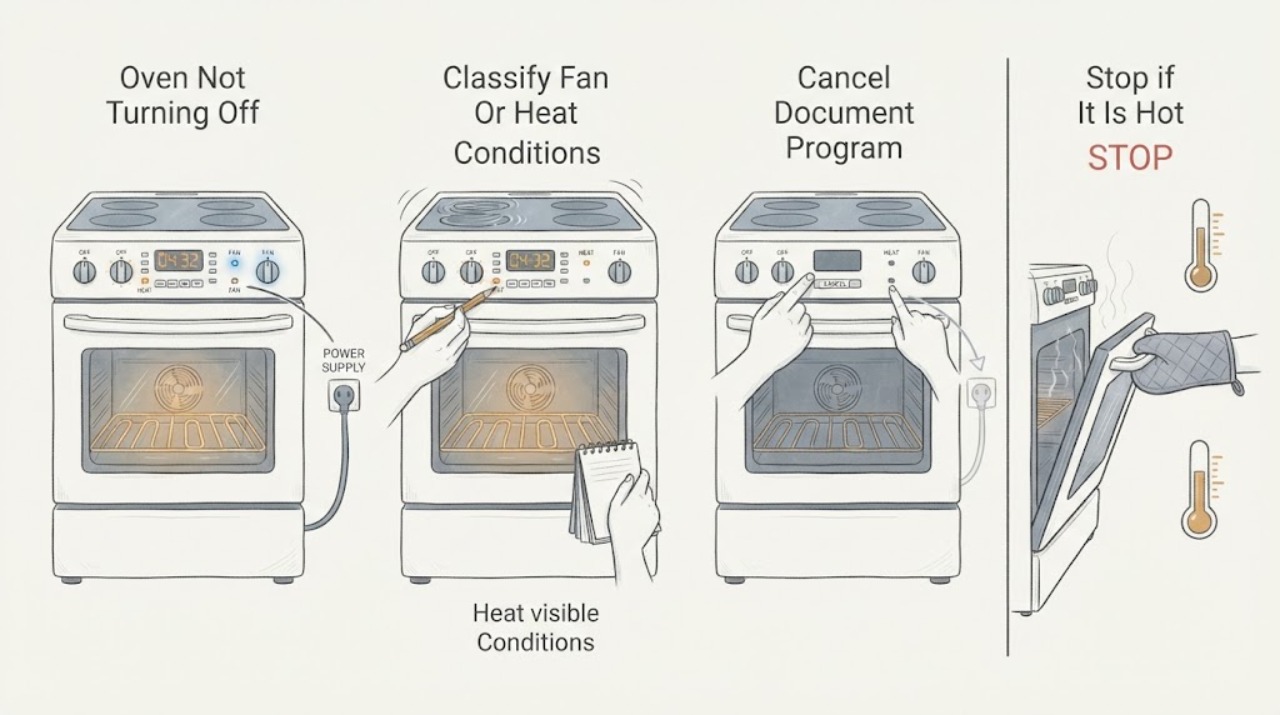
First separate a Smeg cooling fan that runs after shutdown from an oven that is still producing heat. Smeg says its cooling fan can continue for around 20 minutes after the appliance is switched off, so airflow and a warm cavity alone do not prove that cooking is continuing. If a heating element remains visibly active, a gas burner remains lit, the cavity keeps getting hotter, or the controls will not stop an active program, stop using the oven and isolate its energy once it is safe to do so; do not open the appliance. Check the exact model manual before attempting a reset, because controls and safety behavior vary by model.
Work through in order
Diagnostic checks
Use only checks that match the exact appliance or system and its official guide.
-
Check 1
From a safe position, switch the oven off using the normal control and observe through the closed door. Listen for air movement, note whether the display changes, and look for an element glow or a gas flame without opening the door.
Expected result: Airflow continues while visible heating stops and the cavity gradually loses heat, or the heating source remains active and the cavity continues to get hotter.
Next step: If only the fan is running, allow the model's normal cooling period and continue to the model-control check. If heating continues, stop using the oven and follow the isolation and service branch.
Stop if: Stop immediately for smoke, flame outside the normal burner area, sparks, arcing, a burning smell, a hot plug or outlet, or any sign that the appliance cannot be safely approached.
Why this matters
Why: Airflow with falling heat is consistent with post-use cooling; continued heat production points to an active program, control fault, or fuel-control fault rather than just a fan delay.
-
Check 2
When the oven is cool enough to approach safely, record the full model identification and photograph or transcribe the display, symbols, selected function, temperature, timer, and any lock indicator. Note whether the symptom follows baking, grilling, steam, microwave, self-cleaning, or another function if the model offers it.
Expected result: A timer, delayed finish, multi-step stage, cleaning cycle, lock indicator, error message, or function symbol remains present, or the display is already in an idle state.
Next step: Use only the matching Smeg manual to interpret the displayed state and identify the documented stop or cancel control. Do not guess at a cross-model button combination.
Stop if: Do not continue if the display is damaged, the controls are wet, the door or glass is damaged, or touching the panel causes sparks or repeated tripping.
Why this matters
Why: A remaining program or lock can explain why a normal stop command seems ineffective; an idle display combined with continued heat makes a control or power-switching fault more likely.
-
Check 3
With the oven cool, dry, and free of immediate hazards, use the exact model instructions to press the documented stop, cancel, or off control once. If the manual describes a timer, delayed finish, lock, or cleaning-cycle cancellation, follow only that documented sequence and wait for the display to confirm the change.
Expected result: The cooking indicator clears and heat production does not resume, or the panel ignores the documented stop command and the oven remains in a cooking state.
Next step: If the state clears, monitor the fan until it stops and do not restart a questionable cycle. If it does not clear, isolate energy only if safely reachable and arrange service.
Stop if: Do not repeatedly cycle controls, force a lock, or continue using the oven while it is heating without a valid active command.
Why this matters
Why: A successful cancellation points to a retained program or setting; an unresponsive control, recurring restart, or continued heating after cancellation indicates a fault that should not be chased with repeated button presses.
-
Check 4
If actual heating continues after the documented stop command, keep people away from the hot cavity and, only if it is safely reachable without smoke, water, gas odor, or arcing, switch off the normal oven isolator or circuit breaker once. Leave the oven unused and note whether the heat and fan stop after isolation.
Expected result: The oven becomes electrically quiet after isolation, or the source cannot be safely isolated, the fan persists from residual heat, or a gas flame or odor remains.
Next step: Keep the energy isolated and arrange qualified appliance service. If isolation is unsafe, leave the area and contact local emergency or utility support from a safe location.
Stop if: Never remove panels, probe wiring, bypass an interlock, or restore power repeatedly to see whether the fault returns.
Why this matters
Why: Successful isolation limits further heating but does not identify the failed component. A fan may coast or continue briefly from residual heat; a gas condition or unsafe access needs emergency handling rather than further testing.
-
Check 5
Only identify whether the model is gas or dual-fuel from its manual or rating information; do not inspect the gas circuit. If it is a gas model, note whether there is any gas odor, delayed ignition, abnormal flame, repeated clicking, or a flame that remains after the controls are off.
Expected result: There is no gas odor and no abnormal flame, or there is gas odor, delayed ignition, an abnormal flame, repeated ignition behavior, or continued burner operation.
Next step: For odor or suspected leakage, avoid flames and electrical switches, leave from a safe route, and contact emergency or gas-utility help from outside. For a burner that does not shut off without an odor, keep the appliance out of service and request a qualified gas-appliance technician.
Stop if: Do not relight, repeatedly test, search for a leak, adjust a regulator, or disassemble the gas system.
Why this matters
Why: A gas odor or abnormal combustion condition is an emergency risk, while a burner that remains on after a correct stop command is a service fault even without an odor.
-
Check 6
After the oven is cool, dry, and hazard-free, perform at most one model-approved power reset if the Smeg manual documents one: keep the appliance isolated for the documented interval, restore power once, and select no cooking function while observing the idle state.
Expected result: The display returns to idle and remains idle, or the oven resumes heating, shows an error, trips the circuit, or becomes unresponsive again.
Next step: Leave the oven unused after a recurrence and provide the technician with the model, display state, timing, selected function, and whether isolation stopped the heat. Do not attempt another reset.
Stop if: Stop the reset attempt if there is smoke, burning odor, water near electrics, gas odor, sparking, unusual flame, or a hot plug, outlet, or cable.
Why this matters
Why: A stable idle state may clear a temporary control glitch, but a recurrence after one documented reset confirms that continued operation is not a safe repair strategy.
Use your observations
Decision map
Find the observation that best matches what you see, then follow the next safe action.
-
PATH 01Next step
What you see
Only the cooling fan runs after the controls are off and heat is falling
Do this next
Wait without starting another cycle, then check the model manual if the fan runs substantially longer or the oven does not cool.
Why this path and its safety boundary
Why it matters: This can be normal post-use cooling; Smeg's FAQ gives around 20 minutes as a typical period.
-
PATH 02Next step
What you see
An element or burner remains active, or the cavity continues getting hotter after a correct stop
Do this next
If safely reachable, isolate the normal energy supply once, keep the oven out of service, and arrange qualified service.
Why this path and its safety boundary
Why it matters: Treat this as an abnormal heating or control condition, not as ordinary fan operation.
-
PATH 03Next step
What you see
A timer, delayed finish, cleaning cycle, lock, or error remains on the display
Do this next
Use the exact model manual's documented stop or cancel procedure once; do not improvise a reset sequence.
Why this path and its safety boundary
Why it matters: The oven may still be following a model-specific program or may have a control fault.
-
PATH 04Next step
What you see
Gas odor, delayed ignition, abnormal flame, or a burner that does not shut off is present
Do this next
Avoid flames and electrical switches, leave from a safe route, and contact emergency or gas-utility support from outside for odor or suspected leakage. Request a qualified gas-appliance technician for a no-odor shutoff fault.
Why this path and its safety boundary
Why it matters: Do not continue operating or testing the appliance; gas and combustion hazards need emergency or qualified handling.
-
PATH 05Next step
What you see
Smoke, burning smell, sparks, arcing, a hot cord or outlet, water near electrics, or repeated circuit trips occurs
Do this next
Stop using it and leave the area if needed; contact emergency help for active smoke or fire, and arrange qualified electrical or appliance service after the area is safe.
Why this path and its safety boundary
Why it matters: The oven should be treated as an electrical or fire hazard.
Helpful context
Understand the symptom
Fan noise is not the same as continued cooking
A Smeg oven may continue to blow air after the controls are switched off. The manufacturer describes this as a cooling fan that can run for about 20 minutes to remove heat. Listen for fan airflow and look only through the closed door for signs of active heating. Residual heat, a warm door, or a cooling display does not by itself mean the oven is still cooking. The important change is whether heat production continues or the temperature rises instead of settling.
Model details matter
Smeg makes ovens with different control panels, functions, fuel arrangements, and optional locks. Record the complete model and the exact words or symbols on the display before applying any button sequence. A timer, delayed finish, multi-stage program, cleaning cycle, or child lock may make the oven appear to ignore a normal stop command. Use the instructions for that model rather than borrowing a sequence from another Smeg oven.
When the problem is not a user setting
If the heating system remains active after a correct stop command, treat the appliance as faulty even if the fan also runs. A stuck control relay, temperature-control fault, timer/control problem, or fuel valve and ignition fault on a gas model can require professional diagnosis. Do not remove covers, defeat a door or safety interlock, or make live electrical measurements.
Safety boundary
Stop conditions
- Stop immediately for smoke, flame outside the normal burner area, sparks, electrical arcing, a burning or gas odor, a hot plug or outlet, damaged wiring, water near electrical parts, or repeated circuit trips.
- Do not open covers, probe live wiring, bypass an interlock, adjust a gas regulator, search for a leak, or relight a suspect burner.
- If the oven continues producing heat after a documented stop command, leave it isolated and unused until a qualified technician diagnoses it.
Only after diagnosis
Potential parts
- electronic control or relay
Only consider this class if a qualified diagnosis shows that an active heating output remains energized after a valid stop command.
Confirm the exact Smeg model and the technician's diagnosis before sourcing any part. - temperature-control component
Only consider a temperature-control component if measured temperature behavior or a model-specific fault points to it; a fan delay alone does not justify it.
Fit varies by model and fuel arrangement; use the model's parts information or qualified service guidance. - cooling fan assembly
Only consider this class if the fan does not follow the model's documented cooling behavior or a technician identifies a fan fault; a fan running after shutdown can be normal.
Confirm model-specific fit and do not replace parts based only on post-shutdown airflow.
When checks do not resolve it
Need a professional?
Call a qualified Smeg appliance technician when heating continues after the model-specific stop command, the display or controls recur in the fault state, one documented reset does not hold, or the oven needs internal electrical, control, thermostat, heating-element, ignition, or gas-valve diagnosis. For smoke, fire, or gas odor, leave first and contact local emergency or utility support from a safe location.
Have this ready
- Full Smeg model and serial information
- The exact display message or symbols and selected function
- Whether only the fan ran or a heating source stayed active
- When the problem began and whether one documented reset changed it
- Whether isolation stopped the heat and whether any odor, smoke, spark, or circuit trip occurred
Common questions
FAQ
Is it normal for a Smeg oven fan to keep running after I turn it off?
Often yes. Smeg says its cooling fan can continue for around 20 minutes after switch-off. The fan should not be confused with an element or burner that is still producing heat.
What if the Smeg oven is still heating after the stop control?
Stop using it. If the normal isolator or breaker is safely reachable, isolate the energy once, keep the oven unused, and arrange qualified service. Do not open the appliance or repeatedly restore power.
Should I keep testing if I smell gas or see smoke?
No. Avoid flames and electrical switches, leave by a safe route, and contact emergency or gas-utility support from outside for gas odor. For smoke or fire, contact emergency help and do not return to test the oven.
Can I use another Smeg oven's reset sequence?
No. Record the exact model and use only its manual for stop, timer, lock, cleaning-cycle, or reset instructions. If one documented reset does not hold, stop and arrange service.
Read the exact guide
Official sources
- Customer Service | Smeg.comSmeg · Smeg appliance service escalation
- FAQ Ovens | Smeg AustraliaSmeg Australia · Smeg Australia oven FAQ; use the local model manual for exact operation
- FAQ Ovens - Smeg.comSmeg · Smeg oven FAQ; confirm the exact model manual for model-specific controls
- NFPA Educational Messages: 2026 Edition Desk Reference for the Fire Service and Fire and Life Safety EducatorsNational Fire Protection Association · General home safety context for gas cooking appliances; not a Smeg model manual
Community feedback
Share a repair observation
Share a plain-text repair observation. Accepted observations are published automatically; this page may take a moment to update.