
On this page
Start here
Quick answer
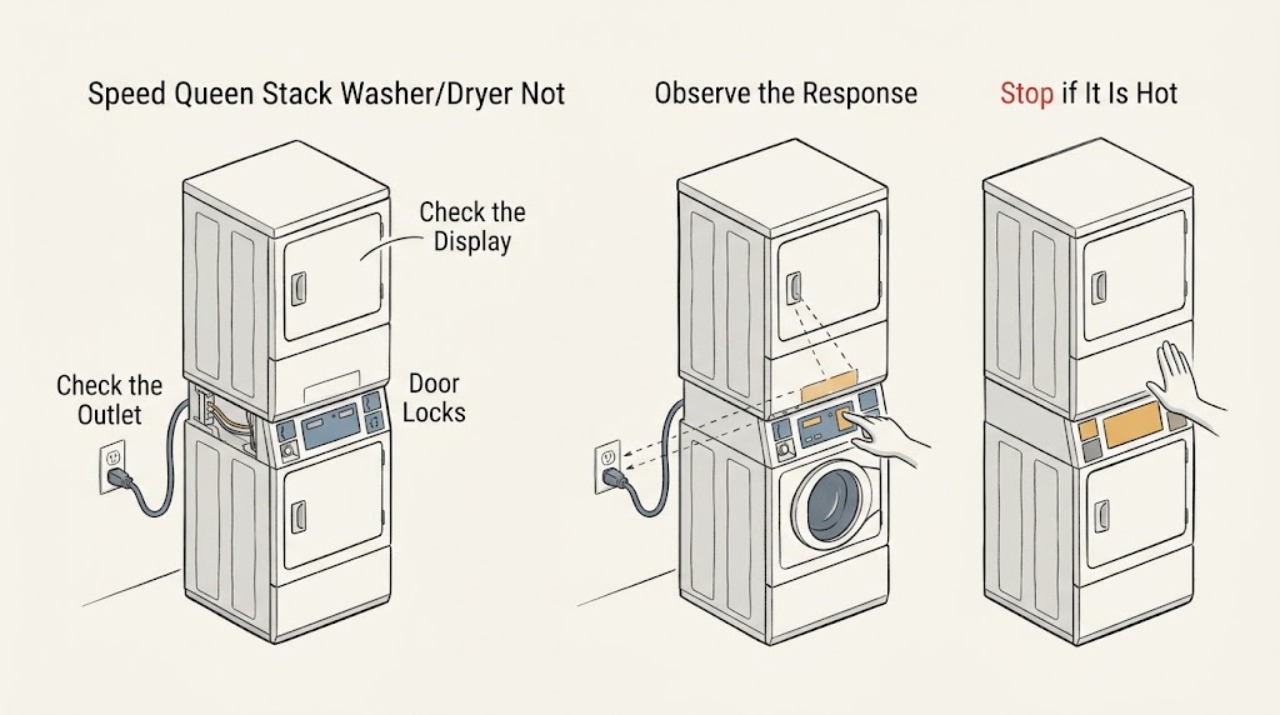
First separate a dark display from a machine that has power but will not start. With no smoke, burning odor, heat, or water hazard, check that the Speed Queen stacked washer/dryer is connected directly to its correctly installed outlet, that the laundry-room breaker or fuse has not opened, that the correct unit's door is fully closed, and that Control Lock or Idle Mode is not preventing input. Select a cycle and press the model-specific Start/Pause control once. If both sections remain dark, a breaker trips again, the cord or outlet is hot or damaged, only one section is dead, or the display returns but the machine still will not start, stop using it and arrange qualified appliance or electrical service. Do not open the stack, separate the units, bypass a door switch, or perform live electrical tests.
Work through in order
Diagnostic checks
Use only checks that match the exact appliance or system and its official guide.
-
Classify the symptom before touching the controls
Look from a safe position at the stacked unit and note whether both displays and indicators are dark, one section has power, or a display is lit but the selected cycle does not begin. Stop immediately if there is smoke, a burning odor, unusual heat, sparking, water at the outlet, or a damaged cord; do not press buttons to reproduce a dangerous symptom.
Expected result: Both sections are dark, one section is responsive, the display is lit but ignores input, or the unit shows a normal-looking display with no cycle activity.
Next step: Use the matching branch and record which section responds. Do not separate the washer and dryer or open the cabinet to compare internal wiring.
Stop if: Stop for smoke, burning smell, sparks, hot or damaged electrical parts, water near power, or any condition that makes the laundry area unsafe.
Why this matters
Why: Two dark sections point first toward the supply or shared power path. One dark section narrows the issue to that unit or its control path. A lit but unresponsive display can involve Control Lock, Idle Mode, a door interlock, or a control fault rather than a total power loss.
-
Check the cord, outlet, and breaker without live testing
With no electrical warning sign, check that the stack unit's power cord is fully seated in the intended wall outlet and that no extension cord, adapter, power strip, or improvised connection is being used. From a safe position, check whether the laundry-room breaker or fuse has opened. Do not remove the outlet cover, perform electrical measurements, or repeatedly reset a breaker.
Expected result: The plug is loose, the cord or outlet is hot, wet, scorched, damaged, or pinched; the breaker or fuse is open; or the connection appears normal and stable.
Next step: Leave the unit off and use qualified electrical or appliance service for damage, heat, moisture, or a breaker that opens again. If the connection is normal and the display has power, continue with the control, door, and lock checks.
Stop if: Do not use an extension cord, touch wet electrical parts, open the outlet, perform live measurements, or keep resetting a breaker.
Why this matters
Why: A loose or damaged supply connection can prevent both sections from turning on and can create a shock or fire risk. A breaker that opens may reflect an electrical fault or overload; a normal-looking outlet does not prove that internal appliance power is present.
-
Check the correct door and control lock
For the washer, close the loading door firmly and verify that no clothing is caught in the seal. For the dryer, close its loading door fully. Look for a Control Lock indicator or other lock indication before pressing the model-specific control to clear it as described by the exact manual; do not bypass a door switch or force a latch.
Expected result: The washer or dryer door is not fully closed, the latch does not engage, Control Lock is active, or the door and lock indication appear normal.
Next step: Remove only an obvious obstruction from the door opening, clear Control Lock using the exact model instruction, select a cycle, and press Start/Pause once. Arrange service if the door cannot latch or the control remains locked or unresponsive.
Stop if: Do not bypass, defeat, or hold a door switch closed, force the door, or operate the stack with a damaged latch or lock.
Why this matters
Why: Speed Queen guides state that the washer and dryer will not begin with the loading door open, and the washer guide includes a door-latch check. A Control Lock can make a responsive panel appear inactive; a damaged latch or lock needs service.
-
Rule out Idle Mode or an incomplete start sequence
If a display or decimal indicator is present, read the exact model's guide before assuming the unit has no power. Speed Queen washer and dryer guides describe Idle Mode after inactivity; use the model-specific Power/Cancel or Start/Pause sequence, select a cycle, and wait for the documented control response. Do not press multiple keys rapidly or attempt a hidden diagnostic sequence.
Expected result: The display wakes when the model-specific Power/Cancel control is pressed, a decimal or status light indicates Idle Mode, the control accepts settings but does not start, or no display responds at all.
Next step: Follow the exact manual for the correct start sequence once. If the display stays dark or the cycle still will not begin, stop repeated attempts and arrange qualified service.
Stop if: Stop if the control behaves erratically, heats, smells of burning, displays an unfamiliar fault, or requires opening the cabinet to continue.
Why this matters
Why: A control in Idle Mode is not the same as a dead appliance. If settings are accepted but the cycle will not begin, the door latch, control lock, start sequence, or control system needs further diagnosis; a totally dark panel returns attention to supply and service boundaries.
-
Compare the washer and dryer sections without separating the stack
Note whether the washer display and controls respond independently of the dryer, or vice versa. Check only the user-accessible doors, controls, and indicators; do not move the appliance, remove panels, unplug internal harnesses, or operate one unit outside the assembled stack.
Expected result: Both sections are dead, only the washer is dead, only the dryer is dead, or both sections respond but neither starts a cycle.
Next step: Record the pattern and arrange qualified appliance service, especially when only one section fails or the symptom returns after the safe external checks.
Stop if: Do not operate individual units if separated from the stack, open panels, bypass interlocks, or handle internal wiring.
Why this matters
Why: A shared no-display symptom prioritizes the household supply and common power path. One inactive section suggests a unit-specific control, door, or wiring fault. Two responsive controls with no cycle can indicate a lock, setting, or control issue, but the exact cause cannot be identified without service diagnostics.
-
Check for a recent overload, interruption, or fault indication
Record whether the unit stopped after a heavy load, a power interruption, a water event, a move, or an unusual noise. If the dryer guide's overload indication was previously visible, allow the documented cool-down period without repeatedly restarting; if a washer cycle stopped, note any status or diagnostic indication. Do not clear an unfamiliar fault by opening the machine.
Expected result: The no-start symptom follows an overload or interruption, a diagnostic indication returns, the unit stopped after movement or water exposure, or there is no identifiable trigger.
Next step: Follow only the exact manual's user-level recovery instruction once. Keep the stack off and arrange service for a repeat indication, water exposure, unusual noise, or an unexplained no-start condition.
Stop if: Stop for repeated fault indications, water in the cabinet, unusual noise, smoke, heat, a damaged stack, or any need to remove panels.
Why this matters
Why: A motor-overload protector or a temporary control state may explain a dryer that recently stopped, but a repeat indication requires service. Movement, water exposure, or an unknown fault raises the risk of a mechanical, electrical, or installation problem.
-
Prepare a complete service handoff
Record the complete model and serial information, whether the washer, dryer, or both are dark, the display and indicator behavior, outlet and breaker observations, door and Control Lock status, exact controls tried, recent load or interruption, any code, and any odor, heat, noise, moisture, or cord damage. Leave the unit off if the no-start symptom persists.
Expected result: The unit starts after a safe external correction, remains dead, one section remains dead, or the breaker or fault symptom returns.
Next step: Provide the record to an authorized or otherwise qualified Speed Queen appliance servicer; use qualified electrical service for outlet, breaker, cord, or household supply symptoms. Resume normal use only after the cause is cleared.
Stop if: Stop all user troubleshooting for smoke, burning odor, sparks, hot or damaged cord, repeated breaker trips, water near power, or an unsafe or damaged stack.
Why this matters
Why: A corrected door, Control Lock, Idle Mode, or supply connection explains a narrow no-start event. Persistent or recurring failure needs internal appliance or household electrical diagnosis rather than another reset.
Use your observations
Decision map
Find the observation that best matches what you see, then follow the next safe action.
-
PATH 01Next step
What you see
Both washer and dryer displays are dark, or the outlet, cord, fuse, or breaker shows a warning sign.
Do this next
Leave the stack off and obtain qualified electrical or appliance service; do not repeatedly reset the breaker or probe live power.
Why this path and its safety boundary
Why it matters: Prioritize the household supply and electrical safety boundary.
-
PATH 02Next step
What you see
A display is present but the panel does not respond and Control Lock or Idle Mode is indicated.
Do this next
Follow the exact model guide once to clear the state; arrange service if the control remains inactive.
Why this path and its safety boundary
Why it matters: The unit may be in a normal locked or idle state rather than without power.
-
PATH 03Next step
What you see
The washer or dryer door does not close or latch fully.
Do this next
Remove only an obvious accessible obstruction and arrange service for a damaged latch or lock; never bypass the interlock.
Why this path and its safety boundary
Why it matters: The corresponding unit may refuse to start because its door interlock is not satisfied.
-
PATH 04Next step
What you see
Only one section of the stack is dark or fails while the other responds.
Do this next
Do not separate the stack or open panels; record the pattern and obtain qualified appliance service.
Why this path and its safety boundary
Why it matters: A unit-specific control, door, or internal power-path fault is more likely than a complete household power loss.
-
PATH 05Next step
What you see
The dryer recently stopped after an overload and showed the documented motor-overload indication.
Do this next
Follow the exact dryer guide's user-level cool-down instruction once; if the indication returns, remove the dryer from use and call a service person.
Why this path and its safety boundary
Why it matters: The overload protector may have interrupted the motor temporarily.
-
PATH 06Next step
What you see
The stack was exposed to water, moved, damaged, or produces smoke, burning odor, heat, sparks, or repeated breaker trips.
Do this next
Keep people away from the hazard, leave the unit off, and arrange qualified electrical and appliance service.
Why this path and its safety boundary
Why it matters: This is a safety stop and may involve electrical, mechanical, or installation damage.
Helpful context
Understand the symptom
A stacked unit can show two different symptoms
The washer and dryer have separate operating functions even though they share one stacked cabinet and a central control area. Note whether both sections are dark, whether one display responds, or whether a display is lit but a cycle will not begin. That distinction helps service identify a supply or control issue without requiring the user to remove panels or separate the stack.
Do not turn a no-start problem into an electrical hazard
A breaker that opens again, a hot or damaged cord, scorch marks, water at the outlet, smoke, or a burning smell is a stop condition. Do not keep resetting the breaker, use an extension cord, defeat a door switch, or test energized wiring. The exact model manual controls any reset or service procedure, and tool-required disassembly belongs to qualified service.
Safety boundary
Stop conditions
- Stop immediately for smoke, burning odor, sparks, unusual heat, water near electrical equipment, a hot or damaged cord, or a breaker that opens again.
- Do not use an extension cord, adapter, power strip, improvised connection, or outlet with a loose or damaged plug fit.
- Do not probe live wiring, remove outlet covers, open the cabinet, separate the washer and dryer, or operate an individual unit outside the assembled stack.
- Never bypass a door or lid switch, force a latch, repeatedly reset a breaker, or keep restarting after an overload or fault indication returns.
- Keep the stacked unit off until qualified service clears a persistent no-start condition or any electrical, mechanical, water, or installation hazard.
Only after diagnosis
Potential parts
- door latch or door-lock assembly
Consider this category only when the exact model and qualified diagnosis confirm that the washer or dryer cannot satisfy its door interlock.
Confirm the full model and section before ordering; never bypass the interlock or fit an unverified latch. - power cord or supply connection component
Consider this category only when qualified inspection confirms a damaged cord or appliance-side supply component and the correct installation method is known.
Match the exact model, electrical configuration, and local installation requirements; household outlet work belongs to a qualified electrician. - washer or dryer control component
Consider this category only after supply, doors, controls, and documented user-level recovery have been checked and a qualified technician identifies a failed control component.
Confirm the full model, section, and technician diagnosis before ordering; do not open the stack or substitute a control by appearance.
When checks do not resolve it
Need a professional?
Arrange qualified Speed Queen appliance service when the stack remains dark after a safe external supply check, only one section fails, a door or control lock will not operate normally, a fault or overload indication returns, or the unit still will not start with power and correct settings. Use qualified electrical service for a hot, damaged, wet, or loose outlet or cord, repeated breaker trips, or other household supply symptoms.
Common questions
FAQ
Why is my Speed Queen stacked washer-dryer completely dark?
First note whether both sections are dark, then safely check the fully seated direct-to-wall connection and the laundry-room breaker or fuse. Do not repeatedly reset a breaker or inspect live wiring. Persistent darkness needs qualified appliance or electrical service.
Why does my Speed Queen stack have power but not start?
Check the correct washer or dryer door, Control Lock or Idle Mode, cycle settings, and the model-specific Start/Pause sequence. If the door will not latch, the panel stays unresponsive, or the problem returns, keep the unit off and arrange service.
Can I reset a Speed Queen stacked washer-dryer by unplugging it?
Do not use repeated unplugging or breaker resets as a diagnosis. Follow only the exact model guide's user-level control or recovery instruction when there is no electrical warning sign; stop for heat, odor, damage, or a recurring fault and arrange service.
Can I operate the washer or dryer separately from the stack?
No. The Speed Queen washer guide warns against operating individual units when separated from a stack unit. Do not move or dismantle the assembly to troubleshoot a no-start problem.
When should I stop troubleshooting a Speed Queen stack?
Stop for smoke, burning odor, sparks, unusual heat, a hot or damaged cord, water near power, repeated breaker trips, a damaged door or stack, or any need to open panels or bypass an interlock. Keep the unit off and obtain qualified service.
Read the exact guide
Official sources
- Speed Queen | SF7008BESpeed Queen by Alliance Laundry Systems · Speed Queen residential stacked washer-dryers where the washer and dryer share a stacked assembly and central control area
- Appliance and Electrical Fire SafetyU.S. Fire Administration · Household washer-dryer electrical connections, cords, outlets, and extension-cord safety
- User's Guide for Frontload DryersAlliance Laundry Systems / Speed Queen · Speed Queen front-load dryer sections in stacked washer-dryer products when the exact model guide is not yet identified
- Speed Queen | Manuals & DownloadsSpeed Queen by Alliance Laundry Systems · Any Speed Queen washer, dryer, or stacked washer-dryer when exact model instructions are required
- User's Guide for Frontload WashersAlliance Laundry Systems / Speed Queen · Speed Queen front-load washer sections in stacked washer-dryer products when the exact model guide is not yet identified
Community feedback
Share a repair observation
Share a plain-text repair observation. Accepted observations are published automatically; this page may take a moment to update.