
On this page
Start here
Quick answer
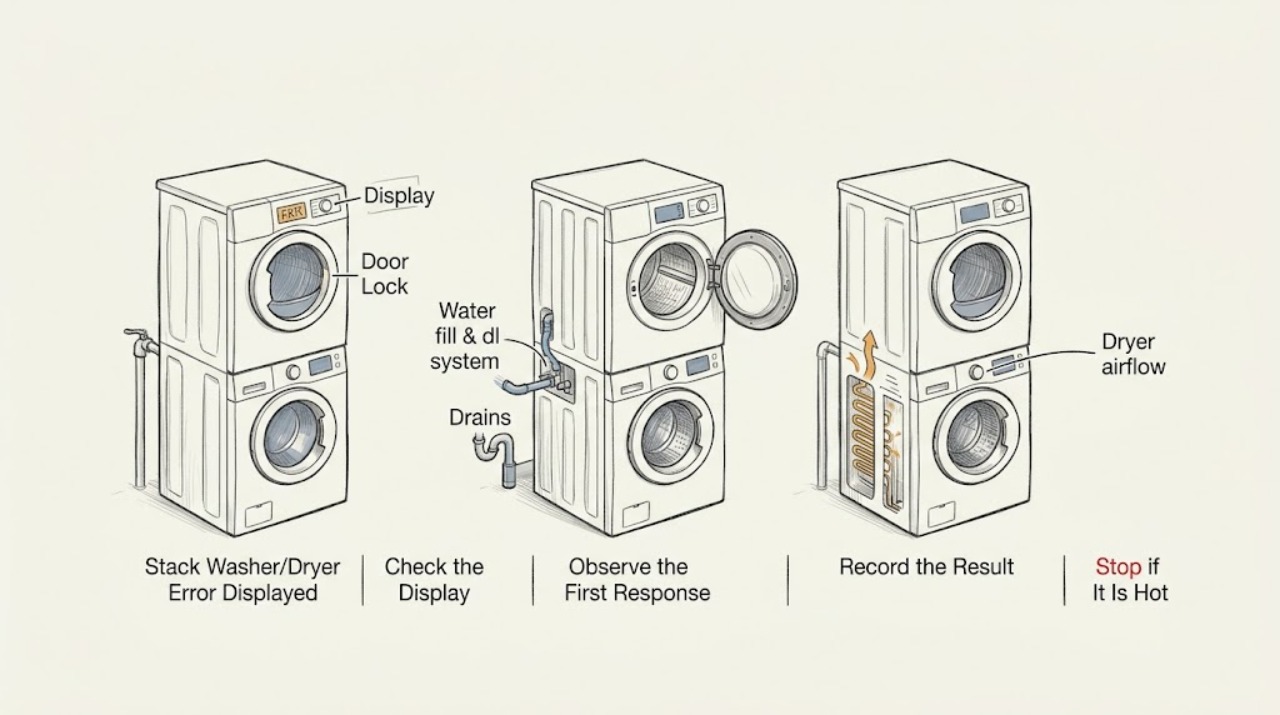
When a Speed Queen stack washer/dryer displays an error, first photograph the exact characters and identify whether the message is on the washer or dryer portion. Use the model-specific guide before clearing the message: Speed Queen's stack-unit guide documents washer codes for door, drain, fill, overflow, water-level sensing, door lock, unbalanced load, power failure, and oversudsing conditions. Perform only the matching external check, such as closing the door, confirming both water faucets are open, checking a visible hose or drain path, correcting a load, or using the documented control-lock or power-clear step. A code that returns, an unknown code, a door that will not lock or unlock, water that will not drain, a repeated power trip, smoke, burning odor, or a gas or electrical hazard is a stop-and-service condition. Do not bypass an interlock, remove panels, probe live wiring, or attempt internal washer or dryer repairs.
Work through in order
Diagnostic checks
Use only checks that match the exact appliance or system and its official guide.
-
Capture the exact code and locate it on the stack unit
Before pressing Power/Cancel or unplugging anything, photograph the complete display and write down the model and serial information. Note whether the message is on the washer or dryer control, which cycle was selected, whether the door is locked, and whether water or heat was already present.
Expected result: The display is a recognizable washer code such as Er, do, Er, dL, Er, dr, Er, FL, Er, nF, Er, OF, Er, PS, Er, dU, Er, dl, Er, ub, PF, Er, SL, or Sr; it is a dryer message; or it is unknown or only partly visible.
Next step: Continue to the matching washer branch below if the code is identified. If the code is on the dryer or remains unknown, retrieve the exact guide by model number and follow its documented user step; preserve the photo for service.
Stop if: Stop immediately for smoke, burning odor, sparks, a hot or damaged cord, gas smell, water near electrical connections, or a machine that starts moving without a start command.
Why this matters
Why: The same-looking display area can represent different systems. The opened guide gives meanings for these washer messages, but an unlisted code or a dryer message requires the exact model guide rather than a guessed reset.
-
Handle door, lock, and control-lock messages without bypassing them
For a washer door or lock message, remove clothing or an object from the door edge, close the door fully without slamming, and check whether the latch now recognizes the closed door. For an unresponsive keypad, look for the control-lock indicator and use only the model guide's documented key sequence; do not force a locked door.
Expected result: The door closes and the code clears; the display identifies an open or unlocked door; the door will not lock or unlock; or the control remains locked or unresponsive.
Next step: If the code clears after the door is correctly closed or the documented control-lock step, run only the model-approved check once. If the latch does not engage, will not release, or the message returns, keep the unit out of use and arrange service.
Stop if: Never tape, hold, short, or otherwise bypass a door interlock; stop if the door, latch, hinge, gasket, or frame is damaged or requires force.
Why this matters
Why: The guide associates door messages with the door being open, unlocked, or not locked, while an unresponsive keypad can be a control-lock state. A recurring lock or latch message can involve the interlock, door alignment, or control and is not safely solved by defeating it.
-
Check drain and fill conditions for the matching washer code
For Er, dr, check the visible drain hose and drain receptacle for an installation problem or obvious blockage, and inspect the user-accessible pump trap only if the exact guide describes that maintenance. For Er, FL or Er, nF, confirm both hot and cold faucets are open, inspect the visible fill hoses for kinks, and clean inlet screens only as the model guide permits. Do not open the cabinet.
Expected result: Water remains in the washer; the drain path is kinked or blocked; a faucet is closed; a fill hose or screen is restricted; the washer has overflowed; or all visible water paths are normal.
Next step: Correct only the accessible condition named by the exact guide, then use the documented power-clear or retry step once. For Er, OF, or a code that returns after the external check, stop using the washer and arrange service.
Stop if: Stop for water near electrical parts, a leak that cannot be contained, a hose or trap that requires force, an overflow that continues, or any need to remove a panel or reach a powered pump or valve.
Why this matters
Why: The guide ties Er, dr to retained water and directs attention to the drain path or pump trap. It ties Er, FL and Er, nF to incomplete filling and directs attention to faucets, hoses, and screens. Er, OF indicates overflow, while normal external paths with a recurring code can require pump, valve, sensor, or control diagnosis.
-
Separate sensor, balance, power, and suds messages
For Er, PS, note that the display concerns water-level sensing and do not attempt to adjust a sensor. For Er, ub, stop the cycle, open the door only when the machine permits it, redistribute the load, and use the documented cycle. For PF, record the power interruption and use the documented clear step. For Er, SL or Sr, use only the model's low-sudsing detergent and load guidance; do not add chemicals to force a reset.
Expected result: The code identifies water-level sensing, an unbalanced load, a power failure, oversudsing, or a different condition; the message clears after the documented external step; or it returns immediately.
Next step: Perform the matching guide-listed user step once and observe the next cycle. If Er, PS persists, the load cannot balance, PF repeats, or Er, SL/Sr returns with correct detergent and load, stop and provide the code history to service.
Stop if: Do not remove covers, bypass a sensor or lock, keep resetting a tripping breaker, or reach into the drum while it is moving.
Why this matters
Why: These messages have different causes and corrections: a sensor code is not a fill-hose code, an unbalanced-load code is not a motor replacement diagnosis, PF records a supply event, and oversudsing can trigger a special routine. Immediate recurrence moves the case from a user correction to service diagnosis.
-
Confirm whether a dryer-side or unknown code needs the exact guide
If the message is on the dryer half, or the washer code is not documented for the model, stop applying washer instructions. Retrieve the exact washer or dryer literature using the model number, record any visible lint, door, airflow, or cycle condition only from the outside, and follow a user step only when the guide explicitly provides one.
Expected result: The exact model guide identifies a safe external check and the message clears, or the message is unknown, returns, or is accompanied by abnormal heat, sound, odor, or no operation.
Next step: If the model-specific external step succeeds, supervise one normal cycle and stop at recurrence. Otherwise keep the affected half out of use and arrange qualified Speed Queen service with the code, model, serial information, and observed behavior.
Stop if: Stop for smoke, burning odor, sparking, abnormal heat, gas smell, repeated breaker trips, a damaged cord, or any need to remove a panel, reach a heater, or test live wiring.
Why this matters
Why: A stacked unit shares a cabinet but not all diagnostic logic. An unknown or recurring dryer-side message may involve the door circuit, airflow, heating, motor, control, or another internal system, and cannot be diagnosed from washer codes.
Use your observations
Decision map
Find the observation that best matches what you see, then follow the next safe action.
-
PATH 01Safety boundary
What you see
The display is a washer door, door-lock, or control-lock message.
Do this next
Remove a visible obstruction, close the door without force, or use the exact model's documented control-lock step. If the code returns or the latch will not operate, stop and arrange service.
Why this path and its safety boundary
Safety stop: Continue to the drain/fill, balance/power/suds, or dryer/unknown-code branch selected by the display.
-
PATH 02Safety boundary
What you see
The code is Er, dr, Er, FL, Er, nF, or Er, OF and the corresponding external water path is visibly abnormal.
Do this next
Correct only the accessible hose, faucet, screen, drain, or trap condition described by the exact guide, then use the documented clear/retry step once. Recurrence or overflow requires service.
Why this path and its safety boundary
Safety stop: Do not open the cabinet to find a hidden pump, valve, pressure-sensor, or control fault; use the model-specific service path if the message persists.
-
PATH 03Safety boundary
What you see
The display is Er, ub, PF, Er, SL, or Sr.
Do this next
Apply the matching load redistribution, documented power-clear, or low-sudsing detergent/load instruction once, then observe the next cycle.
Why this path and its safety boundary
Safety stop: Do not translate an unknown message into one of these codes; preserve the display and retrieve the exact model guide.
-
PATH 04Safety boundary
What you see
The message is on the dryer half, is unknown, or returns immediately after the model-approved user step.
Do this next
Keep the affected half out of use and arrange qualified service with the exact code, model, serial information, cycle, and observations.
Why this path and its safety boundary
Safety stop: True
-
PATH 05Safety boundary
What you see
There is smoke, burning odor, sparking, gas smell, water near electrical connections, abnormal heat, a hot cord, or a repeated breaker trip.
Do this next
Stop operation, disconnect power only if it can be done without contact with a hazard, leave the area if a gas or fire hazard is present, and obtain qualified help.
Why this path and its safety boundary
Safety stop: True
Helpful context
Understand the symptom
Preserve the message and identify the machine half
A stack unit contains two controls in one cabinet. Write the display exactly, including punctuation, capitalization, and whether it is shown on the washer or dryer control. Record the model and serial information from the serial plate, the cycle in progress, and whether the machine stopped, kept running, or will not start. A guessed translation can send you to the wrong branch; the model guide is the authority for a code that is not in the generic examples.
Use the displayed code as a decision point
For the washer half, the opened guide separates door and lock messages from drain, fill, overflow, water-level, unbalanced-load, power-failure, and oversudsing conditions. For the dryer half, use the exact model's dryer guide rather than applying washer codes to it. A message that clears after the documented external step is different from one that returns immediately; the latter needs service diagnosis instead of repeated resets.
Keep the safety boundary visible
Do not defeat a washer door lock or dryer door and lint-panel safety switch, reach into a moving drum, remove cabinet panels, or test energized wiring. Stop for smoke, burning odor, sparking, a hot or damaged cord, a gas smell, water near electrical connections, or a breaker that trips again. Leave the machine out of use and give the service provider the exact code and the checks already completed.
Safety boundary
Stop conditions
- Stop for smoke, burning odor, sparks, gas smell, abnormal heat, a hot or damaged cord, or water near electrical connections.
- Do not keep resetting a breaker that trips again or repeatedly clear a code that returns.
- Do not bypass or tape a washer door lock, dryer door switch, or lint-panel safety switch.
- Do not remove panels, probe live wiring, reach into a moving drum, or attempt internal pump, valve, heater, sensor, motor, or control work.
- Do not force a door, hose, trap, filter, or cover; stop and arrange service when an accessible part will not release or secure normally.
Only after diagnosis
Potential parts
- washer door-lock or latch assembly
Consider this class only if the exact model's door is correctly closed but a recurring door or lock code is confirmed by qualified diagnosis to involve the interlock or latch.
Confirm the complete model and manufacturer fit information; never bypass the lock or select a part from the code alone. - washer drain pump or drain component
Consider this class only after an Er, dr or overflow condition persists with the visible hose, drain receptacle, and permitted user-maintenance path clear.
Verify model-specific fitment and have service isolate power before access; do not reach into a powered pump or cabinet. - washer water inlet valve or pressure-sensing component
Consider this class only when a recurring fill or water-level code remains after faucets, hoses, and permitted inlet-screen checks are normal and a technician confirms the component.
Confirm the complete model and service diagnosis; do not substitute a valve or bypass a pressure-sensing or safety device. - dryer airflow, heating, or control component
Consider this class only for a recurring dryer-side message or abnormal operation after the exact model's accessible lint and airflow checks, with qualified diagnosis of the internal fault.
Dryer electrical and heating work requires model-specific service and safe power isolation; do not select a component from a generic display message.
When checks do not resolve it
Need a professional?
Arrange qualified Speed Queen service for an unknown or recurring code, Er, PS that persists, Er, OF or continuing water, a door that will not lock or unlock, a code on the dryer half without a clear model-specific user step, or any suspected pump, valve, sensor, motor, heater, control, wiring, or interlock fault. Stop immediately for smoke, burning odor, sparking, gas smell, abnormal heat, water near electricity, a hot or damaged cord, or a repeated breaker trip. Provide the exact display photo, model and serial information, affected half, cycle, and external checks already completed.
Common questions
FAQ
What should I do first when my Speed Queen stack washer/dryer displays an error?
Photograph the exact display, identify whether it is on the washer or dryer half, and record the model and serial information before clearing it. Then use the exact model guide rather than guessing from a similar code.
What does Er, dr mean on a Speed Queen stack washer?
The opened Speed Queen guide says Er, dr indicates water is still in the washer at the end of the cycle. Check the visible drain hose and drain receptacle and the permitted pump-trap maintenance in the exact guide; if the code or water returns, arrange service.
What should I check for Speed Queen Er, FL or Er, nF?
The guide associates these messages with incomplete filling. Confirm the hot and cold faucets are open, inspect visible fill hoses for kinks, and clean inlet screens only as the model instructions permit. A recurring code needs service diagnosis.
Can I bypass the door lock to clear a Speed Queen error?
No. Remove visible obstructions and close the door correctly, or use the exact guide's control-lock instruction. Never tape, short, hold, or bypass a washer door lock or dryer safety switch; a recurring lock message belongs with qualified service.
When should I call service for a Speed Queen stack-unit error?
Arrange service for an unknown or recurring code, persistent drain, fill, overflow, sensing, or lock condition, a dryer-side message without a clear model-specific user step, or any suspected internal electrical, heating, motor, pump, valve, sensor, or control fault. Stop immediately for smoke, burning odor, sparks, gas smell, abnormal heat, water near electricity, or a repeated breaker trip.
Read the exact guide
Official sources
- User's GuideSpeed Queen by Alliance Laundry Systems · Opened Speed Queen stack-unit guide covering washer controls, safety boundaries, display codes, external drain/fill checks, load and detergent guidance, and service handoff.
- Speed Queen | SF7008WESpeed Queen by Alliance Laundry Systems · Speed Queen identifies the product as a stacked washer-dryer with separate washer and dryer controls and provides model-specific downloads.
- Speed Queen | Manuals & DownloadsSpeed Queen by Alliance Laundry Systems · Speed Queen states that the manuals portal provides owner and installation literature and that the model number is needed to locate the correct documents.
Community feedback
Share a repair observation
Share a plain-text repair observation. Accepted observations are published automatically; this page may take a moment to update.