
On this page
Start here
Quick answer
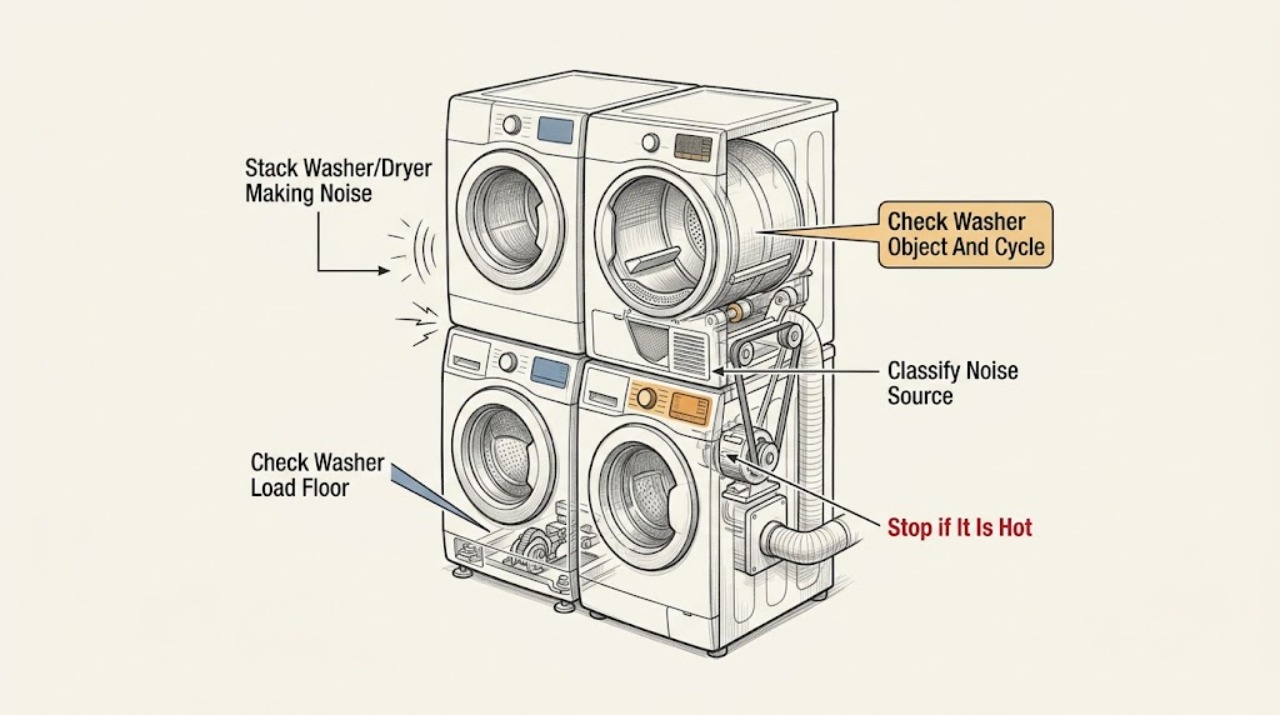
First determine whether the washer or dryer is making the noise and whether it is a click, hum, rattle, scrape, squeak, bang, or vibration. Some clicking, timer movement, heat cycling, and airflow humming can be normal, but a new or worsening sound needs the unit stopped for a safe external inspection. Check the load, visible foreign objects, stable leveling, loose accessible feet, lint filter, and external vent only as the exact model allows. Do not remove stacked-unit panels, lubricate internal rollers, reach into a moving drum, or keep running a dryer that squeaks or scrapes. Stop for smoke, burning or gas odor, sparks, flooding, a moving cabinet, exposed wiring, or a noise that suggests a loose or failing mechanical part, then arrange qualified Speed Queen service.
Work through in order
Diagnostic checks
Use only checks that match the exact appliance or system and its official guide.
-
Check 1
Stop the cycle with the normal control, wait until all motion ends, and record whether the noise comes from the washer or dryer section, when it starts, and whether it is a click, hum, rattle, scrape, squeak, bang, or vibration.
Expected result: The sound occurs only during washer agitation or spin, only during dryer tumble or heat, when the door or lid locks, as the timer advances, or while the cabinet moves.
Next step: Write down the exact cycle, load, sound timing, and any code or performance change, then continue with the washer or dryer check that matches the observation.
Stop if: Stop immediately for smoke, burning or gas odor, sparks, flooding, an exposed conductor, a hot cord or cabinet, uncontrolled movement, or a damaged door or lid.
Why this matters
Why: Timing separates potentially normal control or airflow sounds from load, leveling, foreign-object, or internal mechanical symptoms. A cabinet that moves or a sound that worsens with speed is more urgent than a brief documented click.
-
Check 2
If the washer is noisy or vibrating, with the machine stopped and the door or lid safely accessible, check for a bunched, very small, or obviously overloaded load and observe whether the washer sits level on a solid floor with all accessible feet stable; do not rock or lift the stacked unit.
Expected result: The load is gathered to one side, the washer moves, a foot is visibly loose, the floor is soft or uneven, or the load and installation appear stable.
Next step: Redistribute an obviously uneven load and correct only an accessible loose foot as the model instructions permit; run one supervised test and stop if movement or the same noise returns.
Stop if: Stop for a moving stack, floor damage, a loose mounting or support condition, leaking water, a damaged foot, or any need to tilt or reposition the unit.
Why this matters
Why: An unbalanced load or uneven support can create vibration and noise without proving a failed bearing, motor, or suspension component. A stable load and level support shift attention to a foreign object or an internal fault.
-
Check 3
With the washer off and empty only if it can be opened normally, inspect the visible drum, door seal, and accessible loading area for a coin, fastener, or other foreign object, and compare the noise with the washer's normal lock, agitation, and spin sounds.
Expected result: A foreign object is visible, the noise is a brief documented click during locking or agitation, the noise appears only at high spin, or nothing visible explains a persistent sound.
Next step: Remove only a loose object that is plainly reachable without tools, then perform one supervised test; leave trapped objects, seals, bearings, motor, and suspension work to service.
Stop if: Stop for a torn seal, sharp metal, a locked door, water inside, a drum that does not turn freely when the manual permits a gentle external check, or any need to reach behind the drum.
Why this matters
Why: A visible loose object can strike the drum or seal, while a short lock or balance-ring click may be normal. Noise that rises with spin or persists with no visible object can indicate an internal mechanical or support fault that an external check cannot identify.
-
Check 4
If the dryer makes noise, stop it, allow hot surfaces to cool, remove the load, and inspect the visible drum and pockets for coins, clips, toys, or other objects; check that the load is not packed or creating a single heavy impact pattern.
Expected result: A foreign object is visible, the noise changes with the load, the drum is empty but the same squeak or scrape remains, or the sound is only the documented hum or heat-cycle/timer click.
Next step: Remove only a loose reachable object and run no more than one supervised test with a suitable load; do not continue running a squeaking or scraping dryer to see whether it improves.
Stop if: Stop for smoke, scorching, burning odor, gas odor, a hot cabinet, a drum that binds, a damaged door, or any need to remove a panel or reach the belt or rollers.
Why this matters
Why: A loose object or uneven load can create a rattle or thump, while persistent squeaking or scraping with an empty drum points toward the belt, drum, rollers, or another internal mechanical area. Normal hum or cycling sounds do not require a part diagnosis.
-
Check 5
With the dryer stopped and cool, observe whether the cabinet is level and stable from safe floor-level positions, confirm that the accessible lint filter is correctly seated, and inspect the external exhaust route for a crushed hose or loose contact that could rattle; do not climb or disassemble the stack.
Expected result: The dryer is unlevel, an accessible foot is loose, the lint filter or vent is displaced, the vent contacts the cabinet, or the installation looks stable and clear.
Next step: Correct only an obvious accessible foot, filter seating, or vent-routing issue described by the model manual, then make one supervised test; stop if squeaking or scraping persists.
Stop if: Stop for a moving stack, damaged vent, restricted exhaust with heat or odor, loose structural support, or any need to pull the dryer out or remove panels.
Why this matters
Why: Uneven support or a loose accessible connection can transmit vibration, while a clear stable installation makes an internal drum, belt, roller, blower, or motor fault more plausible. A vent check cannot prove that an internal part is healthy.
-
Check 6
Arrange qualified Speed Queen appliance service when the noise is persistent, new, worsening, tied to a repeatable speed or cycle stage, or remains after one safe external load and leveling check; provide the model and a recording made from a safe position if useful.
Expected result: The noise is a squeak, grind, scrape, repeated bang, high-speed vibration, intermittent mechanical sound, or is accompanied by poor spinning, poor drying, a code, heat, odor, or movement.
Next step: Keep the affected section out of service, preserve the exact cycle and load notes, and use the Speed Queen support or authorized-service route for model-specific diagnosis.
Stop if: Do not continue testing after smoke, gas or burning odor, sparks, flooding, exposed wiring, cabinet movement, or an unsafe door or lid.
Why this matters
Why: The remaining causes can include a belt, drum support, roller, motor, pump, suspension, bearing, blower, or control issue, but the sound alone cannot identify a compatible part or safe repair.
Use your observations
Decision map
Find the observation that best matches what you see, then follow the next safe action.
-
PATH 01Next step
What you see
The washer makes only a brief documented door-lock or balance-ring click and completes normally without movement or performance change.
Do this next
Arrange qualified service and follow the exact model guidance.
Why this path and its safety boundary
Why it matters: Treat that sound as potentially normal for the model, monitor it, and use service if it becomes loud, continuous, or changes the cycle result.
-
PATH 02Next step
What you see
The washer bangs or vibrates during agitation or spin and the load is bunched, very small, or the unit is not level.
Do this next
Arrange qualified service and follow the exact model guidance.
Why this path and its safety boundary
Why it matters: Stop, redistribute a safe load and correct only accessible leveling as directed; keep the stack out of service if it moves or the noise returns.
-
PATH 03Next step
What you see
A coin, fastener, clip, toy, or other loose object is visible in the washer or dryer drum or loading area.
Do this next
Arrange qualified service and follow the exact model guidance.
Why this path and its safety boundary
Why it matters: Remove only the plainly reachable object with the machine stopped and cool where applicable, then make one supervised test. Trapped objects need service, not prying or panel removal.
-
PATH 04Next step
What you see
The dryer squeaks or scrapes with an empty drum, or the sound worsens as the drum turns.
Do this next
Arrange qualified service and follow the exact model guidance.
Why this path and its safety boundary
Why it matters: Do not keep running the dryer. Speed Queen identifies belt, drum, roller, and leveling possibilities, with internal belt or roller work directed to an appliance service technician.
-
PATH 05Next step
What you see
The dryer produces only the documented timer click, heat-source cycling, or airflow hum and completes normally.
Do this next
Arrange qualified service and follow the exact model guidance.
Why this path and its safety boundary
Why it matters: Monitor the sound. If it becomes a rattle, scrape, squeak, or vibration, stop and repeat the external inspection rather than assuming it is normal.
-
PATH 06Next step
What you see
The noise is accompanied by smoke, odor, heat, cabinet movement, electrical symptoms, flooding, or repeated mechanical failure.
Do this next
Arrange qualified service and follow the exact model guidance.
Why this path and its safety boundary
Why it matters: Stop use and arrange qualified appliance, electrical, or gas service. Do not operate the stack again to collect more evidence.
Helpful context
Understand the symptom
Classify the sound before selecting a path
A brief click when a washer door locks or a dryer timer advances is different from a metal scrape, repeated bang, high-pitched squeak, or cabinet vibration. Note which section makes the sound, whether it occurs during fill, agitation, spin, tumble, heat, or shutdown, and whether the sound changes with the load. Do not diagnose by a sound name alone; the same description can come from a loose object, an unlevel installation, a load issue, or an internal component.
A stacked cabinet needs an external access boundary
The washer and dryer share a cabinet but have separate moving systems. A washer can react to a bunched load or uneven floor, while a dryer can rattle from an object in the drum or squeak from its belt, drum, or rollers. Keep the unit stopped before checking the drum, load, feet, or lint filter. Do not remove panels or reach above or behind the stack to inspect a suspected component.
Normal sound does not mean every sound is safe
Speed Queen documentation describes normal operating sounds, but a sound that is new, loud, worsening, accompanied by movement, or followed by poor spinning or drying deserves service. If a dryer squeaks, Speed Queen advises not running it when continued operation could cause damage.
Safety boundary
Stop conditions
- Smoke, scorching, burning odor, sparks, a hot cabinet or cord, or repeated electrical trips.
- Gas odor or hissing from a gas-configured dryer, or uncertainty about the gas connection.
- Flooding, an active leak, water near electrical parts, or a locked washer door with water inside.
- The stack rocks, moves, leans, contacts surrounding structures, or has damaged feet, supports, doors, hoses, or venting.
- Any need to remove a stacked-unit panel, reach a belt, roller, bearing, motor, pump, blower, or live wiring, or lubricate an internal part.
- A squeak, grind, scrape, repeated bang, or worsening vibration persists after one safe external check.
Only after diagnosis
Potential parts
- dryer belt, drum roller, or drum support component
Consider this category only when a qualified technician confirms that the persistent dryer noise comes from a worn belt, roller, drum support, or related internal component after safe external checks.
Confirm the complete Speed Queen model, dryer configuration, component revision, mounting, and manufacturer fit information; do not run a squeaking dryer to identify the part. - washer suspension, bearing, or drive component
Consider this category only after service diagnosis confirms an internal washer component is responsible for persistent noise or high-speed vibration with a balanced load and stable installation.
Match the complete model, washer design, drive system, and manufacturer fit information; load imbalance or leveling alone does not establish a component failure. - dryer blower, motor, or exhaust-support component
Consider this category only when a technician confirms an internal blower, motor, or exhaust-support fault after the drum, load, filter, and accessible vent path are clear.
Confirm the exact model, gas or electric configuration, airflow arrangement, electrical rating, and manufacturer fit information before ordering or installation.
When checks do not resolve it
Need a professional?
The washer remains noisy with a suitable load on a stable level floor, or spin performance changes., The dryer squeaks, scrapes, rattles, or bangs with an empty drum, or the sound returns immediately., A belt, drum, roller, bearing, motor, pump, blower, or suspension issue is suspected., The unit moves, a support or vent is damaged, a code appears, or noise is accompanied by poor heating, drying, draining, or spinning., Any smoke, gas, electrical, flooding, scorching, or uncontrolled mechanical safety symptom is present.
Common questions
FAQ
Is a clicking sound normal on a Speed Queen washer?
Some front-load washer clicks occur when the door locks or from the balance ring during agitation. A click that becomes loud, continuous, or is accompanied by movement, poor spin, or a code should be treated as a service symptom.
Why does my Speed Queen washer bang during spin?
Check whether the load is bunched, too small, or unsuitable, and whether the washer is level on a solid floor with stable feet. If a suitable load still causes banging or the stack moves, stop and arrange service.
Why is my Speed Queen dryer squeaking?
A loose object, unlevel dryer, belt, drum, or roller can be involved. Check only the visible drum and stable external installation; Speed Queen directs belt, drum, and roller work to an appliance service technician and advises not running a dryer that is squeaking when damage may result.
Can I remove the dryer panel to find the noisy part?
Do not remove a stacked-unit panel as a general user check. Stop the dryer, record when the sound occurs, and arrange qualified service for belt, drum, roller, blower, motor, or other internal diagnosis.
Read the exact guide
Official sources
- What To Do About Your Dryer SqueakingSpeed Queen · Supports checking visible drum objects and level, and keeping a squeaking dryer out of operation while internal belt, drum, or roller work is handled by service.
- Speed Queen | SupportSpeed Queen · Supports the manufacturer service handoff when safe external checks do not resolve a persistent or abnormal noise.
- User's GuideSpeed Queen by Alliance Laundry Systems · Supports a model-specific dryer troubleshooting pattern for foreign objects, level, normal timer/heat/airflow sounds, and service escalation.
- User's GuideSpeed Queen by Alliance Laundry Systems · Supports washer noise and vibration observations that may apply to a stacked front-load configuration; the exact model manual remains controlling.
- Speed Queen | Manuals & DownloadsSpeed Queen · Supports using the exact model manual before adjusting a stack, interpreting a sound, or performing any maintenance.
- User's GuideSpeed Queen by Alliance Laundry Systems · Corroborates the external washer load and leveling checks; the assigned stack model and washer design may differ.
Community feedback
Share a repair observation
Share a plain-text repair observation. Accepted observations are published automatically; this page may take a moment to update.