
On this page
Start here
Quick answer
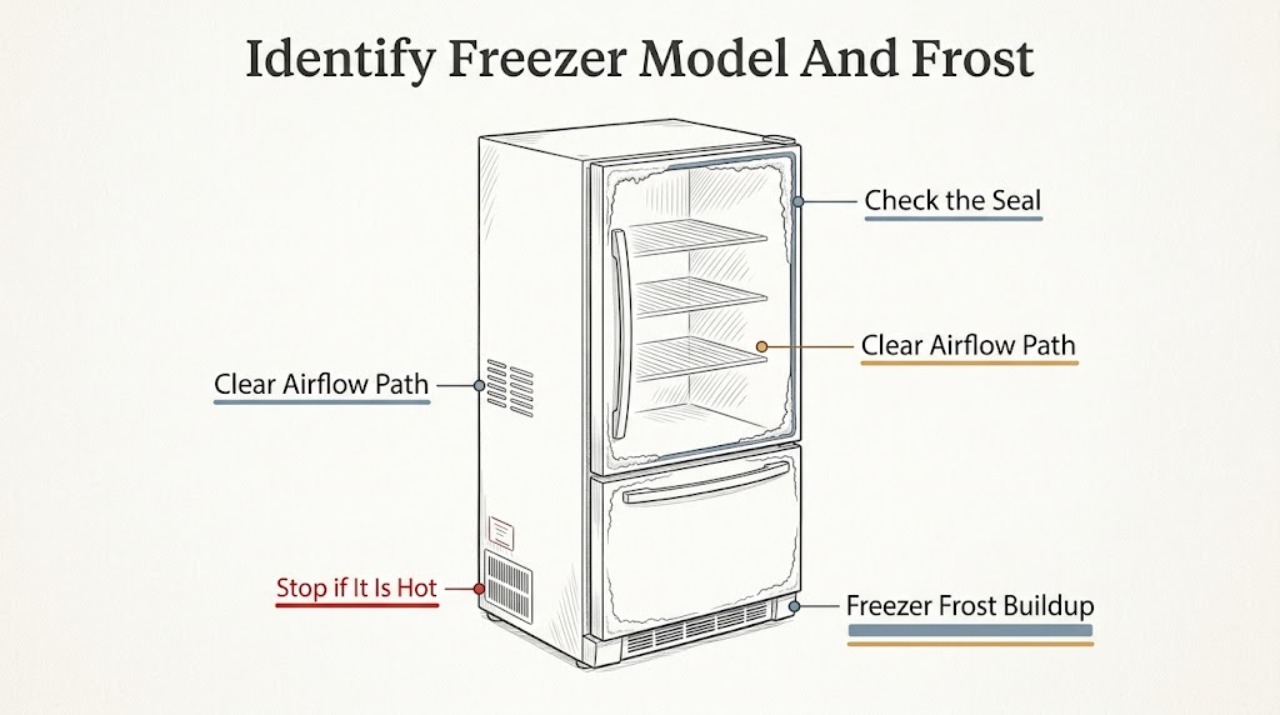
Thermador freezer frost usually starts with warm, humid air entering through a door or drawer that is blocked, not fully closed, or not sealing, but the correct remedy depends on the exact model. First record the model number and determine from its manual whether the freezer is an automatic NoFrost design or requires a documented manual-defrost procedure. Check closure, the accessible gasket, loading around air paths, the setpoint, temperature trend, and alarms without removing panels. If safe external checks do not stop the frost, if it returns quickly, or if the freezer is warming, arrange qualified Thermador service. Never knock or chip ice, use a sharp tool, heat gun, or improvised heater, pour water into the compartment, or remove an internal panel. Stop immediately for smoke, burning odor, exposed wiring, a hot connection, water near electricity, repeated breaker operation, damaged liner or tubing, or food-safety concern.
Work through in order
Diagnostic checks
Use only checks that match the exact appliance or system and its official guide.
-
Check 1
From a dry, stable position, photograph or write down the complete Thermador model and serial information, the freezer layout, the frost location and thickness, the temperature or alarm display, and whether the frost is on one wall, around the door edge, near an air outlet, or spread through the compartment.
Expected result: The model documentation identifies automatic frost management, a manual-defrost design, or a model-specific procedure; frost is localized at the door edge, concentrated near an air path, or widespread; the freezer is still at its expected temperature or is warming.
Next step: Keep the door closed, save the exact manual instructions, and continue only with the accessible checks that apply to that model. If the freezer is warming, food safety is uncertain, or the label cannot be read without moving an unsafe appliance, stop and arrange service.
Stop if: Stop for smoke, burning odor, water near an electrical connection, exposed wiring, a damaged liner or tube, repeated breaker operation, unstable installation, or unsafe food handling.
Why this matters
Why: The exact model controls the safe defrost path. Frost at a door edge points first to moist-air entry or sealing; frost around an air path can restrict circulation; widespread frost or frost with warming can indicate a defrost, airflow, sensor, or control problem that should not be treated as a simple cosmetic issue.
-
Check 2
Inspect the freezer door or drawer from the outside for a package, shelf, basket, rail, or ice ridge that prevents full closure. Close it normally and examine the accessible gasket for a visible gap, tear, distortion, debris, or a section that does not contact the frame; do not pry, stretch, remove, or heat the gasket.
Expected result: The door or drawer was held open, an item blocked it, the gasket has a gap or damage, frost is concentrated along the seal, or closure and gasket appear even.
Next step: Remove only the accessible obstruction, wipe visible debris with the model-approved method, close the door or drawer, and observe recurrence without repeated opening. A damaged seal, sagging door, bent rail, or closure that requires force needs qualified service.
Stop if: Stop for a warped door, broken rail, torn seal that needs removal, a sharp ice ridge, or any need to force or dismantle the door or drawer.
Why this matters
Why: A closure or seal problem allows humid room air into the compartment and commonly creates frost near the perimeter. If the seal looks even and frost is elsewhere, move attention to loading, airflow, temperature, and the model's defrost behavior rather than replacing a gasket from appearance alone.
-
Check 3
Without scraping frost, compare the load with the model's storage and air-circulation guidance. Move only loose items that visibly press against the door, rear wall, ceiling, or accessible air outlet, and leave the vents and sensor area unobstructed; do not remove an air duct or interior cover.
Expected result: Food or a container was against a vent or door, the compartment is packed tightly, an air outlet is covered by frost, or the load and visible airflow openings appear clear.
Next step: Correct only the accessible loading issue, close the freezer, and monitor the temperature and frost pattern. Do not pull on ducts, remove covers, or use a tool or heater to clear an obstructed passage.
Stop if: Stop for a blocked internal fan or duct, a cover that must be removed, a punctured liner, exposed tubing, water near electricity, or any temptation to chip or heat the ice.
Why this matters
Why: A blocked air path can create uneven temperatures and make one area frost while another warms. If an outlet is buried in frost or the fan cannot be assessed without opening a panel, the problem has crossed into a model-specific service check.
-
Check 4
Record the current freezer setpoint, displayed temperature, alarm or warning state, and any recent power interruption or extended door opening. Confirm the zone is enabled and use only the normal controls described for the exact model; do not change hidden service settings or repeatedly reset the appliance.
Expected result: The setpoint or zone was changed, an alarm is active, the temperature is above the expected range, the display is normal with no alarm, or the display is blank or unreliable.
Next step: Restore only an obviously incorrect user setting, document any alarm exactly, close the door, and watch the trend according to the model guidance. If temperature rises, the alarm returns, or the display behaves abnormally, arrange service and protect food only when safe.
Stop if: Stop for smoke, burning odor, abnormal heat, a repeated breaker trip, a damaged display or control, rising temperature with food risk, or any request to access live wiring.
Why this matters
Why: A setting or door event can explain a temporary temperature change, while a persistent high temperature with frost suggests restricted circulation, defrost, sensor, control, or cooling-system evidence. A blank display or repeated alarm needs a power and service check rather than more setting changes.
-
Check 5
Read the exact Thermador manual to determine whether the appliance has automatic frost management or a manual-defrost instruction. If manual defrost is explicitly specified and there is no hazard, protect the food, switch the appliance off or unplug it only from a dry, safe connection, place absorbent towels as appropriate, and let the ice soften naturally; do not use a knife, sharp object, heat gun, hair dryer, boiling water, or improvised heater.
Expected result: The manual confirms automatic defrost, gives a model-specific natural-defrost procedure, gives no user defrost procedure, or the ice does not soften without force or heating.
Next step: For a documented natural defrost, allow the model-directed process to finish, keep water away from electrical parts, dry the compartment, and restart only as the manual says. If the model has automatic defrost or the frost returns quickly, arrange qualified diagnosis rather than repeating a shutdown.
Stop if: Never knock or chip ice, use a sharp tool, heat gun, hair dryer, open flame, boiling water, or improvised heater; stop for water near electricity, a punctured liner, exposed tubing, smoke, odor, or a hot connection.
Why this matters
Why: Automatic-defrost models with heavy or returning frost can have an airflow, defrost, sensor, or control fault. A manual-defrost procedure must be followed exactly. No procedure, inaccessible ice, or ice that requires force means the user check is complete and service is safer.
-
Check 6
After one safe correction of a door obstruction, load, user setting, or model-directed natural-defrost procedure, keep the freezer closed and record whether the temperature trend, alarm state, cooling sound, and frost pattern improve. Do not keep restarting or clearing an alarm to force a result.
Expected result: The frost stops growing and temperature returns toward the expected range, the freezer remains warm, frost reforms rapidly, an alarm returns, or the compressor or fan runs continuously without normal cooling.
Next step: Keep the door closed, record the exact sequence and model, and arrange service for persistent or returning symptoms. Do not remove panels, test live circuits, add refrigerant, or order a component from the frost pattern alone.
Stop if: Stop for smoke, burning odor, abnormal cabinet or cord heat, water near electricity, exposed wiring, repeated breaker operation, food-safety concern, or any sealed-system symptom.
Why this matters
Why: Improvement after a clear door or loading event supports a moisture-entry or airflow cause. Rapid recurrence, persistent warmth, a returning alarm, or abnormal run behavior points toward a defrost, sensor, fan, control, compressor, or sealed-system fault that needs qualified testing.
-
Check 7
Arrange qualified Thermador service when frost is thick or returns quickly, when the freezer stays warm, when a door or gasket cannot close correctly, when an alarm returns, or when the model manual does not provide a safe user defrost path. Provide the exact model, frost location, temperature and alarm history, door and load observations, and every safe step already taken.
Expected result: The issue is persistent or recurrent, the freezer cannot maintain temperature, the frost blocks an internal path, the seal or hardware is damaged, or a control or service message returns.
Next step: Keep the appliance off or closed as appropriate to the hazard, protect or relocate food only when safe, and use Thermador's model-based owner support or a qualified appliance technician. Do not continue tests that require opening the cabinet.
Stop if: Do not continue after smoke, burning odor, repeated breaker operation, water near electrical parts, a punctured liner, exposed tubing, abnormal heat, or any need to remove a panel or open the sealed system.
Why this matters
Why: The remaining possibilities include a defrost heater or sensor, control, fan, gasket, door alignment, compressor, or sealed-system fault. These cannot be identified reliably from the visible frost pattern and may require panel access or electrical or refrigeration work.
Use your observations
Decision map
Find the observation that best matches what you see, then follow the next safe action.
-
PATH 01Next step
What you see
Smoke, burning odor, exposed wiring, a hot or damaged connection, water near electricity, repeated breaker operation, a punctured liner or tube, abnormal cabinet heat, or unsafe food handling is present.
Do this next
Arrange qualified service and follow the exact model guidance.
Why this path and its safety boundary
Why it matters: Stop using the freezer. Disconnect power only from a dry, safe position without touching a hot or wet connection, protect food and people only when safe, and arrange qualified electrical or appliance service. Do not repeat a cooling test or open a panel.
-
PATH 02Next step
What you see
The model is identified and its manual confirms automatic frost management, a manual-defrost instruction, or no user defrost procedure.
Do this next
Arrange qualified service and follow the exact model guidance.
Why this path and its safety boundary
Why it matters: Follow only that model's documented path. Automatic-frost models with heavy or returning frost need service diagnosis; a manual model may allow natural defrost; no documented procedure means stop rather than improvise.
-
PATH 03Next step
What you see
The door or drawer was blocked, did not close fully, the gasket has a gap or damage, or frost is concentrated along the seal.
Do this next
Arrange qualified service and follow the exact model guidance.
Why this path and its safety boundary
Why it matters: Remove only accessible obstructions, close the door normally, and monitor recurrence. A damaged seal, misaligned door, or hardware that needs force requires qualified service.
-
PATH 04Next step
What you see
Food blocks a visible outlet, the load is packed against the wall or door, or frost covers an air path.
Do this next
Arrange qualified service and follow the exact model guidance.
Why this path and its safety boundary
Why it matters: Reposition only loose items that are safely accessible and keep the vents clear. Do not remove ducts or scrape the frost; inaccessible blockage or poor circulation needs service.
-
PATH 05Next step
What you see
The zone is disabled, the setpoint is incorrect, an alarm is active, or temperature is rising.
Do this next
Arrange qualified service and follow the exact model guidance.
Why this path and its safety boundary
Why it matters: Restore only an obvious user setting using the normal model controls, record the alarm exactly, and keep the door closed. A persistent high temperature or returning alarm needs qualified diagnosis.
-
PATH 06Next step
What you see
The exact manual explicitly allows a natural-defrost procedure and there is no electrical, water, food, or cabinet hazard.
Do this next
Arrange qualified service and follow the exact model guidance.
Why this path and its safety boundary
Why it matters: Protect food, shut down only from a safe dry connection, allow ice to soften naturally, dry the compartment, and restart only as documented. Do not chip, puncture, heat, or remove panels.
-
PATH 07Next step
What you see
Frost reforms rapidly, remains thick after one documented correction, blocks an internal path, or the freezer stays warm or runs abnormally.
Do this next
Arrange qualified service and follow the exact model guidance.
Why this path and its safety boundary
Why it matters: Stop at external checks and arrange Thermador service for the gasket, door alignment, airflow, defrost, sensor, control, fan, compressor, or sealed system. Do not select a part or open the cabinet from the frost pattern alone.
Helpful context
Understand the symptom
Start with the exact freezer type
Thermador sells more than one refrigeration layout, including freezer columns and bottom-freezer products. Some models manage frost automatically while other documentation may specify a manual-defrost path. Read the model and serial label and use that model's manual before selecting a defrost method. Do not infer the design from the amount of frost or from another Thermador model.
Why frost forms
Frost is a sign that moisture is reaching a cold surface and freezing. Frequent door opening, a door or drawer that is obstructed, a gasket that does not contact evenly, warm food, blocked air passages, a temperature setting that is not appropriate for the model, or a defrost or airflow fault can all change the pattern. A thin patch after a door event is different from a thick, fast-returning layer that covers an air outlet.
Use a gentle, model-directed response
Only perform accessible checks and any natural-defrost procedure explicitly described for the exact appliance. Protect food before a planned shutdown, keep water away from electrical parts, and let ice soften naturally if the manual allows it. Never knock ice loose, use a knife or other sharp tool, apply a heat gun or improvised heater, or remove an interior panel. Those actions can puncture the liner or tubing, cause a shock or fire, or turn a contained fault into a larger repair.
Protect food and know when to stop
Keep the door or drawer closed while assessing the problem and use the appliance's temperature indication or a suitable independent check if available. If food has become unsafe, handle or relocate it only when conditions are safe and follow local food-safety guidance. Smoke, burning odor, an electrical trip, water near a connection, a damaged liner or tube, or abnormal cabinet heat is a stop condition, not a reason to keep testing.
Safety boundary
Stop conditions
- Smoke, burning odor, exposed wiring, a hot or damaged cord, plug, outlet, cabinet, or control, or a breaker that opens again.
- Water near an electrical connection, a punctured liner, exposed tubing, refrigerant or cabinet damage, flooding, or an unstable appliance.
- Food safety is in doubt or moving food or the appliance would be unsafe.
- A door, drawer, gasket, rail, or hinge is damaged or cannot close without force.
- Any need to knock or chip ice, use a sharp tool, heat gun, hair dryer, open flame, boiling water, improvised heater, remove a panel, test live circuits, or open tubing.
- Frost remains thick or returns quickly, the freezer stays warm, or an alarm returns after one safe model-directed correction.
Only after diagnosis
Potential parts
- freezer door or drawer gasket
Consider this category only when the exact model confirms a torn, distorted, or failed gasket after accessible closure and obstruction checks.
Confirm the complete Thermador model, door or drawer position, seal profile, and manufacturer fit information before any order or repair. - defrost sensor or control
Consider this category only after qualified testing links recurrent frost or a model-specific fault to the sensor or control after door and airflow causes are excluded.
Confirm the complete model, revision, connector, and manufacturer fit information; a frost pattern alone does not identify this component. - freezer fan or defrost component
Consider this category only after qualified diagnosis confirms restricted circulation or a defrost-system fault on the exact model.
Confirm the model, electrical requirements, approved service method, and fit information; internal and sealed-system work is not a user repair.
When checks do not resolve it
Need a professional?
The exact model's defrost type is unclear, no safe user procedure is documented, or the frost is inaccessible behind a cover., A door or drawer will not close, a gasket is torn or distorted, a rail is damaged, or frost is concentrated along a persistent perimeter gap., The freezer stays warm, temperature rises, frost returns quickly, a warning returns, or the compressor or fan runs abnormally., The display is blank or unreliable, the breaker trips again, the connection is hot or wet, or the cabinet, liner, or tubing is damaged., Smoke, burning odor, water near electricity, abnormal heat, or a food-safety concern is present.
Common questions
FAQ
Why is my Thermador freezer building up frost?
Start with the exact model, then check door or drawer closure, the accessible gasket, loading around air paths, setpoint, temperature, and alarms. Moist air from a door gap is common, but thick or fast-returning frost can indicate airflow or defrost trouble and needs model-specific service.
Are all Thermador freezers NoFrost?
Do not assume that from the brand name. Thermador publishes manuals for different freezer columns and bottom-freezer layouts, and the exact manual determines whether the product uses automatic frost management or documents a manual-defrost path.
Can I chip the ice out of a Thermador freezer?
No. Do not knock or chip ice, use a knife or other sharp tool, apply a heat gun or improvised heater, or remove a panel. Follow only an exact model's documented natural-defrost procedure; otherwise arrange qualified service.
What if frost is only around the Thermador freezer door?
Check for a package, shelf, drawer rail, or other obstruction and inspect the accessible gasket for a gap or distortion. Correct only a loose obstruction and close the door normally. A damaged seal, misalignment, or rapidly returning perimeter frost needs service.
When should I stop troubleshooting a frosted freezer?
Stop for smoke, burning odor, water near electricity, exposed wiring, repeated breaker operation, abnormal heat, a punctured liner or tube, unsafe food, or any need to access an internal panel. Also stop after one safe model-directed correction if the freezer stays warm or frost returns quickly.
Read the exact guide
Official sources
- Cleaning & Care | Refrigeration Support | ThermadorThermador · Thermador refrigeration and freezer cleaning and care
- Service Assistance - T42IT100NP/01 | THERMADOR USThermador · Thermador built-in French Door bottom-freezer product documentation and owner support
- Refrigerator Troubleshooting | Problems & Solutions | ThermadorThermador · Thermador refrigeration troubleshooting, owner-manual lookup, temperature and appliance-care guidance
- Appliance Information - Built-in Freezer Column | T18IF905SP/04Thermador · Thermador built-in freezer column product documentation and owner support
Community feedback
Share a repair observation
Share a plain-text repair observation. Accepted observations are published automatically; this page may take a moment to update.