
On this page
Start here
Quick answer
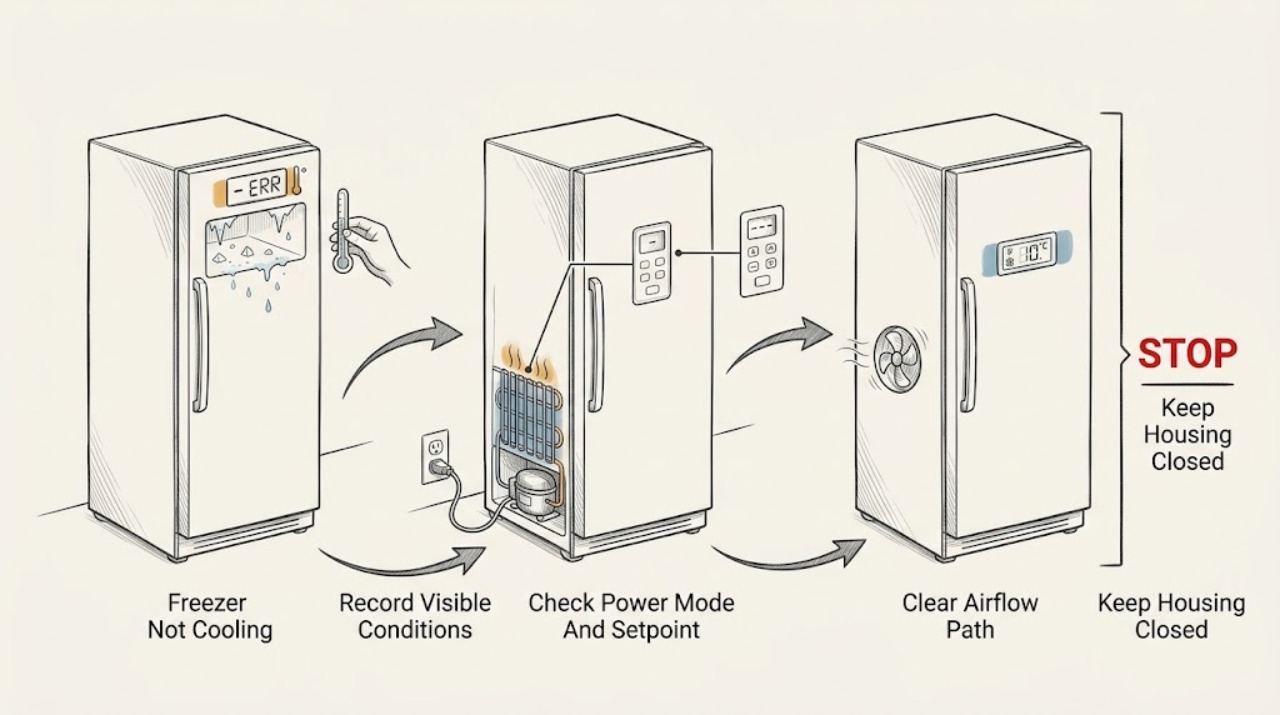
Protect the food first, then record the Thermador model, displayed temperature or alarm, and whether the interior is warm, partially cold, or covered in frost. Use the exact manual to confirm the freezer is switched on, not in Vacation, Sabbath, showroom, or another reduced-cooling mode, and set to the intended temperature. Check that the door closes against the seal, vents are not blocked by food, and the surrounding installation has the clearance required by the manual. A thick, localized frost pattern, a warm compressor area, no airflow, repeated alarm, leak near electrical parts, burning odor, smoke, abnormal heat, or a breaker trip requires service. Do not chip ice, use a heat gun, open sealed refrigeration tubing, or remove electrical panels.
Before you begin
Safety first
- Only ordinary-access, dry, cool observations and exact-manual settings are described. Do not open panels, test live circuits, chip ice, apply high heat, handle refrigerant tubing, or bypass door or control safeties.
Work through in order
Diagnostic checks
Use only checks that match the exact appliance or system and its official guide.
-
Check 1
Keep the door closed as much as practical, record the exact Thermador model and displayed temperature or alarm, and inspect only from the doorway for thawing, ice crystals, condensation, or a warm interior. Move vulnerable food to safe cold storage if the compartment is warming.
Expected result: The display may be blank, show an alarm, show a normal setpoint despite warm food, or show a model-specific mode; food may be solidly frozen, partly thawed, or soft.
Next step: Continue with the switch, mode, and door checks only if there is no leak or electrical hazard. Keep the door closed and arrange service if food is thawing rapidly or the alarm persists.
Stop if: Stop if water is near electrical parts, the cabinet or plug is hot, there is a burning odor, smoke, sparking, or a breaker trip.
Why this matters
Why: This separates a display or control issue from an actual temperature loss and preserves useful food-safety evidence. A warm cabinet with a normal setpoint means the setpoint alone has not proved cooling.
-
Check 2
Using the exact model manual, verify that the freezer is switched on, the temperature setpoint has not been raised, and Vacation, Sabbath, showroom, or another reduced-cooling mode is not active. Check only an accessible plug, switch, and household breaker from a dry, undamaged position; do not remove covers.
Expected result: The freezer may be off, in a special mode, set warmer than intended, showing a power-loss or alarm state, or powered normally with controls responsive.
Next step: If the manual permits one normal power reset and no hazard is present, perform only that model-documented reset. If the display or alarm returns, leave the unit operating only if it is safe and arrange service while protecting food.
Stop if: Do not reset a wet, scorched, damaged, hot, smoking, sparking, or repeatedly tripping appliance.
Why this matters
Why: Thermador states that controls and features differ by model. Correcting a documented mode or setpoint can restore the intended operating request; normal controls with a warm compartment point to airflow, frost, or a cooling-system path.
-
Check 3
Inspect the door gasket, hinge side, and visible cabinet opening for food packages or drawers preventing closure. Confirm that interior air outlets are not packed against boxes and that the external installation area has the clearance and ventilation specified in the manual. Do not disassemble the door or rear cabinet.
Expected result: The gasket may contact evenly, have a visible gap or tear, or be held open by a package; interior vents may be covered; or the unit may have no visible obstruction.
Next step: Remove only visible packaging obstructions and close the door normally. If the gasket is damaged, the door is misaligned, or cooling does not improve, keep the freezer closed and arrange service.
Stop if: Stop if the seal, hinge, cabinet, or power area is damaged, wet, hot, or leaking refrigerant-like fluid; do not force the door.
Why this matters
Why: A door that cannot seal or blocked air circulation can cause warm spots, frost, and longer cooling. An intact seal and open vents make a sensor, fan, frost, compressor, control, or sealed-system problem more likely.
-
Check 4
With the door open only briefly, look for a thin even frost layer versus a dense or localized ice sheet, and listen for normal airflow without touching a fan. Do not chip ice, insert a tool, or use a flame, heat gun, or high-heat appliance to defrost.
Expected result: There may be little frost and no airflow, frost blocking an outlet, a dense sheet around one area, or no unusual frost but a warm cabinet.
Next step: Follow only the exact manual’s safe defrost or cleaning instructions. If frost returns, the fan is abnormal, or the cabinet remains warm, stop user troubleshooting and arrange qualified refrigeration service.
Stop if: Stop if ice is bonded to wiring or sharp surfaces, water approaches electrical parts, the cabinet is hot, or any burning odor, smoke, sparks, or leak appears.
Why this matters
Why: Frost that blocks an air path can restrict circulation, while no airflow or an unusual frost pattern can involve a fan, sensor, defrost, door-seal, or control problem. A warm unit without frost can point further toward power, compressor, control, or sealed-system service.
-
Check 5
Record the alarm or indicator exactly, when the freezer stopped cooling, whether the compressor or fan can be heard, whether the door was recently open, and whether the problem followed installation, cleaning, a power event, or a mode change. Do not remove panels or access refrigerant tubing.
Expected result: The alarm may clear after a documented setting correction, return after a safe reset, or remain while the freezer is warm; sound may be absent, steady, clicking, or unusually loud.
Next step: Keep food protected and provide the model, display, temperature, frost pattern, door-seal result, airflow observation, sounds, and reset result to qualified Thermador service.
Stop if: Keep the unit out of service for a leak, wet electrical area, burning odor, smoke, overheating, sparks, damaged cord, or repeated breaker operation.
Why this matters
Why: The sequence helps a technician distinguish a setting, airflow, door, frost, fan, compressor, sensor, control, or sealed-system path. An alarm that returns or a freezer that remains warm after external checks is not a part-ordering diagnosis.
Use your observations
Decision map
Find the observation that best matches what you see, then follow the next safe action.
-
PATH 01Safety boundary
What you see
Water or another leak is near electrical parts, the cabinet or plug is hot, there is burning odor, smoke, sparking, visible damage, or a breaker trips again.
Do this next
Stop using the appliance. Disconnect power only if safe and without touching wet or damaged parts. Keep people away and arrange qualified appliance or electrical service; for suspected fire or electrical danger, leave the area and seek emergency help from a safe location.
Why this path and its safety boundary
Why it matters: This is a safety event and not a normal freezer-cooling check.
Safety stop: Do not re-energize, scrape ice, open panels, or keep resetting the breaker until the hazard is assessed.
-
PATH 02Safety boundary
What you see
The exact manual shows the freezer is off, set warmer than intended, or in Vacation, Sabbath, showroom, or another reduced-cooling mode.
Do this next
Restore the documented setting once, close the door, and monitor the display and temperature. Protect food while the compartment returns toward the intended condition.
Why this path and its safety boundary
Why it matters: The control request can prevent expected cooling without proving a hardware failure.
Safety stop: Escalate if the alarm returns, the freezer stays warm, or any safety symptom appears.
-
PATH 03Safety boundary
What you see
The door does not seal evenly, a package blocks closure, or interior air outlets are obstructed.
Do this next
Remove only the visible obstruction, close the door normally, and check the seal again. Arrange service for a torn gasket, misaligned door, or recurring frost.
Why this path and its safety boundary
Why it matters: Warm air entry or blocked circulation can cause frost and uneven temperature.
Safety stop: Do not force a damaged door, pull on the gasket, or dismantle the hinge or cabinet.
-
PATH 04Safety boundary
What you see
A dense or localized frost sheet blocks an outlet or the freezer repeatedly frosts after a safe manual-approved defrost.
Do this next
Use only the exact manual’s defrost procedure and protect food. If frost returns or cooling remains poor, arrange refrigeration service.
Why this path and its safety boundary
Why it matters: Air circulation, door sealing, defrost sensing, or control conditions may be involved.
Safety stop: Never chip ice, puncture a cold surface, apply flame, or use high heat near plastic, wiring, or refrigerant components.
-
PATH 05Safety boundary
What you see
Settings, door, and visible airflow paths are correct but the cabinet remains warm, the fan is absent or abnormal, or the compressor never starts.
Do this next
Keep food protected, avoid opening panels, and arrange qualified Thermador refrigeration diagnosis.
Why this path and its safety boundary
Why it matters: A fan, temperature sensor, control, compressor, start device, defrost system, or sealed-system fault remains possible and cannot be identified safely from sound alone.
Safety stop: Stop immediately for leak, electrical heat, smoke, odor, sparks, or a repeated breaker trip.
-
PATH 06Safety boundary
What you see
The model-approved one-time power reset clears the display briefly but the alarm returns or the freezer remains warm.
Do this next
Record the recurrence and leave the unit for qualified service while protecting food. Do not repeat resets or order a part from the alarm alone.
Why this path and its safety boundary
Why it matters: The reset did not establish a repair; a persistent control, sensor, airflow, or cooling-system issue remains.
Safety stop: Do not restore power if the unit is wet, hot, damaged, smoking, sparking, or repeatedly tripping protection.
Helpful context
Understand the symptom
Protect food before troubleshooting
Keep the freezer door closed while you decide what to do. Move food to another functioning freezer or an insulated cold container if the compartment is warming. Do not taste food to judge whether it is safe. Record whether packages still contain ice crystals, whether the displayed temperature is rising, and when the problem began.
A setting problem and a cooling-system fault look similar
A selected Vacation or Sabbath mode, a disabled appliance, a changed temperature setpoint, an open door, or blocked airflow can make a freezer appear to have failed. If the controls are correct but the cabinet remains warm, the cause may be a fan, sensor, compressor, control, sealed-system, or defrost issue that requires a qualified technician.
Frost is a clue, not an invitation to defrost with heat
A thin, even frost layer can be different from a dense sheet that blocks an air path. Do not scrape evaporator surfaces or melt ice with an open flame or high heat. Follow the exact manual for any approved defrost or power-off procedure and keep water away from electrical parts.
Safety boundary
Stop conditions
- Water or another leak near electrical parts, wet controls, damaged cord, burning odor, smoke, sparks, or a repeated breaker trip.
- Abnormally hot cabinet, compressor area, plug, outlet, wiring, or control area.
- A door or gasket that is damaged, misaligned, sharp, or cannot seal without force.
- Ice bonded to wiring or sharp surfaces, a puncture risk, or a need to chip ice or apply high heat.
- Persistent alarm, no airflow, unusual compressor or fan sound, or a warm cabinet after settings and visible obstructions are corrected.
Only after diagnosis
Potential parts
- freezer door gasket
Consider only when the exact model has a confirmed torn, deformed, or non-sealing gasket after visible obstruction is removed.
Confirm the complete Thermador model and manufacturer fit information before ordering. - freezer temperature sensor
Consider only when qualified diagnosis links the recurring temperature or alarm symptom to the sensor or its harness.
Sensor design and fit vary by model; do not infer compatibility from an alarm alone. - freezer evaporator or condenser fan
Consider only when service confirms absent, abnormal, or obstructed fan operation after safe external checks.
Verify exact model, fan location, and manufacturer fit before ordering. - freezer control or compressor-start component
Consider only after qualified testing confirms a control or compressor-start fault rather than a mode, seal, frost, or airflow issue.
Electrical and refrigeration parts require exact model matching and qualified installation.
When checks do not resolve it
Need a professional?
Arrange qualified Thermador refrigeration service when the freezer remains warm after the exact settings, door, airflow, and safe manual checks; when an alarm returns; when frost repeatedly blocks circulation; when a fan, sensor, compressor, control, defrost, or sealed-system diagnosis is needed; or when a leak, abnormal heat, odor, smoke, spark, or breaker event occurs. Protect food while waiting and provide the model and recorded observations.
Safety scope: Only ordinary-access, dry, cool observations and exact-manual settings are described. Do not open panels, test live circuits, chip ice, apply high heat, handle refrigerant tubing, or bypass door or control safeties.
Common questions
FAQ
What should I do first when my Thermador freezer is not cooling?
Keep the door closed, protect food that is warming, and record the exact model, displayed temperature or alarm, setpoint, mode, frost pattern, and when the issue began. Then check only the model-documented power, mode, door-seal, and airflow conditions.
Can a Thermador freezer setting make it seem like it is not cooling?
Yes. Thermador says controls and features vary by model and can include temperature adjustment, SuperFreeze, Vacation, Sabbath, and other modes. Use the exact owner manual to confirm the freezer is on and not in a reduced-cooling or special mode.
Does frost mean my Thermador freezer needs a new part?
No. A door obstruction, gasket gap, blocked air outlet, or model-specific defrost condition can produce frost. A dense or recurring sheet can also indicate a fan, sensor, defrost, or control issue, so do not order a part or chip ice before qualified diagnosis.
Should I reset my Thermador freezer?
Only follow a reset procedure in the exact owner manual and do it once when the appliance is dry, cool, undamaged, and free of odor, smoke, sparks, leaks, or repeated trips. If the alarm returns or cooling does not recover, protect food and arrange service instead of repeating resets.
When is a warm Thermador freezer an urgent service issue?
Arrange prompt service for rapid thawing, a persistent alarm, no airflow, recurring frost, or a warm cabinet after safe setting and door checks. Stop immediately for water near electrical parts, burning odor, smoke, sparks, abnormal heat, a damaged cord, or a breaker that trips again.
Read the exact guide
Official sources
- Cleaning & Care | Refrigeration SupportThermador · Thermador refrigeration care guidance; freezer cleaning and defrost details vary by model.
- How to Use the Controls & SettingsThermador · Thermador refrigeration controls overview; the opened page notes that available settings differ by model.
- Appliance Features | Refrigeration SupportThermador · Thermador refrigeration feature overview; not every freezer includes every listed feature.
- Parts & Accessories | Refrigeration SupportThermador · Thermador refrigeration parts support; part selection requires the exact appliance model.
- Refrigerator Troubleshooting | Problems & SolutionsThermador · Thermador refrigeration support page; exact freezer controls and cooling behavior vary by model.
Community feedback
Share a repair observation
Share a plain-text repair observation. Accepted observations are published automatically; this page may take a moment to update.