
On this page
Start here
Quick answer
First decide whether the whole Thermador induction cooktop is dead or whether the panel turns on but a cooking zone will not activate. If the display is blank, check the main switch, power failure, plug or supply, fuse, and breaker only from a safe, dry position. If the display works, remove moisture and objects from the touch area, check a control lock or other lock symbol using the exact model manual, select a zone, and use induction-compatible cookware centered on it. An error code, cracked glass, smoke, burning odor, visible arcing, a hot or damaged cord, or a breaker that trips again is a stop condition: do not perform live electrical work or keep resetting the appliance.
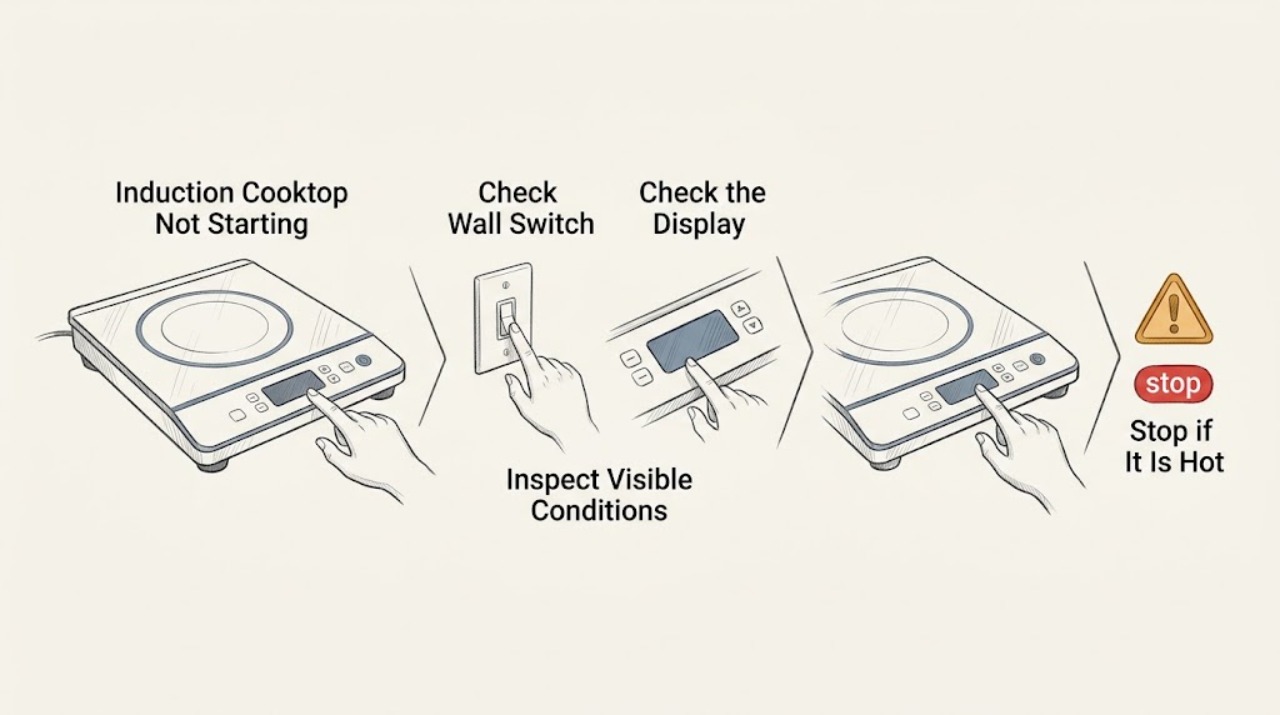
Work through in order
Diagnostic checks
Use only checks that match the exact appliance or system and its official guide.
-
Check 1
Turn all controls off and look at the cooktop from a dry, safe position. Determine whether the entire display is blank or whether the display responds but a cooking zone will not heat. Note any lock symbol, fault code, hot-surface message, smoke, odor, crack, or visible spark.
Expected result: The display is blank; or the display responds but the zone is inactive; or a lock symbol, an F-number, an E-number, a hot-surface warning, or a hazardous symptom is present.
Next step: If there is smoke, burning odor, arcing, a crack, a hot/damaged cord, or repeated breaker trip, stop and arrange qualified help. Otherwise continue with the power check for a blank display or the surface-and-controls check for a responsive display.
Stop if: Stop immediately for smoke, burning odor, visible spark or arc, cracked glass, overheating damage, or a breaker that trips again.
Why this matters
Why: A blank display sends the diagnosis toward supply and controls. A live display with no heat sends it toward panel state, zone selection, pan detection, overheating protection, or a model-specific fault. A fault or hazard takes priority over routine checks.
-
Check 2
If the display is blank, check only the accessible main switch or disconnect, the home's power status, the appliance plug if it is user-accessible, and the dedicated fuse or breaker. Do not remove covers or test energized wiring. If the outlet is safely accessible and dry, use the home's normal non-invasive power check rather than opening the cooktop.
Expected result: The main switch is off, the home has a power outage, the breaker or fuse has opened, or other equipment on the circuit is also without power; alternatively, the supply appears normal but the cooktop remains blank.
Next step: Restore an obviously switched-off control once if there is no hazard. If the breaker opens again, the outlet is warm or damaged, or the cooktop stays blank with normal supply, stop and contact a qualified electrician or Thermador appliance technician.
Stop if: Do not repeatedly reset protection, touch wet electrical equipment, or work inside the appliance. Stop for a damaged cord, warm/discolored receptacle, smoke, smell, or sparks.
Why this matters
Why: Thermador lists the plug or main switch, a power failure, the socket supply, and a fuse or breaker as possible reasons an induction cooktop does not turn on. A normal supply with a blank display points to a cooktop-side fault that requires service.
-
Check 3
If the display responds but the controls do not accept input, remove pans and utensils from the control area. Wipe away spills and moisture with a soft cloth, allow the surface to cool, and try the power control with a clean, dry finger. If a lock symbol is shown, use only the unlock sequence in the exact model owner's manual; do not bypass the lock.
Expected result: The panel begins responding after it is dry and clear, or a lock symbol remains, or the panel stays unresponsive after drying and cooling.
Next step: Use the documented unlock procedure once if the manual identifies one. If no manual sequence applies or the panel remains unresponsive, stop and request service rather than applying cleaners, force, or live electrical tests.
Stop if: Stop if the glass is cracked, the panel is hot enough to damage controls, liquid has entered an opening, or the control behaves erratically.
Why this matters
Why: Moisture, objects near the controls, residual heat, or a model-specific lock state can make a touch interface appear not to start. A panel that remains unresponsive under clean, dry conditions may have a control or supply fault.
-
Check 4
For a responsive panel with no active heat, select one cooking zone according to the model instructions and place one suitable pan flat and centered on that zone. If the model uses a display symbol for detected cookware, watch whether the pan is recognized; test with a different induction-compatible pan only after the surface is safe and cool enough to handle.
Expected result: The zone activates with a suitable centered pan, or the display does not recognize the pan, or the pan is too small, warped, or non-magnetic.
Next step: Use a flat, magnetic pan that the manual permits and center it on the selected zone. If several known-suitable pans fail on one or all zones while the controls work, stop and arrange service for diagnosis of the cookware-sensing or power electronics.
Stop if: Never leave an empty pan, oil, or fat heating unattended, and stop if cookware or the glass is damaged.
Why this matters
Why: Induction heating depends on the zone being selected and cookware being recognized. Thermador says magnetic cookware should be suitable and explains that cookware may fail to appear when it is too small or unsuitable.
-
Check 5
Read any displayed code exactly, including its letter and digits, and compare it with the model's Thermador manual or official error-code guidance. Do not guess from a similar-looking symbol. If the code indicates heat protection, remove nearby hot cookware and allow the electronics to cool before one documented acknowledgment or restart.
Expected result: The code clears after the documented cool-down or acknowledgment, or it returns, is not listed, indicates supply voltage, or appears with abnormal heat or odor.
Next step: Record the exact code and model number. If it returns, indicates incorrect supply voltage, or is not covered by the official instructions, stop and call qualified service or an electrician as directed.
Stop if: Do not open the cooktop to clear a code. Stop immediately for smoke, odor, arcing, cracked glass, or a code associated with unstable power.
Why this matters
Why: Thermador's error guidance distinguishes demo mode, supply-voltage faults, overheating protection, and unlisted faults. A returning or unlisted code is evidence for professional diagnosis rather than repeated resets.
-
Check 6
After a safe, documented correction, perform no more than one brief normal start attempt with the surface clear or with a suitable pan, depending on the symptom. Confirm that the panel turns on, the intended zone is selected, and heat begins without unusual sound, odor, flicker, or repeated shutdown.
Expected result: The cooktop starts normally, or it remains dead/inactive, repeatedly shuts down, shows the same code, or develops heat, odor, flicker, smoke, or an electrical symptom.
Next step: If it still will not start, stop testing and provide the technician with the model, exact display behavior, code, and checks already completed. Do not continue cycling power or heating to reproduce the fault.
Stop if: Stop at once for any smoke, burning odor, spark, arc, crack, overheating, breaker trip, or erratic control response.
Why this matters
Why: A single normal start that remains stable supports a corrected setting, surface, cookware, or transient protection state. Persistence or recurrence after the safe checks points to a component, supply, or control fault.
Use your observations
Decision map
Find the observation that best matches what you see, then follow the next safe action.
-
PATH 01Next step
What you see
The entire display is blank and the home's power or the accessible switch is also off.
Do this next
Restore the obvious external state once if dry and safe; have an electrician investigate an open circuit or recurring breaker trip.
-
PATH 02Next step
What you see
The display responds only after moisture or objects are removed from the touch area.
Do this next
Keep the panel clean and dry and use the normal controls; investigate service if the symptom returns without spills.
-
PATH 03Next step
What you see
The panel is on but a zone does not activate and cookware is not detected.
Do this next
Select the zone and use a flat, magnetic pan centered on it; try one known-suitable pan only when safe.
-
PATH 04Next step
What you see
A code indicates overheating protection and there is no smoke, odor, crack, or electrical damage.
Do this next
Remove hot cookware from the control area, allow the electronics to cool, and acknowledge or restart only as the official instructions state.
-
PATH 05Next step
What you see
The glass is fractured or cracked.
Do this next
Stop using the cooktop and switch off its fuse or disconnect only from a safe, dry position to reduce shock risk; arrange qualified service.
-
PATH 06Next step
What you see
Smoke, burning odor, visible arc or spark, a hot/damaged cord, or a breaker trip occurs.
Do this next
Stop immediately, keep clear, do not operate switches near a suspected electrical or fire hazard, and contact emergency or qualified electrical help as appropriate.
Helpful context
Understand the symptom
“Not starting” can mean two different failures
A completely blank display points first to the cooktop's incoming power, main switch, fuse, breaker, or a control fault. A lit display with no active heat is different: the selected zone may not be enabled, the surface may be wet or locked, the pan may not be detected, or the electronics may have protected themselves from heat. Identify which state you have before trying a reset.
Keep the checks model-specific
Thermador has multiple induction families and control layouts. Use the model number from the rating plate to open the matching owner's manual before using a lock-unlock sequence or interpreting an unfamiliar symbol. Do not assume that a control-lock gesture or displayed code is the same across every model.
What is safe to do at home
Safe checks are limited to the accessible switch, outlet or supply indicator, dry glass and touch area, normal control operation, cookware placement, and the model's documented reset. Do not remove the glass, open the junction box, probe energized wiring, bypass a control lock, or keep heating an empty pan while testing.
When to stop
Stop at once for cracked or fractured glass, smoke, burning smell, visible arc or spark, a hot or discolored plug or cable, repeated breaker trips, or any sign of overheating that does not clear after the documented cool-down. Keep clear of the appliance and arrange qualified electrical or appliance service.
Safety boundary
Stop conditions
- Stop immediately for cracked or fractured glass; it is no longer safe to use the cooktop and qualified service is required.
- Stop for smoke, burning odor, visible arcing or sparks, a hot or discolored plug or cord, or any sign of electrical damage.
- Stop if the breaker trips again, the supply-voltage code returns, or the panel behaves erratically; do not repeatedly reset protection.
- Stop if liquid has entered an opening or if the surface is wet around electrical equipment; do not touch it until a qualified person makes it safe.
- Do not remove panels, probe live wiring, defeat a control lock, or continue testing an appliance that overheats or repeatedly shuts down.
Only after diagnosis
Potential parts
- touch control or user interface
Consider only when the cooktop has safe external power, the clean dry panel remains unresponsive, and a technician confirms a control-interface fault.
Verify the complete model and the manufacturer's parts information; do not order from the symptom alone. - induction power module
Consider only when controls respond but known-suitable cookware is not heated and a qualified technician confirms a power-electronics fault.
Power modules vary by model and electrical configuration; fitment must be confirmed by the manufacturer or technician. - cookware detection sensor or circuit
Consider only after a flat magnetic pan has been tested safely on the selected zone and the technician confirms the appliance is not sensing suitable cookware.
Do not infer a sensor or board replacement without model-specific diagnosis and fit confirmation.
When checks do not resolve it
Need a professional?
Call a qualified appliance technician when the display remains blank with normal external power, a clean dry panel remains unresponsive, suitable cookware is not recognized on known-good zones, an error code returns or is not covered by the manual, or the cooktop still will not start after one safe documented correction. Use a qualified electrician for supply, outlet, fuse, breaker, or wiring concerns. Treat smoke, arcing, burning odor, cracked glass, or repeated breaker trips as urgent stop conditions.
Common questions
FAQ
Why is my Thermador induction cooktop completely blank?
Check the accessible main switch, home power, plug or socket supply, fuse, and breaker from a safe, dry position. If external power is normal but the display stays blank, stop and arrange qualified appliance or electrical service.
Why does the panel turn on but the cooking zone not start?
Clear and dry the touch area, check any lock symbol in the exact model manual, select the zone, and use a flat magnetic pan centered on it. If known-suitable cookware is not detected on multiple zones, service is needed.
Can I reset a Thermador induction cooktop that will not start?
Only use a reset explicitly documented for the exact model or displayed code, and do it once after the surface is safe. Do not repeatedly reset a breaker or continue testing after smoke, odor, arcing, cracking, overheating, or a recurring fault.
Read the exact guide
Official sources
- Error CodesThermador · Thermador induction-cooktop displayed error codes and documented recovery steps
- Cleaning & CareThermador · Thermador induction-cooktop glass safety, cleaning, drying, and fracture guidance
- Appliance Features | Freedom® Induction Cooktops SupportThermador · Thermador Freedom induction-cooktop cookware detection and zone activation
- TroubleshootingThermador · Thermador induction-cooktop power, heating, cookware detection, and service troubleshooting
- Search for Owner ManualsThermador · Thermador model-specific owner's manual lookup
- Induction Cooktops – Parts, Accessories & CleanersThermador · Thermador induction-cooktop cookware suitability and model-specific parts information
- TroubleshootingThermador · Thermador electric-cooktop external power and breaker troubleshooting
Community feedback
Share a repair observation
Share a plain-text repair observation. Accepted observations are published automatically; this page may take a moment to update.