
On this page
Start here
Quick answer
A Thermador oven door that will not close is commonly held open by a rack, pan, food residue, a displaced door seal, a hinge or latch that is not seated, or a self-clean lock that has not returned to its normal position. Let the oven cool, remove only accessible obstructions, and compare the door, hinges, seal, and latch with the exact model manual. Thermador says a latch that will not retract may respond to a model-appropriate power reset, and a self-cleaning model may have a documented self-clean exit procedure; do not force either procedure or run an oven with a door that does not seal. Stop for hot glass, broken glass, smoke, sparks, burning odor, an uncontrolled flame, or a gas smell. If the hinge, latch, seal, or alignment remains wrong, arrange qualified Thermador service.
Before you begin
Safety first
- This article supports cool, ordinary-access observations and exact-manual controls only. Do not force or remove the door, bend hinges, pry or bypass the latch, open panels, touch hot or broken glass, test live circuits, or ignite a suspected gas leak.
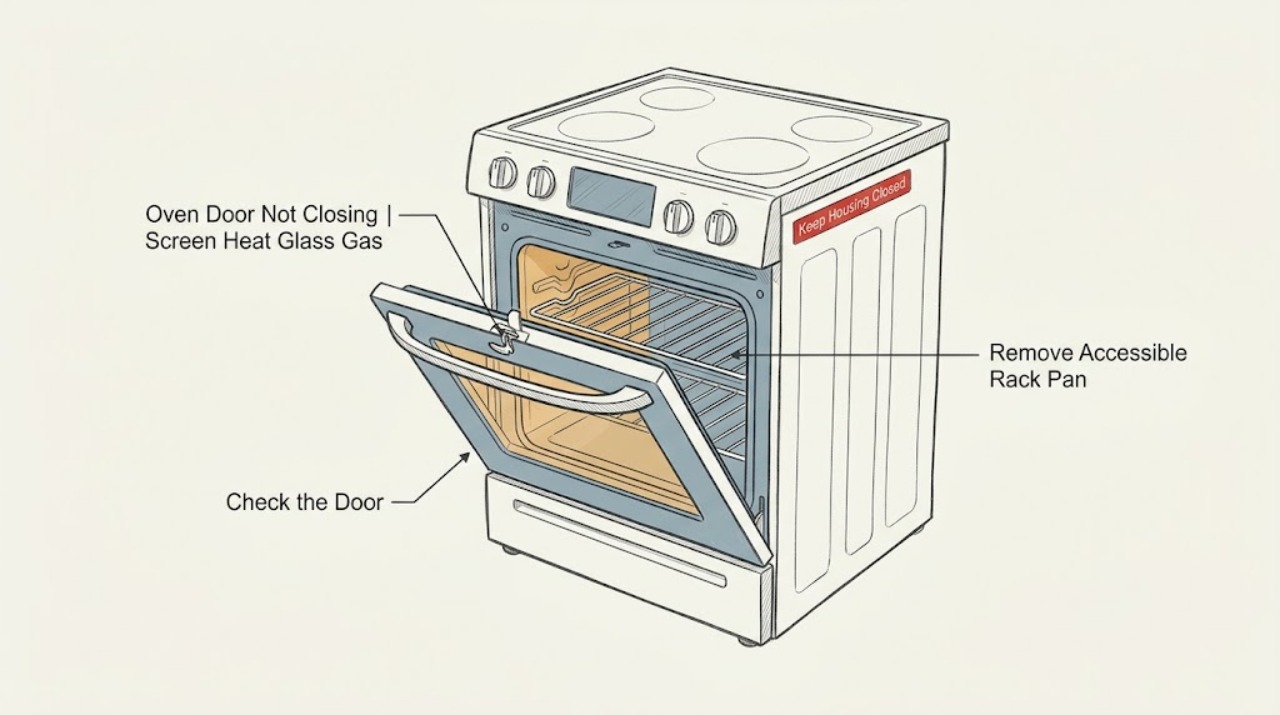
Work through in order
Diagnostic checks
Use only checks that match the exact appliance or system and its official guide.
-
Check 1
Before touching the door, turn the oven off using normal controls if they respond and look from ordinary access for hot glass, broken glass, smoke, burning odor, sparks, an unusually hot control area, an uncontrolled flame, or a gas smell.
Expected result: Record whether the cavity or door is still hot, whether glass or the seal is damaged, whether smoke or odor is present, and whether the appliance is electric, gas, or dual fuel according to its model information.
Next step: Stop using the oven. If safe without touching hot or wet electrical parts, isolate the appliance at its normal disconnect; for a gas smell, avoid switches and ignition, leave the area, and seek appropriate help from a safe location.
Stop if: Do not touch hot or broken glass, operate a gas ignition, open panels, or continue troubleshooting after smoke, sparks, burning odor, uncontrolled flame, or gas smell.
Why this matters
Why: Heat, broken glass, fire, electrical, or gas hazards override a door-alignment check. A gas smell requires a safety response, not an ignition test; a door that cannot close must not be used for cooking.
-
Check 2
Record the Thermador model and whether the door is a wall-oven, range, steam, speed, or other oven door; then note whether it is fully open, rubbing on one side, springing back, latched in a self-clean position, or stopping against something.
Expected result: A one-sided gap or rubbing suggests alignment, hinge, or seal involvement. A door that stops at a rack or pan suggests an accessible obstruction. A latch that remains extended after self-clean is a different branch from a door that is mechanically misaligned.
Next step: Open the matching Thermador owner manual and follow the branch for the recorded oven family; do not borrow a door-removal or latch procedure from another model.
Stop if: Do not force the door closed or keep operating the oven while a gap, rubbing, or latch obstruction remains.
Why this matters
Why: Thermador has multiple oven and range families, so the correct hinge, latch, seal, cleaning-lock, and reset instructions depend on the exact model.
-
Check 3
With the oven cool, remove only an accessible rack, pan, foil edge, or food residue that is visibly in the door path; wipe accessible residue with a suitable cloth and leave the hinge and latch hardware in place.
Expected result: The door may close squarely after an obstruction is removed, or it may still stop, rub, spring back, or leave a gap. A door that closes only when pushed hard is not a successful repair.
Next step: Close the door gently once to confirm normal fit. If it still does not close or seal evenly, keep the oven off and continue with the model-specific hinge, latch, or self-clean checks.
Stop if: Do not reach into a hot cavity, use sharp tools near the seal, bend a hinge, or force the door against an obstruction.
Why this matters
Why: A clear change after removing a visible obstruction supports a fit or cleaning issue. No change moves the diagnosis toward the seal, hinge, latch, door alignment, or cleaning-lock branch.
-
Check 4
When cool and safe, inspect the visible door seal, hinge arms, receiving surfaces, and latch area without removing panels or the door; compare both sides for a folded seal, foreign material, bent hinge, loose-looking trim, or a latch that is visibly extended.
Expected result: A folded or displaced seal may be visible without tools. A bent hinge, cracked glass, loose trim, damaged latch, or persistent one-sided gap indicates a repair condition rather than an adjustment to make by force.
Next step: Remove only loose debris that is plainly accessible. Leave damaged or misaligned hardware untouched and arrange qualified Thermador service using the model and the observed side or component.
Stop if: Do not bend hinge arms, tighten hidden fasteners, remove door hardware, lift the door by its handle, or use the oven with a damaged seal, hinge, latch, or glass.
Why this matters
Why: The door needs a continuous seal and aligned hinge and latch surfaces. Visible hardware damage can prevent safe closure and may worsen if the user pushes or lifts the door.
-
Check 5
If the door problem began during or after self-clean, confirm that the cavity is cool, all accessories are handled only as the manual permits, and the exact Thermador manual describes the normal self-clean completion or latch-release sequence.
Expected result: The latch may retract after the documented cooling and completion state, or it may remain extended while the display still indicates cleaning or a lock. If the latch remains extended after the model instructions, the door will not close completely.
Next step: Wait for the documented cool-down and use only the exact manual's completion or exit control. If the latch remains extended or the oven cannot confirm a safe state, keep it off and call service.
Stop if: Do not pry the door, defeat the self-clean lock, insert tools into the latch, or start another self-clean cycle to force release.
Why this matters
Why: Thermador states that a self-cleaning oven door latch releases after cooling and provides a model-dependent latch-retraction path; a persistent latch is a service issue, not a reason to pry the door.
-
Check 6
If the oven is cool, there is no gas smell or electrical hazard, and Thermador's page or the exact manual identifies a latch reset for the model, perform that documented reset once; for supported Thermador guidance, this may include switching the appliance off at its breaker briefly and restoring power, not repeated cycling.
Expected result: The latch may retract and the door may close normally, or the latch may remain extended, the display may return an error, or the breaker may trip again.
Next step: Test the door gently once after the reset. If it does not close evenly, keep the oven off and arrange qualified Thermador service rather than repeating resets.
Stop if: Do not repeatedly reset the breaker, bypass a latch, operate with a door gap, or perform any live electrical test.
Why this matters
Why: A successful documented reset suggests a controller or interrupted cleaning state; a persistent latch, returned error, or repeated trip indicates a latch, control, wiring, or safety fault requiring service.
-
Check 7
For a confirmed gas or dual-fuel Thermador appliance only, record whether the symptom is an actual gas smell, delayed ignition, abnormal flame, or merely a mechanical door gap; do not turn on a burner or oven to investigate a suspected leak.
Expected result: A gas smell or abnormal flame is a fuel-safety event, while a mechanical gap without gas symptoms remains a door, hinge, seal, or latch diagnosis. An electric oven follows the electrical and mechanical branches, not a gas branch.
Next step: If gas is smelled, avoid ignition and electrical controls, leave the area, and seek gas or emergency help from a safe location. If there is no gas symptom, keep the oven off and continue only with safe mechanical observations.
Stop if: Do not relight, repeatedly ignite, test for leaks with a flame, operate switches in a gas-smell situation, or continue after an abnormal flame or combustion odor.
Why this matters
Why: Fuel type changes the safe response, but a door that does not close is not proof of a gas fault. Gas ignition and leak diagnosis require the manufacturer's and qualified professional's procedures.
-
Check 8
Stop troubleshooting when the door still will not close or seal after accessible obstructions are removed and the exact model's safe latch or cleaning checks, or when hardware, glass, wiring, smoke, heat, or gas symptoms are present.
Expected result: Prepare the model and serial information, oven family and fuel type, door gap or rubbing location, seal and hinge observations, self-clean status, display code, reset performed, and any safety symptom.
Next step: Keep the oven unused and arrange qualified Thermador appliance service; use gas or electrical professionals when the evidence points to fuel or household power rather than the door itself.
Stop if: Do not cook with a door gap, use a damaged door or seal, defeat the latch, open panels, or retry after smoke, sparks, burning odor, uncontrolled flame, or gas smell.
Why this matters
Why: These details let a qualified technician distinguish an obstruction from a hinge, seal, latch, control, cleaning-lock, alignment, or fuel-safety fault without unsafe door removal or panel access.
Use your observations
Decision map
Find the observation that best matches what you see, then follow the next safe action.
-
PATH 01Safety boundary
What you see
The door or glass is hot or broken, smoke, burning odor, sparks, an uncontrolled flame, or a gas smell is present.
Do this next
Stop using the oven. Isolate power only if safe and without touching hot or wet electrics; for gas smell avoid ignition and switches, leave the area, and seek appropriate help from a safe location.
Why this path and its safety boundary
Why it matters: This is an immediate safety stop, not a door-alignment exercise.
Safety stop: Do not touch broken glass, ignite gas, operate electrical controls during a gas smell, or continue testing.
-
PATH 02Safety boundary
What you see
A rack, pan, foil, food residue, or other accessible material is visibly stopping the door and there is no hazard.
Do this next
Let the oven cool, remove only the accessible obstruction, and close the door gently once to check for an even seal.
Why this path and its safety boundary
Why it matters: The obstruction may be preventing normal closure.
Safety stop: Stop if the door still rubs, springs back, or needs force.
-
PATH 03Safety boundary
What you see
The path is clear but the door leaves a one-sided gap, the seal is folded or displaced, or the hinge or latch looks bent or damaged.
Do this next
Keep the oven off, leave hardware in place, record the affected side, and arrange qualified Thermador service.
Why this path and its safety boundary
Why it matters: A seal, hinge, latch, or door-alignment fault is likely; it is not a user-force adjustment.
Safety stop: Do not bend hinges, remove the door, or run the oven with a gap or damaged seal.
-
PATH 04Safety boundary
What you see
The issue began during or after self-clean and the latch remains extended while the oven is cooling or showing a cleaning or lock state.
Do this next
Wait for the exact model's cool-down and follow only its self-clean completion or latch-release instructions; service a persistent latch.
Why this path and its safety boundary
Why it matters: The lock may be performing its high-temperature safety function.
Safety stop: Do not pry, defeat, or repeatedly restart self-clean to move the latch.
-
PATH 05Safety boundary
What you see
The oven is cool and hazard-free, and Thermador's exact model guidance documents a latch reset applicable to this appliance.
Do this next
Perform the documented reset once, then check the door gently. A persistent latch or returned error requires service.
Why this path and its safety boundary
Why it matters: A controller or interrupted cleaning state may be recoverable without opening the oven.
Safety stop: Do not repeatedly cycle power or bypass the latch.
-
PATH 06Safety boundary
What you see
The appliance is confirmed gas or dual fuel and there is gas smell, delayed ignition, or abnormal flame.
Do this next
Do not ignite or operate switches; leave the area and seek gas or emergency assistance from a safe location.
Why this path and its safety boundary
Why it matters: The fuel symptom overrides the mechanical door check.
Safety stop: Do not relight, test with flame, or continue troubleshooting in the gas-smell area.
-
PATH 07Safety boundary
What you see
The door still will not close or seal after accessible obstructions are removed and the applicable model-specific latch or cleaning steps.
Do this next
Keep the oven unused and arrange qualified Thermador appliance service with the model and observed symptoms.
Why this path and its safety boundary
Why it matters: A hinge, seal, latch, alignment, control, or interlock fault needs professional diagnosis.
Safety stop: Do not cook through the fault, dismantle the door, or defeat the safety interlock.
Helpful context
Understand the symptom
Do not operate with a door that cannot seal
Start with the oven off and cool enough to inspect from ordinary access. A door that sits proud, rocks, catches on one side, or leaves a visible gap can leak heat and expose users to hot surfaces. Keep the oven out of use while the cause is identified. Thermador notes that warm air or steam from a vent can be normal during cooling, but that does not make a door that will not close safe to run.
Separate a simple obstruction from a hinge or latch fault
Remove only racks, pans, foil, or food debris that are plainly accessible and blocking the closing path. Check the visible seal for a section folded into the opening and look for a hinge arm that is visibly out of position or bent. Do not push a hinge back, lift a heavy door, or remove the door unless the exact manual explicitly gives a safe owner procedure for that model.
A self-clean latch is a model-specific state
If the problem began during or after self-clean, wait for the oven to cool and use the exact manual's completion or unlock instructions. Thermador describes a latch that will not retract and a self-clean exit path for supported models, but a latch position, control sequence, and safety interlock are not universal. Never pry a locked door or use a self-clean cycle as an improvised repair.
Gas symptoms change the response
A gas oven or dual-fuel range must be identified from its model documentation before any fuel-related reasoning. If gas is smelled, do not try to ignite the oven, operate electrical controls, or search for the fault by repeated testing. Leave the area and contact appropriate emergency or gas assistance from a safe location. A damaged door is not evidence of a gas leak, and an electric Thermador oven does not have an oven gas supply; use the correct safety branch for the appliance.
When checks do not resolve it
Need a professional?
Arrange qualified Thermador appliance service when the door remains open, rubs, springs back, leaves a gap, has a displaced or damaged seal, or has a bent hinge or latch after accessible obstructions and the exact model's safe cleaning-lock or reset steps. Request urgent help for broken or hot glass, smoke, burning odor, sparks, uncontrolled flame, gas smell, repeated breaker trips, or damaged wiring. Use qualified gas or electrical help when the evidence points to the fuel supply or household circuit.
Safety scope: This article supports cool, ordinary-access observations and exact-manual controls only. Do not force or remove the door, bend hinges, pry or bypass the latch, open panels, touch hot or broken glass, test live circuits, or ignite a suspected gas leak.
Common questions
FAQ
Why will my Thermador oven door not close completely?
Check for an accessible rack, pan, foil, or food residue first, then look for a folded seal, one-sided gap, bent hinge, or extended latch. If the path is clear and the door still needs force or leaves a gap, keep the oven off and arrange service.
Could self-clean be keeping my Thermador oven door from closing?
A self-clean latch can remain in a safety position while the oven is hot or completing the cycle. Wait for the exact model's cool-down and follow its completion instructions; never pry the door or start another self-clean cycle to force the latch.
Can I reset a Thermador oven latch?
Only if the Thermador support page or exact owner manual documents a reset for your model and the oven is cool and hazard-free. Perform it once as directed. A latch that stays extended, a returned error, or a repeated power trip requires service.
Should I use my Thermador oven if the door has a small gap?
No. A gap or door that does not seal evenly can expose users to heat and indicate a hinge, seal, latch, or alignment fault. Keep the oven off until the obstruction is removed or the appliance is inspected by qualified service.
What if my gas Thermador oven smells like gas while the door will not close?
Treat the gas smell as the priority: do not ignite the oven or operate electrical switches, leave the area, and seek gas or emergency assistance from a safe location. Do not try to identify the leak by repeated ignition tests.
Read the exact guide
Official sources
- Oven Troubleshooting for Ranges | Support | ThermadorThermador · Official Thermador troubleshooting page covering door obstruction or hinge checks, self-clean latch cooling, latch retraction, oven vent behavior, and model-specific reset guidance.
- Search for Owner ManualsThermador · Official Thermador manual lookup for the exact oven or range model; controls, door hardware, fuel type, and self-clean behavior vary by model.
- CPSC News Feature: Getting Ready For Cold WeatherU.S. Consumer Product Safety Commission · Government safety guidance for a gas smell: do not attempt ignition or operate electrical switches, leave the area, and seek appropriate help; this is not a Thermador repair procedure.
Community feedback
Share a repair observation
Share a plain-text repair observation. Accepted observations are published automatically; this page may take a moment to update.