
On this page
Start here
Quick answer
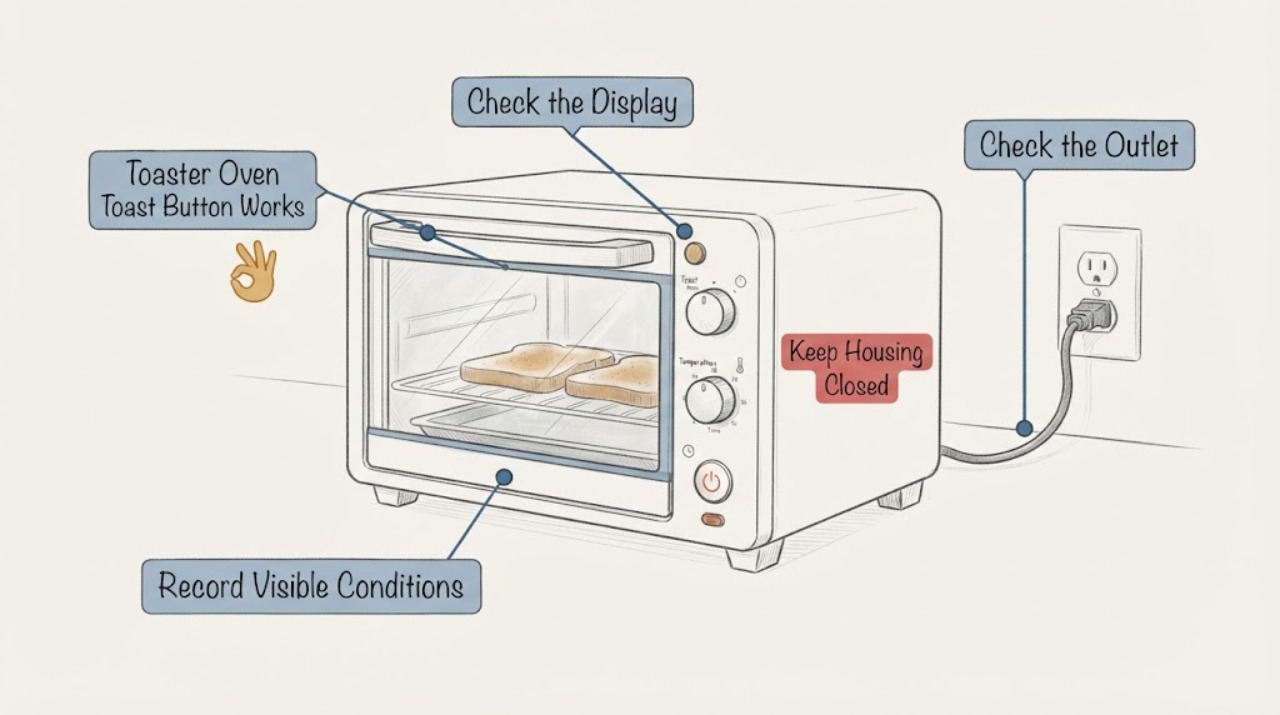
Stop using a toaster oven when its Toast start/stop control works only intermittently. If a cycle is running, use the exact model's cancel or stop control only if it responds normally; do not hold, force, or repeatedly press a failing button. From a safe, dry position, disconnect power if that can be done without reaching across hot surfaces, then let the oven cool. With the oven unplugged, check only the visible cord, outlet connection, display or standby indication, and the outside of the control for damage or contamination. Manufacturer controls and start sequences vary by model: official GE guidance describes both a Start control and a Cancel control and notes that some modes require a second Start press, so an intermittent Toast button cannot identify one universal failed part. If the control remains unreliable, or there is smoke, a burning smell, heat damage or a damaged cord, keep the oven out of service and arrange qualified repair.
Before you begin
Safety first
- Do not hold or force the button, repeatedly heat the oven to test it, open the housing, clean internal contacts, insert metal tools, probe live wiring, bypass a control, or continue using the oven with smoke, burning smell, sparks, abnormal heat or cord damage.
Work through in order
Diagnostic checks
Use only checks that match the exact appliance or system and its official guide.
-
Check 1
If the Toast control fails while the oven is running, stop interacting with the panel. Use the exact model's Cancel or Stop control only if it responds normally; if it does not, do not hold it down, force it, or continue the cycle. From a safe, dry position, disconnect power only if you can do so without reaching across hot surfaces, then leave the oven untouched until fully cool.
Expected result: The cycle stops normally, the control does not respond, or smoke, a burning smell, sparks or abnormal heat is present.
Next step: For a nonresponsive or hazardous condition, keep the oven out of service and arrange qualified appliance or electrical service. Do not restart it to repeat the test.
Why this matters
Why: A normal stop shows only that the documented stop command worked on that attempt. A nonresponsive control means the oven cannot be relied on to stop through its interface; smoke, smell, sparks or heat damage is an immediate safety condition.
-
Check 2
When the oven is cold and unplugged, inspect the plug and cord for visible cuts, crushing, discoloration or looseness, and confirm the plug is fully seated in the intended wall outlet. Do not use an extension cord or open the plug, outlet or oven.
Expected result: The cord or plug is damaged, the plug is loose, the outlet connection is uncertain, or the cord and connection look intact.
Next step: Do not use the oven with cord damage or a loose/damaged outlet; have the appropriate service professional correct it. If the visible connection is sound, continue only with the model-specific manual and the external observations below.
Why this matters
Why: A damaged cord or questionable connection can make a button appear intermittent because the oven is not consistently powered. An intact visible connection does not clear an internal control fault.
-
Check 3
After the oven has cooled, record the behavior of the display or power indicator when the appliance is connected, without placing food inside or starting a heating cycle. Note whether the display is dark, shows a standby or sleep state, or becomes ready but ignores the Toast control. Use the exact manual to identify the model's standby behavior; do not repeatedly press the button to make it respond.
Expected result: There is no display or indicator, the display is in a documented standby/sleep state, or the oven is powered and ready but the Toast control still misses presses.
Next step: Follow only the exact manual's wake or start instruction. If the control remains intermittent after the documented sequence, stop using the oven and provide the model and the observed pattern to qualified service.
Why this matters
Why: No display keeps power or the main unit in scope; a documented standby state may explain a first press that wakes the interface; a powered oven that repeatedly misses a control input keeps the control interface or main unit in scope without identifying a replaceable part.
-
Check 4
With power disconnected and the oven fully cool, look at the control face, button or knob, door and accessible tray area for a cracked or displaced control, spilled liquid, heavy grease, loose trim or trapped food. Wipe only surfaces and removable accessories exactly as the model manual permits; do not pry the control, insert metal, spray into openings or clean internal contacts.
Expected result: There is visible damage or contamination near the control, the exterior looks intact, or the button feels physically loose or binds.
Next step: Keep the oven unplugged and arrange model-specific service for damage, liquid ingress, looseness or binding. Do not operate it to see whether cleaning or pressure temporarily restores the button.
Why this matters
Why: Visible damage, liquid ingress or a binding control is a service boundary rather than proof of a particular switch or board failure. A clean, intact exterior does not rule out an internal fault.
Use your observations
Decision map
Find the observation that best matches what you see, then follow the next safe action.
-
PATH 01Next step
What you see
The Toast control does not stop an active cycle, or the oven produces smoke, sparks, a burning smell, abnormal heat or visible cord damage.
Do this next
Stop use, disconnect power only from a safe dry position, keep clear of hot surfaces, and arrange qualified service. Do not open the enclosure or bypass the control.
Why this path and its safety boundary
Why it matters: The appliance cannot be treated as safely controllable, and the symptom does not justify repeated heating tests.
-
PATH 02Next step
What you see
The display is dark, wakes from a documented standby state, or the exact manual shows that Toast requires a particular start sequence.
Do this next
Follow only that model's manual once the oven is cold and empty; if the same input is still intermittent, stop using the oven and request service.
Why this path and its safety boundary
Why it matters: Power or documented control sequencing may explain a missed first press, but it does not prove the button itself is defective.
-
PATH 03Next step
What you see
The oven has stable visible power and the exact documented sequence is followed, but the Toast control still misses presses or feels loose.
Do this next
Leave the appliance out of service and give a qualified technician the full model number, the exact button sequence, whether other controls respond, and any visible damage.
Why this path and its safety boundary
Why it matters: An internal control or interface problem remains possible, but no safe user-level test can identify the part from this symptom alone.
Helpful context
Understand the symptom
An intermittent control is a stop-use symptom, not a diagnosis
A Toast button that responds sometimes may reflect the control sequence, standby state, power connection, or an internal control fault. The symptom alone cannot identify a switch, keypad, board or other part, especially without a brand and model. Treat the unreliable control as a reason to stop using the heating appliance while you document what happens from the outside.
Use the exact manual for the button sequence
Toaster ovens do not all use the same control logic. In one opened GE toaster-oven guide, an automatic mode starts immediately while a manual mode may require another Start press after preheat; the same guide uses Cancel to end a cycle. That is a reminder to verify the assigned model's instructions, not a reason to transfer GE timing or button behavior to an unidentified oven.
Keep the inspection outside the enclosure
After power is disconnected and the oven is completely cool, limit inspection to the visible cord, plug connection, display or standby indication, control face, door and accessible trays. Do not remove the housing, pry up the button, clean beneath it, probe contacts, use metal tools, or run the heating elements to see whether a failed press will work.
When checks do not resolve it
Need a professional?
Arrange qualified appliance service when the Toast control remains intermittent after the exact manual's documented sequence, any control is loose or binding, the oven will not stop normally, the display remains unexpectedly dead, or the oven shows smoke, burning smell, sparks, heat damage or a damaged cord.
Safety scope: Do not hold or force the button, repeatedly heat the oven to test it, open the housing, clean internal contacts, insert metal tools, probe live wiring, bypass a control, or continue using the oven with smoke, burning smell, sparks, abnormal heat or cord damage.
Have this ready
- Provide the full model and serial information, whether the button fails to start, stop or both, whether the display and other controls respond, the outlet/cord observations, and whether the failure occurs cold or only after heating.
Common questions
FAQ
Can I press and hold the Toast button until it starts?
No. A control that works only intermittently should not be forced or treated as reliable. Use only the exact model's documented press sequence; if it still misses inputs, stop using the oven and arrange service.
Can I spray cleaner or clean under the button?
Do not spray into the control or pry it up. With the oven unplugged and fully cool, clean only the exterior or removable accessories in the manner stated by the exact manual. Internal contact cleaning requires qualified service.
Why might the first press do nothing?
Some toaster ovens have a standby or sleep state, and some use different start steps for automatic and manual modes. Check the exact manual and observe the display; do not assume a standby behavior explains repeated missed presses.
Is it safe to keep using the oven if the Toast button sometimes works?
No. Intermittent control can leave the oven's start or stop behavior unreliable. Keep it out of service, especially if there is smoke, a burning smell, sparks, abnormal heat or cord damage.
Read the exact guide
Official sources
- Calrod and Quartz Toaster Ovens - TroubleshootingGE Appliances · Opened official GE troubleshooting guidance. It supports checking the visible power connection and standby/display state, and escalating an oven that fails to heat or shows listed hazards; it does not diagnose an intermittent button or authorize enclosure access.
- Calrod and Quartz Toaster Ovens - Getting StartedGE Appliances · Opened official GE toaster-oven guidance. It supports unplugging and cooling before handling, avoiding metal cleaning tools, using a grounded outlet without an extension cord, and keeping clearance. It is used as a family-specific safety example, not as proof of the unidentified oven's control design.
- Calrod and Quartz Toaster Ovens - How to OperateGE Appliances · Opened official GE operation guidance. It demonstrates that start and cancel behavior depends on the mode and exact product; no GE sequence or timing is transferred to an unidentified toaster oven.
Community feedback
Share a repair observation
Share a plain-text repair observation. Accepted observations are published automatically; this page may take a moment to update.