
On this page
Start here
Quick answer
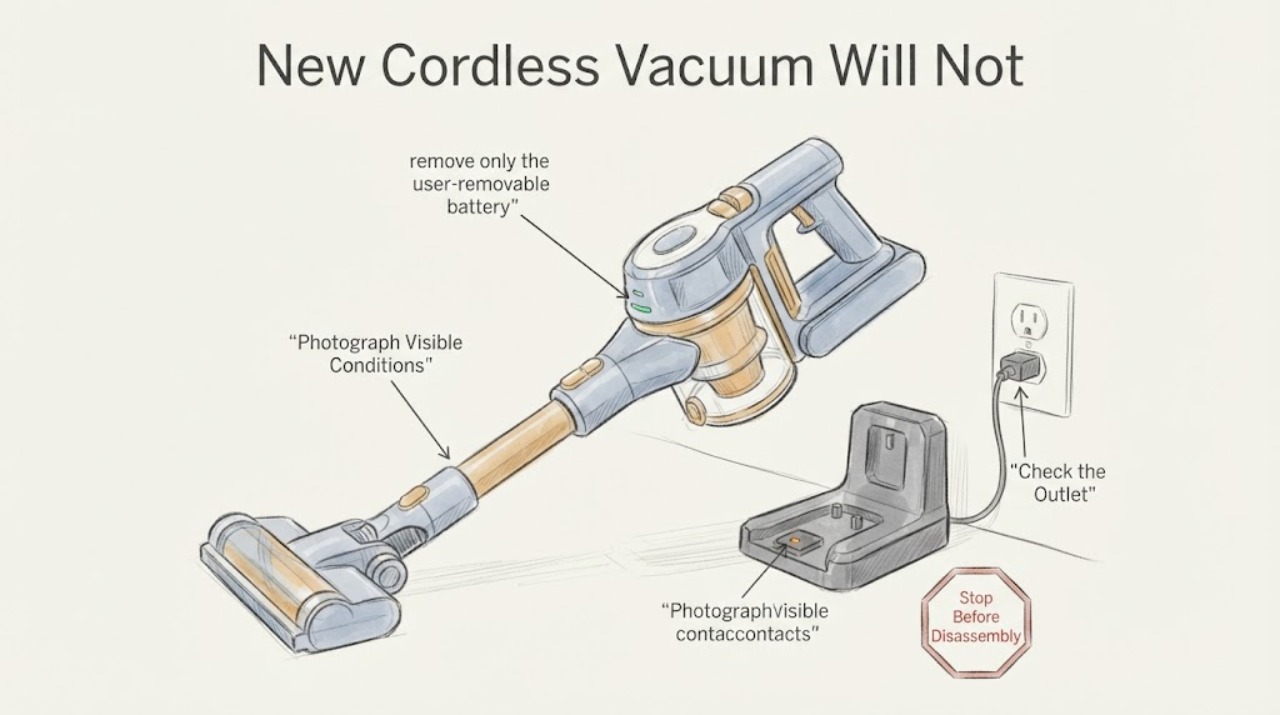
For a new cordless vacuum with no charging sign, do only the checks that can be matched to the exact product: read the supplied manual and charger label, use the charger supplied by the manufacturer directly in a known-good wall outlet, and reseat the vacuum or removable battery on its dock or contacts with the power disconnected while you inspect only visible, dry surfaces. Note exactly what the model's indicator does; light colors, charging times, buttons, and battery removal are not universal. Do not swap in a generic charger, bridge the battery, open the pack, or keep retrying if the battery or charger is hot, swollen, leaking, discolored, noisy, smoking, or smells abnormal. If the correct charger and seating checks still produce no indicator on a first-use product, preserve the receipt, warranty, packaging, model and serial information, and use the seller's return/exchange or manufacturer's warranty/service route rather than declaring a failed battery.
Work through in order
Diagnostic checks
Use only checks that match the exact appliance or system and its official guide.
-
Check 1
Identify the vacuum's full model or product number, the battery arrangement, the supplied charger or dock, and the indicator legend in the exact manual. Photograph or write down the charger's output label and the indicator state before trying another connection.
Expected result: The manual clearly identifies the supplied charging method and indicator meaning, or the model, charger, or light behavior remains unknown.
Next step: If the charging method is still unclear, stop at identification and ask the seller or manufacturer for the exact manual. Do not borrow a charger or apply a different brand's reset sequence.
Why this matters
Why: A missing model cannot support a universal red/blue light interpretation, charging duration, or button combination. The device-specific manual is needed before any control or battery procedure is applied.
-
Check 2
Inspect the supplied plug, adapter, cord, dock and visible charging contacts from a dry position. If they are intact, connect only the supplied charger directly to a known-good wall outlet; do not use a power strip, multiplug adapter, extension cord, or generic charger for this test.
Expected result: The outlet and supplied charger are intact and the vacuum shows the model-documented charging indication, or there is still no indication or there is visible damage, heat, odor or arcing.
Next step: For no indication after one safe connection, continue only to the unpowered seating check and then use seller/manufacturer support. If the charger, cord, outlet or connector is damaged or abnormal, unplug it if safe and stop using it.
Why this matters
Why: A visible indicator after the correct connection shows that the charging path has responded, but it does not prove full battery capacity. No indicator leaves the cause unresolved; damage or abnormal heat is a safety stop rather than a charging diagnosis.
-
Check 3
With the charger disconnected from the outlet, remove only the user-removable battery if the exact manual permits it. Wipe no liquid into the device; inspect and gently clear only visible dust or debris from dry external contacts, then seat the vacuum or battery fully in its documented dock or connector without forcing it.
Expected result: The unit clicks or seats normally and the indicator changes, or it does not seat, the contacts are damaged, or the indicator remains absent.
Next step: If the unit still does not indicate charging, stop repeated reseating. Do not scrape contacts with metal, open the housing, bypass a battery-management circuit, or measure live charging points.
Why this matters
Why: A changed indicator makes seating or contact alignment a possible explanation, but it does not prove a defective battery or contact assembly. A damaged contact or persistent absent indication needs model-specific service or a return decision.
-
Check 4
Run no further charge experiments if the battery or charger becomes noticeably hot, changes shape or color, leaks, smells unusual, makes odd noises, or emits smoke. Move people away; disconnect power only if it can be done without touching a hazardous or smoking device, and follow the local emergency guidance for a fire.
Expected result: There are no abnormal heat, odor, shape, leak, noise or smoke signs, or one of those signs is present.
Next step: For any abnormal sign, keep the product out of use, stay at a safe distance if it is smoking or burning, and contact emergency services for an active fire or the manufacturer/qualified battery service for handling and disposal instructions. Otherwise proceed to the return/warranty record step.
Why this matters
Why: USFA treats these signs as reasons to stop using a lithium-ion battery. A safety event cannot be narrowed to a charging fault by an external user test, and a lithium-ion pack should not be opened or repaired at home.
-
Check 5
Document the first-use failure: purchase date, model and serial, charger and dock markings, outlet used, whether a charging indicator appeared, how long it was connected, and any safe external checks completed. Keep the receipt, warranty, packaging and accessories.
Expected result: The vacuum begins charging under the exact manual's indication, or the no-charge condition persists after the supplied charger and seating checks.
Next step: If charging remains absent, contact the seller promptly about return or exchange and the manufacturer about written warranty/service options. Supply the documented model and indicator behavior; do not buy a replacement battery or charger until compatibility is confirmed by the manufacturer.
Why this matters
Why: A persistent first-use no-charge condition is a product-support or return decision, not evidence of a particular battery, control board, motor, or connector failure. FTC guidance says return deadlines and warranty coverage are controlled by the seller's policy and written warranty, and that purchase records should be kept.
Use your observations
Decision map
Find the observation that best matches what you see, then follow the next safe action.
-
PATH 01Next step
What you see
The exact supplied charger is connected directly to a known-good outlet, the vacuum or battery is seated as the manual shows, and no charging indicator appears.
Do this next
Stop repeated tests and use the seller's return/exchange window or the manufacturer's warranty/service route with the model, serial, charger markings and indicator notes.
Why this path and its safety boundary
Why it matters: The charging response is unconfirmed, but the observation does not identify whether the outlet, charger, dock, contacts, battery, or control is responsible.
-
PATH 02Next step
What you see
The indicator appears under the correct charger, but the vacuum still will not run after the exact manual's documented charge period or start condition.
Do this next
Follow only the exact manual's normal user instructions once, then request manufacturer service if the no-start condition remains. Do not use a cross-brand button sequence or open the pack.
Why this path and its safety boundary
Why it matters: Charging indication alone does not establish usable charge or a failed battery; the model may have a start lockout, battery status rule, or separate fault that cannot be transferred from another vacuum.
-
PATH 03Next step
What you see
The charger or battery is hot, swollen, leaking, discolored, unusually noisy, or giving off an odor or smoke while connected or stored.
Do this next
Stop charging and keep people away; for smoke or fire evacuate and call emergency services, and otherwise obtain manufacturer or qualified battery-service instructions for safe handling and disposal.
Why this path and its safety boundary
Why it matters: This is a battery safety event, not a routine no-charge branch. USFA says to stop using lithium-ion batteries when these warning signs appear.
-
PATH 04Next step
What you see
The product is new, has no abnormal battery signs, and the indicator behavior remains unknown because the brand or model is missing.
Do this next
Read the rating label and exact manual if available; otherwise preserve the purchase records and contact the seller or manufacturer rather than trying another brand's charger or procedure.
Why this path and its safety boundary
Why it matters: The identity gap prevents a reliable light-color, charging-time, reset, battery-removal, or part conclusion, but it does not prevent a safe return or warranty request.
Helpful context
Understand the symptom
No brand or model means no universal charging light or button sequence
The supplied topic identifies a new cordless vacuum but gives no manufacturer, model, battery format, charger type, or region. A red, blue, flashing, or absent indicator can have different meanings, and some vacuums charge on a dock while others use a direct plug or removable pack. Treat the exact manual and the labels on the supplied charger as the authority. The checks below are deliberately external and do not identify a failed battery, charging board, motor, or connector.
A first-use no-charge report should end at the return or warranty boundary
If a new vacuum still shows no charging response after its supplied charger is correctly connected and the unit is correctly seated, record the model and serial label, charger markings, outlet used, and the indicator behavior. Keep the receipt, written warranty, packaging and accessories together. FTC consumer guidance directs buyers to check the seller's return policy and deadline, preserve purchase records, and contact the seller or manufacturer about the defect; it does not require guessing which internal part failed.
When checks do not resolve it
Need a professional?
Promptly, while the seller's stated return or exchange deadline is still open, when a new product still has no charging indication after the supplied charger and seating checks., When the model, charger, dock, indicator legend, or battery arrangement cannot be identified from the product and paperwork., Immediately for smoke, fire, unusual odor, leaking, shape change, excessive heat, odd noise, arcing, or a damaged charger, cord, plug or battery., Before opening the housing or battery pack, bypassing a charging circuit, using a substitute charger, testing live contacts, or ordering a battery or dock part.
Common questions
FAQ
Should I try another vacuum charger to see if it works?
No. Use the charger supplied for that vacuum or one the manufacturer explicitly confirms as compatible. USFA recommends the manufacturer's supplied charger, and UL Research Institutes explains that mismatched chargers and batteries can fail to power correctly and create safety risks.
Does a blue or red light prove the battery is charging?
Not without the exact model manual. An indicator can show a connection or a product-specific state, but this no-model topic cannot assign a color meaning or prove battery capacity. Record what the manual says and what the light actually does, then use support if the result is inconsistent.
Can I open the battery pack or jump-start it because the vacuum is new?
No. Do not open, bridge, or bench-charge an unidentified lithium-ion pack. USFA says lithium-ion battery-pack repairs should be performed by a certified repair facility; a new product with no charge response should go through the seller's return process or the manufacturer's warranty/service route.
What should I keep before asking for a return or warranty service?
Keep the receipt, written warranty, original packaging and accessories, and record the full model and serial, charger markings, outlet used, indicator behavior and safe checks already completed. FTC guidance says these records help with return and warranty discussions, whose deadlines and remedies depend on the seller's policy and written warranty.
Read the exact guide
Official sources
- Safe Shopping TipsUL Research Institutes · Supports the warning against counterfeit or mismatched chargers for a new cordless vacuum; it does not identify any brand, model or replacement part.
- WarrantiesFederal Trade Commission · Supports the article's warranty-record and escalation boundary for a new product; coverage and remedy remain specific to the product's written warranty and seller policy.
- Universal Chargers and SafetyUL Research Institutes · Supports the no-generic-charger boundary only; it is not a vacuum-specific charging or repair manual.
- Solving Problems With a Business: Returns, Refunds, and Other ResolutionsFederal Trade Commission · Supports documenting a new no-charge product and checking the seller's policy; it does not promise a particular refund, exchange or deadline.
- Lithium-Ion Battery Safety for Electronic DevicesU.S. Fire Administration · General charging-safety source for a cordless vacuum with a rechargeable battery; it does not define any vacuum model's indicator, charge time or internal fault.
- Educating your CommunityU.S. Fire Administration · Supports the article's external charging and stop-use boundary for lithium-ion powered devices; it is not a vacuum-specific manual.
- Battery Fire SafetyU.S. Fire Administration · General lithium-ion warning-sign and safe-use guidance; it does not diagnose this unidentified vacuum or authorize a repair.
Community feedback
Share a repair observation
Share a plain-text repair observation. Accepted observations are published automatically; this page may take a moment to update.