
On this page
Start here
Quick answer
A Dyson vacuum making noise should be diagnosed by the sound and by what changes when the detachable air path or floor tool is isolated. A whistle or hiss commonly makes a blockage or damaged or missing seal more likely; a ratcheting, clicking, or chattering sound at the cleaner head makes hair, threads, or another brush-bar obstruction more likely; pulsing or surging makes a blockage or clogged filter more likely. Turn the machine off before touching a cleaner head, brush bar, wand, hose, bin, or filter, and unplug a corded model; follow the exact model guide for a cordless or robot model. Clear only accessible debris and wash a washable filter exactly as Dyson specifies, allowing it to dry completely before refitting. Keep hands, hair, clothing, and tools away from a moving brush bar. Stop using the machine for smoke, sparks, burning smell, hot electrical parts, a damaged cord or battery, liquid ingress, a grinding noise that remains after external checks, or a machine that runs without the normal control. Do not open the motor or battery pack, perform live electrical tests, or keep running a loud machine to reproduce the fault.
Before you begin
Safety first
- The user may identify the sound, disconnect power, inspect accessible detachable air paths and floor tools, remove visible debris as the exact manual permits, and clean a model-approved washable filter. Motor, fan, bearing, wiring, battery pack, sealed air path, damaged drive, and energized testing belong to qualified service.
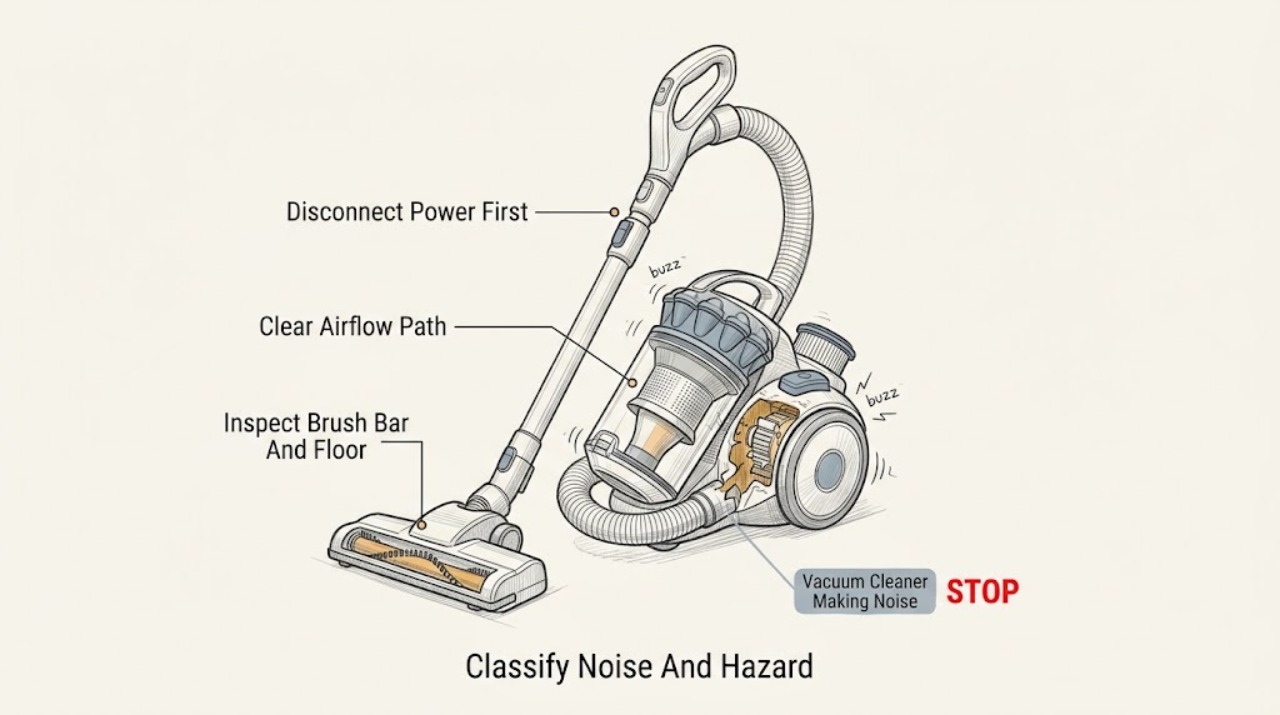
Work through in order
Diagnostic checks
Use only checks that match the exact appliance or system and its official guide.
-
Check 1
From a safe position, note whether the sound is a whistle or hiss, pulsing or surging, brush-bar rattle or ratchet, loose clicking, squeal, grinding, or electrical buzz. Note whether it occurs at the main body, wand or hose, cleaner head, or a single accessory. Stop immediately for smoke, sparks, burning smell, a hot plug or battery, liquid ingress, damaged insulation, or an abnormal control that runs without being commanded.
Expected result: The sound changes with suction or airflow, follows one tool, appears only when the brush bar is engaged, occurs with all tools removed, or is accompanied by a hazard.
Next step: Record the exact model and tool, then continue only if the machine is cool and there is no hazard. For smoke, sparks, burning smell, overheating, liquid, or damaged power parts, isolate power safely, do not retest, and arrange service.
Stop if: Do not keep operating a loud, hot, sparking, or smoking machine to identify the sound, and do not open a battery or motor housing.
Why this matters
Why: A sound tied to airflow suggests a blockage or seal; a sound tied to one tool makes that tool or its brush bar more likely. A persistent motor or electrical sound with hazards is not a user-level blockage check.
-
Check 2
Turn the machine off before disconnecting the wand, hose, bin, cyclone, or accessory. Unplug a corded model and follow the exact cordless model guide before removing a tool. Check both ends of the wand or hose, the visible bin inlet, cyclone shroud opening, and cleaner-head neck for compacted dust or an object. Refit each connection firmly without forcing it.
Expected result: A blockage is visible, a hose or seal is split or missing, a connection is loose, suction is weaker than usual, or the air path is clear and correctly seated.
Next step: Remove only accessible loose debris and reseat the documented connection, then perform one brief cool retest. If a hose or seal is damaged, or the noise remains with the path clear, leave the machine off and arrange service.
Stop if: Do not probe deep into the motor inlet, cut a hose, dismantle the cyclone, or use compressed air or liquid where the manual does not permit it.
Why this matters
Why: Dyson's unusual-noise guidance makes a blockage or damaged or missing seal more likely when a vacuum whistles or loses suction. A clear and sealed detachable path shifts suspicion toward the filter, floor-tool drive, or internal motor path.
-
Check 3
With power disconnected, inspect the cleaner head or turbine tool for wrapped hair, thread, debris in the neck, a loose end cap, damaged soleplate, obstructed duct, or a brush bar that cannot turn freely by the method allowed in the exact manual. Keep fingers, hair, and clothing away from the bar. Use a coin or release method only where the tool is designed for it, and refit every cover before testing.
Expected result: The noise follows the floor tool; hair or fibers are wrapped around the brush bar; the bar is obstructed or stops; the soleplate or end cap is damaged; or the tool is clear and the noise remains.
Next step: Clear only accessible hair and debris as Dyson documents, refit the tool, and make one short test. If the brush bar still rattles, will not rotate, a cover is damaged, or the sound persists, stop using that tool and arrange service.
Stop if: Never touch a moving brush bar, bypass an obstruction sensor, run with the soleplate or guard removed, or force a seized bar.
Why this matters
Why: A tool-specific rattle or ratchet with wrapped fibers is more consistent with a brush-bar obstruction or drive issue than a main motor fault. Damage or persistent noise after clearing requires a tool-level repair decision, not continued operation.
-
Check 4
If the sound is pulsing, surging, or accompanied by reduced suction, check the filter and bin condition using the exact model instructions. Empty the bin if full, inspect the accessible inlet and shroud, and wash only a filter that the manual identifies as washable. Use cold water where Dyson specifies it and leave the filter to dry completely before refitting; do not test with a wet or missing filter.
Expected result: The bin or inlet is blocked, the filter is visibly loaded, the filter is wet, the machine pulses only with the filter fitted, or the path is clear and the fully dry filter changes nothing.
Next step: Clear the documented accessible blockage or refit the fully dry filter and perform one brief test. If pulsing, squealing, or abnormal noise remains, do not continue cycling the machine; arrange qualified service.
Stop if: Do not use a wet filter, wash a non-washable component, put a filter near flame or heat, or operate without the required filter or bin seals.
Why this matters
Why: Dyson attributes applicable cordless-machine pulsing to a blockage or clogged filter. A noise that persists after a clear path and completely dry filter makes a deeper airflow, bearing, drive, battery, or motor fault more likely.
-
Check 5
Use the rating label or Dyson account to identify the exact model and cleaner type, then compare the noise symptom with that model's official troubleshooting and user guide. Record any light pattern, blockage indicator, thermal shutoff, trigger or switch behavior, and whether the sound is present with the main machine separated from every accessory.
Expected result: The model guide identifies a safe external check; a blockage or thermal indicator clears after the documented action; the machine cuts out or overheats; a light or control warning persists; or no supported external check changes the noise.
Next step: Follow only the exact model guide once for a documented external reset or cool-down. If the warning returns, the machine overheats, the noise is internal, or the model procedure does not resolve it, leave it out of service and arrange qualified Dyson or appliance repair.
Stop if: Do not generalize a light pattern, code, filter interval, test, or part across Dyson models, and do not perform live electrical measurements.
Why this matters
Why: Dyson publishes different procedures for cordless, upright, canister, handheld, robot, wet, and wet-and-dry products. A model-specific warning or persistent sound can indicate a protected or internal fault rather than a universal replaceable part.
Use your observations
Decision map
Find the observation that best matches what you see, then follow the next safe action.
-
PATH 01Safety boundary
What you see
The machine whistles or hisses and suction is weaker, or the noise changes when the wand, hose, or cleaner head is isolated.
Do this next
Turn the machine off, clear only visible accessible blockages, inspect seals and connections, and perform one brief retest. Arrange service for a split hose, missing seal, or persistent noise.
Why this path and its safety boundary
Why it matters: A blockage or damaged or missing seal in the accessible air path is more likely than a brush-bar drive fault.
Safety stop: Do not operate with a damaged hose or open motor inlet, and stop for overheating, smoke, or electrical odor.
-
PATH 02Safety boundary
What you see
A rattling, clicking, or ratcheting sound appears only when a floor tool or turbine head is attached, especially with wrapped hair or fibers visible.
Do this next
Disconnect power, clear the documented accessible brush-bar and neck area, refit all covers, and test once. Keep the tool out of use and arrange service if the noise or seizure returns.
Why this path and its safety boundary
Why it matters: A brush-bar obstruction, tool duct blockage, end-cap, soleplate, belt, or drive issue is more likely than the main vacuum motor.
Safety stop: Do not touch the bar while powered, run with the guard removed, or force a seized brush bar.
-
PATH 03Safety boundary
What you see
The motor pulses or surges and suction changes, with a loaded bin, visible inlet restriction, or dirty filter.
Do this next
Empty the bin, clear the accessible inlet, and wash and fully dry the model-approved filter. If pulsing continues with the clear, dry path, arrange service.
Why this path and its safety boundary
Why it matters: A blocked airflow path or clogged filter is more likely; Dyson documents this pattern for applicable cordless models.
Safety stop: Do not operate with a wet or absent filter and do not put a filter in a dryer, oven, microwave, or near a flame.
-
PATH 04Safety boundary
What you see
A squeal, grinding, electrical buzz, or harsh vibration remains with the wand, hose, cleaner head, and accessories removed, or the machine becomes hot or cuts out.
Do this next
Turn the machine off, disconnect power safely, leave it out of service, and arrange qualified diagnosis with the exact model and symptom record.
Why this path and its safety boundary
Why it matters: An internal motor, bearing, fan, drive, battery, wiring, or thermal-protection fault is more likely; the sound does not identify a compatible part.
Safety stop: Do not open the motor or battery pack, perform live tests, keep restarting a hot machine, or use it after smoke, sparks, or burning smell.
-
PATH 05Safety boundary
What you see
A blockage light, thermal shutoff, control warning, or brush-bar indicator returns after the exact model's safe external procedure, or the product type is wet, robot, or another architecture not covered by the observed instructions.
Do this next
Record the model, indicator, sound, tool, and result of the documented check, then arrange qualified Dyson or appliance service.
Why this path and its safety boundary
Why it matters: The machine-specific manual and service path are more reliable than a cross-model diagnosis; continued testing can damage the machine or defeat protection.
Safety stop: Do not copy a reset, filter wash, brush-bar release, or part from another Dyson model and do not bypass a sensor or protection system.
Helpful context
Understand the symptom
Start with the sound, not a guessed part
A high-pitched whistle or hiss usually points the diagnosis toward a restricted air path or a seal that is not seated. A repeated rattle or ratchet that follows the floor tool points toward the brush bar, end cap, belt or drive area, depending on model. A pulsing motor with changing suction points toward airflow restriction or a filter condition. A deep grinding, electrical buzz, smoke, or a sound that remains with every tool removed is not a reason to open the motor; leave the machine off and arrange service.
Isolate detachable tools while powered off
Turn the machine off before removing the wand, hose, bin, cyclone, cleaner head, or accessory. For corded machines, unplug it; for cordless machines, follow the model guide for safe battery isolation. Inspect the openings and connections you can reach without opening the motor housing. If the sound occurs only with a particular head or tool, that result is more useful than a brand-wide part guess.
Brush-bar checks are model and tool specific
Dyson describes brush bars stopping or making noise when hair, threads, or other debris obstructs them. The machine must be off before debris is removed, and some heads use a coin-operated end cap while others use a different release. Clear only the tool's documented accessible path. Keep hands and clothing away from a brush bar during any permitted visual test, and do not use a damaged soleplate or exposed drive.
Filters can change both airflow and sound
A clogged filter can restrict airflow and make a cordless machine pulse or sound strained. Use only the exact model's washable-filter instructions. Dyson's cordless guidance specifies cold-water washing for applicable filters and complete drying before refitting; a filter must not be put in an oven, dryer, microwave, or near a flame. A noise that persists with a clean, completely dry filter and clear external path needs qualified diagnosis.
Safety boundary
Stop conditions
- Stop and isolate power safely for smoke, sparks, burning smell, liquid ingress, a hot plug or battery, damaged cord or insulation, or repeated electrical cut-out.
- Turn the machine off before touching or removing the wand, hose, bin, cyclone, cleaner head, brush bar, filter, or accessory; unplug corded models.
- Keep hands, hair, clothing, and tools away from a moving brush bar and never run a head with its soleplate, guard, or end cap removed.
- Do not open the motor or battery pack, perform live electrical tests, bypass blockage or thermal protection, or substitute parts across Dyson models.
- Do not operate with a wet or missing required filter, heat a filter near flame, or keep restarting a machine that is hot or making a persistent grinding or electrical noise.
Only after diagnosis
Potential parts
- washable or replacement filter
Consider only when the exact model manual identifies the filter as replaceable and qualified diagnosis finds damage or persistent restriction after correct cleaning and complete drying.
Filter shape and washability vary by Dyson model; verify the exact machine and manufacturer fit information before selecting a part. - cleaner head brush bar or end-cap component
Consider only when the noise follows one cleaner head and qualified diagnosis confirms a damaged brush bar, end cap, soleplate, or drive after accessible debris is removed.
Cleaner heads and brush bars are tool- and model-specific; do not run with guards removed or infer compatibility from appearance. - hose or air-path seal
Consider only when a visible split, missing seal, or failed connection is confirmed as the source of a whistle or air leak.
Confirm the exact model, connector style, and manufacturer fit information; internal air-path work remains service work. - battery or motor assembly
Consider only after qualified diagnosis confirms an internal electrical, battery, bearing, fan, or motor fault that remains after safe external checks.
Battery and motor assemblies are safety-critical and model-specific; do not open packs, substitute ratings, or perform live testing.
When checks do not resolve it
Need a professional?
Arrange qualified service when the sound remains after the exact model's accessible blockage, seal, brush-bar, bin, and completely dry filter checks; when it is present with every tool removed; or when the machine overheats, cuts out, runs unexpectedly, loses suction, or shows a persistent warning. Stop immediately for smoke, sparks, burning smell, liquid ingress, a hot plug or battery, damaged cord or insulation, or repeated electrical cut-out.
Safety scope: The user may identify the sound, disconnect power, inspect accessible detachable air paths and floor tools, remove visible debris as the exact manual permits, and clean a model-approved washable filter. Motor, fan, bearing, wiring, battery pack, sealed air path, damaged drive, and energized testing belong to qualified service.
Common questions
FAQ
Why is my Dyson vacuum making a high-pitched whistle?
Dyson's unusual-noise troubleshooting makes a blockage or a damaged or missing seal more likely. Turn the machine off, disconnect power, inspect the accessible wand, hose, bin inlet, cyclone opening, and cleaner-head neck, and arrange service for a split hose, missing seal, or noise that persists after the path is clear.
What causes a Dyson brush bar to rattle or click?
Hair, thread, or debris can obstruct the brush bar or its tool duct. Disconnect power before clearing the tool, use only the release method in the exact manual, refit every cover, and stop using the head if the rattle returns or the bar is damaged or seized.
Can a dirty Dyson filter cause unusual noise?
On applicable cordless models, Dyson links pulsing with a blockage or clogged filter. Empty the bin, clear the accessible inlet, wash only the model-approved washable filter with the specified method, and wait until it is completely dry before refitting. Persistent noise needs service.
Why does my Dyson make noise even when the floor tool is removed?
If the sound remains with the detachable air path and floor tool removed, a deeper airflow, fan, bearing, motor, battery, or control issue becomes more likely. Turn it off and arrange qualified diagnosis rather than opening the motor or repeatedly restarting it.
Is it safe to keep using a noisy Dyson vacuum?
Do not continue using it for smoke, sparks, burning smell, liquid ingress, overheating, a hot plug or battery, damaged cord or insulation, unexpected running, or a persistent grinding or electrical sound. Disconnect power safely and arrange service.
Read the exact guide
Official sources
- Support | Troubleshooting | FilterDyson · Supports cold-water washing and complete drying for applicable washable filters; exact filter count, location, and washability vary by model.
- Support | Troubleshooting | Unusual noiseDyson · Supports whistle, blockage, seal, suction, cleaner-head, brush-bar, hose, and model-guided checks; exact steps do not apply to every Dyson product.
- Support | Troubleshooting | Unusual noiseDyson · Supports model-dependent brush-bar, cleaner-head, wand, bin, and air-path checks; do not generalize its steps to another model.
- Support | Troubleshooting | Machine is pulsatingDyson · Supports the link between pulsing, blockage, and clogged filter for applicable cordless products; it is not a universal diagnosis for every Dyson vacuum.
- Support | Troubleshooting | Unusual noiseDyson · Supports clearing hair and fibers from a floor tool, brush bar, end cap, neck, and cyclone opening; tool design varies by model.
- Support | Vacuum cleanersDyson · Supports the range of product architectures and the need to select the exact machine for troubleshooting and guides.
- Support | Brush bar not spinningDyson · Supports hair and debris obstruction checks and the requirement to turn off and unplug before clearing; exact head release differs by tool and model.
Community feedback
Share a repair observation
Share a plain-text repair observation. Accepted observations are published automatically; this page may take a moment to update.