
On this page
Start here
Quick answer
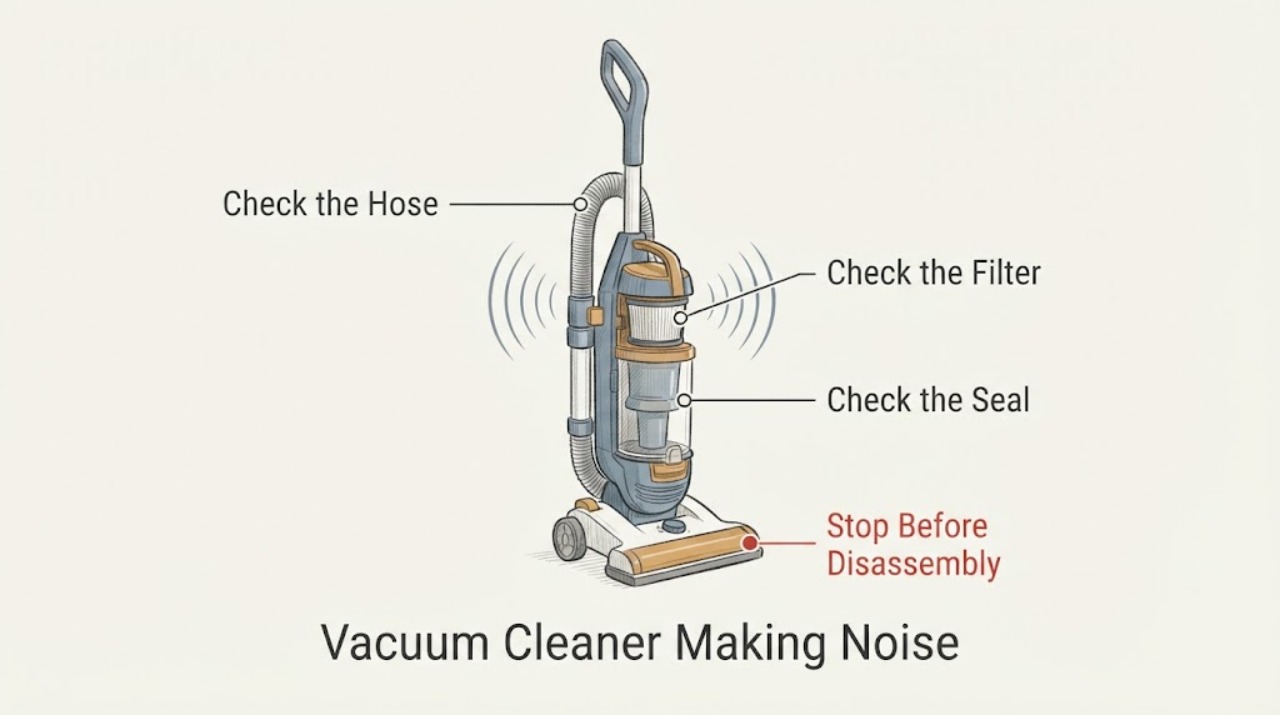
A Samsung vacuum cleaner making noise should be turned off and unplugged before checking the filter, dustbin, hose or pipe, brush roll, and wheels for blockage or debris. A sudden noisy change with weaker suction favors an airflow restriction, while noise or vibration that remains after cleaning on a flat surface can indicate motor, bearing, balance, or internal wear. Make one supervised test after the permitted cleaning steps; if the noise persists, the vacuum becomes hot, smells burnt, or a part is damaged, stop using it and arrange qualified Samsung service.
Work through in order
Diagnostic checks
Use only checks that match the exact appliance or system and its official guide.
-
Check 1
From a safe distance, note the sound while the Samsung vacuum is operating only long enough to locate it: at the motor or air outlet, along the hose or pipe, at the floor brush, at a wheel, or throughout the unit. Also note whether suction dropped, the sound began after a blockage, or the vacuum stops by itself.
Expected result: The noise is paired with weaker suction; follows the brush or wheel; comes from the air path; or remains constant in every position.
Next step: Turn the vacuum off and unplug it before opening the dustbin, filter, hose, pipe, or floor head. If there is abnormal heat or a burning smell, stop without further testing.
Why this matters
Why: Noise with weaker suction makes an airflow restriction more likely. A sound that follows a brush or wheel favors debris, alignment, or wear in that moving part, while a constant sound with clear external parts leaves motor or internal causes possible.
-
Check 2
With the vacuum off and unplugged, empty the dustbin and remove the filter only as the model guide shows. Inspect the filter, dustbin inlet, and air outlet for packed dust or foreign material, and reinstall cleaned parts only when they are dry and correctly seated.
Expected result: The filter is dirty, the dustbin is full, the inlet is blocked, a part is damp or misfitted, or the dust path is clear and dry.
Next step: Clean or empty only the accessible parts described by the manual, then continue to the hose, brush, and wheel checks. Do not operate the vacuum with a wet filter or an unseated part.
Why this matters
Why: Samsung associates dirty filters and a full dustbin with reduced performance and vibrating noise. A dry, clear, correctly seated dust path makes the brush, wheels, or motor more likely sources.
-
Check 3
Inspect the hose, telescopic pipe, and connected suction tool for a blockage or crushed section. Look through the accessible passage and remove only loose material that the exact model instructions permit; do not force a sharp object through the pipe or dismantle a sealed connection.
Expected result: A blockage or foreign material is visible; the pipe is bent or damaged; or the hose and pipe are open and intact.
Next step: Clear only an accessible obstruction and replace a visibly damaged removable hose or tool only after checking the exact model instructions. If the noise or weak suction remains, stop repeated testing and continue with the moving-part checks.
Why this matters
Why: Samsung lists blocked pipes or hoses as a cause of pressure imbalance and vibration. A bent or damaged passage can keep airflow abnormal after loose debris is removed, while an open path shifts the check toward the brush and wheels.
-
Check 4
Inspect the floor brush or brush roll and its ends for hair, thread, grit, or a loose cover. With power disconnected, remove tangled material only as the model guide permits, then check the wheels for trapped debris or visible misalignment without opening the drive housing.
Expected result: Hair or debris is wrapped around the brush; a cover is loose; a wheel is dirty, uneven, or stiff; or the brush and wheels are clear and move normally.
Next step: Remove only accessible debris, secure the cover as the manual shows, and test on a clean flat surface once. Do not continue if a wheel stays stiff, the brush is damaged, or the noise remains.
Why this matters
Why: Samsung identifies debris in the brush roll or wheels as a common source of vibration, while a loose cover or misaligned wheel can create a repeating sound. Clear, normally moving parts leave wear or an internal imbalance possible.
-
Check 5
After the filter, air path, brush, and wheels are clean and dry, place the vacuum on a flat, stable surface and make one brief supervised test. Record whether the sound changes with suction level, floor head, or movement, and whether the unit vibrates or stops.
Expected result: The sound disappears; it occurs only with one tool or floor head; vibration remains on a flat surface; or the vacuum stops, overheats, or becomes louder.
Next step: Stop using the vacuum and arrange qualified Samsung service for persistent noise, vibration, overheating, a burning smell, repeated stopping, or a damaged brush, wheel, cord, battery, or housing.
Why this matters
Why: A sound that disappears after cleaning supports an accessible blockage or fit issue. A tool-specific sound needs that attachment's model instructions, while persistent vibration on a flat surface makes balance, motor, bearing, or internal wear more likely.
Use your observations
Decision map
Find the observation that best matches what you see, then follow the next safe action.
-
PATH 01Next step
What you see
The noise began with a sudden suction drop and clears after the dustbin, filter, hose, pipe, or brush blockage is removed.
Do this next
Reassemble the cleaned parts dry and correctly, then monitor one normal use. Stop if the sound returns or suction falls again.
Why this path and its safety boundary
Why it matters: An airflow restriction or accessible debris is more likely than a confirmed motor failure. Samsung links dirty filters, full dustbins, blocked pipes, and brush material to vibrating noise or weak suction.
-
PATH 02Next step
What you see
The sound follows the floor brush or a wheel, and hair, thread, grit, or a loose cover is found in that area.
Do this next
Clear accessible material and refit the cover using the exact model instructions. Arrange service if the part remains stiff, damaged, or noisy after one test.
Why this path and its safety boundary
Why it matters: A brush or wheel obstruction or fit issue is more likely. The noise does not establish that the brush motor, bearing, or wheel assembly should be replaced.
-
PATH 03Next step
What you see
The filter, dustbin, pipe, brush, and wheels are clear and correctly fitted, but the vacuum vibrates or makes the same noise on a flat surface.
Do this next
Keep the vacuum out of use and arrange qualified Samsung service. Provide the sound location, suction behavior, cleaning steps completed, and whether the sound occurs with every attachment.
Why this path and its safety boundary
Why it matters: Motor, bearing, balance, loose internal component, or other internal wear is more likely than a removable blockage. Samsung directs persistent vibration to professional support.
-
PATH 04Next step
What you see
The vacuum becomes hot, smells burnt, repeatedly stops, exposes a damaged cord or battery, or grows louder after one permitted check.
Do this next
Turn it off, disconnect power when safe, keep it away from use, and arrange qualified appliance or electrical service. Do not open the motor or battery housing.
Why this path and its safety boundary
Why it matters: This is a safety and service boundary. Continued operation could worsen an electrical, motor, or battery problem.
Helpful context
Understand the symptom
Separate airflow noise from mechanical noise
The timing and location of the sound are useful clues. A sudden change in suction with a vibrating sound points toward a dirty filter, full dustbin, blocked pipe, or brush. A noise that follows a wheel or brush, or continues with clear airflow, points toward moving-part alignment or wear. The symptom alone does not prove that a motor, bearing, belt, or other part needs replacement.
Power off before clearing a blockage
Samsung's vibration guidance starts with turning the vacuum off and unplugging it. Keep filters and washable parts dry before reinstalling them, use the model manual for access to a brush or pipe, and do not open the motor or battery housing to chase a noise.
When checks do not resolve it
Need a professional?
Arrange qualified Samsung vacuum service when noise or vibration persists after the filter, dustbin, hose, pipe, brush, and wheel checks; when the vacuum stops repeatedly or overheats; or when a brush, wheel, cord, battery, or housing is damaged. Provide the exact model, sound location, suction behavior, attachment in use, and the result of the one supervised test.
Common questions
FAQ
Why is my Samsung vacuum making a vibrating sound?
Samsung lists dirty filters, blocked pipes or hoses, debris in the brush or wheels, motor or bearing wear, and loose internal components as possible causes. Turn it off and unplug it before checking the filter, dustbin, air path, brush, and wheels.
Can a full dustbin or dirty filter make a Samsung vacuum noisy?
It can, especially when suction also drops. Empty the dustbin and clean or replace the filter according to the exact model guide, then return the parts dry and correctly seated. Persistent noise needs service.
What should I check if the noise comes from the brush or wheels?
With power disconnected, inspect for hair, thread, grit, a loose brush cover, trapped wheel debris, or visible misalignment. Clear only accessible material and use the model instructions; a stiff, damaged, or still-noisy part needs qualified service.
When should I stop using a noisy Samsung vacuum?
Stop when the noise or vibration remains after one permitted cleaning check, the vacuum becomes hot, smells burnt, stops repeatedly, or has a damaged cord, battery, brush, wheel, or housing. Keep it disconnected and arrange Samsung service.
Read the exact guide
Official sources
- How to fix a Samsung vacuum cleaner that vibratesSamsung Gulf · Samsung Jet series, Bespoke Jet, and Powerbot vacuum cleaners; exact access varies by model
- Samsung Stick Vacuum cleaner FAQ | Product, Shipping & SupportSamsung Gulf · Samsung stick vacuum cleaners when suction drops and a vibrating or strange sound appears
Community feedback
Share a repair observation
Share a plain-text repair observation. Accepted observations are published automatically; this page may take a moment to update.