
On this page
Start here
Quick answer
A vacuum that runs for a few seconds and stops may be protecting itself from restricted airflow, a hot motor, a depleted battery, or a model-specific power fault. Turn it off and disconnect power before checking the bin, filter seating, floor head, hose, and other user-removable airflow paths. Let a warm machine cool, then follow its exact manual for filter cleaning and charging. If it cuts out again with a clear path and a properly charged battery or sound outlet, stop using it and arrange model-specific service rather than guessing at a battery, motor, or thermal part.
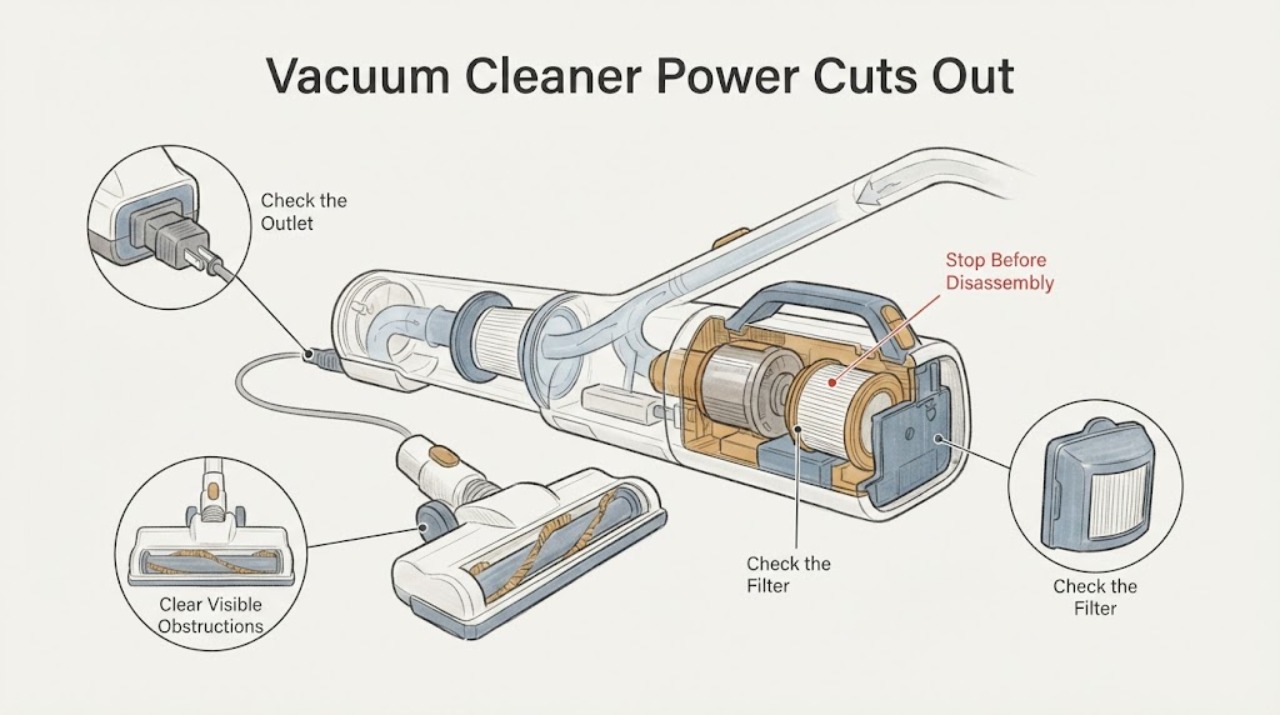
Work through in order
Diagnostic checks
Use only checks that match the exact appliance or system and its official guide.
-
Check 1
Identify whether the vacuum is corded or cordless, then verify the correct outlet or the model's supplied charger and charging indication before another test.
Expected result: A corded unit loses power only at one outlet or a cordless unit shows a low-battery or charging fault, or power status appears normal.
Next step: For a supply or charging indication, stop using the suspect outlet, cord, charger, or battery and follow the exact model support path. If power status is normal, continue to Action 2.
Why this matters
Why: A supply or battery state can look like an airflow cut-out. Manufacturer support treats battery, charger, and no-power paths separately from blockage and filter paths.
-
Check 2
With power disconnected, empty the dirt bin or bag as the manual directs and inspect only the accessible floor head, wand, hose, inlet, and air openings for hair or debris; remove a visible obstruction without tools that could damage the airway.
Expected result: An obstruction is visible and can be removed, or the accessible path is clear.
Next step: Reassemble every user-removable part exactly as the manual requires and continue to Action 3. If a blockage is deep inside or cannot be removed without opening the motor housing, stop and arrange service.
Why this matters
Why: Dyson's official cut-out guidance identifies blockage as a trigger for automatic protection, but a clear opening does not prove the motor or control is good.
-
Check 3
Inspect the filter for dust loading or incorrect seating and clean or wash it only if the exact model manual permits that method; leave a washed filter fully dry before refitting it.
Expected result: The filter is dirty or not seated, or it is clean, correctly fitted, and fully dry.
Next step: Refit the dry filter and test once. Do not use a vacuum with a missing, wet, damaged, or model-incompatible filter; if no model instructions are available, stop and obtain them before washing anything.
Why this matters
Why: Manufacturer guidance links restricted filtration or a filter that is not correctly fitted with loss of performance and cut-out behavior. A wet or improvised filter installation can create a new fault.
-
Check 4
If the vacuum felt hot or had been pulsing, leave it switched off and disconnected in a clear, ventilated place until it has cooled, then perform one brief test with the bin, filter, hose, and head correctly assembled.
Expected result: The vacuum runs normally after cooling and airflow maintenance, or it cuts out again within seconds while cool.
Next step: If it cuts out again, stop repeated restarts and arrange model-specific service. Record whether the motor pulsed, any indicator appeared, and whether the battery or cord became unusually hot.
Why this matters
Why: Automatic thermal protection can stop a blocked or overheated machine; recurrence while cool and clear is a service condition, not proof of a particular thermal fuse, battery, or motor failure.
Use your observations
Decision map
Find the observation that best matches what you see, then follow the next safe action.
-
PATH 01Next step
What you see
The battery/charger indicator is abnormal or a corded vacuum loses power only from one outlet or damaged cord.
Do this next
Stop using the suspect electrical item and use the exact manufacturer's support route; do not splice a cord or substitute an unapproved charger.
Why this path and its safety boundary
Why it matters: The first branch is the electrical supply or charging path rather than an airflow diagnosis.
-
PATH 02Next step
What you see
A visible blockage, full bin or bag, or heavily loaded filter is found and the model permits the relevant cleaning step.
Do this next
Clear only the user-accessible path, refit every part, dry washable filters completely, and test once after the machine cools.
Why this path and its safety boundary
Why it matters: Restricted airflow can activate an automatic cut-out or reduce motor performance.
-
PATH 03Next step
What you see
The machine is cool, charged or supplied correctly, assembled with a dry correctly seated filter, and still stops after a few seconds.
Do this next
Stop using it and arrange qualified service. Provide the brand/model, power type, indicator behavior, timing of the cut-out, and the external checks already completed.
Why this path and its safety boundary
Why it matters: The public evidence does not identify a safe user-replaceable part; persistent cut-out needs model-specific diagnosis.
-
PATH 04Next step
What you see
There is smoke, a burning smell, a hot or swollen battery, exposed cord damage, or the vacuum trips household power.
Do this next
Disconnect power if it can be done without touching a damaged conductor, keep the vacuum out of use, and obtain qualified service or appropriate emergency help.
Why this path and its safety boundary
Why it matters: This is an electrical or heat safety boundary, not a routine blockage check.
Helpful context
Understand the symptom
First separate airflow protection from power loss
A cut-out after a few seconds is a symptom, not a confirmed failed part. A blocked airway or dirty filter can make some vacuums protect the motor; a cordless machine may instead have a battery or charger issue. The same check should not be transferred between models without the model manual.
Switch off before checking
Turn the vacuum off and disconnect it from the charger or outlet before touching a brush head, hose, bin, filter, or blockage. Do not operate a partly dismantled vacuum, bypass a thermal or battery protection, or continue using it if there is smoke, a burning smell, a damaged cord, or a hot or swollen battery.
When checks do not resolve it
Need a professional?
Arrange model-specific service when a cool, correctly assembled vacuum still cuts out after the accessible airflow path and filter checks, when the battery or charger is suspect, or when the machine trips power. Stop immediately for smoke, burning odor, exposed cord damage, a hot or swollen battery, or any need to open the motor or battery housing.
Have this ready
- Provide the brand and model from the rating label, corded or cordless type, charge/outlet result, filter and blockage observations, indicator behavior, and whether the cut-out occurs only when a floor head or hose is attached.
Common questions
FAQ
Does a vacuum that shuts off after a few seconds always need a new battery?
No. Official support also points to blockage, filter or cyclone condition, overheating protection, and charger or power-state issues. The model and the result of the external checks are needed before selecting a part.
Can I run the vacuum without the filter to test the motor?
Do not do that. Follow the exact manual and keep the filter correctly fitted; a missing, wet, or incorrect filter can create airflow and safety problems.
How long should I wait after an overheating cut-out?
The wait is model-specific. Leave the vacuum switched off and disconnected until it is fully cool, then follow the manual's blockage and filter checks; repeated cut-outs after cooling require service.
Read the exact guide
Official sources
- Support | Dyson V15 Detect™ vacuum | DysonDyson · Opened Dyson support states that blockage, filter/cyclone condition, battery, and charger can lead to cut-out or power complaints; it also requires model-specific filter instructions and complete drying before refitting.
- My FeatherWeight/ReadyClean Cordless Vacuum Shuts Off After a Few Seconds | SupportBISSELL · Opened BISSELL page explicitly scopes the exact symptom to listed models and sends a fully charged unit that shuts off after seconds to its no-power troubleshooting; it is used to show why brand/model identification matters, not to transfer BISSELL parts or steps to an unknown vacuum.
- Troubleshooting | Dyson vacuum cleaner automatic cut-out and brush bar guidanceDyson · Opened Dyson troubleshooting text states that blockage or overheating can trigger automatic cut-out, requires power off before checks, and warns against operating a partially dismantled machine; it is not used to infer a model or part for this unbranded topic.
Community feedback
Share a repair observation
Share a plain-text repair observation. Accepted observations are published automatically; this page may take a moment to update.