
On this page
Start here
Quick answer
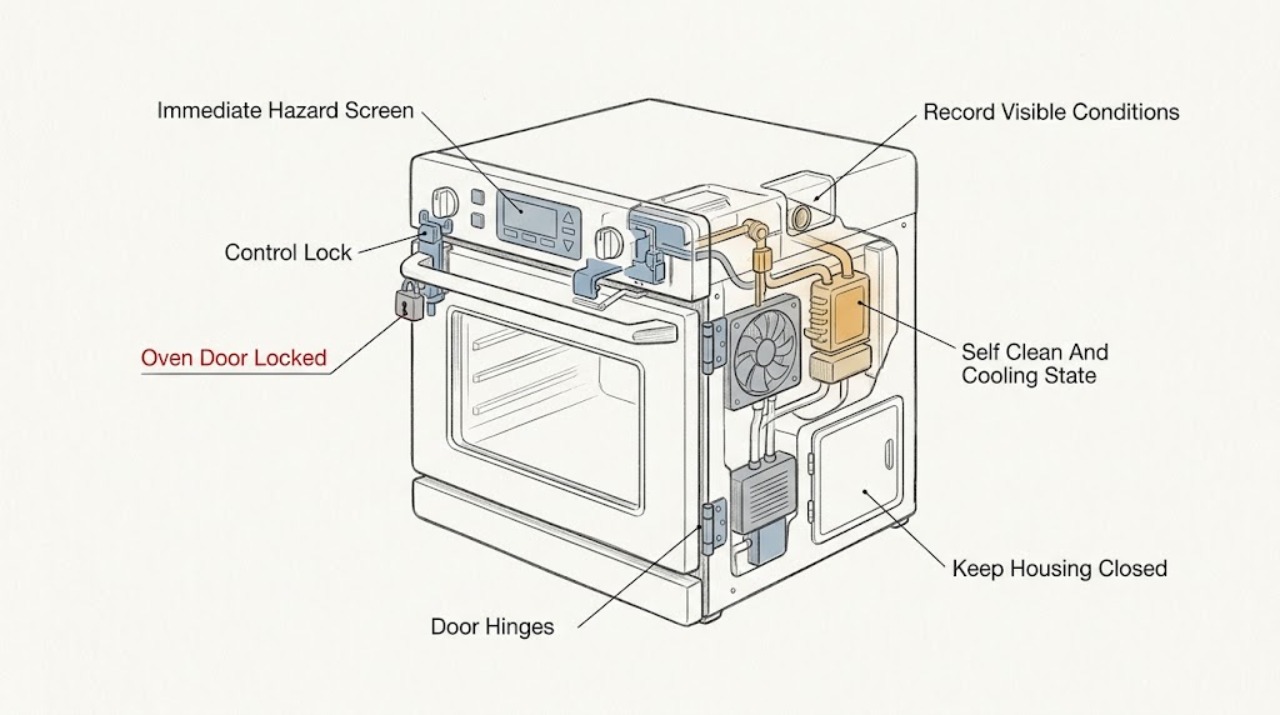
Do not force a Viking oven door. First decide whether the lock is holding the door because the oven is still hot after self-cleaning, because a control-lock feature is enabled, or because a latch, control, power, or error condition has failed. If self-clean or cooking has just run, leave the door closed and let the oven cool according to the exact model manual; Viking manuals state that the self-clean latch keeps the door closed at cleaning temperatures and releases only after a safe temperature is reached. If the oven is cool, check the display for an Oven Lock or panel-lock message and use only the exact manual’s unlock command. If heating continues after cancellation, smoke, flame outside the intended burner area, a gas odor, carbon-monoxide alarm, arcing, burning smell, damaged glass, a hot control area, or a repeated protection trip is present, stop using the oven and keep clear. Never pry the door, insert tools, remove the door while locked, bypass an interlock, or open panels. Record the model, mode, display, self-clean state, temperature, time since shutoff, fan behavior, and whether the latch moves; after one safe model-authorized recovery, arrange qualified Viking service if the door remains locked or the symptom returns.
Work through in order
Diagnostic checks
Use only checks that match the exact appliance or system and its official guide.
-
Check 1
Stand clear and look at the oven, control area, door glass, surrounding cabinet, plug or isolator if safely visible, and room without touching the door or a hot surface.
Expected result: Record smoke, fire, flame outside the intended burner area, gas odor, a carbon-monoxide alarm, arcing, burning or electrical smell, melted controls, damaged glass, a hot cord or connection, or a repeated breaker trip.
Next step: Stop using the oven and keep clear. If safe from a dry position, switch it off or isolate its supply; for gas odor or a fire, avoid switches and ignition sources, leave as appropriate, and use local emergency guidance. Arrange qualified appliance or electrical service.
Stop if: Do not open the door to investigate flames, touch wet or hot electrical parts, relight a burner, reset a tripped protection device, or run another cycle.
Why this matters
Why: These signs indicate a fire, gas, carbon-monoxide, electrical, glass, or uncontrolled-heating hazard; the lock must not be investigated as a routine adjustment.
-
Check 2
When there is no immediate hazard and the exterior is safe to approach, record the complete Viking model number, single or double oven or range configuration, fuel type, selected mode, and the exact display or indicator state.
Expected result: Record Oven Lock, panel-lock, self-clean, clean, cooling, error, timer, blank-display, or no-message states; note whether the door is cool, warm, or extremely hot and whether the latch handle has resistance.
Next step: Use Viking’s product documentation and the exact model manual, not a generic key sequence or another series’ latch instructions.
Stop if: Do not pull the handle repeatedly, infer that a cool door is mechanically safe to force, or apply a procedure from a different Viking model.
Why this matters
Why: The same ‘door locked’ symptom can be a normal hot-door interlock, a control lock, a power or error state, or a mechanical latch fault. Model and mode determine the applicable procedure.
-
Check 3
If self-clean was recently selected or the oven is hot, leave the door closed and observe the display, clean indicator, and cooling fan from a safe position; do not touch the vent or door glass.
Expected result: Record whether the clean cycle is active, the fan is running, the oven is still hot, the latch indicator remains on, or the cycle was interrupted early.
Next step: Keep the oven closed and allow the exact manual’s cooling and completion sequence. If the fan does not run as the manual requires, or the lock remains after safe cooling, keep the oven off and arrange service.
Stop if: Do not pry the door, insert a tool, disconnect the latch, interrupt a hot clean cycle to gain access, or touch hot surfaces.
Why this matters
Why: Viking states that the latch stays engaged while the oven is at cleaning temperatures and releases after safe cooling. Fan operation during self-clean is expected on the referenced models; a missing fan in a cleaning cycle is a service clue.
-
Check 4
When the oven is cool and no hazard is present, compare the display with the exact manual’s Oven Lock or control-lock section and perform only its documented unlock command.
Expected result: Record whether the lock message clears, the controls respond, the door opens normally, the door remains physically latched, or the lock message returns immediately.
Next step: If the exact manual confirms a control lock and the command clears it, use the oven only if the door and heating behavior are normal. Otherwise stop and arrange service.
Stop if: Do not use magnets, unplug repeatedly, enter service mode, force a hidden override, or treat a control unlock as permission to open a hot door.
Why this matters
Why: A control lock can prevent pad operation without proving a door-latch failure. A physically latched door, a returning lock, or controls that remain unresponsive needs model-specific service assessment.
-
Check 5
With the oven cool and controls available, check whether a timed bake, stop-time, delayed start, Sabbath, showroom, or other special mode is active, using the exact model manual; do not restart heating merely to test the door.
Expected result: Record whether the oven is still commanded to cook, whether a timer has ended, whether the display is waiting for a clock or selection, and whether a special mode changes control behavior.
Next step: Cancel or exit only the unambiguous mode described by the exact manual. If the control will not cancel or heating continues, isolate the oven when safe and arrange service.
Stop if: Do not use self-clean or a cooking cycle as a test, repeatedly change modes, or continue operation with abnormal heat or an unresponsive control.
Why this matters
Why: A programmed state can explain an unexpected control response, but it does not explain smoke, uncontrolled heat, a damaged latch, or a door that remains physically locked after cooling.
-
Check 6
After the oven has fully cooled, inspect the visible door glass, frame, hinges, gasket, latch area, and cavity edge for an object, spill, warped part, loose trim, or damaged glass without removing the door.
Expected result: Record whether the door closes squarely, the gasket is intact, debris is visibly blocking the frame, the latch indicator disagrees with the physical position, or glass, hinges, or trim are damaged.
Next step: Remove only a loose external object from a cool, safe surface if the manual permits. For damaged glass, hinge, gasket, latch, or persistent misalignment, keep the oven off and arrange service.
Stop if: Do not bend the hinge, remove the door, insert tools into the latch, wedge the door, or operate with cracked glass or a damaged seal.
Why this matters
Why: A visible obstruction or door damage can prevent correct latch alignment; it does not prove that the interlock is safe to bypass. Viking warns against damaging or moving the gasket and treats the door and surrounding surfaces as hot during and after use.
-
Check 7
From a dry position, record whether the display is powered and whether an error, lock, or service indication appears; check the household breaker or fuse only by the normal safe household procedure and do not open the appliance.
Expected result: Record a blank display, a recently tripped breaker, a code or repeating alarm, partial power to one oven in a double unit, or a normal display with a door that remains locked.
Next step: If the manual authorizes one safe reset and there is no hazard, perform it once. If the code or lock returns, the display remains abnormal, or protection trips again, keep the oven off and arrange service.
Stop if: Do not repeatedly reset a breaker, pull the appliance from cabinetry, open the control panel, or make live measurements.
Why this matters
Why: Power interruption or a control fault can leave a lock state unresolved, while partial power or a recurring code needs a model-specific diagnosis. Viking’s documentation directs owners to qualified service for appliance or electrical faults.
-
Check 8
Only when the oven is cool enough to observe safely and the exact manual permits normal control use, cancel the active mode once and observe from outside whether heating stops and the cooling sequence behaves normally; do not open the door to inspect elements.
Expected result: Record whether the oven stops heating, remains hot only from residual heat, continues actively heating, the fan runs, the door remains latched, or a gas burner or ignition sequence persists where applicable.
Next step: Stop use and isolate the oven from a dry safe position if active heating, ignition, gas odor, smoke, or abnormal fan behavior continues; arrange qualified service.
Stop if: Do not repeat the cycle, test a burner, open the door against resistance, bypass the latch, or continue a gas or electrical fault for confirmation.
Why this matters
Why: Residual heat can keep a door locked temporarily, but continued active heating after cancellation suggests a control, relay, sensor, mode, or latch fault. Persistent gas ignition or abnormal flame is a gas-safety issue.
-
Check 9
When the oven is fully cool, dry, intact, free of smoke or odor, and no active heating or gas symptom exists, perform one reset or lock-clear step explicitly authorized by the exact Viking manual.
Expected result: Record whether the display returns normally, the lock clears, the door opens without force, the same indicator returns, or the oven heats or locks without a command.
Next step: Stop after one unsuccessful authorized recovery and arrange qualified Viking service with the exact result recorded.
Stop if: Do not reset after smoke, fire, gas odor, arcing, damaged glass, active overheating, or a repeated protection trip; do not remove a cover to reach a reset.
Why this matters
Why: A one-time recovery may clear a transient control state. A returning lock, spontaneous heating, or persistent error points to a latch, control, sensor, fan, power, or wiring fault.
-
Check 10
Keep the oven out of use and prepare the complete model, oven type, fuel, mode, self-clean and timer state, display wording, temperature, time since shutoff, fan behavior, door temperature, latch behavior, door and gasket condition, and all safety symptoms for qualified service.
Expected result: The door remains locked after safe cooling and one authorized step, a control lock returns, the latch or door is damaged, active heating continues, the fan does not cool as expected, a code returns, or any smoke, gas, electrical, glass, or protection symptom occurred.
Next step: Arrange qualified Viking appliance service. Use a qualified electrician for household supply, breaker, outlet, isolator, or wiring concerns, and follow local emergency or gas-safety procedures for gas or carbon-monoxide symptoms.
Stop if: Do not remove the door, open panels, bypass the interlock or thermal protection, make live measurements, or continue operation to reproduce the lock.
Why this matters
Why: A latch, control, temperature sensor, cooling fan, relay, door assembly, wiring, or household supply fault remains possible; the locked-door symptom alone cannot select a part.
Use your observations
Decision map
Find the observation that best matches what you see, then follow the next safe action.
-
PATH 01Safety boundary
What you see
Smoke, fire, gas odor, a carbon-monoxide alarm, arcing, burning smell, melted controls, damaged glass or wiring, dangerously hot surroundings, or a repeated protection trip is present.
Do this next
Stop using the oven, keep the door closed, isolate power or gas only when safe and appropriate, leave the area for a gas or fire emergency, and use local emergency guidance. Arrange qualified service afterward.
Why this path and its safety boundary
Why it matters: The locked door is part of an immediate fire, gas, carbon-monoxide, electrical, or burn hazard.
Safety stop: Do not open the oven door to inspect flames, operate switches near gas odor, relight, reset protection, or attempt a latch release.
-
PATH 02Safety boundary
What you see
Self-clean has run or was interrupted and the oven remains hot, the clean indicator is active, or the latch indicator remains on.
Do this next
Leave the door closed, keep people away, and allow the exact model’s cooling sequence. Arrange service if the fan fails, the oven continues heating, or the latch remains after safe cooling.
Why this path and its safety boundary
Why it matters: The self-clean safety latch may be correctly holding the door until the oven reaches a safe temperature.
Safety stop: Do not force the latch, insert tools, remove the door, or touch hot exterior or vent surfaces.
-
PATH 03Safety boundary
What you see
The oven is cool and the display identifies Oven Lock, panel lock, or another documented child-control lock, without a physical hot-door latch or hazard symptom.
Do this next
Use only the exact model manual’s unlock command. If the control lock clears and the door operates normally, no latch repair is implied; if it returns, arrange service.
Why this path and its safety boundary
Why it matters: The controls may be locked by a user setting rather than the door being held by residual oven temperature.
Safety stop: Do not bypass the lock with a magnet, tool, repeated power interruption, or service-mode procedure.
-
PATH 04Safety boundary
What you see
The oven is fully cool but a visible object, warped trim, damaged gasket, misaligned hinge, cracked glass, or latch-area obstruction prevents normal closure or release.
Do this next
Remove only a loose external object when the manual permits and the area is safe. Keep the oven off and arrange service for any damaged or misaligned component.
Why this path and its safety boundary
Why it matters: The door assembly may be mechanically misaligned or damaged, and forcing it can worsen the interlock or glass hazard.
Safety stop: Do not bend hinges, remove the door, pry the latch, wedge the door, or operate with damaged glass or gasket.
-
PATH 05Safety boundary
What you see
The display is blank, partially powered, shows an error or repeating alarm, or a breaker or fuse recently interrupted the oven.
Do this next
Check household supply only by a normal safe procedure and use one manual-authorized reset if safe. Keep the oven off and arrange service if the state returns.
Why this path and its safety boundary
Why it matters: A power or control state may have left the lock unresolved; the exact code and model control the safe response.
Safety stop: Do not repeatedly reset protection, open panels, pull out a built-in oven, or guess an error-code meaning.
-
PATH 06Safety boundary
What you see
Heating continues after cancellation, the oven warms without a valid command, a gas burner or ignition sequence persists, or the cooling fan does not behave as the exact manual requires.
Do this next
Stop use, isolate the appliance from a dry safe position when possible, and arrange qualified Viking appliance service; use qualified gas or electrical help as applicable.
Why this path and its safety boundary
Why it matters: A control, relay, sensor, burner or ignition, fan, or safety-interlock fault may be present and the oven is not safe to operate.
Safety stop: Do not repeat the mode, test ignition, open the door against resistance, bypass protection, or continue operation to reproduce the symptom.
-
PATH 07Safety boundary
What you see
The door is warm after ordinary cooking, the fan is cooling normally, no self-clean or error is active, and no smoke, odor, damage, or continued heating is present.
Do this next
Wait for the model’s normal cooling behavior and use the manual’s controls. If the door remains locked after it is fully cool, arrange service.
Why this path and its safety boundary
Why it matters: Residual heat can delay a safe release; the door should not be forced while hot.
Safety stop: Do not use the handle as a lever, block the vent, or keep cooking while the lock behavior is unexplained.
-
PATH 08Safety boundary
What you see
The oven is cool, safe, and intact, and one exact-model-authorized unlock or reset clears the indicator and releases the door without force.
Do this next
Record what cleared and monitor without running self-clean. Stop and arrange service if the lock, heating, or error returns.
Why this path and its safety boundary
Why it matters: A transient control or timing state may have cleared, but the underlying condition is not proven repaired.
Safety stop: Do not repeat resets or use the appliance for hazardous confirmation testing.
-
PATH 09Safety boundary
What you see
The door remains locked after safe cooling, visible checks, and one authorized recovery, or the safe cause cannot be established externally.
Do this next
Keep the oven out of use and arrange qualified Viking appliance service with the complete model and symptom record.
Why this path and its safety boundary
Why it matters: A concealed latch, sensor, control, fan, wiring, or mechanical fault remains possible.
Safety stop: Do not pry, remove the door or panels, bypass the interlock, or choose a latch or control part from the symptom alone.
Helpful context
Understand the symptom
A locked door can be normal after high heat
Self-cleaning uses high heat, so the latch is intended to keep the door closed while the cavity is at cleaning temperature. Viking’s manuals describe an automatic latch and a release only after cooling to a safe temperature. A fan may continue during the cooling or cleaning period. Do not shorten that process by pulling the handle or interrupting it with an improvised tool.
Control lock is different from a hot-door latch
Some Viking ovens have an Oven Lock or control-lock feature that prevents control pads from being activated when the oven is not in use. That can make the controls appear unresponsive, but it is not permission to force the door. Use the exact model’s documented unlock command and verify whether the door itself is hot, latched, or obstructed.
Fuel type and model matter
Viking sells electric ovens and gas or dual-fuel ranges, with different controls, latches, fans, and self-clean arrangements. A model manual for one series cannot establish the correct key sequence or latch behavior for another. Record the model and use Viking’s product documentation before attempting any reset, lock release, or cleaning procedure.
When the lock is a safety symptom
A door that remains locked while the oven is still heating, a control area that becomes unusually hot, a damaged glass panel, smoke, arcing, a gas odor, or a protection trip changes the response from troubleshooting to isolation and service. Keep the door closed during an oven fire, leave the area if flames escape, and use emergency help rather than trying to inspect the latch.
Prepare the evidence before service
The useful details are the complete model, oven type, mode, whether self-clean was selected, display wording, temperature or timer state, time since the cycle stopped, fan operation, whether the controls respond, whether heating continues, and any smoke, odor, gas, electrical, or glass symptom. Do not remove the door or panels to obtain more evidence.
Safety boundary
Stop conditions
- Stop immediately for fire, smoke, gas odor, a carbon-monoxide alarm, arcing, burning smell, melted controls, damaged glass or wiring, dangerously hot surroundings, or a repeated protection trip.
- Keep the door closed during a fire or hot self-clean cycle; do not open it to investigate flames, smoke, or an unexplained locked state.
- Do not force, pry, wedge, drill, tool, magnet, or bypass the door latch, control lock, thermal protection, or interlock.
- Do not remove the door, open panels, make live measurements, pull out a built-in oven, or work on gas or electrical components as a first check.
- Do not use self-clean, repeated resets, or another cooking cycle to reproduce a locked door; stop after one safe model-authorized recovery fails.
Only after diagnosis
Potential parts
- door latch or interlock assembly
Consider only when the exact model remains locked after safe cooling and qualified diagnosis confirms a failed or misaligned latch or interlock.
Confirm the complete Viking model, oven configuration, and diagnosis; never bypass the safety interlock. - temperature sensor or thermal switch
Consider only when qualified diagnosis finds that temperature feedback or a thermal protection device is preventing correct release or safe control.
Confirm model and electrical specification; do not test or replace a sensor on an energized or hot appliance. - electronic control or relay assembly
Consider only when the control or relay fails to clear the lock, stop heating, or interpret the door state after model-specific diagnosis.
Confirm exact model, revision, and configuration; a locked door alone does not identify a control failure. - cooling fan assembly
Consider only when the exact manual calls for fan operation during cooling or self-clean and qualified diagnosis confirms a failed or abnormal fan.
Confirm model-specific fan location and fitment; do not open the fan housing or operate with abnormal cooling.
When checks do not resolve it
Need a professional?
Arrange qualified Viking appliance service when the door remains locked after the oven is safely cool and one exact-model-authorized recovery, when a lock or error returns, when the latch, glass, hinge, gasket, fan, or control is damaged or abnormal, or when heating continues after cancellation. Arrange qualified electrical service for a hot, damaged, wet, or repeatedly tripping supply connection. Use local gas-safety or emergency help for gas odor, ignition abnormalities, or a carbon-monoxide alarm. Do not force the door or open the appliance to continue troubleshooting.
Common questions
FAQ
Why is my Viking oven door locked after self-cleaning?
The self-clean latch is designed to keep the door closed while the cavity is at cleaning temperature and should release only after safe cooling. Leave the door closed and wait according to the exact model manual. Do not pry it; arrange service if the fan fails, heating continues, or the door remains locked after cooling.
How do I turn off the Viking Oven Lock?
First confirm the oven is cool and that the display indicates a control lock rather than a hot self-clean latch. Use only the exact Viking model manual’s documented unlock command. Do not use a tool, magnet, repeated power interruption, or an interlock bypass.
Can I force open a Viking oven door that is locked?
No. Forcing the door can damage the latch, hinges, gasket, or glass and can expose you to hot air or fire. Keep it closed during self-clean or an oven fire, and arrange qualified service when safe cooling and the model-authorized unlock step do not release it.
What if my Viking oven keeps heating while the door is locked?
Stop using it. Active heating after cancellation, smoke, a burning smell, unusual control heat, gas odor, arcing, or a repeated protection trip is a safety condition. Isolate the appliance only from a dry safe position if possible and arrange qualified service; do not run another test.
Does a power outage cause a Viking oven door to stay locked?
A power interruption can leave a display or lock state unresolved, but the safe response depends on the exact model and whether the oven is still hot. Record the display and wait for cooling. Use one reset only if the exact manual authorizes it and no hazard exists; a returning lock or code needs service.
Read the exact guide
Official sources
- Viking Range, LLC | Support and Docs | DocumentationViking Range, LLC · All Viking ovens and ranges when verifying the exact model, controls, latch, self-clean, and service instructions
- Viking Use & Care Manual Professional & Designer Series Built-In Electric Touch Control Single and Double OvensViking Range Corporation · Use as a model reference while confirming the user's exact Viking oven; control and latch behavior can differ by series
- Pictograph: Oven Fire SafetyU.S. Fire Administration · Any household oven when flames escape the oven or an oven fire is suspected
- Viking RVGR Range ManualViking Range, LLC · Use as a gas-range reference only while confirming the user's exact Viking model and fuel configuration
Community feedback
Share a repair observation
Share a plain-text repair observation. Accepted observations are published automatically; this page may take a moment to update.