
On this page
Start here
Quick answer
Do not force a Beko oven door that shows a door-lock symbol or will not open. First identify whether the lock is expected: Beko's high-temperature self-cleaning instructions keep the door locked while the oven is hot and until the lock symbol disappears after the cleaning process; the exact model's manual controls the timing. Leave the oven off, let the self-cleaning cycle finish and cool, and follow the manual's end-of-cycle steps. If the display shows a key-lock symbol rather than a hot door-lock state, use the exact model's key-lock release sequence. A door that remains locked after the cycle is finished and the oven is cool, a handle or hinge that is damaged, or a lock that returns during normal cooking needs authorized service. Do not pry the door, insert tools into the latch, defeat the interlock, remove panels, or repeatedly cycle power as a guessed repair.
Before you begin
Safety first
- This article covers only external identification, natural cooling, model-documented key-lock release, model-documented end-of-cycle control state, and visible inspection from a safe position. It does not authorize forced opening, latch or hinge disassembly, panel removal, live electrical work, interlock bypass, or operation with a damaged door.
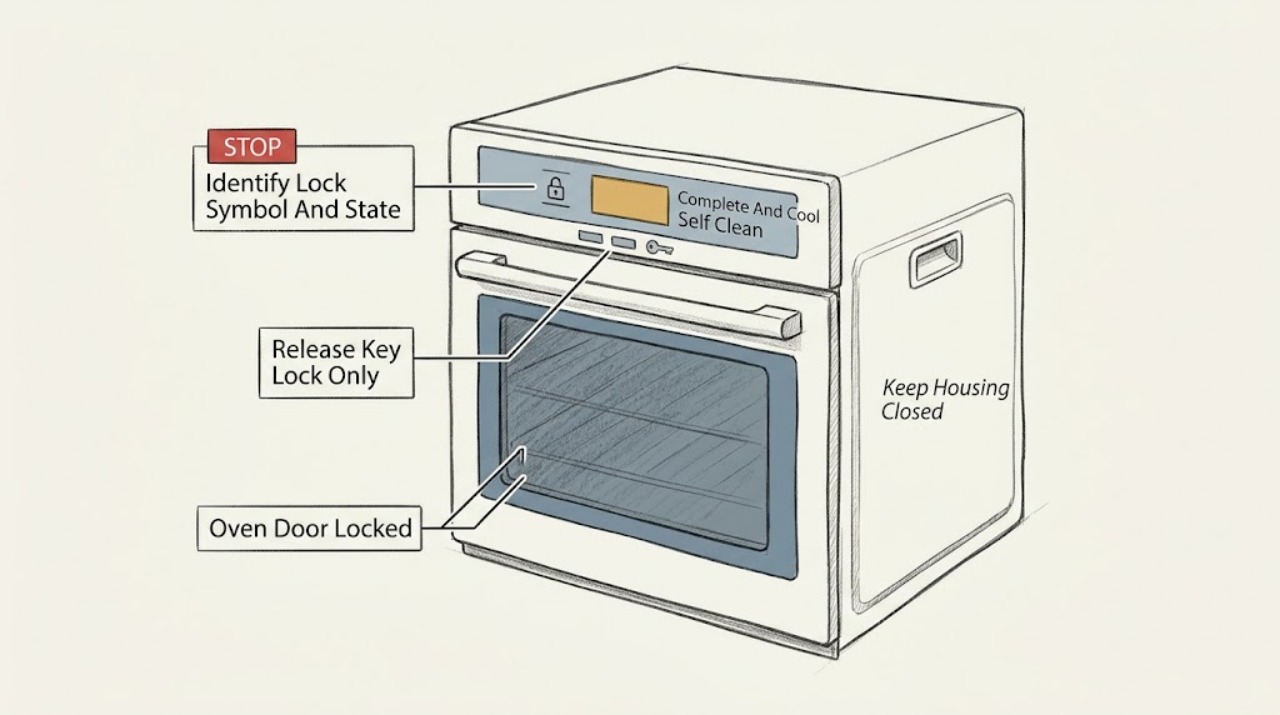
Work through in order
Diagnostic checks
Use only checks that match the exact appliance or system and its official guide.
-
Check 1
From outside the oven, read the display and controls and identify whether the symbol is a physical door-lock symbol, a key-lock symbol, a hot-temperature indicator, or an unfamiliar warning; note whether a pyrolytic or other self-cleaning cycle is active or recently ended.
Expected result: Record the exact symbol or message, the selected function, whether the oven feels hot from the outside, whether a cleaning cycle is counting down or shows End, and the appliance model from its label.
Next step: Use the exact Beko manual for the recorded model and function before touching the handle or attempting a key sequence.
Stop if: Do not pull the handle, insert tools into the latch, remove the control panel, or guess at a reset while the cavity may be hot.
Why this matters
Why: A door-lock state during self-cleaning follows a heat and interlock path; a key-lock state follows a control-setting path. An unfamiliar message cannot be safely interpreted from appearance alone because lock availability and symbols vary by model.
-
Check 2
If pyrolytic or high-temperature self-cleaning is active or has just ended, leave the oven off, allow the cleaning process to finish, let the oven cool naturally, and keep the door closed until the lock symbol disappears as the exact manual instructs.
Expected result: Record whether the cleaning cycle is still running, shows End, the oven remains hot, or the lock symbol disappears after cooling.
Next step: After the cycle is complete and the symbol has disappeared, follow the manual's end-of-cycle control positions before gently testing the handle; if the symbol persists while the oven is cool, use the persistent-lock branch.
Stop if: Do not force the handle, cool the glass with water, cover cooling vents, start another function, or bypass the interlock.
Why this matters
Why: Beko states that the door cannot open at cleaning temperature and remains locked until the oven cools to an appropriate temperature. A lock during this state is expected and does not indicate a failed latch.
-
Check 3
If the oven is cool and the display shows a key-lock symbol rather than an active hot door lock, use only the exact Beko model's documented key-lock deactivation sequence; do not pull the door while holding random controls.
Expected result: Record whether the key-lock symbol disappears, the controls respond, and the physical door remains locked or opens normally after the control lock is disabled.
Next step: If the key lock clears but the door remains physically locked while cool and outside self-cleaning, stop and arrange service; if it opens normally, do not restart self-cleaning until the cause of the lock state is understood.
Stop if: Do not remove knobs, pry the door, enter service mode, or change wiring or latch settings to clear a key-lock symbol.
Why this matters
Why: Beko's settings guide says the key lock disables timer keys and is released by the specified paired-key action. A released key lock does not prove that a separate physical door interlock is clear.
-
Check 4
Once the oven is cool, verify from the front that the function and temperature controls are in the exact model's OFF position and that no delayed cooking, cleaning, or active heating function is selected; do not reach into the latch.
Expected result: Record whether the display is at the normal idle state, still shows a cleaning or heat state, shows End but the controls are not OFF, or shows an error or unrecognized code.
Next step: Follow the exact model's documented end-of-cycle step once; if the lock remains after the oven is cool and OFF, record the display and arrange service.
Stop if: Do not repeatedly start or cancel cleaning, defeat the latch, or turn controls beyond their stops.
Why this matters
Why: Beko manuals direct the user to end self-cleaning by returning function and temperature controls to OFF after End, while a remaining heat or cleaning state can keep the lock active. An error or a cool oven still locked is not resolved by repeatedly turning controls.
-
Check 5
From outside the appliance, inspect only the visible handle, door alignment, hinges, glass, gasket, control display, and cooling openings for damage, obstruction, smoke, or overheating; do not remove the door or front panel.
Expected result: Record normal alignment and intact glass; a handle that is loose or jammed; a hinge or seal obstruction; cracked glass; an error; smoke or burning smell; or a door that is physically displaced.
Next step: Keep the oven off and arrange authorized service for any damage, abnormal heat, error, or persistent physical lock; remove only an obvious external object that is not touching the latch or hot surfaces.
Stop if: Do not bend hinges, pry the door, remove glass, use a tool in the latch, spray liquid into controls, or operate a damaged oven.
Why this matters
Why: A visible obstruction or damage can prevent a normal latch release, while smoke, burning smell, cracked glass, or misalignment creates a safety issue. None authorizes opening the latch by force or selecting an unverified part.
-
Check 6
If the lock persists after the model-matched cooling, key-lock, and OFF-state checks, leave the appliance isolated and document the model, display, cycle, cooling state, and visible door behavior for an authorized technician.
Expected result: Record whether the oven is cool, whether the lock symbol remains, whether the key lock is cleared, whether the door handle moves at all, and whether the problem started after self-cleaning, a power interruption, or normal cooking.
Next step: Contact Beko or an authorized service provider using the exact model support route and provide the recorded details; keep the oven unused until assessed.
Stop if: Do not perform live electrical tests, remove panels, release the latch manually, or continue using the oven while its door-lock behavior is unresolved.
Why this matters
Why: This evidence distinguishes an expected cooling lock from a latch, sensor, control, or interlock fault without requiring unsafe access. A persistent lock cannot be assigned to a particular part from symptoms alone.
Use your observations
Decision map
Find the observation that best matches what you see, then follow the next safe action.
-
PATH 01Safety boundary
What you see
The lock symbol appears during or immediately after high-temperature self-cleaning and the oven has not cooled to the manual's release condition.
Do this next
Let the cycle finish and the oven cool naturally; open only after the lock symbol disappears and the exact manual's end-of-cycle steps are complete.
Why this path and its safety boundary
Why it matters: The door lock is an expected heat-safety state, not proof of a broken handle or latch.
Safety stop: Do not force the handle, pour water on the hot door, cover vents, or bypass the lock.
-
PATH 02Safety boundary
What you see
The oven is cool and the display shows the key-lock symbol or the timer keys are unresponsive, without an active self-cleaning heat lock.
Do this next
Use the exact model's documented paired-key deactivation sequence and verify whether the physical door remains locked afterward.
Why this path and its safety boundary
Why it matters: The control key lock may be enabled; this is distinct from the physical door-lock interlock.
Safety stop: Do not guess the keys, enter a hidden service mode, or pry the physical door.
-
PATH 03Safety boundary
What you see
The self-cleaning display shows End or a completed state, but the function or temperature control has not been returned to the exact manual's OFF position.
Do this next
Follow the exact manual's documented end-of-cycle control position once, then wait for cooling and disappearance of the lock symbol.
Why this path and its safety boundary
Why it matters: The model may still be in its end-of-cycle lock state; the display's completion message alone does not establish a safe release.
Safety stop: Do not repeatedly cancel or restart the cleaning cycle or force the latch.
-
PATH 04Safety boundary
What you see
The handle, hinge, glass, gasket, or door alignment is visibly damaged, displaced, or obstructed.
Do this next
Keep the oven off and arrange authorized service; remove only an obvious external obstruction that is safely away from the latch and hot surfaces.
Why this path and its safety boundary
Why it matters: The physical door assembly may be preventing a safe latch release; opening it by force can worsen damage or expose heat.
Safety stop: Do not bend hinges, disassemble the door, remove glass, or force the handle.
-
PATH 05Safety boundary
What you see
The oven is cool, self-cleaning is complete, controls are OFF, the key lock is cleared or not present, and the door-lock symbol or physical lock remains.
Do this next
Keep the oven unused and contact Beko or authorized service with the model, display, cycle history, and visible symptoms.
Why this path and its safety boundary
Why it matters: A latch, temperature sensor, control, wiring, or interlock fault is possible, but the symptom does not identify a safe part or repair.
Safety stop: Do not remove panels, test live wiring, manually release the latch, bypass the interlock, or keep cycling power.
-
PATH 06Safety boundary
What you see
Smoke, burning smell, sparking, severe heat, cracked glass, or an electrical fault accompanies the lock.
Do this next
Stop using the oven, isolate power only from a safe dry position if possible, leave the door closed, and arrange qualified appliance or electrical help.
Why this path and its safety boundary
Why it matters: The lock symptom is secondary to an immediate appliance-safety hazard.
Safety stop: Do not touch the door or controls if unsafe, spray liquid, restore power to test, or attempt a manual release.
Helpful context
Understand the symptom
Separate a hot self-clean lock from a control key lock
A door-lock symbol during or after pyrolytic self-cleaning is a heat-safety state. A key-lock symbol can disable timer or control keys without necessarily describing the physical door latch. Symbols and button combinations vary by model, so read the exact Beko manual before pressing or holding controls.
Cooling is part of the lock release
Beko's self-cleaning instructions keep the door locked until the oven reaches a suitable temperature and the lock symbol disappears. Ending the cleaning program on the display does not necessarily mean the cavity is cool enough to open. Keep the oven off and do not obstruct its cooling openings while waiting.
Persistent locking is not a handle-adjustment problem
If the oven is cool, the self-cleaning cycle is complete, the lock symbol remains, or the handle and hinges do not behave normally, the latch, sensor, control, or interlock may need diagnosis. The lock protects against a hot cavity and unintended opening; forcing it can damage the door or create a burn hazard.
Safety boundary
Stop conditions
- Do not force or pry a Beko oven door while a door-lock symbol is shown or the cavity may be hot; wait for the self-cleaning process to finish, cool, and release the symbol.
- Do not defeat, tape, wedge, manually release, or bypass the door interlock, latch, temperature sensor, or key-lock function.
- Do not remove panels, test live wiring, insert tools into the latch, bend hinges, remove glass, or improvise a door repair.
- Stop for smoke, burning smell, sparking, cracked glass, severe heat, damaged wiring, or a door that is physically displaced; keep the oven off and arrange qualified help.
- If the oven is cool and OFF but the lock remains or returns during normal operation, stop using it and arrange authorized service rather than selecting a replacement part by symptom.
When checks do not resolve it
Need a professional?
Arrange Beko or qualified appliance service when the door remains locked after the self-cleaning cycle is complete and the oven is cool, the lock returns during normal cooking, the handle or hinge is damaged, an error persists, the key-lock sequence does not restore controls, or any next step would require panel removal, live electrical testing, latch access, sensor work, or interlock bypass. Beko's troubleshooting guidance says persistent problems should be handled through an authorized service route.
Safety scope: This article covers only external identification, natural cooling, model-documented key-lock release, model-documented end-of-cycle control state, and visible inspection from a safe position. It does not authorize forced opening, latch or hinge disassembly, panel removal, live electrical work, interlock bypass, or operation with a damaged door.
Common questions
FAQ
Why is my Beko oven door locked after self-cleaning?
High-temperature self-cleaning can keep the door locked while the oven is hot and during cooling. Beko says not to force the handle; wait for the cycle to finish, the oven to cool, and the lock symbol to disappear, then follow the exact model's end-of-cycle steps.
What is the difference between a Beko key lock and door lock?
Beko documents a key-lock symbol for disabling timer or control keys and a separate, model-dependent door-lock symbol for the physical door interlock. Clear a key lock only with the exact model's documented key sequence; it does not authorize forcing a physical latch.
Can I force open a Beko oven door when the lock symbol is displayed?
No. Beko's self-cleaning instructions explicitly say not to force the handle while the lock symbol is displayed. Keep the oven off and allow the cleaning process and cooling state to finish; a lock that remains after the oven is cool needs service.
The Beko oven says End but the door is still locked. What should I do?
End may indicate that the cleaning countdown is complete, not that the cavity is cool enough to open. Follow the exact manual's step for returning the function and temperature controls to OFF, keep the door closed, and wait until the lock symbol disappears. Do not pry it open.
How do I turn off the key lock on a Beko oven?
Use the exact model's settings instructions. Beko's documented procedure uses a specified pair of keys held until the key-lock symbol disappears, but the keys and availability vary by model. Do not use a guessed combination or treat key-lock release as permission to open a hot door.
When should I call a technician for a Beko oven door that stays locked?
Arrange service if the oven is cool, the self-cleaning cycle is complete, controls are OFF, and the lock remains; if the handle, hinge, glass, or gasket is damaged; if an error or hazard appears; or if the next step would require panels, live electrical work, latch access, or interlock bypass. Beko says persistent problems should go to authorized service.
Read the exact guide
Official sources
- SettingsBeko · Beko online settings documentation for a model family with a key lock; the exact key combination varies by model.
- High temperature self-cleaningBeko · Beko online documentation for models with the described high-temperature cleaning function; exact functions vary by model.
- Operation of the Oven Control UnitBeko · Beko online control documentation; symbols and features marked as model-dependent must be checked against the installed oven manual.
- TroubleshootingBeko · Beko online troubleshooting guidance; exact repair and reset instructions depend on model.
- BBIS13300XMPE Built-in Oven User ManualBeko · Beko BBIS13300XMPE user manual; the exact installed model's manual controls if symbols or cleaning functions differ.
Community feedback
Share a repair observation
Share a plain-text repair observation. Accepted observations are published automatically; this page may take a moment to update.