
On this page
Start here
Quick answer
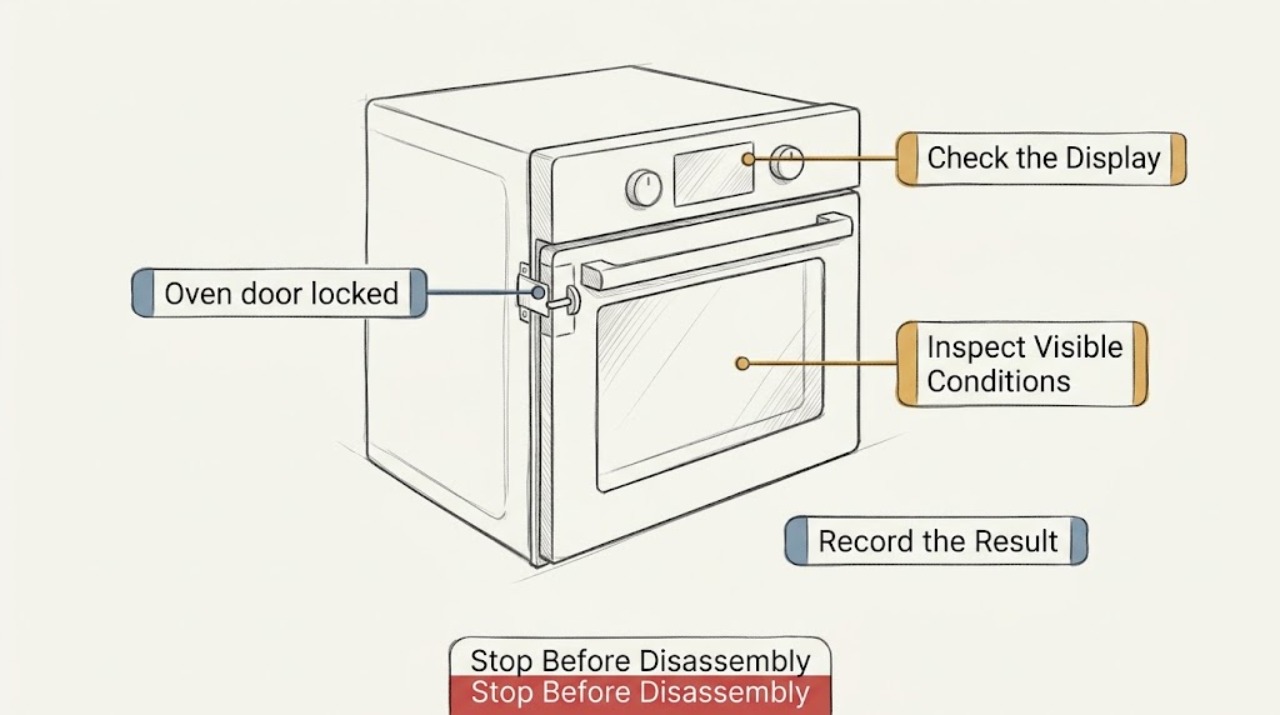
An oven door can remain locked normally during a self-clean cycle and while the cavity is still hot. Do not pull, pry, or bypass the latch. First check from outside for heat, smoke, fire, gas odor, a carbon-monoxide alarm, broken glass, or electrical damage; stop and seek emergency or gas-safety help for those hazards. If the oven is cool, use the exact model's Cancel/Off or unlock sequence, and allow the documented cool-down period. After a power interruption, one model-authorized power reset may clear a lock state, but never open the panel or force the door. If the latch stays locked at room temperature, a code returns, the door is misaligned, or the oven continues heating, leave it unused and arrange qualified appliance service.
Work through in order
Diagnostic checks
Use only checks that match the exact appliance or system and its official guide.
-
Check 1
From a safe position, check whether the oven is still hot and look for smoke, fire, gas odor, soot, an unusual flame, broken glass, arcing, a hot cord or outlet, or a carbon-monoxide alarm. If any is present, stop and keep away.
Expected result: Heat after cooking or self-clean can explain a temporary lock. Smoke, fire, gas odor, abnormal flame, arcing, broken glass, or an alarm is not a normal lock condition.
Next step: Do not force the door or operate controls in the hazard area. Leave for fire, gas odor, or a carbon-monoxide alarm and contact emergency or gas-safety help from outside; keep the oven unused until cleared.
Why this matters
Why: Opening or restarting a hot or hazardous oven can cause burns, fire, gas exposure, or electric shock.
-
Check 2
With no hazard sign, read the display and identify whether Self-Clean, Clean, Locked, a cooling message, a control-lock indicator, or an error code is shown. Note whether the lock began during cleaning, baking, cooling, or immediately after a power interruption.
Expected result: A lock or cooling message during or after self-clean is consistent with a temperature interlock. A lock during ordinary baking, a control-only lock indicator, or a returning code follows a different model-specific path.
Next step: Record the exact message and model number for the owner's manual or service. Do not guess a code meaning from another brand or model.
Why this matters
Why: The display and timing separate a normal high-temperature lock from a control, power, latch, or fault condition.
-
Check 3
If Self-Clean is active or recently ended, leave the door closed and let the oven cool fully according to the exact model instructions. Once cool, use only the documented Cancel/Off or self-clean completion control; do not pull the handle while the lock icon is displayed.
Expected result: A lock that releases after the normal cool-down supports a functioning temperature interlock. A latch that stays fixed at room temperature or a lock icon that remains after the documented cancel path supports service.
Next step: If the oven is cool but still locked, stop manipulating it and arrange qualified appliance service. Do not start another cycle or insert tools around the seal.
Why this matters
Why: The interlock is designed to prevent access at unsafe temperature; forcing it can damage the latch or door.
-
Check 4
If the oven is cool, there is no hazard, and a power interruption caused the lock, follow the exact model manual for one external power reset only. Use the breaker handle only if it is clearly identified and safe to reach; do not remove the panel cover or touch wiring.
Expected result: A lock that clears after the model-authorized reset and remains clear may have been a temporary control state. A lock or error that returns, or a breaker that trips, indicates a fault rather than a reset opportunity.
Next step: Leave the oven unused and call qualified service if the lock returns, the circuit trips, the display stays abnormal, or the door will not open without force. Never repeatedly cycle power.
Why this matters
Why: Power cycling can reinitialize a control but cannot repair a stuck latch, damaged wiring, overheating, or a failed sensor.
-
Check 5
After the oven is cool and unlocked, inspect only the visible door edge, gasket, latch area, and floor for an obvious cloth, rack, cookware, spill, bent trim, or broken glass. Do not remove the door, gasket, latch, panel, or hinge, and do not push the door against resistance.
Expected result: A loose visible obstruction may explain why a door does not close or why a latch cannot return. A bent latch, hinge, frame, damaged gasket, broken glass, or no visible obstruction needs professional diagnosis.
Next step: Remove only a loose item that is cool and safely reachable. If the door remains locked, misaligned, or damaged, keep the oven out of service and arrange appliance repair.
Why this matters
Why: The lock and door alignment affect heat containment and safety; an internal or structural fault is not a safe user repair.
-
Check 6
Prepare a service handoff with the model and serial information, exact display message, selected mode, whether Self-Clean was used, time since it stopped, power interruption, temperature or smoke history, and whether the latch moved at all. Keep the oven off.
Expected result: A clear history can distinguish normal cooling, control or power state, latch alignment, door damage, and a recurring heating or safety fault.
Next step: Arrange qualified appliance service. If gas odor, smoke, abnormal flame, fire, or a carbon-monoxide alarm occurred, obtain gas-safety or emergency clearance before ordinary repair and do not reuse the oven.
Why this matters
Why: The correct remedy may require model-specific latch, sensor, control, or wiring diagnosis that should not be performed behind the panel by a general user.
Use your observations
Decision map
Find the observation that best matches what you see, then follow the next safe action.
-
PATH 01Next step
What you see
The oven is hot or has just run Self-Clean and shows a lock or cooling state.
Do this next
Arrange qualified service and follow the exact model guidance.
Why this path and its safety boundary
Why it matters: Keep the door closed and wait for the model-specified cool-down. Use only the documented Cancel/Off sequence after cooling; never force the door.
-
PATH 02Next step
What you see
The oven is cool but the lock remains after the documented cancel or unlock sequence.
Do this next
Arrange qualified service and follow the exact model guidance.
Why this path and its safety boundary
Why it matters: Stop handling the latch and arrange qualified appliance service. Do not pry, remove the door, or insert tools.
-
PATH 03Next step
What you see
The lock began after a power interruption and there is no heat, smoke, gas odor, or electrical damage.
Do this next
Arrange qualified service and follow the exact model guidance.
Why this path and its safety boundary
Why it matters: Follow the exact model manual for one external power reset. If the lock or code returns, leave the oven unused and request service.
-
PATH 04Next step
What you see
A control-lock indicator is present but the physical door is not held by a hot-cycle interlock.
Do this next
Arrange qualified service and follow the exact model guidance.
Why this path and its safety boundary
Why it matters: Use the model-specific control-lock release instructions; do not assume a generic button combination or force the door.
-
PATH 05Next step
What you see
There is smoke, fire, gas odor, abnormal combustion, a carbon-monoxide alarm, broken glass, arcing, or a hot damaged cord.
Do this next
Arrange qualified service and follow the exact model guidance.
Why this path and its safety boundary
Why it matters: Treat it as an emergency, leave the hazard area, and contact emergency or gas-safety help from outside. Do not attempt to unlock, reset, or reuse the oven until cleared.
Helpful context
Understand the symptom
“Door locked” has several meanings: a self-clean interlock may be doing its job, a recently hot cavity may still be cooling, a power interruption may have left the control and latch out of sequence, or a mechanical latch may be stuck. A control-lock icon may disable keys on some models without being the same as a physical door lock. The exact buttons and waiting time are model-specific.
Keep hands away from the seam if the oven is hot, and do not use a knife, hook, screwdriver, or force against the glass or handle. Do not start another heating or cleaning cycle to make the lock change state. If there is smoke, fire, gas odor, abnormal combustion, or a carbon-monoxide alarm, treat that as a safety event rather than an unlocking problem.
Safety boundary
Stop conditions
- Stop immediately for smoke, fire, gas odor, abnormal flame, soot, a carbon-monoxide alarm or symptoms, broken glass, arcing, electric shock, a hot or damaged cord, or a breaker that trips again.
- Do not pry or pull the door, insert tools, remove the door or gasket, bypass the interlock, open a panel, touch wiring, start another heating or cleaning cycle, or repeatedly reset power.
- Keep the oven out of service when the door remains locked at room temperature, the latch is bent or stuck, a code returns, the oven continues heating, or the door cannot close and seal normally. Resume only after qualified service or safety clearance.
Common questions
FAQ
Why is my oven door locked after self-cleaning?
The lock normally holds the door while the oven is at a high temperature and releases after the model-specific cool-down. Keep it closed, use only the documented cancel sequence after cooling, and never force it.
Can I force open an oven door that is locked?
No. Forcing the door can damage the latch, glass, gasket, or frame and can expose you to heat. If it stays locked at room temperature or a code returns, arrange qualified appliance service.
What if the oven door locked during normal baking?
Turn the controls off if safe, stay clear while it cools, and follow the exact model instructions. A lock during ordinary baking, continued heating, smoke, gas odor, or a returning error needs prompt service; do not pry or restart the oven.
Read the exact guide
Official sources
- Introduction to electrical safetyHealth and Safety Executive · Electrical shock, arcing, fire, wet conditions, and competent-person boundaries
- LG Range – How to Clean Your Oven Using Self CleanLG USA Support · Manufacturer self-clean door-lock, cooling, smoke, and no-force guidance
- Range & Wall Oven - Oven Door Locked During BakingGE Appliances · Manufacturer guidance for an automatic lock engaging during baking and service escalation
- Oven Door Locked - Wall OvenWhirlpool Product Help · Manufacturer guidance for self-clean locks, cooling, power reset, manual latch, and service
- Range - Oven Door Won't UnlockGE Appliances · Manufacturer examples for oven door lock and unlock troubleshooting
- High Temperature Self-Clean Cycle InformationWhirlpool Product Help · High-temperature self-clean cooling, door lock, smoke, and no-force context
- Carbon Monoxide Fact SheetU.S. Consumer Product Safety Commission · Fuel-burning appliance, carbon-monoxide, and service safety
Community feedback
Share a repair observation
Share a plain-text repair observation. Accepted observations are published automatically; this page may take a moment to update.