
On this page
Start here
Quick answer
A Maytag oven door can stay locked normally during Self-Clean and while the oven is still hot. Do not pull or pry the door. Cancel the cycle if the controls respond, then wait for the oven to cool; Maytag says the latch may not release until the cavity is about 200°F/95°C, and a normal cool-down can take roughly 30–90 minutes depending on the model. If the display says LOC or Lock while the oven and timer are off, the control-lock feature may be enabled; on models that use this procedure, hold START/ENTER for 5 seconds to unlock. If a power interruption left the latch engaged, press Cancel/Off once and wait 20–30 seconds, or make one safe one-minute breaker reset after the oven is cool and dry. If the door remains locked at room temperature, the latch will not move gently, the door or glass is damaged, or there is smoke, a gas odor, arcing, or abnormal heat, stop using the oven and arrange qualified service.
Before you begin
Safety first
- Keep the oven off and the door closed if it is hot or damaged. Do not bypass the interlock, force the latch, remove covers, or perform energized electrical checks.
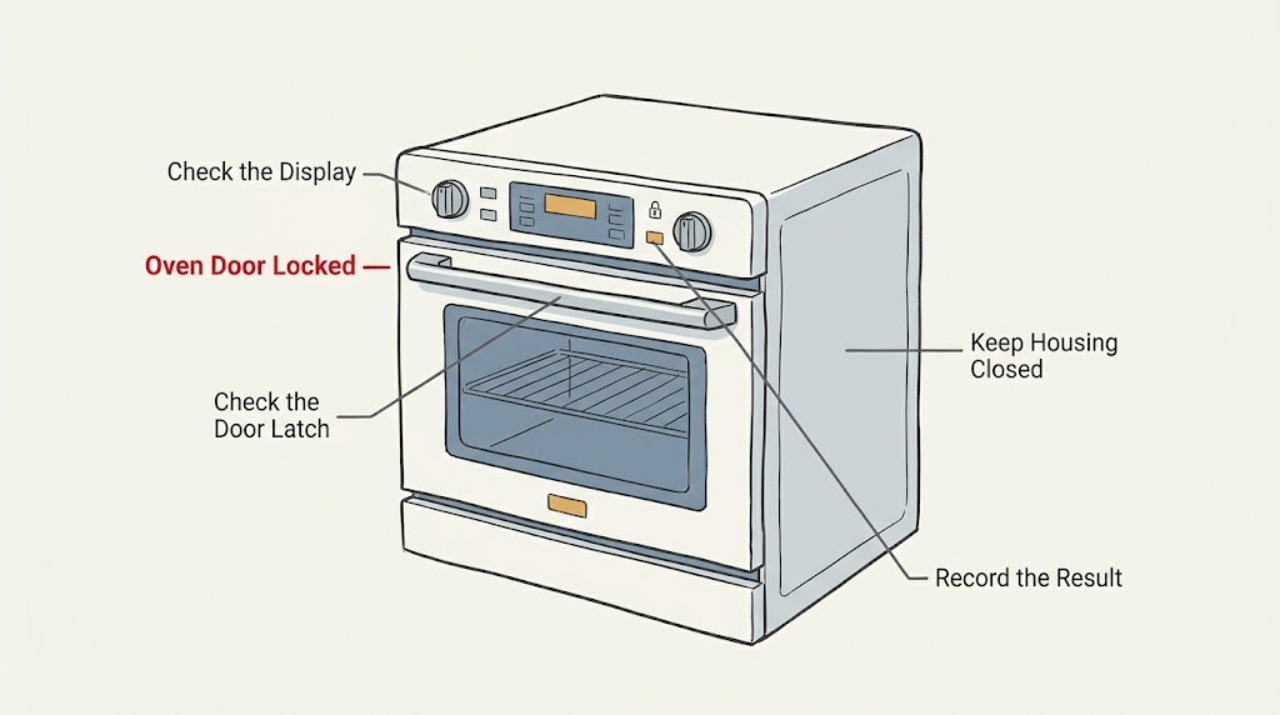
Work through in order
Diagnostic checks
Use only checks that match the exact appliance or system and its official guide.
-
Check 1
Read the display and note the selected cycle, whether Self-Clean is active or was recently canceled, whether LOC/Lock is shown, whether the oven is still hot, and the full model number from the rating label.
Expected result: The display shows Self-Clean, Clean, Heat, On, or Locked; the cavity is hot; or the lock appeared shortly after Self-Clean started.
Next step: Keep the door closed, cancel the cycle if the controls respond, and continue with the cooling check. Do not force the handle.
Why this matters
Why: This is consistent with the thermal safety interlock doing its job, not proof of a broken latch.
-
Check 2
Check the oven from a safe distance after canceling or ending the cycle; allow the cavity and door to cool fully before trying the handle or latch.
Expected result: The door is still hot, the display still shows a lock state, or the latch does not release during the cool-down.
Next step: Wait until the oven is at room temperature; Maytag guidance gives about 30–90 minutes for some interrupted or canceled cycles. Recheck only after cooling, and stop if smoke, a gas odor, or abnormal heat appears.
Why this matters
Why: The lock can remain engaged until the temperature falls to the model's release threshold. Pulling harder can damage the door, latch, or seal and can expose you to a burn.
-
Check 3
If the cycle was interrupted or the controls stopped responding, press Cancel/Off once and leave the door closed while the latch-reset sequence runs.
Expected result: The latch releases after about 20–30 seconds and the display returns to an idle state.
Next step: Open the door only after it is cool, then run a normal non-cleaning cycle only if the door closes and latches normally.
Why this matters
Why: The interruption likely left the electronic latch in a reset state; no part replacement is indicated from this result alone.
-
Check 4
If the display shows LOC or Lock while the oven and timer are off, use the model's control-lock procedure; on Maytag models documented with this method, hold START/ENTER for 5 seconds.
Expected result: LOC disappears and the control pads respond, or the display does not change.
Next step: Use the model-specific Use and Care Guide for another documented key sequence. Do not hold keys while Self-Clean is hot, and do not keep trying random combinations if the door itself is physically stuck.
Why this matters
Why: A disappearing LOC indicates the control lock was active. No change means the model may use another key sequence, or the issue is not only control lock.
-
Check 5
After the oven is fully cool, inspect only the visible latch area, door edge, hinges, and seal for an obstruction, bent latch, loose trim, damaged glass, or a door that is not square with the opening; do not remove panels.
Expected result: The latch arm on a manual-latch model moves gently to the left at room temperature, or the door closes evenly with no damage.
Next step: Follow the model guide to return the manual latch to its normal position, then test only the door's normal closing action. If the latch will not move gently, do not force it; arrange service.
Why this matters
Why: A manual latch that moves freely after cooling may have been held by residual heat or an interrupted cleaning cycle. A door that closes evenly does not establish that an electronic lock is healthy, but it makes a forced-door event less likely.
-
Check 6
If the oven is cool and dry but the latch remains locked after Cancel/Off, perform one power reset by switching the dedicated breaker or fuse off for one minute, then restore power and observe the display without starting a heat cycle.
Expected result: The lock clears after power returns, or the lock immediately returns, the breaker trips, or the controls remain unresponsive.
Next step: Use the oven only if the door opens, closes, and latches normally with no heat or odor concern. Otherwise leave it off and schedule qualified appliance service; do not repeat breaker cycling or perform energized electrical checks.
Why this matters
Why: A cleared lock can indicate a recoverable controller or latch-state interruption. A recurring lock, trip, unresponsive control, or visible damage needs diagnosis rather than repeated resets.
Use your observations
Decision map
Find the observation that best matches what you see, then follow the next safe action.
-
PATH 01Next step
What you see
The lock appeared during Self-Clean or before the oven cooled.
Do this next
Cancel if appropriate, keep the door closed, and wait for the complete cool-down. Never pry the door.
Why this path and its safety boundary
Why it matters: Expected thermal interlock behavior is more likely than a latch failure.
-
PATH 02Next step
What you see
The oven is cool, but LOC is displayed and no physical damage is visible.
Do this next
Try the documented model procedure, commonly holding START/ENTER for 5 seconds with the oven and timer off. Stop if the model guide does not confirm that sequence.
Why this path and its safety boundary
Why it matters: Control Lock may be preventing the controls from responding.
-
PATH 03Next step
What you see
A power failure or canceled Self-Clean left the door locked, but the oven is now cool.
Do this next
Press Cancel/Off once and wait 20–30 seconds. If needed, make one one-minute breaker reset; if the lock persists, call for service.
Why this path and its safety boundary
Why it matters: The electronic latch may need its documented reset sequence.
-
PATH 04Next step
What you see
A manual latch will not move gently at room temperature, or the electronic lock remains after cooling and one reset.
Do this next
Leave the oven off and have a qualified technician identify the model-specific failure before any part is ordered.
Why this path and its safety boundary
Why it matters: A latch, door-switch/interlock, wiring, or control fault is possible, but the visible symptom does not identify a replacement part.
-
PATH 05Next step
What you see
The oven has smoke, a burning or gas odor, arcing, uncontrolled heat, a hot damaged door, water near electrical parts, or a repeatedly tripping breaker.
Do this next
Stop using the oven. From a safe location and only if it can be done without touching hot or wet equipment, isolate the appliance; leave the area and use local emergency or gas-safety help for an active gas odor or fire risk.
Why this path and its safety boundary
Why it matters: This is a safety event, not a routine door-lock reset.
Helpful context
Understand the symptom
Why the lock may be normal
The lock is a heat and self-clean safety interlock, not just a handle catch. Self-Clean reaches temperatures high enough that Maytag locks the door shortly after the cycle begins and keeps it locked during cooling. A cooling fan or residual warmth after the cycle ends does not by itself mean the latch has failed. The useful distinction is whether the display identifies Self-Clean or a lock message, whether the cavity is still hot, and whether the door remains locked after a complete cool-down.
Before touching the latch
Keep the door closed while the oven is hot. Keep children away, do not defeat the interlock, and do not insert tools around the seal or hinge. Only use the controls and the exact latch procedure that apply to the model; Maytag instructions differ between electronic-lock and manual-latch ovens.
Safety boundary
Stop conditions
- Do not force, pry, bypass, or defeat a locked oven door, especially during Self-Clean or while the cavity or door is hot.
- Stop immediately for smoke, a burning or gas odor, visible arcing, uncontrolled heating, a damaged door or glass, or a door that will not close safely.
- Do not continue after water reaches electrical areas, a breaker trips again, or the control remains unsafe or unresponsive after one reset.
- Do not remove panels, probe live wiring, or attempt latch, gas, heating-element, or control-board repair without the model-specific qualifications and isolation procedure.
Only after diagnosis
Potential parts
- door latch or lock assembly
Only consider this after the oven is cool and a qualified diagnosis finds that the latch or lock mechanism does not release or position correctly; a hot Self-Clean lock alone does not establish a failed part.
Confirm the full oven model and the manufacturer's fit information before ordering; similar-looking latch parts are not interchangeable by appearance. - door switch or interlock
Consider this only if service testing links a persistent lock or control symptom to the door switch/interlock after the latch and cooling behavior have been checked.
Fit and electrical rating are model-specific and must be confirmed by a qualified technician and manufacturer documentation. - oven control or control-lock circuit
Consider this only when the documented cooling, Cancel/Off, control-lock, and one power-reset checks fail and diagnosis identifies a control-side fault.
Do not infer a control-board replacement from a lock message alone; verify the exact model and diagnosis first.
When checks do not resolve it
Need a professional?
Call for qualified appliance service after the oven has cooled and one documented reset has failed, or immediately for damage, smoke, gas odor, arcing, uncontrolled heat, or repeated breaker trips.
Safety scope: Keep the oven off and the door closed if it is hot or damaged. Do not bypass the interlock, force the latch, remove covers, or perform energized electrical checks.
Common questions
FAQ
Why is my Maytag oven door locked after Self-Clean?
The lock is normally engaged during the high-temperature cycle and cooling period. Cancel if appropriate and wait until the oven is cool; do not force the door.
How long should I wait before trying a locked Maytag oven door?
Wait for the complete cool-down. Maytag's locked-door guidance gives about 30–90 minutes for some interrupted or canceled cycles, while the exact time depends on the model and cavity temperature.
What does LOC mean on a Maytag oven?
LOC commonly indicates that the control-lock feature is active. When the oven and timer are off, models using the documented procedure can toggle it by holding START/ENTER for 5 seconds; use the model guide if that does not work.
What should I do if a power outage left my Maytag oven locked?
Once the oven is cool, press Cancel/Off once and wait about 20–30 seconds. If needed, make one one-minute breaker reset. A lock that persists, a repeated trip, or an unresponsive control needs qualified service.
Can I pry open a Maytag oven door that is locked?
No. Forcing the door can damage the latch, hinges, seal, or glass and can expose you to heat. Keep it closed while hot and arrange service if it stays locked after the documented cool-down and reset checks.
Read the exact guide
Official sources
- Oven Door Locked - Wall OvenMaytag · Use for Maytag wall ovens; exact control and latch details vary by model.
- Oven is Locked - What to DoMaytag · Use for Maytag oven assistance; follow the model-specific guide if its controls differ.
- High Temperature Self-Clean Cycle InformationMaytag · Use when the locked door is associated with a high-temperature Self-Clean cycle.
- Use and Care GuideMaytag · Manual-specific guidance; confirm that the guide matches the oven model before applying details.
- Locked, Lock or Loc - RangeMaytag · Use for Maytag models that display LOC or Lock and use the documented control-lock sequence; verify the model guide.
- How to Use a Self-Cleaning OvenMaytag · General Maytag Self-Clean explanation; the model manual controls exact operation.
Community feedback
Share a repair observation
Share a plain-text repair observation. Accepted observations are published automatically; this page may take a moment to update.