
On this page
Start here
Quick answer
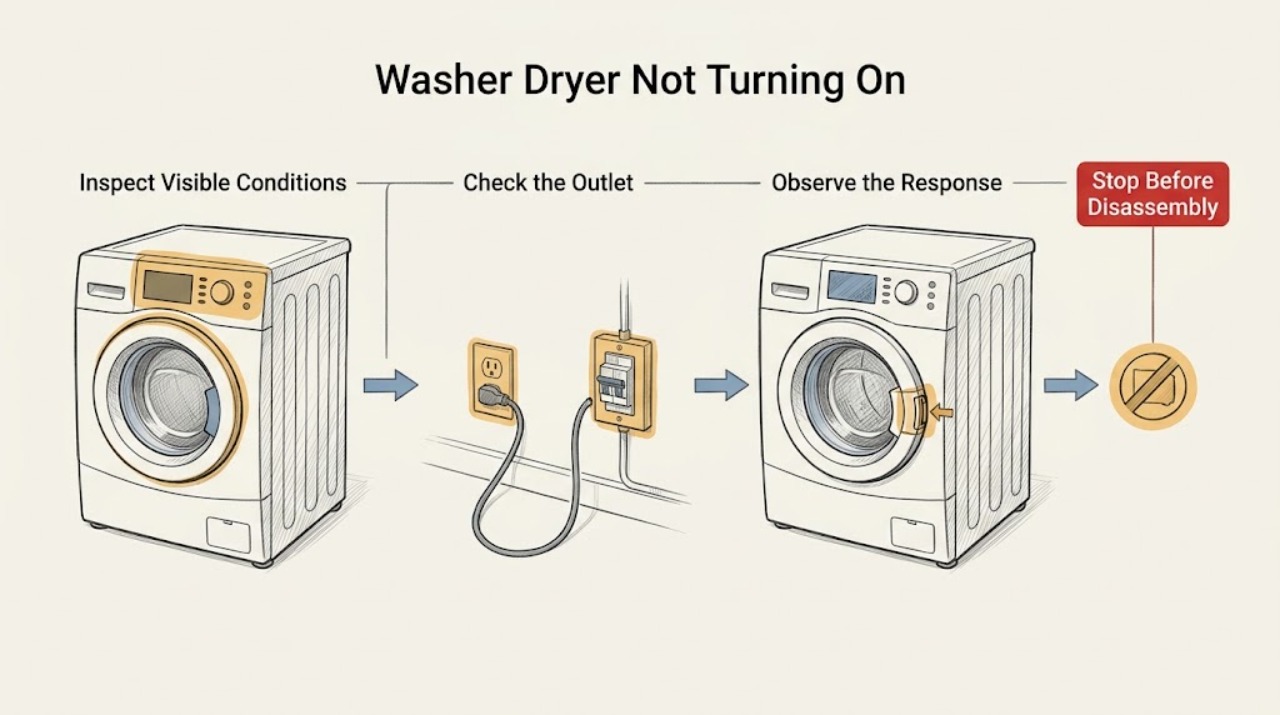
If a washer dryer will not turn on, first decide whether the entire appliance is dark, the panel lights up but will not start, or only the washer or dryer side is affected. Then check the external plug, outlet and breaker from a dry, undamaged position, the control or child lock, the correct power and Start controls, and the door latch. For the washer side, also check the visible water supply and whether water is trapped; for the dryer side, check the selected cycle and latch. Never force a locked door or keep resetting a breaker. If there is a leak, water near electrics, a damaged cord, burning smell, smoke, sparking, overheating, or a repeat trip, stop and arrange qualified service.
Work through in order
Diagnostic checks
Use only checks that match the exact appliance or system and its official guide.
-
Check 1
Press the normal Power control once and observe the whole appliance, then test the washer and dryer controls separately if the unit has separate sections or power buttons. Note whether the display, drum light, indicators, or any side responds.
Expected result: No lights or display anywhere means the common power path needs checking. A lit panel that ignores commands means controls, lock, or a fault state. One side responding while the other does not narrows the problem to that side or its controls.
Next step: Continue to the safe power check for a dark unit, or to the lock, door, washer, or dryer branch when the panel is lit.
Why this matters
Why: Combination units may have distinct controls and operating paths, so a single symptom should not be treated as a universal appliance failure.
-
Check 2
With the appliance off and your hands dry, inspect the accessible plug, cord, and outlet for looseness, burn marks, melted areas, moisture, or other damage. Check the laundry-room breaker for an obvious trip; reset it only once from a safe dry position when there is no damage, odor, or water.
Expected result: A restored display after one safe reset suggests an external interruption. A dead outlet, damaged cord, visible heat mark, or breaker that trips again is an electrical stop condition.
Next step: Do not keep resetting or test a damaged connection. Leave the appliance off and arrange a licensed electrician or qualified appliance servicer.
Why this matters
Why: The power supply can be mistaken for an appliance failure, but damage or a repeat trip can indicate a dangerous wiring or appliance fault.
-
Check 3
If the panel is lit but commands do not work, look for a Control Lock, Child Lock, or similar indicator. Use only the exact model manual's unlock command, and press and hold the documented Start or Power control rather than tapping it if the manual requires a hold.
Expected result: The panel responds after the lock is released or the Start command is held, or it remains unresponsive with the lock indicator off.
Next step: Make one normal start attempt after the documented unlock. If the panel stays unresponsive, do not bypass the lock or open the console; arrange service.
Why this matters
Why: A lock intentionally blocks controls, and some laundry controls require a deliberate press-and-hold. A still-unresponsive panel points to a control or power-state fault rather than a normal cycle selection issue.
-
Check 4
Check the door and latch area without forcing it. Remove only a visible piece of clothing or debris that prevents the door from seating, close the door firmly, and confirm that the latch engages. If water is visible or the lock will not release, do not open the door.
Expected result: A cycle that starts after the door is correctly latched supports a door-sensing condition. A door that will not latch, a lock indicator that stays on, or water behind the door requires a stop and service or safe-drain branch.
Next step: Leave a persistent lock or latch fault for qualified service. Never bypass the interlock, pry the door, or reach into the drum.
Why this matters
Why: Washers and dryers use the door state as a safety interlock; a washer may also keep the door locked when it cannot safely drain.
-
Check 5
For the washer side, verify the visible water taps are open, the inlet hoses are not sharply kinked, and no connection is leaking. Select a normal washer cycle and use the model's Start/Pause command once; do not disconnect hoses behind a wet appliance.
Expected result: The washer begins filling and progresses, or it remains idle with a water-related message, no fill, or a visible hose problem.
Next step: Correct only an obvious tap or hose-position issue without dismantling. If there is no fill, a hose is damaged, or the message returns, stop and arrange service using the exact model guidance.
Why this matters
Why: Some washer models will not start correctly without the required water connection, and a water fault can be mistaken for a dead control.
-
Check 6
For the dryer side, select a cycle that is valid for the model and press and hold Start for the period stated in its manual. Confirm the door latch is clear and the panel is dry; if the dryer had been shutting off during a cycle, inspect only the accessible lint filter and vent outlet after it is cool and off.
Expected result: A countdown or drum movement confirms that the dryer cycle actually started. No response with a good latch and correct cycle, or repeated shutoff after starting, points to a dryer-side fault or airflow safety condition.
Next step: Do not run repeated tests when the dryer smells hot, smokes, or overheats. Arrange qualified service for a persistent no-start or shutdown; clean only accessible lint as the manual allows.
Why this matters
Why: Dryer guides distinguish a failure to start from a dryer that loses power or stops during operation, and both the latch and cycle selection can block startup.
-
Check 7
If the washer side stopped with water in the drum, keep the door closed and inspect only the visible drain hose for a kink or crushing. Use an emergency drain or pump-filter procedure only when the exact manual permits it, power is disconnected, the machine is cool, and water can be contained safely.
Expected result: Water remains, the visible hose is blocked or pinched, or a drain warning is shown; alternatively, the hose looks clear but the drum still will not empty.
Next step: Do not force the door or restart a water-filled machine. Stop if water is near electrical parts or the manual's drain procedure is unclear, and arrange service.
Why this matters
Why: A washer cannot safely unlock or proceed to spin when the water level is unsafe, and a drain problem can make the washer side appear not to turn on or start.
-
Check 8
After the model-specific external checks show no hazard, perform one controlled power cycle using the owner's instructions, then select the correct side and program and try once. Record any message or light pattern exactly; do not substitute a different brand's code explanation.
Expected result: The unit starts normally, or the same no-start condition, code, or side-specific failure returns.
Next step: Stop after the one restart and provide the model, affected side, code or light pattern, water status, and power observations to a qualified service provider.
Why this matters
Why: A single successful restart can clear a temporary control state, while a repeat condition indicates that the fault needs model-specific diagnosis.
Use your observations
Decision map
Find the observation that best matches what you see, then follow the next safe action.
-
PATH 01Next step
What you see
The entire washer dryer is dark.
Do this next
Check the accessible plug, outlet, and breaker once from a dry, undamaged position; a dead outlet, damaged cord, or repeat trip requires an electrician or servicer.
-
PATH 02Next step
What you see
The panel is lit but buttons do not respond.
Do this next
Check the model's Control Lock or Child Lock and use the documented press-and-hold command; do not bypass a lock or open the console.
-
PATH 03Next step
What you see
The washer side works but the dryer side does not, or the reverse.
Do this next
Follow only the affected side's cycle, door, water, start, or airflow checks and give the servicer the working-versus-failed comparison.
-
PATH 04Next step
What you see
The washer door does not latch or water remains in the washer drum.
Do this next
Keep the door closed, do not bypass the lock, and use only a safe model-specific drain procedure or qualified service.
-
PATH 05Next step
What you see
The washer shows no fill, a water message, or a visible inlet-hose problem.
Do this next
Inspect the open tap and visible hose position without dismantling; correct an obvious issue once and escalate a persistent fault or leak.
-
PATH 06Next step
What you see
The dryer panel is on but the timer does not start after the correct cycle and held Start command.
Do this next
Recheck the latch and control lock once, then request service rather than repeatedly running the dryer.
-
PATH 07Next step
What you see
The dryer loses power or stops during a cycle.
Do this next
Stop if there is heat damage or a burning smell; otherwise inspect only the safe external power connection and accessible airflow path, then arrange service for recurrence.
-
PATH 08Next step
What you see
A message, code, or light pattern returns after one documented restart.
Do this next
Use the exact model manual and provide the original code or pattern to a qualified service provider; do not generalize another brand's code.
Helpful context
Understand the symptom
A washer dryer combines two operating paths, but the controls and power arrangements differ by model. A completely dark unit is a supply or common-control question. A lit panel with no response is more often a lock, door, cycle, Start command, or displayed-fault question. A washer that works while the dryer does not, or the reverse, points to the affected side rather than proving that the whole appliance has lost power.
Use the owner manual for the exact model for button names and any error message. Manufacturer guides cited here use examples such as Control Lock, Child Lock, a held Start button, and a closed door, but those labels and sequences are not universal. Do not apply a code meaning from another brand or model.
Keep all checks external and low risk. Do not remove an access panel, test live wiring, bypass a door lock, reach into a moving drum, or open a wet appliance.
Safety boundary
Stop conditions
- If there is water near the plug, controls, or other electrical parts, do not touch the appliance or wet surfaces; keep clear and arrange qualified help.
- If the door is locked over standing water or hot water, never force it open or bypass the interlock; use the exact manual or call service.
- If you see a damaged cord, burn mark, smoke, sparking, a burning or melted smell, abnormal heat, or a breaker trip, stop using the appliance and arrange qualified service.
- If a breaker trips again or the same no-start condition returns after one documented restart, do not keep resetting or running cycles.
- Do not remove electrical covers, test live wiring, reach into a moving drum, bypass a door lock, or dismantle a pump, heater, motor, or control as a home troubleshooting step.
Only after diagnosis
Potential parts
- door lock or door-sensing component
Consider this only when the door is physically aligned but the exact model repeatedly reports a latch or lock condition and a technician confirms the component fault.
Match the exact washer dryer model and revision with the manufacturer or qualified servicer before selecting a part. - user interface or main control component
This category is relevant only when stable external power, lock state, correct controls, and model-specific operation have been checked and a technician identifies a control fault.
Confirm the exact model, control design, and manufacturer fit information; do not substitute a board by appearance. - drain pump or water inlet component
Consider this only after a model-specific water or drain symptom remains with the visible hoses correctly positioned and a qualified diagnosis confirms the failed component.
Verify model-specific fit and installation through the manufacturer or an authorized service professional.
When checks do not resolve it
Need a professional?
Arrange qualified appliance service, and an electrician when the supply is suspect, if the washer dryer remains dark or unresponsive after the safe external checks, one side still will not start, the door or drain condition persists, an exact-model fault returns, or there is any leak, damage, smoke, overheating, spark, or repeat breaker trip.
Have this ready
- Provide the model and serial information, affected side, exact display or light pattern, cycle selected, door and water status, power observations, and any leak, odor, heat, noise, smoke, spark, or trip.
Common questions
FAQ
Why is my washer dryer completely dark?
Check the accessible cord, outlet, and breaker once from a dry, undamaged position. A damaged connection or repeat trip needs an electrician or qualified servicer rather than more resets.
Why does the panel light up but the washer dryer will not start?
Look for Control Lock or Child Lock, confirm the correct side and cycle, make sure the door latches, and use the model's documented press-and-hold Start command. Persistent no response needs service.
Why will the washer dryer door not open after it stops?
The lock may be protecting you from moving parts, unsafe water level, or temperature. Do not force it; if water remains, use the exact model drain instructions or call service.
Why does only the washer or dryer side fail?
A combination unit can have separate controls and operating paths. Record which side responds, then follow that side's door, water, cycle, Start, or airflow checks instead of assuming the whole appliance has lost power.
Should I keep resetting the washer dryer?
No. After the safe external checks, use the model manual's restart sequence once. If the same condition, message, or power trip returns, leave the appliance off and arrange qualified service.
Read the exact guide
Official sources
- Power issues with Samsung washing machineSamsung Electronics · Samsung washing machine power and unexpected-stop guidance
- Not Starting or Not Operating - Front Load Washer - Product HelpWhirlpool Corporation · Whirlpool front-load washer start and operation guidance
- Latching a Front Load Washer Door - Product HelpWhirlpool Corporation · Whirlpool front-load washer door latch and unlock guidance
- Samsung dryer loses power or won't turn onSamsung Electronics · Samsung dryer power-loss and safe inspection guidance
- Samsung dryer turns on but will not start or spinSamsung Electronics · Samsung dryer start, child lock, cycle, and service guidance
- Not Starting or Not Operating - Dryer - Product HelpWhirlpool Corporation · Whirlpool dryer start and operation guidance
Community feedback
Share a repair observation
Share a plain-text repair observation. Accepted observations are published automatically; this page may take a moment to update.