
On this page
Start here
Quick answer
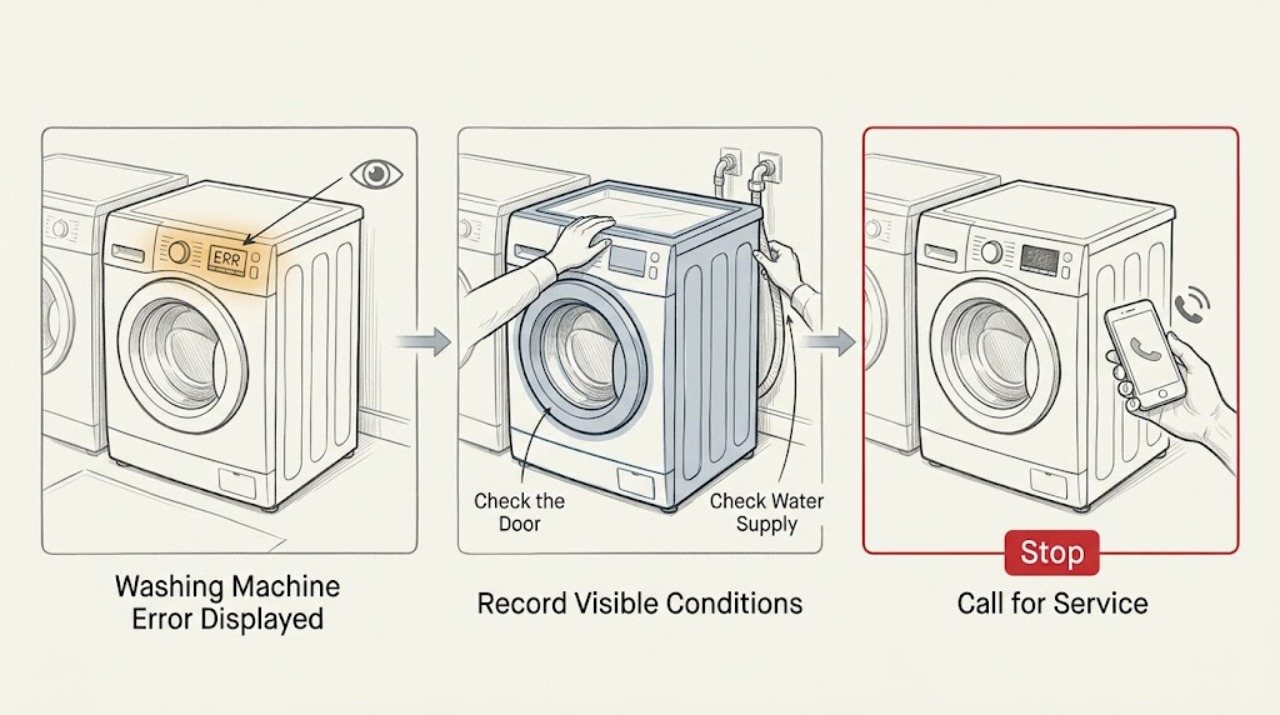
When a washing machine displays an error, photograph or write down the complete code, flashing-light pattern, model, front- or top-loader layout, programme, and stage before switching anything off. Error codes are not universal: one manufacturer may use a code for draining while another uses it for a door, motor, or power condition. Use the exact owner's manual or the manufacturer's model lookup, then check only the matching low-risk conditions: visible door or lid closure, water taps and kinked hoses, the external drain path, load or foam symptoms, and the power connection. A single manual-authorized reset may clear a temporary state, but it does not prove a component is healthy. Stop for active leakage, water near electrical equipment, hot water or steam, violent vibration, smoke, burning smell, sparks, a damaged cord or outlet, or a repeated circuit trip. If the code is unlisted, returns after the documented correction, or requires a panel, pump, lock, motor, sensor, or wiring diagnosis, leave the washer off and arrange qualified service.
Work through in order
Diagnostic checks
Use only checks that match the exact appliance or system and its official guide.
-
Check 1
Before clearing the display, record every character, decimal or icon, flashing-light count, audible pattern, model number, front- or top-loader layout, selected programme, and the stage when the error appeared. Take a safe photo of the panel without opening the appliance.
Expected result: The display shows a stable code, a code alternates with another message, only lights flash, or the indication changes after power is interrupted.
Next step: Use the exact owner's manual or the manufacturer's support lookup for the recorded model. Do not apply a code explanation from a different washer.
Stop if: Stop documenting and move away for smoke, burning or electrical smell, sparks, a hot panel or outlet, active leakage, water near electrical parts, violent movement, or a repeated trip.
Why this matters
Why: The exact code and context determine the lookup path. A code from another brand or model can lead to the wrong repair, and a changing indication may represent a secondary symptom rather than the root cause.
-
Check 2
If the manual maps the error to a door or lid, inspect only the visible closure area. Remove an obvious small item or excess laundry that prevents closure, make sure no fabric is caught in a front-loader seal, and close the door or lid normally without forcing it.
Expected result: The door or lid now closes and locks, an object or overload was blocking it, the lock indicator remains absent, or the glass, hinge, seal, or latch is damaged.
Next step: Follow the exact model instruction once and press Start only if the door or lid locks normally. If the lock remains unconfirmed or any door part is damaged, keep the washer off and request service.
Stop if: Do not force, tape, hold, or bypass the lock; stop for broken glass, a torn seal, an active leak, or a door or lid that cannot latch safely.
Why this matters
Why: A door or lid error can be an obstruction or alignment issue, but a lock that remains undetected with a clear closure points to an interlock or control fault. A trapped item can also cause a leak.
-
Check 3
If the manual maps the error to filling or water level, inspect from a dry, stable position that the household tap is open, the visible inlet hoses are connected and not kinked, and water is not leaking at a connection. Do not remove a hose unless the model instructions say how to isolate the water safely.
Expected result: A tap is closed, a hose is bent or disconnected, the connection leaks, water supply is unavailable, or the visible supply appears normal but the error remains.
Next step: Correct only an obvious tap or hose position and perform one model-approved test. If water will not enter, the connection leaks, or the error returns, close the tap as appropriate and request appliance or plumbing service.
Stop if: Stop for uncontrolled filling, an active leak, a burst hose, water near electrical equipment, or any need to open the cabinet or test a valve electrically.
Why this matters
Why: A restricted or unavailable supply can produce an inlet or water-level error. A normal visible supply with a returning code shifts the issue toward an inlet valve, sensor, control, or another model-specific fault.
-
Check 4
If the manual maps the error to draining, inspect the visible drain hose, household standpipe or sink connection, and any water remaining in the drum. If a pump filter is explicitly accessible on that model, isolate power and water first and follow the manual; do not tilt the machine or open a sealed panel.
Expected result: The drain hose is kinked or blocked, the household drain backs up, water remains in the drum, the model-approved filter is restricted, or the external drain route is clear.
Next step: Correct only a visible hose or household-drain issue and perform no more than one manual-approved test. If water remains or the error returns, leave the appliance off and arrange service.
Stop if: Stop for sewage-contaminated water, a leak, water near electrical equipment, a hot pump, or any need to dismantle a pump or work while powered.
Why this matters
Why: A restricted hose, drain, or filter can prevent the washer from advancing. A clear external route with retained water may indicate a pump, sensor, or control fault and is not diagnosed by the code alone.
-
Check 5
If the manual maps the error to overload, foam, imbalance, or vibration, wait until the drum is stationary and observe whether the load is clumped, excessive, or producing unusual suds. Redistribute or remove a small amount only when the door or lid unlocks normally and there is no water or electrical hazard.
Expected result: The load is bunched or oversized, suds are excessive, the washer is level and stable, or it shakes, walks, bangs, or remains in error with a safe balanced load.
Next step: Use a suitable balanced load once if the manual permits and the machine is stable. If the error returns or movement is severe, stop testing and arrange appliance service.
Stop if: Stop for violent shaking, walking, metal impact, smoke, burning smell, sparks, water, a damaged cabinet, or repeated breaker operation.
Why this matters
Why: Load balance, detergent foam, or a level problem can trigger protective stops or error indications. Severe movement or a persistent error with a stable load suggests service for the suspension, motor, sensor, drain, or control.
-
Check 6
If the code indicates power or a temporary control state, switch the washer off and use only the model manual's reset procedure. Disconnect power from a dry, safe position, wait the documented interval, reconnect once, and do not reset a breaker repeatedly.
Expected result: The error clears and the washer starts normally, the same code returns, the circuit trips, or the cord, plug, or receptacle is hot, wet, loose, or damaged.
Next step: If the error returns or the circuit trips, leave the appliance disconnected and arrange qualified appliance or electrical service. Provide the exact code and stage rather than trying another reset.
Stop if: Do not reconnect a wet or damaged appliance, perform a live test, bypass protection, or continue after smoke, burning smell, sparks, overheating, or a repeated trip.
Why this matters
Why: A one-time reset can clear a transient state but cannot prove that a motor, sensor, lock, pump, wiring, or control is sound. A recurring code or trip needs diagnosis.
-
Check 7
Prepare a service handoff without opening the machine: provide the model and serial information if safely visible, full code and light pattern, front- or top-loader type, programme and stage, water level, door or lid behavior, load and foam observations, recent installation or maintenance, and safe external photos.
Expected result: The machine works after one safe correction, or the same code, lock, water, drain, load, or power symptom remains.
Next step: Keep the washer out of service when the error persists and give the recorded information to qualified appliance service. Use an electrician or plumber when the evidence points outside the appliance.
Stop if: Stop documenting and leave for smoke, fire, strong odor, sparks, flooding, water near electrical parts, violent movement, or another immediate hazard.
Why this matters
Why: The model and event stage let a technician distinguish a water, drain, lock, motor, sensor, foam, vibration, or electrical path without guessing from a generic code list.
Use your observations
Decision map
Find the observation that best matches what you see, then follow the next safe action.
-
PATH 01Next step
What you see
The code or lights indicate a door or lid problem, or the door or lid will not lock.
Do this next
Check only visible closure and load obstructions using the exact manual. Do not bypass the interlock; a persistent lock issue needs appliance service.
-
PATH 02Next step
What you see
The code indicates water supply, inlet, pressure, or water-level trouble.
Do this next
Check the accessible tap and inlet hoses for supply and kinks. Stop for leaks or uncontrolled filling and arrange appliance or plumbing service if the error returns.
-
PATH 03Next step
What you see
The display indicates a drain fault or water remains in the drum.
Do this next
Inspect the visible drain path and only the model-approved filter procedure after safe isolation. Persistent retained water or a returning code requires service.
-
PATH 04Next step
What you see
The code or lights indicate overload, suds, imbalance, vibration, or the machine stops around spin.
Do this next
Wait for the drum to stop and make one safe load or detergent correction if the manual permits. Violent movement or a returning error requires service.
-
PATH 05Next step
What you see
The code indicates power or the display is blank, the circuit trips, or the plug or outlet is hot or damaged.
Do this next
Leave the washer disconnected and arrange qualified electrical or appliance service. Do not repeatedly reset the circuit or perform live tests.
-
PATH 06Next step
What you see
The code is not listed for the exact model, changes after reset, or returns after the documented correction.
Do this next
Stop testing and provide the exact model, code, stage, and observations to qualified appliance service. Do not translate the code from another brand.
Helpful context
Understand the symptom
A code is a clue, not a universal diagnosis
Manufacturers use different code families and display formats. Samsung describes codes and blinking lights as a starting point for troubleshooting, while LG explicitly warns that notification codes vary by product model. Even within one brand, a front-loader and top-loader can use different controls. Preserve the exact characters, symbols, light count, programme, and timing, then use the manual for that machine rather than translating the code from a different brand.
Start with safe external observations
Many codes can be narrowed by observing the visible door or lid, water supply, drain hose, load, and foam without opening the cabinet. A door-lock code may be caused by an obstruction, a water code by a closed tap or kinked hose, and a drain code by a restricted route. Those are decision branches, not permission to force a lock, tilt the washer, or dismantle a pump. Isolate power and water before any model-authorized filter work, and stop if water reaches electrical parts.
Reset once, then escalate a returning error
A documented power cycle can clear a temporary control state, but repeated resets can hide a recurring leak, over-current, water-level, drain, or lock fault. Follow the exact model procedure and make no more than one safe attempt after recording the code. If the same error returns, close the water supply when appropriate, disconnect power from a safe dry position, and arrange service with the code and observations ready.
Safety boundary
Stop conditions
- Stop and isolate water or power only from a safe, dry position for active leakage, uncontrolled filling, flooding, sewage-contaminated water, or water near electrical equipment.
- Stop for smoke, a burning or electrical smell, sparks, a hot or scorched plug or outlet, exposed wiring, or a repeated breaker or safety-switch trip; do not keep resetting the circuit.
- Stop for hot water or steam, violent shaking, walking, metal impact, broken glass, a torn seal, or a door or lid that will not latch. Never bypass the interlock.
- Do not use an extension cable, tilt the appliance, perform live electrical tests, open sealed panels, reach into a moving drum, or apply another brand's error-code or reset sequence.
When checks do not resolve it
Need a professional?
Request qualified appliance service for a persistent or unexplained error, failed door or lid detection, recurring inlet or drain fault, overload or vibration error with a stable load, or any internal electrical or mechanical diagnosis. Use an electrician or plumber when the fault is outside the washer.
Have this ready
- Provide the model and serial information, front- or top-loader layout, exact display code and flashing pattern, programme and stage, door or lid behavior, tub water level, load and foam observations, socket result, hose observations, recent installation or maintenance, and safe external photos.
Common questions
FAQ
Can I look up a washing-machine error code online?
Yes, but use the manufacturer's support page or owner's manual for the exact model. Record every character, symbol, flashing pattern, programme, and stage first. Code meanings are not universal across brands or even product types.
What should I check first when an error appears?
Start with the exact code and context, then follow its matching branch: visible door or lid closure, water supply, drain route, load or foam, or safe power state. Do not open panels or guess a component from the code alone.
Is it safe to reset a washing machine showing an error?
A single reset is reasonable only when the exact manual authorizes it and there is no leak, water near electricity, heat, smoke, odor, sparks, or circuit problem. If the error returns, stop resetting and arrange service with the recorded code.
Can a door or lid problem cause an error code?
Yes. Manufacturers commonly use a code or light for a door or lid that is open, obstructed, or not locked. Remove only an obvious visible obstruction and close it normally; never force or bypass the safety lock.
When does a washing-machine error require a technician?
Request service when the code is unlisted, returns after one documented correction or reset, or points to an internal lock, pump, valve, motor, sensor, control, or wiring issue. Stop immediately for leaks, water near electrical parts, smoke, burning smell, sparks, violent movement, or repeated trips.
Read the exact guide
Official sources
- Samsung washing machine information and error codesSamsung Support · Official Samsung washing-machine support used as a manufacturer example; codes and remedies do not generalize to other models or brands.
- [LG Top Load Washer] Error Code ListLG USA Support · Official LG top-load washer reference used only to show why code meaning is model-dependent and how safe external branches differ.
- Not Starting or Not Operating - Front Load WasherWhirlpool Product Help · Official Whirlpool front-load washer guidance used for general decision examples; it is not a universal error-code table.
- LG Front Load Washer - Error Code List(New)LG USA Support · Official LG front-load washer reference used only for examples; exact code meaning and procedure depend on model.
Community feedback
Share a repair observation
Share a plain-text repair observation. Accepted observations are published automatically; this page may take a moment to update.