
On this page
Start here
Quick answer
A Westinghouse oven may make a smooth fan sound during convection, rapid heat, self-clean, or cool-down, and a brief click or tick can occur when a relay switches or hot metal expands. The exact model, fuel type, mode, and timing matter. A new grinding or scraping sound, wobbling fan, loud crackle, electrical arcing, burning smell, smoke, repeated breaker trip, uncontrolled heat, or a gas-related whoosh, hissing sound, delayed ignition, abnormal flame, or gas odor is not a sound to keep testing. Turn the oven off, keep clear of hot surfaces, and arrange qualified service. If gas odor or flames are present, leave the area and use the local gas or emergency safety route from a safe location.
Work through in order
Diagnostic checks
Use only checks that match the exact appliance or system and its official guide.
-
Check 1
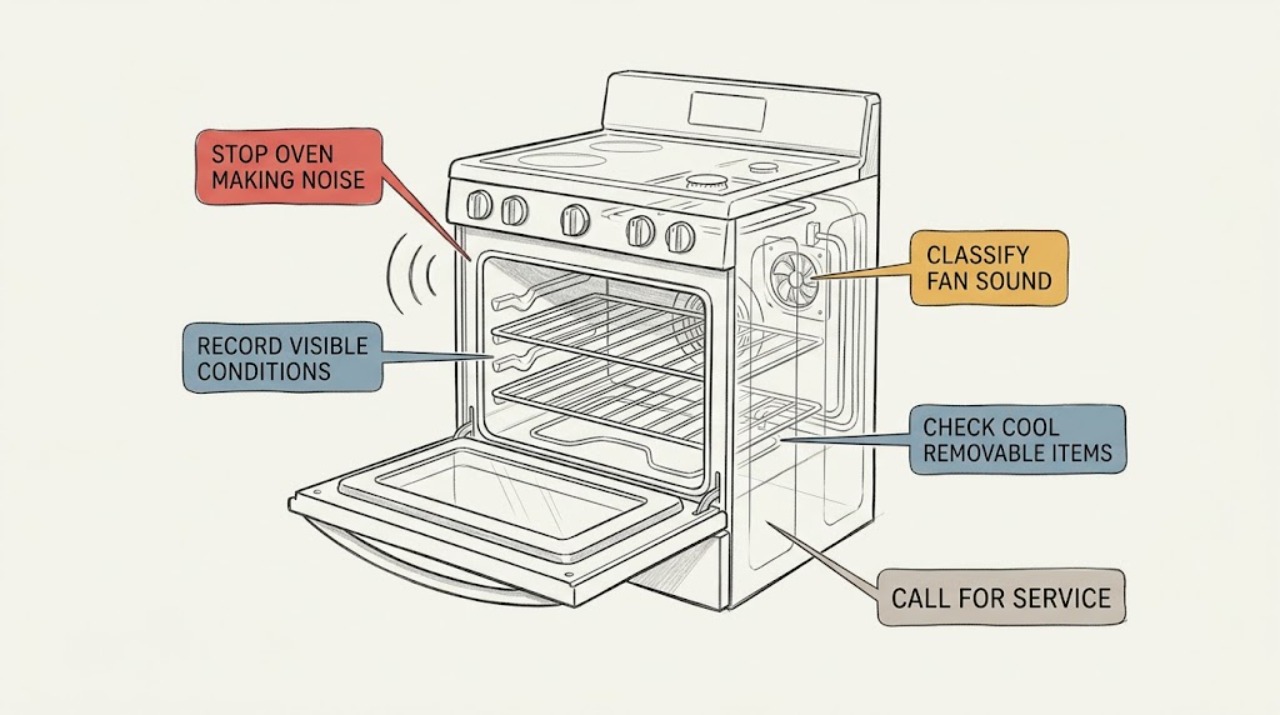
From a safe position, record the Westinghouse model, fuel type if known, oven cavity, selected mode, door position, and when the sound starts and stops; do not open a hot door or reach behind the appliance.
Expected result: The sound occurs during preheat, fan cooking, grill, gas ignition if fitted, self-clean, cool-down, door movement, or while the oven is idle.
Next step: Compare the stage with the exact Westinghouse manual and use the matching branch. Stop for smoke, odor, arcing, abnormal heat, or a repeated circuit trip.
Stop if: Do not start and stop modes repeatedly just to reproduce the sound, and do not touch hot vents or internal parts.
Why this matters
Why: Timing distinguishes airflow, relay switching, heat expansion, ignition, door hardware, and a sound that is not tied to an intended operating stage.
-
Check 2
If the sound is a whir or airflow, note whether convection, fan-assisted cooking, rapid heat, self-clean, or cool-down is active; listen from outside the hot zone and keep vents clear.
Expected result: The fan sound is smooth and stage-specific, changes speed normally, or is rough, scraping, wobbling, pulsing, or unusually loud.
Next step: Allow a smooth documented cycle or cool-down to finish under supervision. Turn the oven off and request service before further use for rough, scraping, wobbling, or excessive fan noise.
Stop if: Do not insert a tool, finger, foil, or cleaner into a fan or vent, and do not remove the fan cover.
Why this matters
Why: Westinghouse manuals describe fan use in applicable modes, but a rough or excessive sound may indicate an obstruction, mount, motor, or fan fault.
-
Check 3
After the oven is fully cool and isolated only if safe, check that accessible racks, trays, and cookware are seated without contacting the cavity or door; do not remove hinges, seals, panels, or fixed baffles.
Expected result: The noise stops after a cool rack or tray is reseated, follows door movement, or continues with removable items clear.
Next step: Reseat only a plainly accessible cool item once. Arrange service for door resistance, fixed-part rubbing, broken hardware, or a noise that returns.
Stop if: Do not force the door, lubricate hinges, remove a gasket, or reach into a warm cavity to catch a moving item.
Why this matters
Why: A rack, tray, or door can vibrate or rub, while persistent noise with loose items ruled out points toward a fixed fan, motor, relay, element, burner, or control concern.
-
Check 4
From outside the oven, note whether a brief click occurs exactly when a control or heating stage changes, or whether ticking continues without a control or temperature-cycle change.
Expected result: There is a brief switching click, limited tick while heating or cooling, repeated clicking, a sharp pop or boom, or a continuous crackle.
Next step: Do not repeat a gas ignition attempt or cycle an electrical mode to compare sounds. Stop and arrange qualified service for repeated, sharp, or unexplained noise.
Stop if: Do not inspect or adjust an igniter, burner, valve, element, wiring, or control enclosure.
Why this matters
Why: A brief relay or heat-expansion sound can be normal for a model. Repeated ignition noise, a boom, or continuous crackle can signal combustion or electrical trouble and cannot identify a part by sound alone.
-
Check 5
If the rating label confirms a gas or dual-fuel oven, note only from a safe position whether the sound is paired with gas odor, hissing, delayed lighting, a whoosh or boom, yellow or unstable flame, soot, smoke, or a carbon-monoxide alarm; do not open the door or operate controls to confirm it.
Expected result: The event is a brief ignition sound followed by stable operation, or it is repeated, delayed, explosive, hissing, odorous, smoky, sooty, or associated with an abnormal flame or alarm.
Next step: For gas odor, delayed ignition, boom, abnormal flame, smoke, alarm, or symptoms, leave immediately and contact the gas utility or emergency service from a safe location. Keep the oven off until qualified service clears it.
Stop if: Do not operate electrical switches, use a flame, search for a leak, move the range, relight repeatedly, or remain nearby to listen.
Why this matters
Why: A delayed or failed gas ignition can allow unburned fuel to accumulate and create a flare-up or burn hazard. Carbon monoxide has no dependable odor, so an alarm or symptoms override any sound diagnosis.
-
Check 6
From a dry safe position, note smoke, sparks, electrical crackle, burning plastic or wire odor, a hot plug or connection, uncontrolled heating, or a breaker that trips when the sound occurs; do not open the control area or perform energized checks.
Expected result: The sound has no visible hazard, or it is paired with arcing, smoke, burning odor, abnormal exterior heat, a hot connection, or a repeated trip.
Next step: Stop using the oven and isolate power only from a dry safe position. Arrange qualified appliance or electrical service; do not reset and retest.
Stop if: Stop immediately for flames, smoke, arcing, burning odor, a hot cord or outlet, water near electrical parts, or repeat trips.
Why this matters
Why: Arcing, crackling, overheating, and repeated trips are not normal fan or relay explanations. They can indicate an electrical fault or fire risk.
-
Check 7
If self-clean is active, compare only the observed fan and cool-down behavior with the exact Westinghouse manual, keep the room ventilated, and do not touch the exterior or force the door.
Expected result: A smooth fan runs during the documented high-heat cycle and cool-down, or the fan is absent, grinding, scraping, or accompanied by smoke, flame, or severe heat.
Next step: Use the exact manual's OFF or cancel control only if safe, then keep the oven closed until cool. Contact authorized service for abnormal operation.
Stop if: Do not spray cleaner into a hot oven, pour water on a hot surface, restart the cycle for comparison, or force a locked door.
Why this matters
Why: Applicable Westinghouse manuals describe fan operation and very high temperatures during pyrolytic cleaning. A failed fan or any smoke, flame, severe heat, or new mechanical sound needs the model-specific stop and service path.
-
Check 8
For a new, persistent, excessive, or unexplained noise, leave the oven off and provide the qualified servicer with the model and serial information, fuel type, cavity, mode, timing, sound description, and safe observations of smoke, odor, flame, heat, or circuit behavior.
Expected result: The noise occurs only in one mode, follows the fan or door, occurs at ignition, continues while idle, or cannot be safely reproduced.
Next step: Keep the oven out of service until qualified service identifies the cause and confirms safe operation. Follow gas or emergency instructions first for any gas or combustion event.
Stop if: Do not remove panels, adjust gas pressure, bypass a safety device, or replace a component based only on the sound.
Why this matters
Why: Stage and sound character help distinguish fan, relay, door, element, igniter, burner, control, and installation concerns, but sound alone does not establish a replacement part.
Use your observations
Decision map
Find the observation that best matches what you see, then follow the next safe action.
-
PATH 01Next step
What you see
The sound is a smooth airflow or whir only during a documented fan mode, rapid heat, self-clean, or cool-down.
Do this next
Treat it as a possible normal operating sound for the confirmed model, keep vents clear, and supervise the cycle. Stop for rough, scraping, wobbling, or excessive noise.
-
PATH 02Next step
What you see
The fan is rough, scraping, wobbling, unusually loud, or absent when the exact manual requires it.
Do this next
Turn the oven off and arrange qualified service before continued use. Do not reach into or uncover the fan.
-
PATH 03Next step
What you see
A brief click occurs at a control or heat change, or a limited tick occurs while the oven warms or cools, with no hazard sign.
Do this next
Record the stage and compare the exact manual. Do not repeatedly cycle the oven; request service if the sound becomes persistent, sharp, or disruptive.
-
PATH 04Next step
What you see
A confirmed gas model produces repeated clicking, hissing, a whoosh or boom, delayed lighting, gas odor, soot, smoke, or an abnormal flame.
Do this next
Stop using the oven. If gas odor is strong or persistent, leave immediately without operating switches or ignition sources and contact the gas utility or emergency service from a safe location. Arrange qualified gas service before reuse.
-
PATH 05Next step
What you see
The sound is paired with smoke, arcing, electrical crackle, burning plastic or wire odor, uncontrolled heat, a hot connection, or repeat circuit trips.
Do this next
Stop use and isolate power only from a dry safe position. Keep clear and arrange qualified appliance or electrical service; do not reset and retest.
-
PATH 06Next step
What you see
The sound follows door movement or stops after a cool, accessible rack or tray is correctly seated.
Do this next
Reseat only the cool removable item without force. Request service for hinge resistance, rubbing, damaged hardware, or a noise that returns with loose items clear.
-
PATH 07Next step
What you see
Self-clean is active and the sound is grinding, scraping, or associated with smoke, flame, severe heat, or a fan that does not run as documented.
Do this next
Use only the exact model's safe cancellation guidance if it is safe, keep clear until cool, and contact qualified service. Do not force the door or restart the cycle.
-
PATH 08Next step
What you see
The sound continues while idle, cannot be linked to a documented stage, returns after a safe observation, or the model manual does not explain it.
Do this next
Keep the oven off and arrange qualified service with the model, serial information, stage, sound description, and safe observations. Do not open the appliance or guess at a part.
Helpful context
Understand the symptom
The operating stage is the first clue
Record whether the sound starts during preheat, fan cooking, grill, gas ignition if applicable, door movement, self-clean, or cool-down. Westinghouse documentation for applicable electric models describes fan operation in several modes, including a fan starting during fast heat-up, while product pages describe some oven families as designed for quiet operation. A smooth sound that follows a documented stage can be normal; a sound that is rough, persistent, or unrelated to the stage needs service.
Separate gas ignition from electrical arcing
Not every Westinghouse oven has the same fuel system. Confirm the rating label and exact manual before applying gas-oven guidance. On a gas or dual-fuel model, a brief ignition event may be expected, but repeated clicking without stable flame, a delayed whoosh or boom, hissing, soot, or gas odor requires immediate stop action. On an electric model, crackling or visible sparks near an element, control, cord, plug, or outlet are electrical-fault signs, not normal fan noise.
Keep inspection cool and external
Only after the oven is fully cool, check plainly accessible racks, trays, and the closed door for rubbing or loose placement. Do not remove panels, fan covers, door hinges, fixed elements, burner parts, or insulation. Do not pour water into a hot cavity or spray cleaner toward electrical parts. Leave repairs and energized checks to an appropriately qualified technician.
Only after diagnosis
Potential parts
- convection or cooling fan assembly
Consider only after qualified service confirms a fan, motor, mount, or airflow fault from the mode and sound pattern.
Match the exact Westinghouse model and oven cavity. An unusual sound alone does not establish fit or authorize fan-cover removal. - heating element or element wiring
Consider only when qualified diagnosis links crackling, visible damage, or a heat-stage fault to the model-specific element or wiring.
Confirm the exact model, cavity, element position, and electrical rating before ordering; do not inspect or replace energized components. - gas igniter or ignition assembly
Consider only for a confirmed gas or dual-fuel model after qualified diagnosis identifies an ignition-related cause.
Gas-path and ignition work requires qualified service and exact model matching. Do not relight or replace this part by guesswork after an odor or delayed-ignition event.
When checks do not resolve it
Need a professional?
Contact qualified Westinghouse appliance service for persistent, idle, excessive, grinding, scraping, or unexplained noise; door or fixed-part rubbing; fan failure; repeated ignition noise; or any sound accompanied by a fault indication. Use gas-utility or emergency assistance first for strong gas odor, delayed ignition, boom, abnormal flame, smoke, a carbon-monoxide alarm, or symptoms.
Have this ready
- Provide the exact model and serial information, fuel configuration, cavity, selected mode, when the sound starts and stops, sound type, whether fan or heat was active, and safe observations of smoke, odor, flame, heat, or circuit behavior.
Common questions
FAQ
Is a Westinghouse oven fan noise normal?
It can be normal during a documented fan-assisted mode, rapid heat, self-clean, or cool-down on the confirmed model. A rough, scraping, wobbling, unusually loud, or persistent fan sound is not a reason to keep testing; turn the oven off and request service.
Why does my Westinghouse oven click or tick?
A brief click at a control or heating change, or a limited tick as hot metal expands and cools, may be normal. Repeated clicking, a sharp pop or boom, crackling, gas odor, smoke, or an abnormal flame requires immediate stop action and qualified service.
Why does the oven make noise after I turn it off?
A cooling fan may continue after heating or self-clean on applicable models. If the sound is smooth and follows cool-down, let the oven cool under supervision. Grinding, scraping, wobbling, excessive noise, or sound unrelated to heat requires service.
Can a rack cause a Westinghouse oven to vibrate or scrape?
A cool removable rack or tray can vibrate or contact a surface. Reseat only an accessible cool item without force. Door rubbing, fixed-part noise, or a sound that returns after loose items are clear needs service rather than hinge or panel removal.
When should I stop using a noisy Westinghouse oven?
Stop for gas odor, delayed ignition, a boom, abnormal flame, smoke, arcing, burning odor, uncontrolled heat, a hot connection, repeated circuit trips, grinding, scraping, wobbling, or excessive fan noise. Isolate power only from a dry safe position and use qualified service; follow gas or emergency instructions first for a gas event.
Read the exact guide
Official sources
- USER MANUALElectrolux Home Products Pty Ltd (Westinghouse) · Use only for the documented Westinghouse electric oven family; confirm the exact model because modes and fan behavior vary.
- Gas Range Delayed Ignitions - Tests and Examinations of RangesU.S. Consumer Product Safety Commission · General gas-range evidence, not a Westinghouse-specific diagnosis or recall notice.
- White multifunction ovenWestinghouse Electric Corporation / Electrolux Home Products Pty Ltd · Product-specific WVE615WH information only; use it as a model example, not proof for every Westinghouse oven.
- Electrical Safety Advice for Oven and Grills / Oven and Grills SafetyElectrical Safety First · General household electrical-safety guidance, not a Westinghouse diagnosis or model manual.
Community feedback
Share a repair observation
Share a plain-text repair observation. Accepted observations are published automatically; this page may take a moment to update.