
On this page
Start here
Quick answer
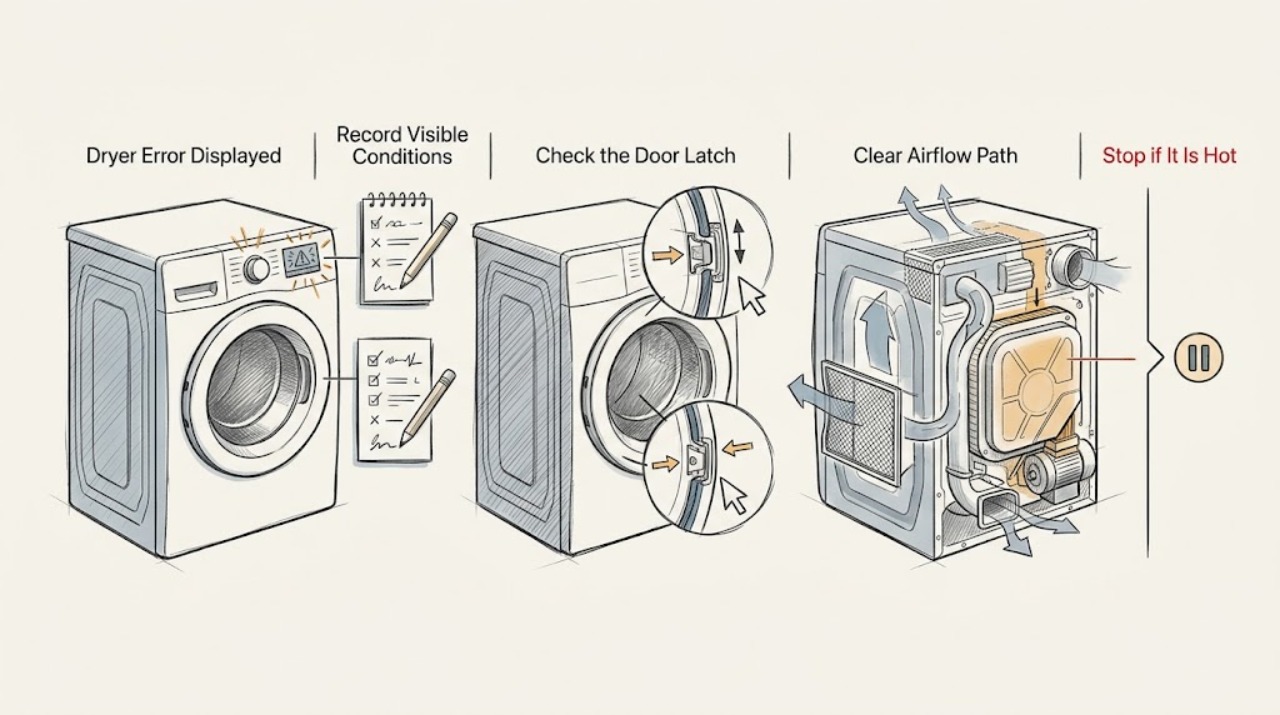
Photograph or write the complete Whirlpool dryer code exactly as displayed, including spaces, alternating characters, and any message, then record the model, electric or gas configuration, cycle, and stage. Do not apply the meaning of a code from another dryer family. Whirlpool's official dryer list treats AF or F4E3 as an airflow path, L2 as a supply-voltage path on applicable dryers, PF as a power interruption, and alternating F# E# codes as service conditions, while an ERR message can be tied to an incompletely latched door on covered models. Check the door, lint screen and visible exhaust path, and any applicable gas or condenser-water path without opening panels. Use at most one model-approved reset. Stop immediately for gas odor, smoke, burning smell, abnormal heat, arcing, a damaged cord, or a repeated power trip.
Work through in order
Diagnostic checks
Use only checks that match the exact appliance or system and its official guide.
-
Check 1
Before pressing a clear or reset key, record the complete code or message exactly as shown, the full model number, serial information if available, electric or gas configuration, cycle and stage, whether the drum is turning, and any smell, smoke, heat, or unusual sound.
Expected result: The display shows AF or F4E3, L2, PF, ERR, an alternating F# E# code, another named code, or a message that cannot be read confidently.
Next step: Use the exact model manual and the matching code branch below. If smoke, gas odor, burning smell, abnormal heat, arcing, or a repeated trip is present, stop without further testing.
Why this matters
Why: Different displays lead to different checks: airflow, supply, power interruption, door latch, or service. An unreadable or model-mismatched code cannot be safely interpreted from a generic list.
-
Check 2
If the display shows ERR or another door-related indication, stop the cycle, remove any garment caught at the opening, and close the door firmly without forcing the latch. Do not run the dryer with the door switch bypassed.
Expected result: The door was not fully latched, a latch is obstructed, the code clears after normal closure, or ERR returns with a clean and fully closed door.
Next step: Use the exact model manual for one normal restart or approved reset. If ERR returns, the door will not latch, or the dryer runs with the door open, stop use and arrange qualified service.
Why this matters
Why: Whirlpool documents ERR as a door-latch condition on covered dryer models. A returning code with a correctly closed door points toward a latch or sensing fault, not a reason to press harder or defeat the switch.
-
Check 3
For AF, F4E3, Check Vent, or a similar airflow indication, stop the dryer and clean the user-accessible lint screen. Inspect the visible exhaust hose and exterior hood for crushing, blockage, or a flap that cannot move freely; do not dismantle the cabinet or exhaust system.
Expected result: The lint screen is blocked, the hose is kinked or crushed, the exterior hood is blocked, the dryer is unusually hot, or the visible airflow path is clear but the code returns.
Next step: Correct only a visible lint or hose issue, then make one supervised cycle check if the exact manual permits it. Stop for abnormal heat, smoke, burning smell, or a returning code and arrange service or qualified duct cleaning.
Why this matters
Why: Whirlpool identifies restricted lint or exhaust airflow as the AF/F4E3 path. A clear visible path with a recurring code can involve deeper ducting, a sensor, fan, or control issue and needs model-specific service.
-
Check 4
For L2, PF, a blank display, or a dryer that runs without heat, check the household breaker or fuse state from a dry, safe position and note whether the dryer is electric or gas. Do not touch terminals, change wiring, use an extension connection, or repeatedly reset a circuit.
Expected result: A breaker or fuse is open, the code follows a power interruption, the display returns but heat is absent, the circuit operates again, or the household supply appears normal.
Next step: Restore a household breaker or fuse once only when there is no hazard and follow the exact manual for clearing PF. If the circuit operates again, the code returns, or heat remains absent, stop and arrange qualified electrical or appliance service.
Why this matters
Why: Whirlpool treats L2 as a low or absent supply path and PF as a power interruption on covered models. Electric dryers may use more than one household protection device; a repeat trip or damaged connection is an electrical service condition.
-
Check 5
For a gas dryer, confirm only the user-visible gas configuration and control state specified by the exact manual; for a condenser or heat-pump model, check only an accessible water container, filter, or drain message if the model includes one. Do not open gas, refrigerant, heater, pump, or control compartments.
Expected result: The machine is gas and ignition or heat is abnormal, gas odor is present, a condenser-water message appears, a filter or container is visibly full, or the code does not match the appliance configuration.
Next step: For gas odor, smoke, or abnormal combustion, stop, avoid ignition sources, leave clear if needed, and seek appropriate gas-safety help. Otherwise follow the exact manual once and arrange service for a recurring or mismatched code.
Why this matters
Why: Fuel and water-management paths are configuration-specific. A gas odor or abnormal ignition is a safety event; a water-container or filter prompt is a user-maintenance path only when the exact model supports it.
-
Check 6
After the code, model, and visible condition are documented, use the matching Owner's Manual. If that exact code page or manual permits a power cycle, isolate the dryer safely, restore power once, select the documented test cycle, and monitor the display, heat, drum, and airflow without opening panels.
Expected result: The code clears and the cycle completes, the code returns, the dryer stops or overheats, the drum or heater behaves abnormally, or a hazard appears.
Next step: Do not repeat resets. Keep the dryer off and arrange qualified service with the exact code, model, cycle stage, and test result; use gas-safety help for fuel odor or combustion concerns.
Why this matters
Why: A single successful reset can clear a transient power or control state, but a recurring code is evidence for the model-specific fault path. Any smoke, gas odor, arcing, uncontrolled heat, or repeated trip ends the test immediately.
Use your observations
Decision map
Find the observation that best matches what you see, then follow the next safe action.
-
PATH 01Next step
What you see
The code is AF, F4E3, or Check Vent
Do this next
Clean the lint screen and inspect only the visible exhaust route for crushing or blockage. If the code returns or the dryer is hot, smoky, or burning-smelling, stop and arrange qualified service or duct cleaning.
-
PATH 02Next step
What you see
The code is ERR or the door will not latch
Do this next
Remove a visible obstruction and close the door normally once. A returning code, failed latch, or unsafe door behavior requires service; never bypass the door switch.
-
PATH 03Next step
What you see
The code is L2, PF, or the display went blank after a power event
Do this next
Check the household breaker or fuse once from a dry, safe position and follow the exact manual. Repeated circuit operation or absent heat requires qualified electrical or appliance service.
-
PATH 04Next step
What you see
An alternating F# E# or another exact code appears
Do this next
Record the complete code, model, configuration, cycle, and stage, then use the matching model manual. Do not borrow a meaning from another Whirlpool dryer; recurring F# E# codes require service.
-
PATH 05Next step
What you see
A gas or condenser/heat-pump-specific symptom appears
Do this next
Follow only the exact configuration manual for an accessible filter, container, or control check. Gas odor or abnormal combustion requires immediate stop and gas-safety help; a persistent water-system code requires service.
-
PATH 06Next step
What you see
Smoke, gas odor, burning smell, abnormal heat, arcing, damaged wiring, or a repeated power trip occurs
Do this next
Stop using the dryer, keep clear of the hazard, isolate power or gas only if safe, and seek appropriate emergency or qualified help. Do not restart it.
Helpful context
Understand the symptom
A code is a branch point, not a diagnosis
Write the code exactly before clearing it. Record the full model, fuel type, cycle, stage, whether the drum is turning, whether heat is present, and any recent cleaning, installation, vent change, or power event. Whirlpool's general error list includes several code families, but the same-looking characters can have different meanings across dryer models.
Stop when the code comes with a hazard
Do not continue a cycle to see whether the code returns if there is gas odor, smoke, burning smell, abnormal heat, arcing, a damaged cord, or a repeated circuit trip. Keep the lint area and exhaust clear of combustible material, but leave internal wiring, heater, motor, gas, and control diagnosis to qualified service.
Safety boundary
Stop conditions
- Do not guess the meaning of a code from another Whirlpool model or dryer family.
- Do not open panels, probe live wiring, bypass a door switch, or work on gas, refrigerant, heater, pump, or control compartments.
- Do not keep resetting a breaker or running cycles after a repeated code, overheating, or a power trip.
- Do not continue a gas-dryer test with gas odor, delayed ignition, abnormal flame, or suspected combustion products.
- Do not restart after smoke, fire, burning smell, arcing, abnormal heat, damaged wiring, or water near electrical parts.
Only after diagnosis
Potential parts
- door latch or door-sensing switch
Consider only when a recurring ERR or door-related code remains with a clean, correctly closed door and qualified service confirms a latch or sensor fault.
Verify the complete model and approved component before replacement; never bypass the door safety circuit. - airflow sensor, blower, or exhaust component
Consider only when the visible lint and exhaust path is clear but an AF or Check Vent code returns and service confirms a sensor, blower, or internal airflow fault.
Airflow components vary by dryer family and require model-specific diagnosis. - electronic control or temperature-sensing assembly
Consider only after a recurring exact code or abnormal heat condition is diagnosed as a control or temperature-sensing fault.
Confirm the complete model, fuel type, revision, and approved replacement before ordering or installing.
When checks do not resolve it
Need a professional?
Use qualified Whirlpool or appliance service for a recurring F# E# or model-specific code, persistent ERR or door-sensing failure, an airflow code after visible cleaning, recurring L2 or PF, a no-heat condition, an unresolved gas or water-management fault, or any internal electrical or mechanical symptom.
Have this ready
- complete model number and serial information
- exact code or alternating display text
- electric or gas configuration and condenser or heat-pump status if applicable
- cycle and stage when the code appeared
- door-latch and drum behavior
- lint screen and visible exhaust observations
- breaker or fuse result and any power event
- result of the single model-approved reset
- any gas odor, smoke, burning smell, abnormal heat, arcing, or repeated trip
Common questions
FAQ
What should I do first when my Whirlpool dryer displays an error?
Record the complete code, model, electric or gas configuration, cycle, stage, drum state, and any smell or heat. Use the exact Owner's Manual and matching Whirlpool code page; do not guess from another dryer model.
What does AF or Check Vent mean on a Whirlpool dryer?
Whirlpool uses AF or F4E3 for a restricted-airflow path on covered dryers. Clean the accessible lint screen and inspect the visible vent route for crushing or blockage. A returning code or abnormal heat needs service or qualified duct cleaning.
What does ERR mean on a Whirlpool dryer?
On covered models, ERR can mean the door is not completely closed and latched. Remove a visible obstruction and close the door normally once. If the code returns or the dryer behaves unsafely, stop and arrange service.
What should I do with an L2 or PF dryer code?
L2 can indicate a supply-voltage issue on applicable dryers, while PF indicates an interrupted cycle. Check the household breaker or fuse once from a dry, safe position and use the exact manual. Repeated trips or absent heat require qualified service.
Can I reset a Whirlpool dryer error code?
Only when the exact code page or manual permits it, and only once. Monitor one documented test cycle. If the code returns, heat or drum behavior is abnormal, or there is gas odor, smoke, burning smell, arcing, abnormal heat, or a power trip, stop using the dryer.
Read the exact guide
Official sources
- F1 E4 - Error Code - Dryer - Product Help | WhirlpoolWhirlpool Product Help · Whirlpool dryer F1E4 control or wiring guidance and limited reset-and-monitor path for the covered code.
- Error CodesWhirlpool Product Help · Whirlpool dryer error-code category index and model-specific error-page navigation.
- ERR - Error Code - Dryer - Product Help | WhirlpoolWhirlpool Product Help · Whirlpool dryer ERR door-latch guidance and limited cycle-power procedure for covered models.
- Error Codes in DryersWhirlpool Product Help · Whirlpool dryer error-code meanings and model-aware user-level checks for AF/F4E3, L2, PF, and F# E# displays.
Community feedback
Share a repair observation
Share a plain-text repair observation. Accepted observations are published automatically; this page may take a moment to update.