
On this page
Start here
Quick answer
First determine whether the Whirlpool dryer is truly running continuously or is performing a normal Wrinkle Shield, Wrinkle Prevent, or Wrinkle Guard interval. Whirlpool says these options can turn the dryer off and back on for short periodic tumbles after the normal cycle, and some models can continue this behavior for a model-defined period. If the drum and heat continue without that option, the controls do not stop the cycle, the dryer runs with the door opened, the cabinet or clothes become unusually hot, or there is smoke, a burning smell, gas odor, scorching, or repeated electrical trips, stop using it immediately. Use the normal Power/Cancel or Stop control once only when it is safe; if the dryer remains on and the plug or breaker is safely reachable, isolate power once and arrange qualified appliance service. Do not open panels, defeat the door switch, or keep testing a hot or gas appliance.
Before you begin
Safety first
- Safe user checks are limited to identifying the selected feature, reading the display, using the normal stop control once when safe, maintaining the accessible lint screen, and observing external conditions. Cabinet, timer, control, motor, heater, door-switch, gas, vent, and live electrical work require qualified service.
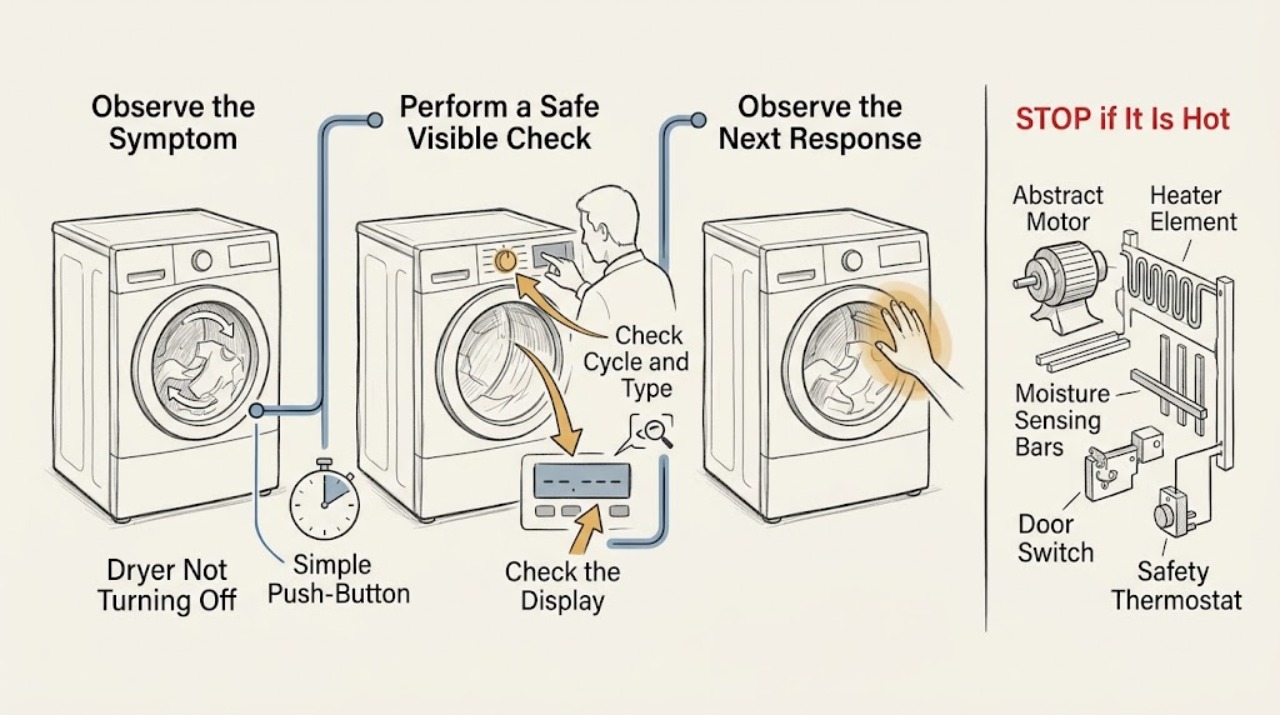
Work through in order
Diagnostic checks
Use only checks that match the exact appliance or system and its official guide.
-
Check 1
From a safe position, check whether the dryer is producing smoke, sparks, a gas odor, burning or plastic smell, scorching, excessive heat, a hot outlet or cord, or repeated breaker trips; do not open the door if there is fire or smoke.
Expected result: Record whether the drum is moving, heat is present, clothes or cabinet are scorching, a gas or carbon-monoxide alarm sounds, or water or damage affects the outlet.
Next step: Keep people away, leave for a gas, smoke, fire, or carbon-monoxide hazard, and contact appropriate emergency or utility help from a safe location. For an electrical or overheating warning without immediate fire, isolate power only if dry and safely reachable and arrange service.
Stop if: Do not touch switches or phones inside a suspected gas area, operate the dryer, open a burning drum, move the appliance, or reset a tripped protection device repeatedly.
Why this matters
Why: Fire, gas, combustion, carbon-monoxide, and electrical warnings override all cycle troubleshooting and require an immediate stop.
-
Check 2
When no hazard is present, read the selected cycle, option, display message, and whether the dryer stops completely or only tumbles intermittently after the displayed cycle end.
Expected result: Record Wrinkle Shield, Wrinkle Prevent, Wrinkle Guard, Cool Down, Static Reduce, Steam, Check Vent, an automatic or timed cycle, and the interval between restarts.
Next step: If the behavior matches the selected option and the load is cool and safe, end the option using the model's normal control or open the door as the manual directs. If the behavior is continuous or unexplained, keep the dryer out of service and continue only with safe identification.
Stop if: Do not keep waiting through excessive heat, smoke, odor, gas concern, or a cycle that cannot be stopped normally just because a wrinkle option is displayed.
Why this matters
Why: Whirlpool says a wrinkle option can intentionally turn the dryer off and back on for periodic tumbling after the normal cycle. A steady motor or heater, no selected option, or operation beyond the model's documented interval is not explained by that feature.
-
Check 3
If the dryer is cool enough, free of gas or fire symptoms, and the controls are dry, press the model's Power/Cancel or Stop/Start control once according to the owner's guide; do not hold a mechanical or electronic control indefinitely.
Expected result: Record whether the motor stops, heat stops but the drum continues, the display cancels, the panel is unresponsive, or the dryer restarts by itself.
Next step: If it stops, remove the load when safe and do not resume use until the cycle and option are understood. If it does not stop, isolate power once only when safely reachable and arrange qualified service.
Stop if: Do not repeatedly press controls, reach into a moving drum, open a hot door, defeat the door switch, or continue if the panel or wiring is wet or damaged.
Why this matters
Why: A normal stop confirms that the user control can interrupt the cycle; a motor or heater that continues after the documented stop points to a control, relay, motor, heater, or safety-control fault.
-
Check 4
After the dryer is stopped, cool, and isolated as the manual permits, record whether the cycle was automatic or timed and inspect only the user-accessible lint screen and visible external vent hood for blockage, without dismantling the vent.
Expected result: Record a damp or oversized load, a wet item added mid-cycle, a Check Vent or AF indication, a blocked lint screen, weak external airflow, a crushed visible duct, or no airflow symptom.
Next step: Clean or restore only the user-maintainable lint screen as the manual directs and arrange qualified vent service for restricted or damaged ducting. If the stop fault remains, arrange appliance diagnosis.
Stop if: Do not run the dryer with a missing or blocked lint screen, add a booster fan, reach into the duct, or keep testing when the cabinet, clothing, or exhaust is hot or scorched.
Why this matters
Why: Automatic sensing can extend time when moisture remains, while restricted airflow can lengthen drying and raise heat. These conditions may explain a long cycle but do not justify operation when the dryer cannot stop or is overheating.
-
Check 5
With the appliance off and safe, record the exact Whirlpool model, fuel type, control style, cycle and option, whether the drum and heat continued, whether the problem followed a power interruption, and whether the dryer restarts immediately when power is restored.
Expected result: Classify the symptom as periodic wrinkle tumbling, continuous motor, continuous heat, panel-only display, timer not advancing, restart after a power event, or an operation that changes when the door is normally opened.
Next step: Provide the record and any code or vent observation to qualified Whirlpool appliance service. Keep the dryer disconnected or otherwise out of service as directed until assessed.
Stop if: Do not remove the back or console, inspect relays, bridge a switch, test live voltage, or use an unapproved external timer to control the dryer.
Why this matters
Why: This behavior record helps a technician distinguish a selected feature from a stuck control, timer, motor circuit, sensor, door switch, or safety fault without unsafe cabinet access.
-
Check 6
If the dryer still runs after the documented stop control and there is no gas, fire, water, or electrical-contact hazard, isolate power once using the accessible disconnect or breaker; then leave the dryer unused for service.
Expected result: Record whether the drum and heat stop after isolation, whether a breaker trips again, whether the plug or cord is hot or damaged, and whether the dryer resumes when power is restored.
Next step: Arrange qualified appliance service, and electrical service when the cord, outlet, breaker, or building wiring is implicated. Provide the model, cycle, option, temperatures, timing, and isolation result.
Stop if: Do not repeatedly reset the breaker, unplug a wet or hot connection, restore power for another test, or open panels after isolation.
Why this matters
Why: Power isolation prevents continued motion or heat while preserving a useful symptom for service. A renewed trip, hot connection, or immediate restart indicates an electrical or control fault and is not a reset invitation.
Use your observations
Decision map
Find the observation that best matches what you see, then follow the next safe action.
-
PATH 01Safety boundary
What you see
Smoke, fire, gas odor, carbon-monoxide alarm or symptoms, sparks, scorching, hot cord or outlet, water near power, or repeated electrical trips are present.
Do this next
Leave or move away as appropriate, contact emergency or utility help from a safe location, and keep the dryer out of service until qualified responders and service clear it.
Why this path and its safety boundary
Why it matters: This is an immediate fire, combustion, health, or electrical hazard.
Safety stop: Do not operate switches in a suspected gas area, open a burning dryer, reset protection repeatedly, or re-enter before clearance.
-
PATH 02Safety boundary
What you see
The dryer stops between brief tumbles, a Wrinkle Shield, Wrinkle Prevent, or Wrinkle Guard option is selected, and there is no heat, smoke, odor, or damage.
Do this next
Use the model's normal option-cancel or door-opening instruction and verify that the dryer ends when the documented option ends.
Why this path and its safety boundary
Why it matters: Whirlpool describes this periodic restart after the normal cycle as normal behavior for equipped models.
Safety stop: Stop if the motor runs continuously, heat remains on, the interval exceeds the manual's range, or any hazard appears.
-
PATH 03Safety boundary
What you see
The dryer is in an automatic cycle, clothes remain damp, a wet item was added, or a lint or vent indication appears, but the stop control works and no overheating is present.
Do this next
Follow the cycle guide, maintain the accessible lint screen, and arrange vent inspection if airflow is weak or the condition persists.
Why this path and its safety boundary
Why it matters: Moisture sensing or restricted airflow can extend the displayed time without proving a stuck off-control.
Safety stop: Do not keep the dryer running when it becomes hot, smoky, scorched, or unable to respond to Stop/Cancel.
-
PATH 04Safety boundary
What you see
The drum or heater continues steadily after the normal cycle and stop control, with no selected wrinkle option, or the dryer restarts immediately after power is restored.
Do this next
Isolate power once when safely accessible and arrange qualified appliance service with the model and behavior record.
Why this path and its safety boundary
Why it matters: A timer, electronic control, relay, motor circuit, sensor, door switch, or safety control may be faulty.
Safety stop: Do not keep cycling power, run a load, open the cabinet, bridge a switch, or replace a component from the symptom alone.
-
PATH 05Safety boundary
What you see
The controls are unresponsive, the motor or heat continues after Stop/Cancel, the dryer is unusually hot, or the same symptom returns after one safe isolation.
Do this next
Keep it disconnected or otherwise out of service and arrange urgent qualified diagnosis; involve an electrician for a cord, outlet, breaker, or wiring concern.
Why this path and its safety boundary
Why it matters: The appliance cannot be trusted to control motion or heat safely.
Safety stop: Do not restore power for another test or use a temporary control workaround.
Helpful context
Understand the symptom
A periodic restart can be a selected wrinkle option
Whirlpool describes Wrinkle Shield, Wrinkle Prevent, and Wrinkle Guard as options that tumble the load intermittently after the normal drying cycle. The dryer may stop and restart for a short tumble several minutes later, which can look like a failure to turn off. Check the actual option and model guide before calling that normal, because a dryer that never stops or keeps heating is a different safety problem.
Separate a long cycle from a running control fault
Automatic cycles use load moisture and temperature information to adjust time and shut off at the selected dryness, while timed cycles run for the time selected. A damp load, added wet clothing, restricted airflow, or an incorrect cycle can extend operation, but should not make a healthy control run indefinitely. Record the cycle, option, display state, drum motion, and heat rather than repeatedly restarting it.
Heat, lint, and vent symptoms change the response
If the cabinet, clothing, outlet, or exhaust is unusually hot, or a lint screen or vent warning appears, stop and let the appliance cool in a safe state. Whirlpool says the lint screen should not be loose, blocked, damaged, or missing and that the vent should not be crushed, bent, or obstructed. Do not run the dryer longer to see whether a heat-related symptom clears.
Persistent operation needs model-specific service
If the normal stop or cancel command does not end motion, or the dryer restarts without a selected wrinkle option, a timer, electronic control, motor circuit, door switch, sensor, or safety component may need diagnosis. A gas model also adds a fuel and combustion boundary. Do not defeat the door switch, open the cabinet, test live wiring, or adjust a gas control as a home repair.
Safety boundary
Stop conditions
- Stop immediately for smoke, fire, gas odor, carbon-monoxide alarm or symptoms, sparks, scorching, a hot cord or outlet, water near power, or repeated electrical trips.
- Do not run the dryer continuously when the heater or motor does not stop normally, the cabinet or clothes are unusually hot, or the stop control is unresponsive.
- Do not open panels, test live wiring, defeat the door switch, alter a timer or relay, adjust gas controls, or use an external workaround.
- Do not reset breakers repeatedly or resume use merely because a wrinkle option or warning disappeared.
Only after diagnosis
Potential parts
- timer or electronic control assembly
Consider only after service confirms that no wrinkle option, airflow condition, or user-control issue explains continuous operation and the control fails to end the cycle.
Mechanical timers and electronic controls vary by model; confirm the exact Whirlpool model and revision through qualified service. - motor circuit or motor component
Consider only when the motor continues after a valid stop command or power-control diagnosis identifies a motor or relay fault.
Do not access or test the motor circuit while energized; confirm model-specific fit and safe installation. - moisture sensor or thermostat
Consider only when an automatic cycle fails to end or the appliance overheats after airflow and control checks, and service confirms the sensor or safety component fault.
A sensor or thermostat should not be selected from a long cycle alone; confirm the exact model and safety requirements. - door switch or latch assembly
Consider only when qualified service confirms abnormal door-state feedback or a damaged latch contributes to the control fault.
Never defeat the door switch; verify exact model fit and safe installation through service.
When checks do not resolve it
Need a professional?
Use emergency or gas-utility response for fire, gas odor, or carbon-monoxide concern. Arrange qualified appliance repair for continuous motion or heat, an unresponsive stop control, repeated restart, timer or control behavior, overheat, vent-related damage, or a recurring code.
Safety scope: Safe user checks are limited to identifying the selected feature, reading the display, using the normal stop control once when safe, maintaining the accessible lint screen, and observing external conditions. Cabinet, timer, control, motor, heater, door-switch, gas, vent, and live electrical work require qualified service.
Have this ready
- Provide the exact Whirlpool model, fuel type, cycle and options, display or code, whether the drum and heater continued, restart interval, stop-control result, power-isolation result, lint and vent observations, temperature or odor evidence, and any breaker or alarm event.
Common questions
FAQ
Why does my Whirlpool dryer turn back on after the cycle ends?
Wrinkle Shield, Wrinkle Prevent, or Wrinkle Guard can periodically tumble the load after the normal cycle. Check the selected option and exact model guide. Continuous running, continuous heat, excessive duration, or any hazard is not normal feature behavior.
How do I stop a Whirlpool dryer that keeps running?
If there is no heat, gas, smoke, or electrical hazard and the controls are dry, use the model's normal Power/Cancel or Stop control once. If the dryer does not stop, isolate power only when safely reachable and leave it out of service for qualified repair.
Can a blocked vent make a Whirlpool dryer run longer?
Yes. Restricted airflow can extend drying and raise heat, but it does not make an unresponsive stop control safe. Stop for unusual heat, scorching, smoke, or a damaged vent, and arrange appliance or vent service.
Is it safe to open the dryer door while it is running?
Use only the normal door operation when the dryer is safe and not hot, smoking, or damaged. Do not open a burning or smoking dryer, defeat the door switch, or reach into a moving drum. Persistent operation needs service.
Should I reset the breaker if my Whirlpool dryer will not turn off?
Only isolate power once when the plug, outlet, floor, and hands are dry and intact and there is no gas or fire concern. Do not repeatedly reset a breaker or restore power for another test; a renewed trip or immediate restart requires service.
When is a Whirlpool dryer that will not turn off an emergency?
Treat smoke, fire, gas odor, carbon-monoxide alarm or symptoms, sparks, scorching, a hot cord or outlet, water near power, or repeated electrical trips as an immediate stop. Leave or move away as appropriate and use emergency or utility help from a safe location.
Read the exact guide
Official sources
- Dryer SafetyWhirlpool · Whirlpool dryer installation instructions; exact model instructions and local requirements take precedence.
- Dry Time Keeps Going Up - DryerWhirlpool Product Help · Whirlpool dryer support guidance; cycle behavior varies by model and load.
- Owner's ManualWhirlpool · Whirlpool dryer owner manual example; the exact model manual takes precedence.
- Dryer Too HotWhirlpool Product Help · Whirlpool dryer support guidance; do not continue operation when overheating or damage is present.
- Dryer Turns On after Cycle is Complete - DryerWhirlpool Product Help · Whirlpool dryer support guidance; option names and duration vary by model.
- Not Starting or Not Operating - Dryer - Product HelpWhirlpool Product Help · Whirlpool dryer operation guidance; model-specific control and safety instructions apply.
- Dryer Quick Start GuideWhirlpool · Whirlpool touch-control dryer guide example; exact controls vary by model.
Community feedback
Share a repair observation
Share a plain-text repair observation. Accepted observations are published automatically; this page may take a moment to update.