
On this page
Start here
Quick answer
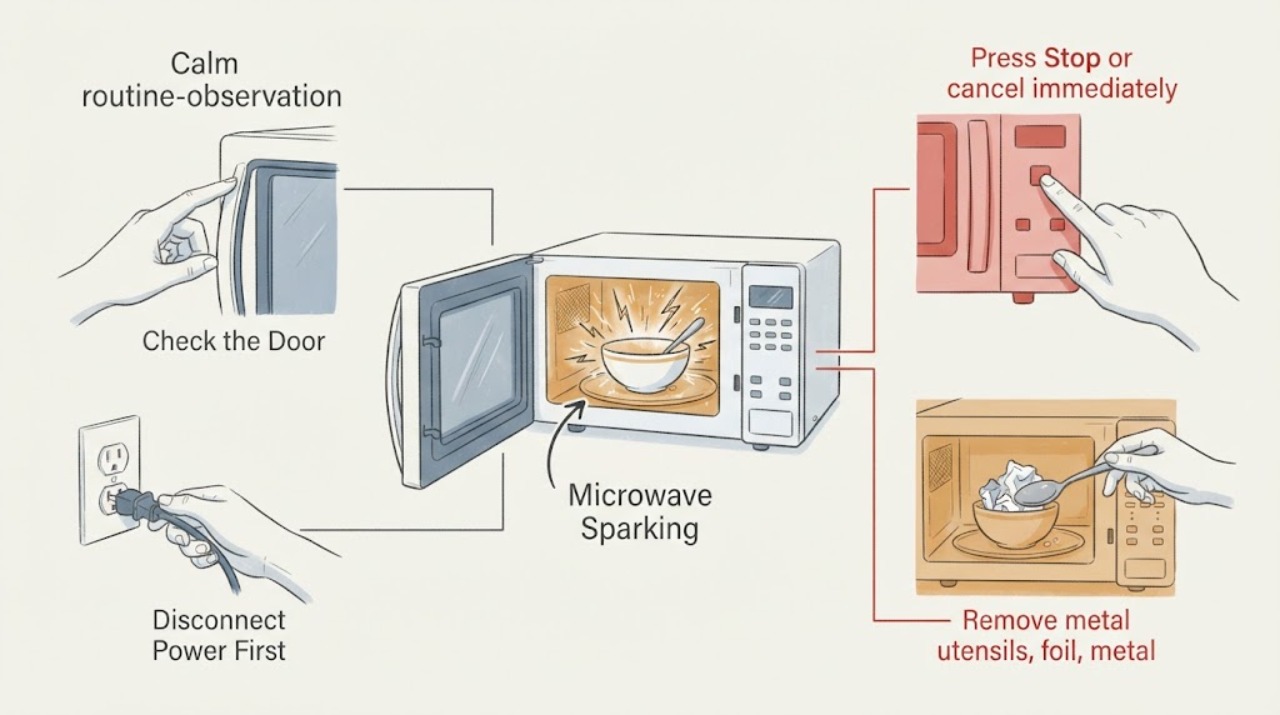
Stop a Whirlpool microwave immediately when arcing or sparking appears. Whirlpool’s official guidance identifies metal or foil contact, a rack or crisper pan touching the cavity, food-related arcing, and soil buildup near the microwave cover or door area; persistent arcing or cavity damage needs service.
Work through in order
Diagnostic checks
Use only checks that match the exact appliance or system and its official guide.
-
Check 1
Press Stop or cancel immediately, wait until the cavity is safe to approach, and identify where the flash occurred without reaching into a hot or energized appliance.
Expected result: Sparking stops when the cycle is canceled, or smoke, burning odor, charring, or a damaged cover or cavity is visible.
Next step: Do not restart until the load and cavity have been checked and the model manual permits a test.
Why this matters
Why: A one-time load or contamination cause is possible only when there is no cavity or component damage; persistent damage needs service.
-
Check 2
Remove metal utensils, foil, metal trim, skewers, and any rack or crisper pan touching the cavity walls, ceiling, or floor.
Expected result: A metal item or accessory was touching the cavity, or no such item was present.
Next step: Use only cookware approved by the exact model manual and keep accessories clear of the cavity surfaces.
Why this matters
Why: Whirlpool identifies metal contact as a direct arcing trigger; no metal contact makes contamination or internal damage more likely.
-
Check 3
Inspect and clean visible food or soil from cavity walls, the microwave cover, rack supports, and the door contact area after power is disconnected and the unit is cool.
Expected result: Grease or residue is present, or the surfaces are clean but arcing continues.
Next step: Clean only with the manual-approved method; do not scrape, remove, or replace the microwave cover yourself.
Why this matters
Why: Whirlpool identifies soil buildup in these areas as a cause; clean surfaces with continued arcing point toward an internal fault or damaged cover.
-
Check 4
Run no further test if sparking recurs, appears without metal or soil, or leaves a burn mark.
Expected result: Arcing repeats, damages the cavity, or is accompanied by smoke, odor, or abnormal noise.
Next step: Stop using the microwave and arrange qualified Whirlpool service.
Why this matters
Why: A persistent or load-independent arc is not a normal operating condition and may damage the oven or indicate an internal fault.
Use your observations
Decision map
Find the observation that best matches what you see, then follow the next safe action.
-
PATH 01Next step
What you see
Sparking occurred once with metal or foil, stopped immediately, and there is no cavity or cover damage after removal and cleaning.
Do this next
Follow the exact model manual for safe cookware and monitor; stop immediately if it sparks again.
Why this path and its safety boundary
Why it matters: A load or contamination condition is more likely than an internal failure.
-
PATH 02Next step
What you see
Sparking repeats with a correct load, or the cavity cover, paint, door area, or rack support is damaged.
Do this next
Stop using the microwave and arrange qualified service.
Why this path and its safety boundary
Why it matters: An internal or component fault is more likely and cannot be cleared by user cleaning.
-
PATH 03Next step
What you see
Smoke, burning odor, charring, arcing with no load, or damaged wiring occurs.
Do this next
Disconnect power when safe and obtain qualified microwave service; do not open the cabinet.
Why this path and its safety boundary
Why it matters: The appliance presents an immediate electrical or fire hazard.
Helpful context
Understand the symptom
What to check first
Stop a Whirlpool microwave immediately when arcing or sparking appears. Whirlpool’s official guidance identifies metal or foil contact, a rack or crisper pan touching the cavity, food-related arcing, and soil buildup near the microwave cover or door area; persistent arcing or cavity damage needs service. Record the exact model and symptom pattern before ordering a part. A user check should change the next decision; it should not be used to infer an unverified component.
When checks do not resolve it
Need a professional?
Arrange qualified Whirlpool microwave service for recurring arcing, arcing without an identified load cause, a damaged cavity or cover, smoke, charring, burning odor, or any internal electrical diagnosis.
Common questions
FAQ
Can I keep running the microwave after one spark?
Only after canceling, cooling, removing the identified cause, and confirming the cavity and cover are undamaged under the model manual. Any recurrence means stop and service.
Can I remove the microwave cover to clean behind it?
No. Whirlpool’s user guidance supports cleaning accessible surfaces; internal cover removal or cavity repair belongs to qualified service.
Read the exact guide
Official sources
- General Arcing and Sparking - Over-the-Range MicrowaveWhirlpool Corporation · General Arcing and Sparking - Over-the-Range Microwave is official manufacturer material; model-specific details remain limited to the named product or manual.
- Whirlpool Manuals & LiteratureWhirlpool Corporation · Whirlpool Manuals & Literature is official manufacturer material; model-specific details remain limited to the named product or manual.
Community feedback
Share a repair observation
Share a plain-text repair observation. Accepted observations are published automatically; this page may take a moment to update.