
On this page
Start here
Quick answer
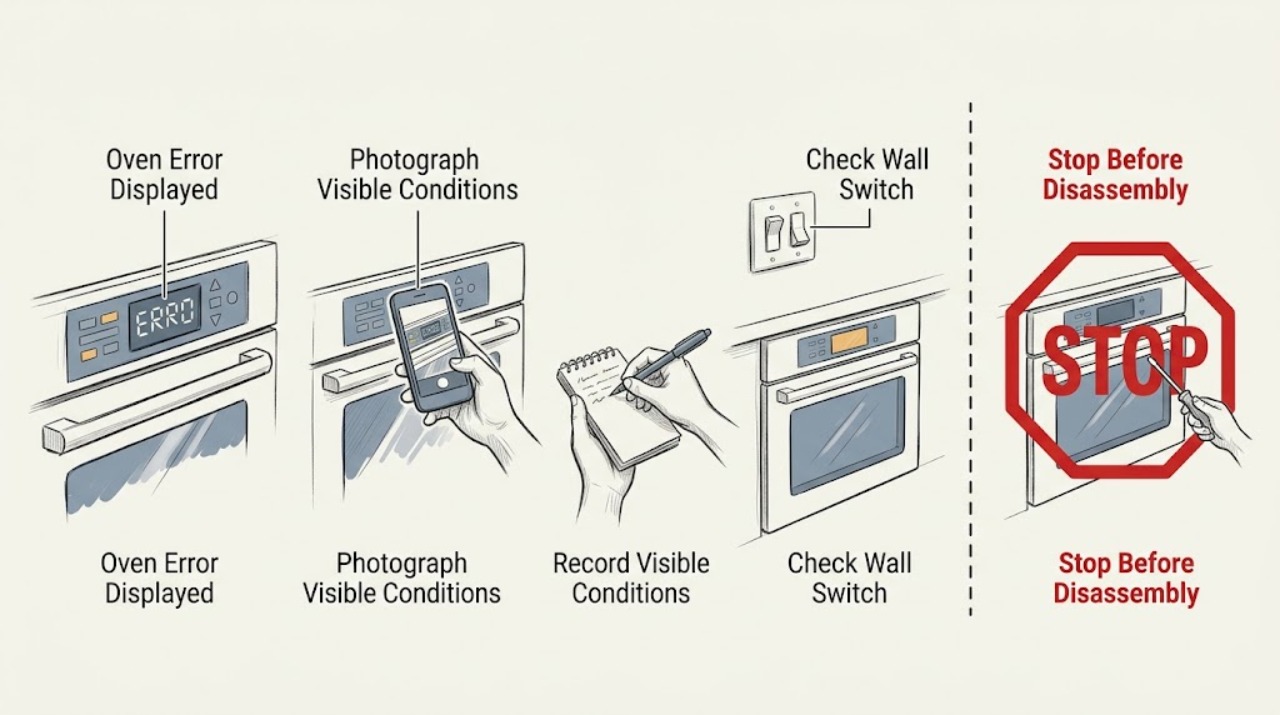
Do not interpret a Wolf oven message from the digits alone. Record the complete display, oven type, model line, operating mode, and what happened just before it appeared. Wolf guidance treats an erratic display or codes such as 888, PF, OPP, OE, OC, or PROBE as model- or situation-dependent: one safe power reset may be appropriate where the matching Wolf guide says so, but a code that returns, a control that remains unresponsive, or any heat, smoke, gas, or electrical warning needs the oven left off and qualified service.
Work through in order
Diagnostic checks
Use only checks that match the exact appliance or system and its official guide.
-
Check 1
Before clearing anything, photograph and write down every character on the Wolf display, including dashes, question marks, alternating screens, and whether the message appeared during baking, preheat, probe use, self-clean, or after a power interruption. Record the oven model line from the rating information without removing panels.
Expected result: A stable code, a blinking or jumbled display, a blank panel, and a PROBE message are different evidence. The oven line may be L Series, E Series, M Series, Dual Fuel, Induction, or Convection Steam.
Next step: Use the exact display and model line in Action 2. If the display is accompanied by smoke, gas odor, sparks, severe heat, or a breaker trip, skip further testing and follow the stop guidance.
Why this matters
Why: Wolf's own troubleshooting pages assign different causes and steps to erratic displays, 888, probe messages, and Dual Fuel codes. Without the complete message and model line, a code explanation would be guesswork.
-
Check 2
Compare the recorded message only with the matching Wolf Use and Care Guide or Wolf support page for that oven line. Check whether the message is 888, PF, OPP, OE, OC, PROBE or PROBE?, a blank or jumbled display, or a different exact code; do not substitute a code from another Wolf family.
Expected result: 888 is documented for specified L, E, and M Series wall ovens; PF, OPP, OE, and OC are documented in the Dual Fuel guide; PROBE messages have their own model and mode conditions. A different or returning message remains unidentified until the exact guide addresses it.
Next step: Follow the branch for the documented message if one matches. If no exact match exists, keep the oven off and provide the photo, model, serial information, and operating mode to qualified service rather than trying random resets.
Why this matters
Why: The same-looking display can represent a power event, a locked or unavailable mode, a probe connection or mode issue, or a control fault. Product-family scope changes the next action.
-
Check 3
If the matching Wolf guidance calls for a reset and there is no smoke, gas odor, active heat fault, water at the controls, or electrical damage, turn the oven off and, from a dry safe position, switch the oven circuit breaker off for the guide's stated interval, then restore it once. Do not remove a panel or work inside the oven.
Expected result: The display may return to normal and accept a control command, or the same message may return immediately. A breaker that will not stay on is an electrical stop condition, not a reset invitation.
Next step: If the display normalizes, test only the basic control response described by the matching guide and monitor for recurrence. If the message returns, the panel stays blank, or the breaker trips, leave the oven off and arrange service.
Why this matters
Why: Wolf's erratic-display, 888, and several line-specific guides describe a brief power interruption as a permitted first response. A returning message indicates that the underlying condition was not cleared.
-
Check 4
With power left on only when there is no safety warning, check external control response and visible door status. For an E Series or similar touchscreen, note whether a lock or Sabbath indicator is shown; for a Dual Fuel control, note whether the display says SAb, PF, or OPP and whether another oven is in self-clean.
Expected result: A lock or Sabbath state can prevent commands, PF can follow a power outage, and OPP can indicate that another oven is in self-clean. A nonresponsive panel with no such documented state points toward a control or power issue.
Next step: Use the exact line's guide to exit a documented user mode only when it gives that procedure. If the panel remains erratic or an OE, OC, or other unlisted error persists, stop and request qualified service.
Why this matters
Why: Wolf documents these conditions for specific product lines. They are not proof that every Wolf oven uses the same control behavior, and they do not authorize bypassing a lock or self-clean interlock.
-
Check 5
If the display reads PROBE? or ? PROBE, only while the oven is cool and the task is safe, check that the probe is the one specified for the exact Wolf line, is fully seated, and is being used in a mode that supports it. Do not force a connector or use a probe from another model family.
Expected result: A properly seated, correct probe may clear the message; debris, moisture, a wrong probe, an unsupported mode, or a message that continues after the external check leaves the fault unresolved.
Next step: Stop using the probe function and arrange service if the message continues, the receptacle is damaged, the oven is hot or wet, or any control or wiring issue is suspected.
Why this matters
Why: Wolf documents different probe types for different oven families and says the message can reflect sensing, seating, moisture, or mode conditions. A persistent probe message may require service or an exact replacement probe, not a guessed part.
Use your observations
Decision map
Find the observation that best matches what you see, then follow the next safe action.
-
PATH 01Next step
What you see
The complete message is 888 and the oven is an L Series, E Series, or M Series wall oven.
Do this next
Turn the unit off, perform the single 30-second breaker reset described by the Wolf support page if the area is dry and safe, and retest once. If 888 returns, arrange Factory Certified Service.
-
PATH 02Next step
What you see
The display is blinking, jumbled, partial, or unresponsive rather than showing a documented code.
Do this next
Record the display and model line, perform the one Wolf erratic-display reset only if safe, and try one control command. If the display remains erratic, stop and request service for the control and power path.
-
PATH 03Next step
What you see
The display is PF, SAb, or OPP on a Dual Fuel control.
Do this next
Use the Dual Fuel guide's matching path: treat PF as a power-outage state, SAb as Sabbath mode, and OPP as a possible other-oven self-clean lockout. Do not apply those meanings to another Wolf line without its guide.
-
PATH 04Next step
What you see
The display is OE, OC, or another exact code not explained by the matching guide.
Do this next
Leave the oven off and arrange qualified Wolf appliance service. Give the technician the complete code, model and serial information, operating mode, and whether the code returned after one permitted reset.
-
PATH 05Next step
What you see
The display is PROBE? or ? PROBE.
Do this next
Use only the exact Wolf line's probe and mode guidance, check seating and visible moisture or debris while cool, and stop using the probe function if the message remains. Request service rather than guessing a replacement.
-
PATH 06Next step
What you see
Smoke, gas odor, flame outside the intended cooking area, sparks, burning odor, severe heat, water at electrical controls, damaged wiring, a tripped breaker, or broken hot glass is present.
Do this next
Stop using the oven immediately. From a safe dry position, isolate power only when doing so does not expose anyone to water, flame, or damaged equipment; for suspected gas, fire, smoke, or active arcing, leave the area and contact the appropriate emergency service. Do not reset or retest.
Helpful context
Understand the symptom
Why the exact display matters
Wolf has several oven lines and control styles. A blinking or jumbled display can follow a power interruption and can also involve the control panel, electronic control head, board, communication cable, or power supply. A message that looks like a code on one line may have a different meaning on another. Photograph the whole display, including punctuation, letters, and alternating screens, before clearing it.
Examples that are not universal codes
Wolf's opened guidance gives different scopes for different messages. The 888 display guidance is for L Series, E Series, and M Series wall ovens. The Dual Fuel guide lists PF after a power outage, OPP when another oven may be in self-clean, and OE or OC as service conditions. The probe guidance covers several Wolf oven families and requires the correct probe and mode. Treat these as examples tied to their documented product families, not as a cross-model code table.
The safe boundary
A homeowner can record the display, check an unobstructed door and control panel, confirm whether a documented lock, Sabbath, self-clean, or probe condition applies, and perform the single power reset described for the exact Wolf line. Do not open the oven or control housing, bypass a lock, probe wiring, or repeat a reset after a breaker trips. Persistent errors belong with Wolf Factory Certified Service or another qualified appliance technician.
Safety boundary
Stop conditions
- Stop immediately for smoke, a burning or gas odor, flame outside the intended burner or cavity, sparks or arcing, a hot or damaged electrical connection, or a breaker that trips again.
- Do not operate a Wolf oven with broken hot glass, water at the controls, uncontrolled heat, or a door that cannot close safely.
- Do not open panels, probe wiring, bypass a lock or self-clean interlock, force a probe connector, or keep clearing a returning error.
- Do not use a generic code list to interpret an unknown display. Keep the exact message and model information for qualified service.
Only after diagnosis
Potential parts
- Wolf oven temperature probe
Consider this category only if the exact Wolf guide and a qualified diagnosis confirm a persistent probe-sensing fault after seating, mode, and moisture checks.
Wolf documents different probe types across oven families. Confirm the exact model and approved fit before selecting any part. - Wolf oven control component
Consider this category only after service identifies the control, relay, display, or communication component responsible for a returning error.
An error message does not identify a replacement component by itself. Exact model documentation and professional diagnosis are required.
When checks do not resolve it
Need a professional?
Ask for Wolf appliance diagnosis for a persistent or undocumented error, a nonresponsive control, a returning 888 or probe message, or a code tied to a control, power, lock, sensor, or self-clean condition.
Common questions
FAQ
What should I do when my Wolf oven shows an error message?
Photograph the complete message and record the model line and operating mode. Compare it only with the matching Wolf guide. If that guide permits one power reset and the oven is otherwise safe, perform it once; a returning or undocumented error needs qualified service.
Is 888 the same error on every Wolf oven?
No. Wolf's support guidance scopes 888 to L Series, E Series, and M Series wall ovens. Do not apply that explanation to another Wolf line without its own guide, and request service if the display returns after the documented reset.
What does PROBE? mean on a Wolf oven?
It means the oven is not sensing the probe as expected, but the cause depends on the oven family, probe type, cooking mode, seating, moisture, and receptacle condition. Check only the cool, external items described in the matching Wolf guide and stop using the probe function if the message continues.
Read the exact guide
Official sources
- TROUBLESHOOTINGSub-Zero, Wolf, and Cove · Wolf Dual Fuel range oven display states PF, SAb, OPP, OE, OC and related troubleshooting
- 888 Shown on a Wolf Wall Oven | FAQ | Sub-Zero, Wolf, and CoveSub-Zero, Wolf, and Cove · Wolf L Series, E Series, and M Series wall oven 888 display
- Erratic Oven Display | FAQ | Sub-Zero, Wolf, and CoveSub-Zero, Wolf, and Cove · Wolf oven erratic, blinking, blank, partial, or jumbled control displays
- Wolf Oven with Probe Flashing on Display or Probe Does Not Register | FAQ | Sub-Zero, Wolf, and CoveSub-Zero, Wolf, and Cove · Wolf probe display messages and probe sensing across specified Dual Fuel, Induction Range, M Series, E Series, L Series, and Convection Steam ovens
- TroubleshootingSub-Zero, Wolf, and Cove · Wolf E Series oven use and care guide, control response, lock, Sabbath, power reset, probe, and service guidance
Community feedback
Share a repair observation
Share a plain-text repair observation. Accepted observations are published automatically; this page may take a moment to update.