
On this page
Start here
Quick answer
If a dryer turns on but its drum does not tumble, first confirm that the controls have actually started a cycle and that the door is latched. Check the display, timer response, sound, and any odor from a safe position. If the timer advances or the motor hums while the drum stays still, the drive system needs service; do not open the cabinet, force the drum, or keep running the dryer. A burning smell, smoke, sparks, unusual heat, or a gas-like odor is a stop-use condition.
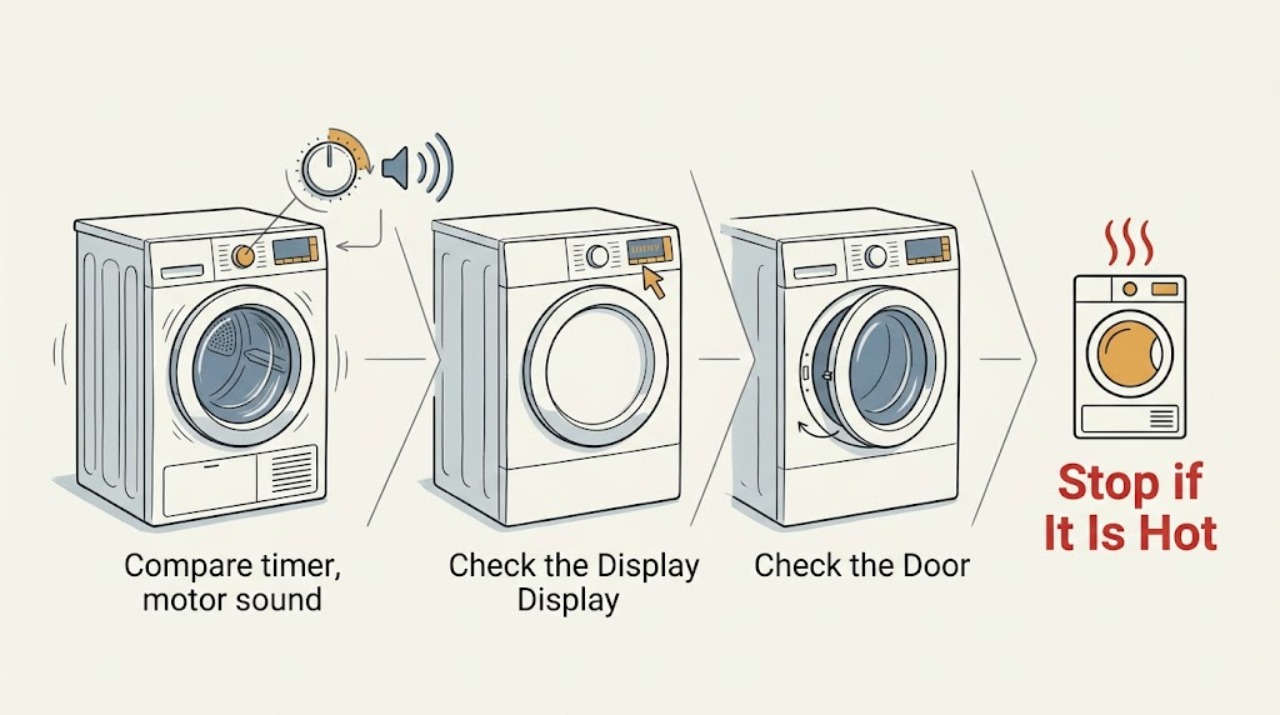
Work through in order
Diagnostic checks
Use only checks that match the exact appliance or system and its official guide.
-
Check visible power and control status
With the dryer untouched internally, look at the drum light, control-panel lights, display, and any error code or blinking indicator. Confirm that the power cord is visibly seated at the wall and that no outlet, cord, or surrounding area shows scorching or damage; do not open the plug, receptacle, panel, or breaker enclosure.
Expected result: Record whether the controls are dark, lit but idle, showing an error, or showing a selected cycle. Note a tripped indication only if it is visible from the normal user area, and note any damaged cord, smoke, or hot-plastic odor.
Next step: Write down the exact display text or indicator pattern and use the model manual or service request. Do not repeatedly reset power or continue if there is damage, smoke, or odor.
Stop if: Stop use and leave the area if there is smoke, sparking, a hot-plastic or burning smell, a damaged cord, or a gas-like odor. Use the appropriate emergency, utility, or qualified appliance response from a safe location.
Why this matters
Why: No lights or an error can prevent a cycle from starting, while visible damage or an odor makes this a safety issue rather than a drum-drive diagnosis. Whirlpool directs users to verify power and refer to the model guide when the controls do not light; Samsung says an error or blinking light may block starting.
-
Verify the door and start input
Close the empty, cool dryer door normally and confirm that no clothing is caught in the opening or latch. Select a cycle allowed by the owner manual and use the model’s normal Start or Push to Start input with dry hands; make one brief start attempt only when there is no warning odor, smoke, unusual heat, or hazardous sound.
Expected result: Record whether the door latches, the panel acknowledges Start, and the dryer remains idle, beeps, stops immediately, or begins a cycle. A control-lock symbol or a door/error indicator is a different path from a mechanical drum fault.
Next step: Follow only the owner manual’s control-lock or door guidance. If the dryer acknowledges the cycle but the drum still does not move, continue to the timer and sound observation once; do not keep retrying.
Stop if: Stop if the door will not latch without force, an error persists, the machine starts and produces grinding or burning symptoms, or the drum remains still after a valid start.
Why this matters
Why: Whirlpool notes that a firmly latched door, correct cycle, and model-specific Start input are required for operation. Samsung likewise treats Child Lock and a cycle that never actually starts as possible reasons for no spin.
-
Compare timer, motor sound, and drum movement
From outside the dryer, watch through the door window or opening without reaching in. During the single safe start attempt, note whether the timer or cycle indicator advances, whether you hear silence, a click, a hum, or a motor-like sound, and whether the drum visibly tumbles. Do not put a hand in the opening, touch the drum, or run another test to reproduce a fault.
Expected result: Record one of these combinations: no cycle/timer response; cycle response but no motor sound; a hum or motor sound with a stationary drum; or visible tumbling that stops or reverses unexpectedly. Record any scraping, thumping, or rapidly worsening sound.
Next step: If the timer advances or the motor hums while the drum stays still, stop the cycle and arrange appliance service. Give the technician the exact combination and whether the drum ever moved.
Stop if: Stop immediately for grinding, scraping, repeated clicking, smoke, burning odor, unusual heat, or a stalled drum with the motor continuing to sound. Do not keep operating the dryer.
Why this matters
Why: Samsung says a timer that counts down while the drum does not spin is a service condition. Whirlpool explains that a motor sound without drum rotation can be consistent with a worn or broken drive belt, but sound alone cannot identify the part or justify cabinet work.
-
Check load and exterior airflow conditions without forcing anything
With the dryer off and cool, look at the load size and remove only easily accessible items. Note whether a very heavy, wet load was present and whether the lint screen and exterior exhaust outlet are visibly blocked; do not move the appliance, disconnect the vent, reach into the exhaust, or open the cabinet.
Expected result: Record empty, normal, or unusually heavy load; a clean or visibly loaded lint screen; and normal, weak, or absent airflow at the exterior outlet only if it can be observed without touching hot surfaces. Do not use a new run as a test after removing clothes.
Next step: Provide the load and airflow observations to the technician. Clean only the user-accessible lint screen according to the manual when the dryer is off and cool; leave vent cleaning or restricted-duct investigation to an appropriate professional if it requires moving or disassembly.
Stop if: Stop if the lint area or exhaust is hot, wet, smoky, heavily contaminated, or smells burnt, or if any cleaning would require access inside the appliance.
Why this matters
Why: GE notes that a heavy wet load can contribute to belt slip and that a drum that turns freely during operation can indicate a loose or broken belt, but that internal conclusion requires service. A blocked lint path is also a safety concern, not a reason to dismantle the drive system.
-
Record odor, heat, and recurrence context
From a safe position, note whether the symptom occurred with an empty or loaded drum, at startup or after heating, and whether there was a burning-plastic, electrical, gas-like, or unusual hot odor. Do not sniff inside the drum, touch the cabinet, relight anything, or run the dryer again to compare temperatures.
Expected result: Distinguish no odor from a normal brief laundry odor, a persistent hot or burning odor, smoke, sparks, or a gas-like odor. Note whether the dryer or laundry felt abnormally hot only if that was already noticed without touching hot surfaces.
Next step: Leave the dryer off and include the timing, odor, load, and display details in a service request. For smoke, fire, or a strong gas-like odor, leave the area and contact the appropriate emergency or utility service from safety.
Stop if: Stop use immediately for burning odor, smoke, sparks, a hot-plastic smell, or a gas-like odor. Do not reset, restart, or open the appliance.
Why this matters
Why: An odor or heat event can indicate a fire, electrical, airflow, or gas hazard and is more urgent than identifying a belt, pulley, or roller. It is unsafe to diagnose those causes by repeated operation.
Use your observations
Decision map
Find the observation that best matches what you see, then follow the next safe action.
-
PATH 01Safety boundary
What you see
The panel is dark, an error/control-lock indication persists, or the door does not latch normally.
Do this next
Record the indication and follow the owner manual’s external control guidance; request appliance service if it remains unresolved.
Why this path and its safety boundary
Safety stop: Do not bypass the door switch, open the cabinet, or repeatedly reset power.
-
PATH 02Safety boundary
What you see
A valid cycle starts and the timer advances, but the drum stays still or a motor hum is heard.
Do this next
Stop the cycle and arrange qualified dryer service. Provide the timer result, sound, model number, load condition, and whether the drum ever moved.
Why this path and its safety boundary
Safety stop: Do not force the drum, keep running it, or attempt belt, pulley, roller, motor, or wiring work.
-
PATH 03Safety boundary
What you see
The drum moves only with a light load, stalls with a heavy wet load, or the problem began after an unusually heavy load.
Do this next
Leave the dryer off and request service rather than treating load removal as a repair. A technician can assess the drive system and fitment safely.
Why this path and its safety boundary
Safety stop: Do not repeat heavy-load tests or operate if there is heat, odor, grinding, or smoke.
-
PATH 04Safety boundary
What you see
There is burning odor, smoke, sparks, unusual heat, damaged power equipment, or a gas-like odor.
Do this next
Leave the dryer off, keep people and pets away, and use the appropriate emergency, utility, electrical, or appliance response from a safe location.
Why this path and its safety boundary
Safety stop: Do not restart, reset repeatedly, open panels, handle gas parts, or investigate the source internally.
Helpful context
Understand the symptom
What the symptom tells you
A dark control panel or a cycle that never starts points first to power, door, control-lock, or start-input conditions. A cycle that starts and counts down while the drum remains still points toward the drum drive or another internal fault. The exact failed part cannot be identified safely from the outside, and dryer models differ, so use the observations to decide whether service is needed rather than guessing a replacement.
Before any check
Keep the dryer unloaded or cool, keep hands away from the drum opening and moving parts, and stop immediately for burning odor, smoke, sparks, or abnormal heat. Do not remove a cabinet or access panel, handle wiring, work on a belt or motor, alter gas parts, or manually force the drum. If access for a maintenance task would require unplugging or opening the appliance, leave that work to a qualified technician.
Only after diagnosis
Potential parts
- dryer drive belt
Only consider this category after a technician confirms that a started cycle or motor sound occurs without drum rotation and the belt is worn, broken, or displaced.
Confirm the full dryer model and manufacturer fit information before any part is selected. - dryer idler pulley
Only consider this category if professional inspection identifies a seized, noisy, or damaged idler in the drum-drive path.
Pulley shape and fit vary by model; verify model-specific compatibility before ordering. - dryer drum roller
Only consider this category if service inspection finds a worn or seized drum support roller that is preventing normal tumbling.
Match the exact dryer model and approved fitment information; do not infer compatibility from appearance alone.
When checks do not resolve it
Need a professional?
Call for qualified appliance service when the timer advances but the drum does not move, the dryer hums without tumbling, the door/control path is unresolved, or the symptom returns after one safe external check. Escalate immediately for burning odor, smoke, sparks, unusual heat, or a gas-like odor.
Have this ready
- Provide the dryer brand and model, electric or gas type, exact display/error text, door and control response, timer behavior, sound description, whether the drum ever moved, load size, odor/heat observations, and whether any lint or exhaust blockage was visible.
Common questions
FAQ
Why does my dryer sound like it is running but the drum does not tumble?
If a cycle starts or the timer advances while the drum remains still, an internal drum-drive problem is possible. Stop the dryer and arrange service; do not open the cabinet or force the drum.
Can a heavy load stop a dryer drum from tumbling?
A very heavy wet load can contribute to belt slip on some dryers, but removing clothes is not a repair. Do not repeat heavy-load tests; provide the load context to a technician.
Should I keep trying the dryer if it smells hot or burnt?
No. Turn it off and stop using it for burning odor, smoke, sparks, unusual heat, or a gas-like odor. Leave the area when needed and use the appropriate emergency, utility, electrical, or appliance response from a safe location.
Read the exact guide
Official sources
- Samsung dryer turns on but will not start or spinSamsung · Supports checking error/control-lock indicators and whether a selected cycle’s timer advances before requesting service.
- Why won’t my dryer start: common reasons & how to fixWhirlpool · Supports door/start/cycle observations and the conditional motor-sound-without-rotation drive-belt clue; it does not identify the assigned dryer model.
- Dryer - Drum Does Not TurnGE Appliances · Supports treating heavy wet loads and a no-tumble condition as service clues without claiming a model-independent diagnosis.
- Not Tumbling or Spinning - DryerWhirlpool · Supports checking visible power/control response and the model-specific Start input before service.
Community feedback
Share a repair observation
Share a plain-text repair observation. Accepted observations are published automatically; this page may take a moment to update.