
On this page
Start here
Quick answer
A convection fan can be audible by design, and some ovens run or cycle it during preheat or even during non-convection functions. First capture when the sound occurs: a smooth air-moving hum that follows the selected mode may be normal, while rubbing, metal-on-metal scraping, harsh rattling, or a fan that runs with the door open is not. Let the oven cool, stop the cycle, and use the owner's manual to identify the fan and visible air path; do not reach through a guard or remove the rear oven panel. Check that racks, bakeware, foil, and the visible vent area are not obstructing the cavity or cooling airflow. If the noise changes with fan speed, persists after an ordinary external check, continues with the door open, or comes with smoke, burning odor, heating problems, an error, or a breaker trip, stop using the oven and arrange qualified appliance service.
Before you begin
Safety first
- This article supports cool, ordinary-access observation, manual-directed filter or vent care where applicable, and removal of loose visible obstructions only. Fan, motor, shroud, heating, wiring, controls, and built-in mounting work belongs to qualified service.
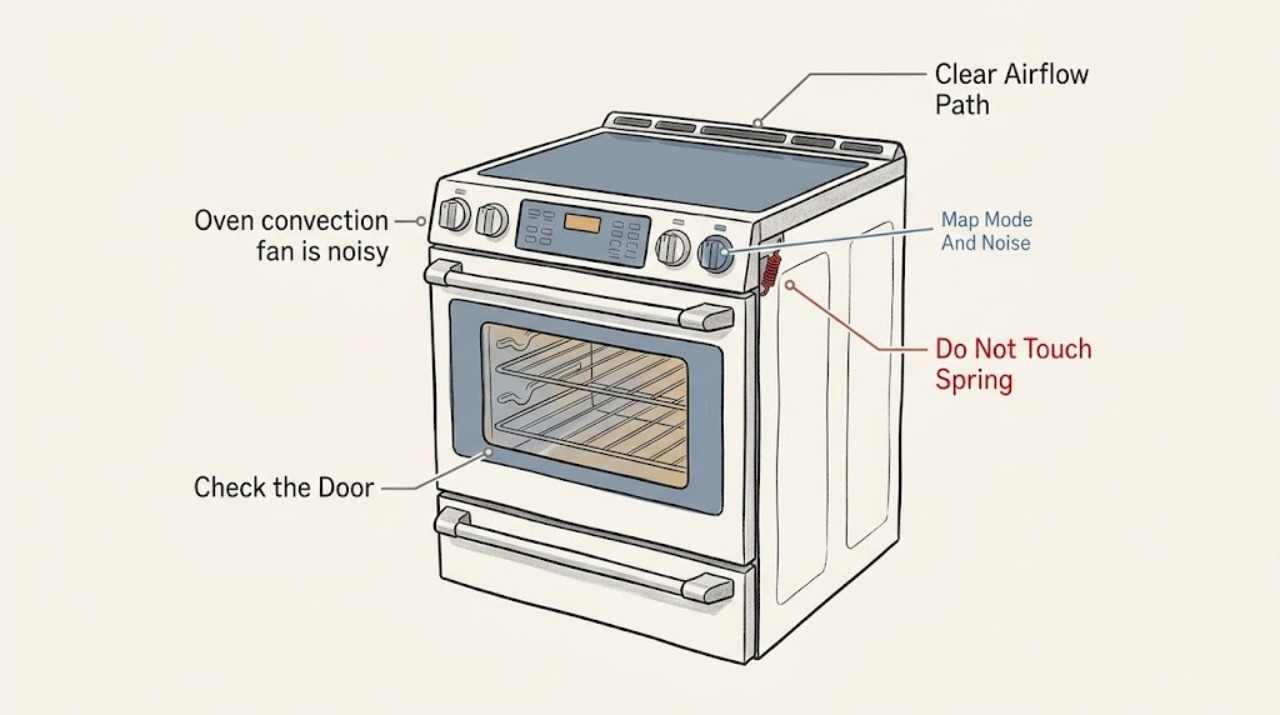
Work through in order
Diagnostic checks
Use only checks that match the exact appliance or system and its official guide.
-
Check 1
From a safe position, record whether the noise occurs only when convection is selected, during preheat, in ordinary bake or broil, during self-clean, after a cycle, or when the door is opened. Describe the sound as smooth airflow, hum, pulsing, click, whine, rattle, rubbing, or metal-on-metal scraping.
Expected result: Note the operating mode, whether the oven is heating, how long the sound lasts, whether it follows fan-speed changes, and whether it stops when the selected cycle stops or the door is opened as the model allows.
Next step: Make a short recording from outside the hot cavity and use the matching normal-operation or abnormal-noise branch. Do not open a hot door merely to locate the fan.
Stop if: Stop immediately for smoke, burning odor, sparking, a breaker trip, a door that will not close, or abnormal heat escaping from a control area.
Why this matters
Why: A mode-linked airflow hum or short cycling pattern can be normal. A persistent scrape, harsh rattle, or sound that occurs with the door open is more likely abnormal. A sound after the cycle may be the separate cooling fan rather than the convection fan.
-
Check 2
Only after the oven has cooled and only as the owner manual permits, compare the fan or air-movement sound with the door closed and briefly opened while the oven is not actively hot. Do not place a hand inside or touch the fan; use the change in sound, not a physical test.
Expected result: Record whether the fan or air-movement noise becomes quieter or stops with the door open, remains unchanged, or cannot be safely tested because the oven is hot or the model's door behavior differs.
Next step: If the result identifies a convection fan, continue only with cool, visible checks. If it identifies a cooling fan or remains uncertain, follow the cooling-fan and service branch rather than replacing a convection part.
Stop if: Do not open the door while the cavity is hot, bypass a door switch, hold the switch closed, or reach through the opening to stop the fan.
Why this matters
Why: Whirlpool uses a noise change with the door open to identify the convection fan on applicable models; unchanged noise may be the cooling fan or another source. A fan running with the door open is not normal for the cited convection-fan guidance and should be serviced, subject to the exact model design.
-
Check 3
With power off and the oven completely cool, inspect the cavity and visible vent areas for foil, a rack, bakeware, crumbs, or another object that is touching a fan cover, blocking a vent, or changing the airflow path. Remove only an obvious loose item without removing a rear panel or fan guard.
Expected result: Record whether an item is contacting the rear fan area or vent, a rack or pan is out of position, a visible vent is blocked, or the cavity and visible air path are clear.
Next step: Restore only the manufacturer's specified rack and bakeware positions, keep vents clear, and run one controlled test. Arrange service if the sound remains or a fan cover, blade, or panel appears damaged.
Stop if: Do not remove the rear oven cover, fan guard, insulation, heating element, or wiring; do not bend a blade or use a tool to dislodge an object from behind the cover.
Why this matters
Why: A loose or misplaced item can create contact or airflow noise and may explain why the sound is limited to convection mode. A clear visible path with persistent rubbing or vibration points toward a concealed blade, shroud, motor, or support issue.
-
Check 4
Using the exact model manual, observe one cool-start convection cycle and the first part of the cooldown without repeatedly opening the door. Note whether the fan runs immediately, cycles on and off, reverses direction, or continues after the cooking cycle to cool the controls.
Expected result: Classify the behavior as a regular mode-linked cycle, a cooling fan that continues after cooking, a fan that runs outside the documented mode, a fan that fails to run while the oven overheats, or a cycle accompanied by abnormal noise or poor heating.
Next step: Monitor a normal pattern without changing settings. Stop and request service for an undocumented run pattern, overheating, poor heating, an error, or a noise that persists through cooldown.
Stop if: Do not run self-clean or repeated high-temperature tests to reproduce a noise, defeat a door or temperature switch, or continue with an overheating control panel.
Why this matters
Why: Regular cycling and post-cycle cooling can be normal and vary by model. A fan outside its documented mode, failure to cool controls, or abnormal noise with heating or temperature problems makes a control, motor, airflow, or safety fault more likely.
-
Check 5
After the oven is cool and disconnected from power as the manual directs for cleaning, inspect only the visible front, vent, trim, and accessible surrounding cabinet for a loose panel, contact with a wall or cabinet, grease or debris at a vent, or evidence that the oven was recently moved or installed.
Expected result: Record a loose-looking exterior panel, contact or resonance with surrounding cabinetry, a blocked visible vent, recent installation or relocation, or no external condition that matches the noise.
Next step: Leave the appliance in its installed position and show the observation to the installer or qualified technician; do not tighten concealed fasteners or remove panels as a homeowner noise fix.
Stop if: Do not pull out a built-in oven, lift the appliance, touch terminals, spray cleaner into vents, or work on wiring or the fan assembly.
Why this matters
Why: A loose trim or contact point can amplify otherwise normal fan vibration. A blocked vent can change cooling airflow. No external clue with a rubbing or electrical sound increases the likelihood of an internal fan, motor, control, or wiring fault.
-
Check 6
Check the display for an error or warning and note whether the noisy convection cycle also produces smoke, a burning smell, sparks, a breaker trip, a fan that runs with the door open, food that is not heating evenly, or a control area that becomes unusually hot.
Expected result: Record no warning and normal cooking, an abnormal noise alone, an error or safety symptom, repeated power protection, or a combined noise and heating-control problem.
Next step: Stop operation, disconnect power only as the owner's instructions direct, and arrange qualified appliance service. Give the technician the model, recording, mode, timing, and prior observations.
Stop if: Do not restart to see if the noise returns, reset a tripping breaker, bypass a door switch, or test live wiring or a hot fan.
Why this matters
Why: An isolated normal airflow sound can be monitored. A rubbing or metal-on-metal sound, abnormal fan-door behavior, or a noise combined with smoke, odor, power interruption, or heating failure is not a cleaning issue and may damage the oven or create a safety hazard.
Use your observations
Decision map
Find the observation that best matches what you see, then follow the next safe action.
-
PATH 01Safety boundary
What you see
The sound is a smooth airflow hum or regular cycling that begins with preheat or convection selection, changes with the mode, and stops or changes as expected when the cycle or door state changes; there is no rubbing, odor, error, or heating problem.
Do this next
Keep the visible air path clear and use the oven according to the model manual. Reassess if the sound changes to scraping, rattling, or an electrical buzz.
Why this path and its safety boundary
Why it matters: Normal convection-fan operation is more likely. Some models cycle the fan or use it during preheat, and exact timing varies by gas or electric design and selected mode.
Safety stop: Do not replace a fan or open the oven solely because an expected convection airflow sound is audible.
-
PATH 02Safety boundary
What you see
The fan sound continues after cooking or occurs during bake, broil, or clean, and it does not stop or reduce with the convection-fan door behavior; the oven is cooling normally without abnormal noise.
Do this next
Keep cooling vents clear and allow the fan to finish its normal cooldown. Use the model manual if the fan runs excessively or the oven shows an error, overheating, or poor performance.
Why this path and its safety boundary
Why it matters: The sound may be the automatic cooling fan protecting the cavity and electronic controls rather than the convection fan. Cooling fan run time varies with oven temperature, cycle duration, and surroundings.
Safety stop: Do not block vents, force the fan to stop, or cycle power repeatedly while the oven is hot.
-
PATH 03Safety boundary
What you see
A new or worsening rattle, scrape, vibration, or metal-on-metal sound follows the convection fan, remains after visible racks or objects are clear, or occurs with the door open on a model where the fan should stop.
Do this next
Stop using the convection function and arrange qualified service for the fan, shroud, motor, mounting, and controls. Provide a safe recording and note the exact mode and door behavior.
Why this path and its safety boundary
Why it matters: Fan-blade contact, a loose shroud or panel, motor or bearing wear, or installation vibration is more likely than normal airflow. The sound cannot identify the failed part without inspection.
Safety stop: Do not reach through the fan guard, bend the blade, remove the rear cover, or tighten random hardware inside a hot or built-in oven.
-
PATH 04Safety boundary
What you see
The fan and cavity are intact by visible inspection, but noise changes with rack or bakeware position, a visible vent is blocked, an exterior panel contacts cabinetry, or the sound resonates after installation or relocation.
Do this next
Restore only manual-specified rack, vent, and installation clearances, then perform one controlled test. Have the installer or technician inspect persistent resonance, loose panels, or cabinet contact.
Why this path and its safety boundary
Why it matters: An airflow obstruction or structure-borne vibration may be amplifying the fan. Correcting an obvious external placement issue may reduce the noise, but it does not prove the fan assembly is healthy.
Safety stop: Do not pull out a built-in oven, add improvised pads, block vents, or alter the mounting, trim, or fan housing.
-
PATH 05Safety boundary
What you see
The noise occurs with smoke, burning odor, sparks, repeated breaker operation, an error indication, overheating controls, a fan that will not run or will not stop, or food that is not heating as expected.
Do this next
Stop operation, disconnect power only as the manual directs, keep clear of hot surfaces, and arrange qualified appliance service. Preserve the error code and recording instead of restarting repeatedly.
Why this path and its safety boundary
Why it matters: This is not a normal convection-noise pattern. An electrical, motor, control, heating, airflow, or safety fault may be present, and continued operation can create damage or injury risk.
Safety stop: Do not use self-clean to test the oven, reset a tripping breaker, bypass a door or temperature switch, or work on live wiring or a hot fan.
Helpful context
Understand the symptom
Noise that occurs in convection mode may be normal
Convection is supposed to move hot air around the oven, so a fan sound is expected in that mode. Whirlpool says a convection fan may run during preheat, may cycle during any cooking function on some models, and turns off when the door is opened. GE likewise notes that some fans operate at different speeds or reverse direction to circulate air. A smooth change in airflow or a cycling hum therefore has a different meaning from a rubbing or metal-on-metal sound. The exact oven manual controls which fan runs in which mode.
Do not confuse the convection fan with the cooling fan
The convection fan is associated with air movement inside the cavity and usually changes with a convection selection. A cooling fan protects controls and other enclosed components and may run during bake, broil, clean, or after the cycle ends. Whirlpool recommends observing whether fan noise stops when the door opens to distinguish these sources, but the oven must be treated as hot and the manual's door-opening cautions followed. Noise that continues after cooking is not automatically a failed convection fan.
Rubbing, scraping, and safety symptoms change the decision
A metallic scrape, harsh rattle, or vibration that tracks fan operation can indicate contact, a loose cover, a damaged blade, a motor or bearing issue, or an installation problem. It cannot be identified safely by listening alone. If the fan runs when it should be off, if the oven overheats, fails to heat, shows an error, trips a breaker, or produces smoke or a burning smell, stop the oven and arrange service instead of continuing tests.
Safety boundary
Stop conditions
- Do not reach through the oven door or fan guard, touch the convection blade, or remove the rear cavity cover, fan shroud, heating element, insulation, or wiring.
- Do not test a hot oven by holding a door switch, repeatedly opening the door, running self-clean, or using a heat cycle to reproduce the noise.
- Do not reset a tripping breaker, bypass a door or temperature switch, spray cleaner into vents, or continue operation with smoke, sparks, or burning odor.
- Do not pull out or lift a built-in oven, alter the mounting or trim, add improvised vibration pads, or tighten concealed hardware without the exact service procedure and support.
- Stop and arrange qualified service for rubbing or metal-on-metal noise, persistent rattling, abnormal fan operation with the door open, overheating, error indication, poor heating, or noise that remains after a permitted external check.
Only after diagnosis
Potential parts
- convection fan motor or blade assembly
Consider this category only if service confirms that the convection fan blade, motor, bearing, or related rotating component is damaged or contacting its shroud after visible obstructions and installation vibration are ruled out.
Confirm the exact oven model, fan direction, blade geometry, motor specification, temperature rating, and manufacturer's fit information; do not order from a noise description alone. - convection fan shroud or cover
Consider this category only if inspection by a qualified technician finds a bent, loose, cracked, or displaced shroud or cover causing rubbing or airflow noise.
Confirm the exact cavity and model fit, fastener arrangement, heat rating, and manufacturer's repair procedure; do not bend or remove the cover as a homeowner test. - oven cooling fan assembly
Consider this category only when the noise is proven to come from the separate cooling fan during or after a cycle and service confirms fan damage or abnormal operation.
Confirm the exact model, fan location, electrical specification, thermal control, and manufacturer's fit information; do not substitute a convection fan for a cooling fan.
When checks do not resolve it
Need a professional?
Arrange qualified appliance service when rubbing, metal-on-metal scraping, harsh rattling, or electrical buzzing persists; the fan runs with the door open on a model where it should stop; the sound continues outside its documented mode; the fan or controls overheat; the oven heats poorly; an error appears; a breaker trips; or smoke, burning odor, sparks, or structural vibration occurs. Provide the exact model, gas or electric type, mode and timing, safe recording, door-state observation, rack and vent checks, and any heating or error symptoms.
Safety scope: This article supports cool, ordinary-access observation, manual-directed filter or vent care where applicable, and removal of loose visible obstructions only. Fan, motor, shroud, heating, wiring, controls, and built-in mounting work belongs to qualified service.
Common questions
FAQ
Is it normal for an oven convection fan to be noisy?
A smooth airflow hum or regular cycling can be normal in convection mode or preheat, and some ovens use the fan in other modes. A rubbing, metal-on-metal, harsh rattling, or electrical sound is not normal fan behavior and needs service if it persists.
Why does the convection fan turn on in a mode I did not select?
Some ovens run the convection fan during preheat or cycle it during other cooking functions to improve temperature distribution. Check the exact model manual. Distinguish this from the separate cooling fan, which may run during or after cooking to protect controls.
How can I tell whether the noise is the convection fan or cooling fan?
Note whether it follows a convection selection and whether it changes when the cool door state changes as the model permits. A fan that continues after a cycle or runs during bake, broil, or clean may be the cooling fan. Do not test a hot oven by reaching inside or bypassing a door switch.
What should I do if the convection fan makes a scraping sound?
Stop the convection function, let the oven cool, and check only for a loose visible rack, bakeware, foil, or external obstruction. Do not remove the rear fan cover or touch the blade. Persistent scraping or metal-on-metal noise requires qualified inspection of the blade, shroud, motor, and mounting.
When should I stop using an oven with a noisy fan?
Stop for smoke, burning odor, sparks, a breaker trip, an error, overheating controls, a fan that runs with the door open when it should stop, poor heating, or worsening scrape and vibration. Disconnect power only as the manual directs and arrange appliance service rather than repeatedly restarting the oven.
Read the exact guide
Official sources
- Fan Noise - Convection - RangeWhirlpool · Official Whirlpool range guidance; gas, electric, and model-specific fan sequences differ.
- Range & Wall Oven - Normal Sounds During UseGE Appliances · Official GE support for normal sounds during range and wall-oven use; it does not establish that persistent mechanical scraping is normal.
- Understanding Fan or Humming Noise in OvenWhirlpool · Official Whirlpool product assistance for multiple range and wall-oven types; it does not diagnose a particular fan assembly.
- Range & Wall Oven - Fan Noise and Normal OperationGE Appliances · Official GE guidance used for general convection behavior; exact fan operation varies by oven model and fuel type.
- Normal Convection Fan Sounds - Wall OvenWhirlpool · Official Whirlpool wall-oven guidance; exact fan timing and door behavior vary by model.
Community feedback
Share a repair observation
Share a plain-text repair observation. Accepted observations are published automatically; this page may take a moment to update.