
On this page
Start here
Quick answer
A light airflow hum or a fan that cycles during preheat can be normal, but grinding, rubbing, metal-on-metal, scraping, or a new rattle is not a normal convection-fan sound. Stop using the affected oven function, let the oven cool completely, and arrange appliance service. If the plug is directly and safely accessible without moving the appliance, disconnect it before any external visual check; do not open the rear panel, reach toward the fan, perform electrical measurements, or contact a fan while it is running. Smoke, burning odor, scorch marks, arcing, repeated breaker trips, or an unusually hot plug or socket requires immediate shutdown and professional escalation.
Before you begin
Safety first
- Before any access, the oven must be off, cool, and disconnected only through a safely accessible plug when applicable. Do not open rear panels, move a built-in oven, measure live electricity, remove the fan shroud, or touch a running fan.
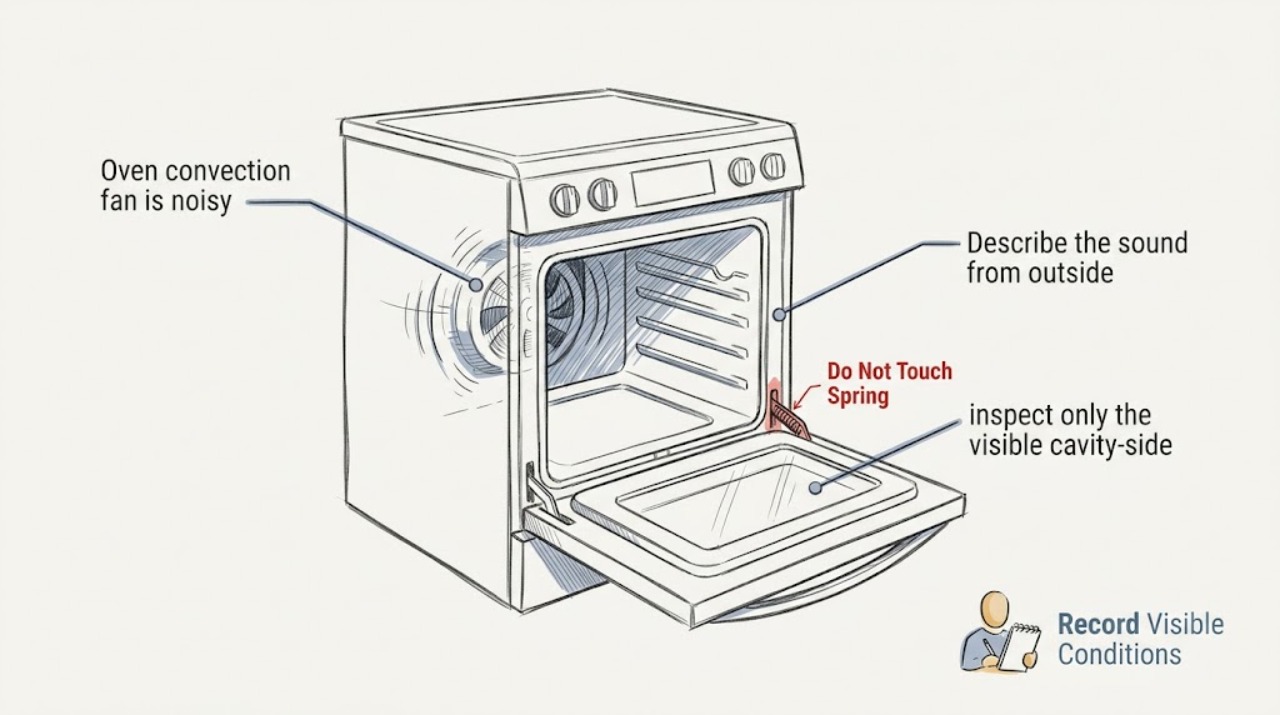
Work through in order
Diagnostic checks
Use only checks that match the exact appliance or system and its official guide.
-
Check 1
From a safe position, record when the noise is heard without starting another cooking cycle solely to test it.
Expected result: Note whether it occurred during preheat, convection cooking, an ordinary bake, self-cleaning, after the oven was switched off, or only while the door was closed; also note whether it stopped as the appliance cooled.
Next step: Give the timing and selected mode to the repair professional and check the model manual for the normal fan sequence without opening the appliance.
Stop if: Stop using the oven immediately if the sound is accompanied by smoke, burning odor, heat damage, an alarm, or a loss of electrical power.
Why this matters
Why: The timing helps separate the cavity convection fan from a cooling fan and shows whether the sound follows a normal model-specific cycle. It does not by itself prove that a motor or blade has failed.
-
Check 2
Describe the sound from outside the oven rather than trying to reach the fan or change its speed.
Expected result: Classify it as a steady airflow hum, intermittent click, vibration or rattle, scraping, grinding, or metal-on-metal rubbing, and note whether it is new or becoming louder.
Next step: Make a short written description for the technician and stop using the noisy convection function until it has been assessed.
Stop if: Stop immediately if the noise becomes a harsh grind, the oven shakes, a loose object appears to strike the cavity, or the smell of hot insulation or burning material is present.
Why this matters
Why: A steady airflow sound or cycling may be normal for the model, while rubbing or metal-on-metal noise is an abnormal sign that warrants service; the sound alone cannot identify a replaceable part.
-
Check 3
With the oven off and completely cool, inspect only the visible cavity-side fan cover and nearby surfaces from the front; do not remove, bend, probe, or clean the cover or blade.
Expected result: Look for an obvious loose piece of foil, rack accessory, or debris in the cavity, a visibly distorted cover, or a mark showing that something has been rubbing; do not reach through the cover.
Next step: Leave the item and cover undisturbed, photograph the view if useful, and tell the repair professional exactly what is visible.
Stop if: Stop the visual check if the cover is loose, sharp, hot, damaged, or accessible only by removing a part or reaching into the fan area.
Why this matters
Why: A visible obstruction or damaged cover can explain a new noise, but the fan assembly and its mounting still need professional inspection. A clear view does not rule out a motor, bearing, or electrical fault.
-
Check 4
If the oven uses a directly accessible plug, check the plug and socket from the front without moving the appliance; if it is hardwired or the plug is not safely accessible, do not reach behind it.
Expected result: Look for scorch marks, melting, a burning smell, a tripped breaker, or other heat damage; a clean visible connection does not establish that internal wiring is safe.
Next step: For a warning sign, keep the oven out of service and contact a qualified appliance repair professional or electrician. If no warning is visible and the plug is safely accessible, disconnect it before any further external inspection; do not perform a live test.
Stop if: Stop immediately for arcing, smoke, burning odor, a hot plug or socket, repeated breaker trips, or any need to move a built-in oven or access wiring.
Why this matters
Why: Electrical warning signs can make continued operation unsafe and require professional attention. No visible mark only means that no external warning was seen.
-
Check 5
Read the model and serial information from the rating label or user-accessible documentation and note any recent cleaning, rack change, spill, impact, or service history.
Expected result: Record the exact model, whether the noise began after self-cleaning or another event, and whether heating, the display, and the door still behave normally; do not use a fault-free display as permission to keep operating a grinding fan.
Next step: Provide the information and the sound description when booking service, and do not order a fan component until fitment and the actual fault are confirmed.
Stop if: Stop and escalate if the door, controls, cavity, wiring, or cabinet show heat damage, smoke residue, or structural damage.
Why this matters
Why: Model and history let the technician compare the correct fan design and parts while avoiding an unsupported diagnosis based on sound alone.
Use your observations
Decision map
Find the observation that best matches what you see, then follow the next safe action.
-
PATH 01Next step
What you see
The noise is a normal airflow hum or cycling that matches the model's documented fan operation
Do this next
Continue to follow the model manual and monitor it without opening the appliance; arrange service if the sound changes, becomes mechanical, or affects cooking.
-
PATH 02Next step
What you see
The sound is scraping, grinding, rubbing, metal-on-metal, or a new persistent rattle
Do this next
Stop using the convection function and arrange qualified appliance repair. Do not remove the rear panel, touch the fan, or keep running cycles to reproduce the noise.
-
PATH 03Next step
What you see
There is smoke, burning odor, arcing, scorch or melt damage, a hot plug or socket, or repeated breaker tripping
Do this next
Stop using the oven, disconnect it only if the plug is safely reachable without moving the appliance, and get professional electrical or appliance service. Do not access wiring or reset the appliance to test it.
-
PATH 04Next step
What you see
The noise began after a spill, self-cleaning cycle, impact, or a loose visible item
Do this next
Keep the oven off and cool, document what is visible, and have a professional inspect it; do not probe through the fan cover or remove the shroud yourself.
Helpful context
Understand the symptom
Ovens can have more than one fan. A convection fan circulates air in the cavity and may cycle during preheat or selected cooking modes; a separate cooling fan can run during or after cooking to protect controls. The first useful question is therefore when the sound occurs and whether it is airflow-like or a new mechanical rubbing sound. Do not assume a familiar hum is a failed part, and do not assume a grinding noise is safe because the oven still heats.
These checks are documentation only. Do not remove a rear cover or fan shroud, touch the blade, probe live wiring, move a built-in oven, or run the oven with an exposed component. If a visual check would require reaching behind the appliance, leave it to a qualified repair professional.
Only after diagnosis
Potential parts
- oven convection fan blade
Consider only if a qualified technician confirms a bent, loose, or damaged blade after identifying the exact oven model.
Fan blades vary by model and mounting pattern; confirm the model, revision, and manufacturer-approved fit before ordering. - oven convection fan motor
Consider only if professional diagnosis finds a motor, bearing, or motor-mount fault rather than a normal cooling-fan sound or an obstruction.
Confirm the exact model and electrical specification through approved service information; motor replacement is not a live user test. - oven fan shroud
Consider only if a technician confirms that the visible shroud is distorted, loose, or damaged and is the source of the rubbing noise.
Shroud shape and fasteners are model-specific; do not remove the shroud to compare parts.
When checks do not resolve it
Need a professional?
Arrange appliance service for a new grinding, scraping, metal-on-metal, or persistent rattling sound, or when the fan noise changes cooking behavior. Escalate immediately for smoke, burning odor, arcing, scorch marks, a hot plug or socket, or repeated breaker trips.
Safety scope: Before any access, the oven must be off, cool, and disconnected only through a safely accessible plug when applicable. Do not open rear panels, move a built-in oven, measure live electricity, remove the fan shroud, or touch a running fan.
Have this ready
- Provide the model and serial information, the operating mode and timing, the sound description, visible cavity or electrical warning signs, and any recent cleaning, spill, impact, or service history.
Common questions
FAQ
Is a convection-fan hum always a fault?
No. Many ovens cycle a convection or cooling fan during preheat, cooking, and cooldown. Compare the timing with the model manual. A new scraping, grinding, rubbing, or metal-on-metal sound is not a normal reason to keep operating the oven.
Can I remove the rear panel to inspect the noisy fan?
No. Keep the oven off and fully cool, and leave rear-panel removal, wiring access, fan-shroud removal, and electrical diagnosis to a qualified professional. If the appliance is hardwired or built in, do not move it to reach the connection.
Should I run another cycle to confirm the noise?
Do not run another cycle solely to reproduce a mechanical noise. Record when it occurred and what it sounded like. If the oven must be stopped because of smoke, odor, heat damage, arcing, or breaker trips, keep it disconnected and arrange service.
What should I tell the repair technician?
Provide the exact model, the cooking mode and timing, whether the sound is airflow-like or mechanical, whether it changes as the oven cools, any visible cavity or plug/socket warning signs, and any recent spill, self-cleaning cycle, impact, or service.
Read the exact guide
Official sources
- Electrical Safety Advice for Oven and GrillsElectrical Safety First · General appliance-safety guidance for visible heat damage, arcing, breaker trips, unplugging, and qualified repair escalation.
- Range & Wall Oven - Fan Noise and Normal OperationGE Appliances · Manufacturer guidance on model-dependent convection and cooling-fan timing and normal cycling.
- Normal Convection Fan Sounds - Wall OvenWhirlpool Product Help · Manufacturer guidance; the page identifies rubbing or metal-on-metal sound as abnormal and directs users to service.
Community feedback
Share a repair observation
Share a plain-text repair observation. Accepted observations are published automatically; this page may take a moment to update.