
On this page
Start here
Quick answer
A Samsung freezer can change compressor speed and run for long periods while it removes heat, so a long hum is not automatically a fault. First determine whether it is actually starting and stopping every few minutes, or simply running at low or high speed while the food stays cold. Check the actual food temperature, the selected temperature and any Power Freeze setting, the door seal and obstructions, frost near the vents, and the clearance around the appliance. Warm food, frequent door openings, a damaged seal, blocked vents, a very warm location, or a recent power event can increase cooling demand. If food is warming, an alarm or compressor error appears, the compressor clicks and fails to start, the cord or outlet is hot, the unit makes unusually loud noise, or rapid cycling persists after the accessible checks, protect the food and arrange qualified Samsung appliance service. Do not open the sealed refrigeration system, test live terminals, add refrigerant, or replace a compressor based on cycling alone.
Before you begin
Safety first
- This article supports timing the symptom, checking temperature and settings, inspecting the load, door seal, visible frost, vents, clearances, and obvious power hazards from outside. Do not open panels or sealed tubing, reach into fans, perform live electrical work, add refrigerant, or replace compressor or start components as a user test.
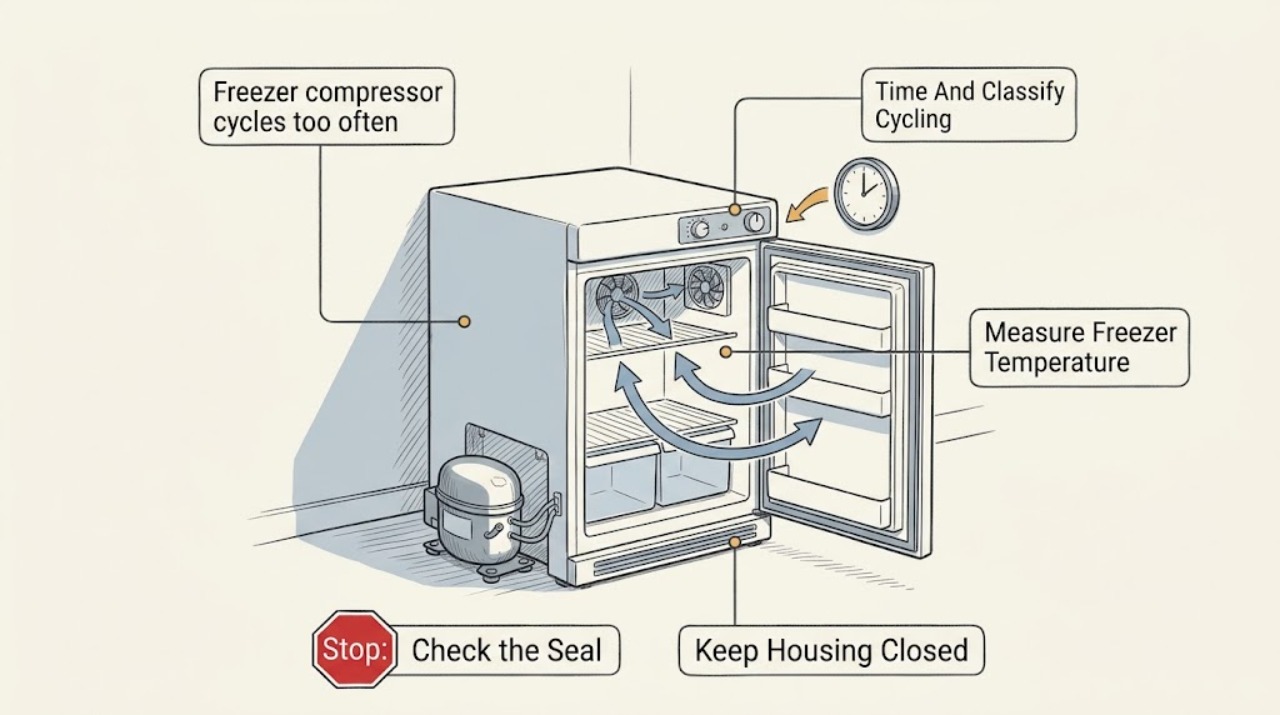
Work through in order
Diagnostic checks
Use only checks that match the exact appliance or system and its official guide.
-
Check 1
With the Samsung freezer door closed and the appliance undisturbed, record when the compressor starts, how long it runs, how long it stays off, and whether the sound changes from low to high speed. Note the interior fan, clicking at startup or shutdown, alarm, display, and any warming of the cabinet.
Expected result: The compressor runs for long stretches with cold food and changes speed, or it starts and stops every few minutes with repeated clicks, a failed restart, warming food, or an alarm.
Next step: Continue with temperature, door, frost, and clearance checks only when the unit is stable and no electrical hazard is present. For rapid starts with warming food, repeated clicking, smoke, a hot connection, or an alarm, protect the food and arrange qualified service.
Stop if: Do not force repeated starts, repeatedly disconnect power, or touch a hot cord, outlet, compressor area, or exposed wiring.
Why this matters
Why: Variable-speed or long operation can be normal cooling behavior. Rapid short cycling with poor cooling or failed starts is more consistent with a power, start-protection, control, fan, or refrigeration fault than normal speed changes.
-
Check 2
Measure the freezer using the method in Samsung's temperature guidance: place a thermometer between frozen food packages, keep the door closed long enough for a stable reading, and record the panel setting and any blinking temperature display or alarm.
Expected result: Food remains properly frozen and the measured temperature is stable, or food is soft or warming and the display is blinking or an alarm is active.
Next step: If food is warming, protect perishable food and follow Samsung's cooling-service path rather than setting the freezer colder repeatedly. If the temperature is stable, continue with the door, frost, and airflow checks.
Stop if: Do not leave the door open to watch the compressor or use a measurement setup that blocks a vent or damages a package.
Why this matters
Why: Frequent compressor operation with stable frozen food may reflect normal demand or temperature control. Warming food or a persistent high-temperature indication means the issue is cooling performance, not merely an objectionable compressor cycle.
-
Check 3
Inspect the freezer door, drawer, gasket, shelves, and packages from ordinary access. Confirm that no food or drawer is preventing complete closure; clean a dirty gasket with the model-approved method and, if appropriate for the door style, perform Samsung's paper-resistance check without forcing the seal.
Expected result: The door is blocked or misaligned, the gasket is dirty, the paper slips out easily, frost or condensation appears near the seal, or the door and gasket contact evenly with no obstruction.
Next step: Remove only loose obstructions and restore normal organization. If the gasket is torn, warped, or cannot seal, keep the freezer closed as much as possible and request service; if the seal is sound, continue to the frost and vent check.
Stop if: Do not bend, glue, heat, cut, or force the gasket or door, and do not disassemble hinges or wiring as a user test.
Why this matters
Why: A gap lets warm air enter and can create frost and repeated cooling demand. A clean, intact, evenly contacting seal makes the door a less likely explanation, although a hidden alignment or control issue can remain.
-
Check 4
Look for frost or ice on the freezer back wall, around interior vents, or along the door edge, and check that food is not pressed against the vents. Inspect the exterior clearance and visible grille from outside without removing covers or reaching into a fan.
Expected result: Frost blocks a vent, the door edge has frost or condensation, food is packed against an air outlet, the appliance has restricted exterior clearance, or the visible airflow path is clear.
Next step: Move only loose food away from vents and follow the exact model instructions for light frost removal or defrosting. Do not use a hair dryer or chip bonded ice. If heavy or returning frost remains, arrange service.
Stop if: Do not use a hair dryer, knife, heater, sharp tool, or force to remove ice, and do not remove an evaporator cover or fan guard.
Why this matters
Why: Samsung links frost with warm moist air entering through a door gap or blocked ventilation; frost can then block airflow and make cooling demand persist. A clear visible path does not rule out a hidden fan, defrost, control, or sealed-system fault.
-
Check 5
Record whether the freezer is newly installed or recovering from a move, a large amount of warm food was added, the room is unusually warm or exposed to a heat source, the doors have been opened often, or Power Freeze or another rapid-cooling mode is enabled. Compare the setting with the exact Samsung manual.
Expected result: A recent warm load, frequent opening, hot location, initial cool-down, or rapid-freeze mode matches the timing, or no demand-related event explains the cycles.
Next step: Minimize door openings, keep the freezer away from heat, avoid blocking vents, and allow recovery according to the model instructions. If cycling remains rapid or cooling does not recover, arrange qualified service.
Stop if: Do not move a loaded freezer, cover ventilation openings, or leave a rapid-cooling mode active as a way to hide a recurring fault.
Why this matters
Why: Extra heat entering the compartment can legitimately increase compressor work. If the demand event has passed and food remains warm or the compressor is rapidly short cycling, a component or airflow fault becomes more likely.
-
Check 6
Read the display for a fan, temperature, voltage, or compressor-related code and inspect the visible cord and outlet for looseness, heat, discoloration, or damage. Record any power interruption or brownout; do not open the rear compartment or test live power.
Expected result: A Samsung error code returns, the compressor clicks but fails to start, the cord or outlet is hot or damaged, a breaker trips, or there is no code or visible power hazard.
Next step: For an error that returns, failed starts, warming food, a hot or damaged connection, or a repeated trip, keep the freezer out of service and arrange qualified appliance or electrical diagnosis. If no hazard is present, provide the complete timing and temperature record if cycling persists.
Stop if: Do not repeatedly reset power, bypass a fan or safety control, open an energized compartment, or work on compressor wiring or refrigeration tubing.
Why this matters
Why: Samsung identifies compressor abnormal-current, under-voltage, and over-voltage codes as power or electrical-anomaly clues, and a freezer-fan error may be caused by ice or a failed fan. Hot connections and repeated trips are safety faults, not normal cycling.
Use your observations
Decision map
Find the observation that best matches what you see, then follow the next safe action.
-
PATH 01Safety boundary
What you see
The compressor hum changes speed, runs for extended periods, food stays properly frozen, no alarm or code is present, and the pattern follows a warm load, frequent opening, or a hot room.
Do this next
Minimize openings, keep vents and exterior clearances open, let the load recover, and monitor food temperature. Request service if food warms, an alarm appears, or rapid starts begin after conditions normalize.
Why this path and its safety boundary
Why it matters: The behavior is more consistent with normal variable-speed cooling and increased heat demand than with a short-cycle failure.
Safety stop: Do not dismiss repeated click-and-fail starts, warming food, hot connections, or a returning error as normal compressor noise.
-
PATH 02Safety boundary
What you see
Frost or condensation is near the door or vents, the seal fails a careful paper check, a drawer is blocked, or food is pressed against an interior vent.
Do this next
Correct only loose obstructions, clean the seal, and follow the exact model's safe frost or defrost procedure. If the seal is damaged or frost returns, request service.
Why this path and its safety boundary
Why it matters: Warm moist air or blocked circulation is likely increasing cooling demand and can create a persistent frost-and-airflow cycle.
Safety stop: Do not force the door, chip bonded ice, use a hair dryer, or remove an evaporator cover to restore airflow.
-
PATH 03Safety boundary
What you see
The freezer recently received warm food, was opened often, is in a warm location, is newly installed or recovering, or has a rapid-freeze feature active while food remains frozen.
Do this next
Follow the Samsung manual, minimize door openings, and let the freezer recover before reassessing the timing and food temperature. Escalate if it cannot recover or begins short cycling.
Why this path and its safety boundary
Why it matters: Additional heat load or an intentional cooling mode can explain increased compressor operation without proving a compressor failure.
Safety stop: Do not repeatedly change the temperature or leave a rapid-freeze setting on to mask a persistent cooling problem.
-
PATH 04Safety boundary
What you see
The compressor starts and stops every few minutes, food is warming, a high-temperature display or alarm persists, or clicking precedes failed starts after door, frost, load, and setting checks are normal.
Do this next
Protect the food, keep the freezer out of service, and arrange qualified diagnosis. Provide the timing, measured temperature, codes, sounds, settings, and recent power or loading events.
Why this path and its safety boundary
Why it matters: This pattern is not explained by normal speed changes alone and may involve start protection, power, a fan, control, compressor, or sealed refrigeration fault.
Safety stop: Do not force starts, repeatedly power-cycle the appliance, open the compressor compartment, or add refrigerant.
-
PATH 05Safety boundary
What you see
A compressor current or voltage code returns, the cord or outlet is hot or damaged, a breaker trips, a freezer-fan code appears, or fan noise is absent or unusually loud with warming food.
Do this next
Stop using the freezer and request qualified appliance or electrical service. If there is smoke, sparking, or exposed wiring, leave the area as appropriate and seek emergency assistance from a safe location.
Why this path and its safety boundary
Why it matters: An electrical supply, start/overload, fan, or control fault is possible; the fan and compressor systems cannot be safely distinguished from outside by sound alone.
Safety stop: Do not reset a tripping breaker repeatedly, bypass a fan or safety device, test live terminals, or remove panels.
Helpful context
Understand the symptom
Do not confuse variable-speed operation with short cycling
Samsung describes the compressor as sounding like a quiet engine or motor that can start, run at low or high speed, change speed, and make some clicking as the fan slows. That is different from a compressor that starts, stops, and tries again every few minutes while the freezer warms. Count the starts and stops with the door closed, and judge the symptom by food temperature and alarms rather than by a hum alone.
Warm air entering the freezer creates repeated cooling demand
A door that does not close or seal, warm items, frequent openings, blocked vents, or frost can let warm moist air into the compartment. The compressor may then work harder or more often. Samsung's door and frost guidance makes the accessible checks straightforward, but a damaged seal, returning frost, or a freezer that remains warm needs service rather than repeated temperature changes.
Power and sealed-system checks belong to a technician
A click-and-fail start or a compressor-current or voltage error can have an electrical, start, control, or compressor cause. Check only the visible cord, outlet, display, and model information. Do not open the rear cover, measure live power, handle refrigerant tubing, or assume a compressor replacement is the answer before qualified diagnosis.
Safety boundary
Stop conditions
- Stop using the freezer for smoke, sparking, a hot or damaged cord or outlet, exposed wiring, repeated breaker trips, a burnt smell, or a compressor that repeatedly clicks and fails to start.
- Protect the food and arrange service when rapid starts and stops persist with warming food, a high-temperature alarm, a returned compressor or voltage code, or a fan error.
- Do not open the sealed refrigeration system, add or release refrigerant, test live terminals, open the compressor compartment, or replace a compressor or start component based on cycling alone.
- Do not chip bonded ice, use a hair dryer or heater, reach into fans, remove covers, or operate the freezer with a guard or panel removed.
- Do not dismiss a short-cycle pattern as normal variable-speed operation when the measured temperature is rising, frost returns, the door cannot seal, or the symptom persists after the accessible demand checks.
Only after diagnosis
Potential parts
- Samsung freezer door gasket
Consider this category only if the exact model's gasket is torn, warped, or unable to seal after accessible cleaning and door-obstruction checks.
Confirm the exact Samsung model and manufacturer's fit information; do not bend, heat, glue, or force a mismatched gasket. - Samsung freezer fan or fan motor
Consider this category only after a fan error, missing airflow, or abnormal fan noise is confirmed by qualified diagnosis and frost or door causes are addressed.
Confirm the exact Samsung model and fan location before ordering; do not reach into a fan or operate without guards. - Samsung temperature sensor or control
Consider this category only when measured food temperature and qualified testing show that the control or sensor is not responding to the selected setting.
Confirm the exact model, sensor/control design, and manufacturer's fit information; cycling behavior alone does not identify this part. - Samsung compressor start or overload component
Consider this category only after qualified testing confirms repeated click-and-fail starts or abnormal current behavior with a correct power supply.
Confirm the exact Samsung model and electrical specifications; do not substitute a start or overload component by appearance.
When checks do not resolve it
Need a professional?
Arrange qualified Samsung appliance service when rapid compressor starts and stops persist, food is warming, a temperature or compressor error returns, a fan error or heavy recurring frost is present, the door seal cannot close, or accessible load, setting, and airflow checks do not explain the pattern. Use qualified electrical help for a hot or damaged connection or repeated breaker trip.
Safety scope: This article supports timing the symptom, checking temperature and settings, inspecting the load, door seal, visible frost, vents, clearances, and obvious power hazards from outside. Do not open panels or sealed tubing, reach into fans, perform live electrical work, add refrigerant, or replace compressor or start components as a user test.
Common questions
FAQ
Is it normal for a Samsung freezer compressor to run often?
A long or changing-speed hum can be normal: Samsung says the compressor can run at low or high speed, change speeds, and make some clicking as it operates. Judge the situation by food temperature, alarms, and whether it is actually starting and stopping every few minutes rather than by sound alone.
How can I tell whether my Samsung freezer is short cycling?
With the door closed, record the compressor's on and off intervals. Repeated starts and stops every few minutes, especially with a click-and-fail start, warming food, an alarm, or a returned code, are more concerning than a long run or a normal speed change. Keep the unit out of service and arrange diagnosis for that pattern.
Can a Samsung freezer door seal make the compressor run more?
Yes. A dirty, warped, or damaged gasket, a package blocking closure, or a door gap lets warm air enter and can create frost and additional cooling demand. Clean and inspect the seal from ordinary access, and request service for a damaged seal or a door that will not close.
Where should I put a thermometer in a Samsung freezer?
Samsung recommends placing a thermometer between frozen food packages rather than in a glass of water. Keep the door closed while the reading stabilizes and compare the result with the exact model's setting guidance.
What should I do if my Samsung freezer shows a compressor or voltage error?
Record the exact code and follow only the model-specific Samsung support instruction. If the code returns, the freezer is warming, the compressor clicks and fails to start, or the cord or outlet is hot or damaged, protect the food and arrange qualified appliance or electrical service. Do not open the compressor compartment or sealed system.
Read the exact guide
Official sources
- What temperature should I set my Samsung refrigerator to?Samsung Support · Samsung refrigerator and freezer temperature guidance; some models differ, so the user manual controls the setting.
- Samsung refrigerator error codesSamsung Support · Samsung refrigerator and freezer error-code guidance; codes and reset behavior vary by model.
- Cooling issues with Samsung refrigerator or freezerSamsung Support · Samsung refrigerator and freezer support guidance; exact model manual and display behavior control the installed appliance.
- Frost forms in the Samsung freezer, refrigerator, or ice bucketSamsung Support · Samsung refrigerator and freezer frost guidance; model-specific defrost instructions take precedence.
- Understanding the different noises coming from your Samsung refrigeratorSamsung Support · Samsung refrigerator and freezer compressor-noise guidance used to distinguish ordinary sound from an abnormal condition; exact model controls.
Community feedback
Share a repair observation
Share a plain-text repair observation. Accepted observations are published automatically; this page may take a moment to update.