
On this page
Start here
Quick answer
A washer that will not start may have no power, a control lock, an unrecognized door or lid state, a required water condition, a delayed or paused cycle, or a control fault; the symptom alone does not prove that the control board is bad. First classify whether the display is blank or the panel has power. From a dry, safe position, check the dedicated outlet, breaker or GFCI, and cord arrangement without opening the washer. If the panel is powered, clear Control Lock only as the exact manual directs, make sure the door or lid is fully latched, hold Start for the model's required time, and check any displayed code or water-supply requirement. One model-authorized power cycle may clear a temporary control state; repeated resets, a recurring no-start, a returning lock or communication code, burning odor, smoke, arcing, a hot plug, or water near electricity requires the washer to stay off and qualified service. A technician should confirm the control board, user interface, wiring, power path, or latch before any part is selected.
Before you begin
Safety first
- Keep the washer off for smoke, burning or electrical odor, arcing, a hot or damaged plug, water near electrical parts, a damaged cord or hose, a moving tub that does not stop, or repeated breaker trips. Do not open the cabinet or bypass an interlock.
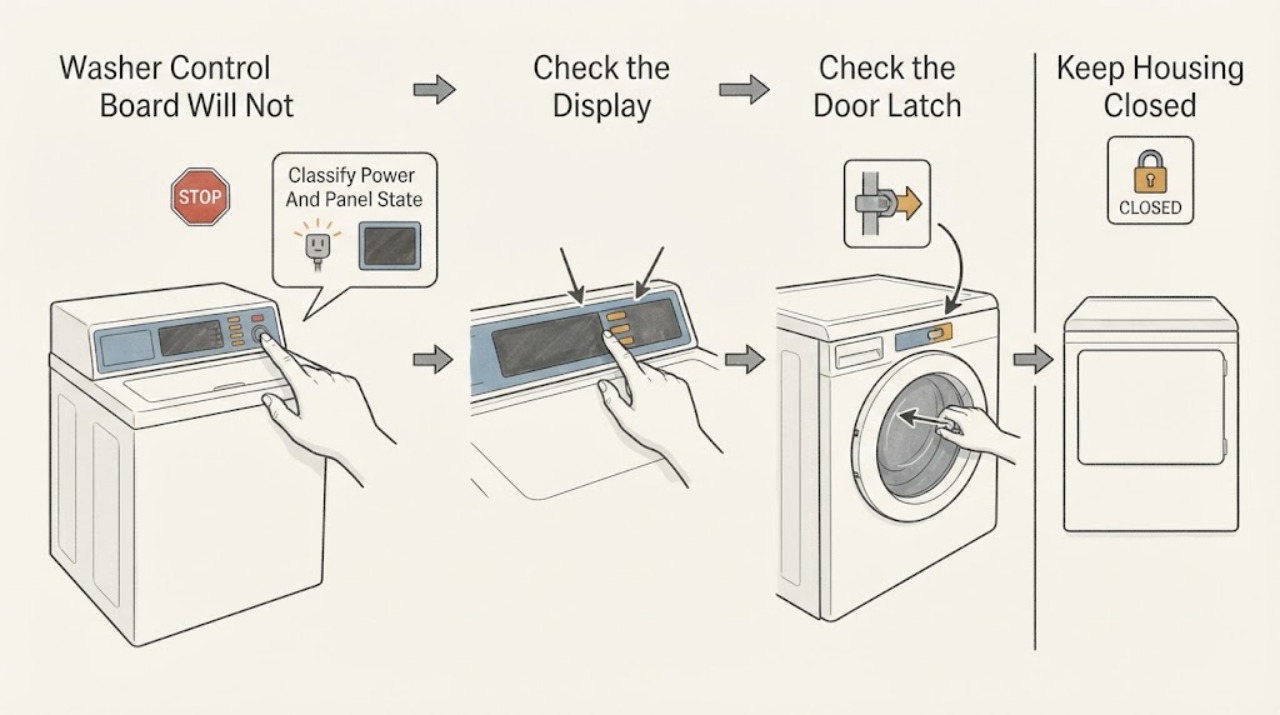
Work through in order
Diagnostic checks
Use only checks that match the exact appliance or system and its official guide.
-
Check 1
With the washer stopped and hands and floor dry, observe whether the display, indicator lights, and buttons are completely blank, partly lit, or responsive. Check the dedicated outlet connection and, from a safe position, the associated breaker or GFCI; do not open the washer or use a live electrical test.
Expected result: The outlet has no power, the breaker or GFCI is tripped, the washer display is blank while the outlet works, or the panel lights and accepts input.
Next step: Restore a tripped breaker or GFCI only once if no hazard is visible. If it trips again, the cord or receptacle is damaged, or the washer remains blank at a working outlet, leave the washer off and arrange electrical or appliance service. If the panel is alive, continue with the lock and latch checks.
Stop if: Stop for a hot, loose, scorched, wet, sparking, or damaged plug, cord, receptacle, or GFCI; do not reset repeatedly or touch the appliance.
Why this matters
Why: No power at the outlet points outside the washer. Power at the outlet with a blank washer can involve the cord, internal power path, fuse, or control electronics. A lit and responsive panel makes a household-power failure less likely and shifts attention to settings, interlocks, supplies, and the control path.
-
Check 2
If the panel has power, look for a Control Lock, LOC, LC, or child-lock indicator and check that the controls are clean and completely dry. Use the exact model manual to hold the lock-control key for its documented interval; do not copy a sequence from another model.
Expected result: A lock indicator is present, the panel starts responding after the documented unlock, the panel is wet or dirty, or it remains unresponsive with no lock indication.
Next step: Dry and clean only the accessible control surface as the manual permits, unlock it once, and try the normal command. If the lock cannot be cleared, the panel remains dead, or the behavior returns, stop and provide the model and display behavior to a qualified technician.
Stop if: Do not spray liquid into the controls, remove the console, bridge a connector, or continue with a wet panel.
Why this matters
Why: A control lock can deliberately make buttons appear dead, while moisture or residue can interfere with a touch panel. Persistent unresponsiveness after an unlocked, dry panel keeps the user interface, control board, harness, or power path in consideration but does not identify one of them.
-
Check 3
With no hands inside the washer, close the front door or top lid firmly and check the visible latch area for clothing, a damaged strike, or an obstruction. Select a normal cycle and press or hold Start exactly as the matching manual describes; do not force or bypass the interlock.
Expected result: The door or lid was not fully closed, a lock click or indicator appears, an open-door or lid message remains, Start is accepted only after a hold, or the latch appears closed but the washer still will not begin.
Next step: Remove only a visible obstruction, close the door or lid correctly, and retry once. If the latch is damaged, the lock message returns, Start is never accepted, or the washer makes an abnormal click or hum, leave it off and arrange service.
Stop if: Never reach into a moving tub or bypass, tape, wedge, or manually defeat a door or lid lock.
Why this matters
Why: A washer may refuse to start until the interlock confirms a closed door or lid, and some models distinguish a tap from a held Start command. A recurring open-state message or failed lock confirmation can indicate the latch, sensor, harness, or control path rather than a proven board failure.
-
Check 4
Read the full display for delay, pause, drain, door, or water-supply messages and confirm the selected cycle is not waiting for a model-specific condition. If the manual requires water, verify that both applicable supply valves are open and the visible hoses are connected without a kink; do not disconnect a pressurized hose.
Expected result: A delay or pause is active, an error identifies a door or water condition, a supply valve is closed or hose is visibly kinked, or the washer accepts Start but still neither fills nor advances.
Next step: Cancel or resume only with the exact manual, correct one visible hose or valve issue if safe, and make one supervised start attempt. If the message returns or the cycle remains idle, stop rather than repeatedly selecting cycles or replacing a board by guesswork.
Stop if: Stop for a leaking, bulging, or damaged hose, water near electrical parts, an unlisted code, or any need to remove a hose, access a valve, or open the cabinet.
Why this matters
Why: A delayed or paused state can look like a failed control. A model may require hot and cold supplies or a confirmed door state before it advances. If visible conditions are correct but the washer still does not start, a sensor, valve, harness, user interface, or control board fault is possible and needs diagnosis.
-
Check 5
After the safe external checks and only when no safety symptom exists, perform at most one power cycle using the exact model instructions: turn the washer off, disconnect it from a safe dry location, wait the manual's interval, reconnect, and try the intended cycle once. Record the model, code, indicators, sounds, and result.
Expected result: The washer starts normally once, remains unresponsive, shows the same or a new code, refuses the latch, or stops again at the same point.
Next step: If the problem returns or the panel stays dead, leave the washer off and arrange qualified appliance service. Give the technician the exact model, sequence, code, power observations, latch behavior, water status, and reset result.
Stop if: Do not repeat resets, operate with smoke, burning odor, arcing, a hot plug, a leak near electricity, or a breaker that keeps tripping; do not open the control console.
Why this matters
Why: A one-time recovery can clear a temporary control state, but recurrence indicates an unresolved condition. A returning code or repeated no-start can involve the control board, user interface, lock, harness, power path, or another component; the symptom alone cannot select a part.
Use your observations
Decision map
Find the observation that best matches what you see, then follow the next safe action.
-
PATH 01Safety boundary
What you see
The outlet is dead, a breaker or GFCI trips again, the receptacle or cord is damaged, or the washer stays blank even though the outlet works.
Do this next
Stop resetting power and arrange qualified electrical or appliance service. Do not open the console or attempt an energized check.
Why this path and its safety boundary
Why it matters: The problem is more consistent with a household power, cord, internal power-path, fuse, or electronic fault than with a simple start-button setting.
Safety stop: Keep clear of heat, scorch marks, water, sparks, a hot receptacle, or a damaged plug and cord.
-
PATH 02Safety boundary
What you see
The display is lit but a lock symbol or LOC/LC message is present, or the panel responds after the documented Control Lock command.
Do this next
Unlock once using the matching manual and keep the panel dry. If it cannot unlock or immediately relocks, arrange service for the interface, board, or related control path.
Why this path and its safety boundary
Why it matters: The lock setting, not necessarily a failed control board, is preventing normal input.
Safety stop: Do not spray the panel, remove its cover, or defeat the lock.
-
PATH 03Safety boundary
What you see
The controls light up and accept some input, but an open-door or lid message remains, the lock never confirms, or Start is ignored until the door or lid is manipulated.
Do this next
Close the door or lid correctly and remove only a visible obstruction. If the message or failed lock returns, keep the washer off and have the interlock and control path diagnosed.
Why this path and its safety boundary
Why it matters: A latch, interlock sensor, strike, harness, or associated control input is more likely than a generalized board diagnosis.
Safety stop: Never bypass, wedge, tape, or reach through the interlock.
-
PATH 04Safety boundary
What you see
The cycle accepts Start but remains idle or reports a water condition, and a required supply valve is closed or a visible hose is kinked.
Do this next
Correct only the visible valve or hose condition documented for the model and try once. For a returning code, leak, or no fill with correct supplies, arrange service.
Why this path and its safety boundary
Why it matters: The washer may be waiting for the model's water-supply condition; this pattern does not establish a failed control board.
Safety stop: Do not disconnect a pressurized hose or continue if water reaches electrical parts.
-
PATH 05Safety boundary
What you see
The washer starts and completes the intended command after one model-authorized power cycle, with no safety warning and no returning code.
Do this next
Monitor the next normal use and keep the model and event details. If the no-start recurs, stop repeating resets and arrange service.
Why this path and its safety boundary
Why it matters: A temporary control state may have cleared, but a reset does not prove the board or another component is healthy.
Safety stop: Stop immediately if the recovered washer develops heat, smoke, odor, arcing, a leak near electrics, or repeated breaker trips.
-
PATH 06Safety boundary
What you see
The panel is powered, the lock and visible supply conditions are correct, and the washer still will not start after the documented command and one reset, or a code returns.
Do this next
Leave the washer off and request qualified appliance diagnosis. Provide the exact model, full code, indicator behavior, latch response, water state, and reset result.
Why this path and its safety boundary
Why it matters: A control board, user interface, harness, power supply, lock, sensor, or another machine fault is possible; the observed symptom is not enough to choose a part.
Safety stop: Do not order a control board by symptom or appearance, open the console, bypass a lock, or keep retrying cycles.
Helpful context
Understand the symptom
Separate no power from a no-start command
Look at the symptom before changing settings. No display or indicator points first to the outlet, breaker, GFCI, cord, internal fuse, or power path. A lit display with no response points toward Control Lock, a wet or dirty touch surface, a door or lid interlock, a paused or delayed cycle, or the control and user-interface path. A panel that responds but refuses one cycle can instead be waiting for a latch, water connection, or model-specific condition. Record the exact model and every display symbol or code rather than assuming the control board is the failed part.
Use only safe external checks
Keep hands and the floor dry. From outside the appliance, check that the washer is connected to its intended grounded outlet and that no extension cord or loose connection is involved. A tripped breaker or GFCI can remove power, but repeated trips are a service or electrical concern. Do not remove the console, probe energized wiring, bypass a lid or door lock, or try to force a cycle while the panel or surrounding area is wet.
A control board is a diagnosis, not a symptom
The control board exchanges information with the user interface, door or lid lock, sensors, power path, and other washer components. The same no-start symptom can come from any of them. If the panel, latch, supply, and one model-directed reset do not restore operation, preserve the exact model, code, lights, sounds, and sequence for service. Do not order a board by appearance or install it based only on a blank or unresponsive panel.
When to stop immediately
Stop using the washer for smoke, burning or electrical odor, sparks, arcing, a hot or damaged plug or receptacle, water near electrical parts, a damaged cord, or repeated breaker trips. Isolate power only from a dry, safe location if that can be done without touching a hazard, close the water valves when a leak is present if safe, and arrange qualified help. Never restart to test a safety symptom.
Safety boundary
Stop conditions
- Stop immediately for smoke, burning or electrical odor, sparks, arcing, a hot or scorched plug or receptacle, a damaged cord, or repeated breaker or GFCI trips. Isolate power only from a dry, safe location and obtain qualified help.
- Stop for a leak or standing water near electrical parts, a bulging or damaged supply hose, or water that cannot be controlled safely. Close the supply valves only if reachable without contact with a hazard.
- Do not open the console or cabinet, probe energized wiring, bypass a lid or door interlock, reach into a moving tub, or use an extension cord to keep testing.
- Do not repeat power resets or cycle attempts. Use only the exact model manual for Control Lock, Start-hold, door or lid, water, error-code, and reset instructions; a returning no-start needs diagnosis.
Only after diagnosis
Potential parts
- main control board or electronic control
Consider this category only after a qualified technician confirms a control-board fault from the exact model's power, input, output, and code evidence; no-start alone does not prove it.
Control boards are model- and revision-specific. Confirm the full model and diagnosis before any part decision; do not select by appearance or symptom. - user-interface or control-panel assembly
Consider this only when the panel, buttons, display, or touch input is diagnosed as the failed interface rather than a lock, power, harness, or main board fault.
Interface assemblies vary by washer style and model revision. Confirm the exact model and connector arrangement through service documentation. - door or lid lock and interlock assembly
Consider this only if the washer has correct power and commands but the door or lid cannot confirm closed or a returning lock code is diagnosed.
Interlocks are safety components and model-specific. Do not bypass one or choose a replacement without qualified diagnosis. - control harness, connector, or power-path component
Consider this category only after service inspection finds a damaged connection, harness, fuse, or power-path component causing the documented no-start state.
Electrical parts require exact model and safe de-energized service procedures; no visible external symptom establishes compatibility.
When checks do not resolve it
Need a professional?
Arrange qualified appliance service when the washer remains blank at a working outlet, the control panel remains unresponsive after the model-specific lock and reset checks, a door or lid will not confirm closed, a code returns, the washer will not start with correct visible supplies, or the symptom recurs. The technician should test the power path, user interface, control board, harness, latch or interlock, and relevant sensors before selecting a part. Treat smoke, arcing, a hot plug, burning odor, water near electricity, or repeated breaker trips as immediate safety issues.
Safety scope: Keep the washer off for smoke, burning or electrical odor, arcing, a hot or damaged plug, water near electrical parts, a damaged cord or hose, a moving tub that does not stop, or repeated breaker trips. Do not open the cabinet or bypass an interlock.
Common questions
FAQ
How can I tell whether the washer control board is bad?
You cannot confirm a failed control board from a no-start symptom alone. First distinguish a blank panel from a powered panel, then check the model's Control Lock, door or lid, Start command, water conditions, and one authorized reset. If the washer still will not start or a code returns, a technician should test the control board along with the user interface, wiring, power path, interlock, and sensors.
Why is my washer display on but it will not start?
A lit display can still be locked, waiting for a fully latched door or lid, waiting for a required water condition, paused or delayed, or showing a code. Read the exact display, unlock only with the matching manual, close the door or lid, and use the documented Start command. A recurring no-start needs service rather than a guessed board replacement.
Should I keep resetting a washer that will not start?
No. If the model manual permits a reset and no safety symptom is present, perform one power cycle and observe the result. Repeated resets can obscure the pattern and do not repair a failed latch, wiring path, user interface, or control board. Record the code and behavior and arrange service if the issue returns.
What should I do if the washer has no lights at all?
From a dry, safe position, check the intended grounded outlet and the associated breaker or GFCI once. Do not use an extension cord or open the washer. If the outlet works but the washer remains blank, or power trips again, leave it off and arrange qualified electrical or appliance service.
Read the exact guide
Official sources
- No Power - WasherWhirlpool · Whirlpool top-load support guidance; electrical work and exact appliance requirements remain model- and site-specific.
- How Do You Reset a Washing Machine?Whirlpool · Whirlpool general guidance; a model's owner manual controls the exact reset and lock procedure.
- Not Starting - WasherWhirlpool · Whirlpool top-load support guidance; exact washer model and region control the sequence and requirements.
- Not Starting or Not Operating - Front Load WasherWhirlpool · Whirlpool front-load support guidance; exact washer model and region control the sequence and requirements.
Community feedback
Share a repair observation
Share a plain-text repair observation. Accepted observations are published automatically; this page may take a moment to update.