
On this page
Start here
Quick answer
When a washer will not start because the door lock is not engaging, first remove clothing or debris from the door gasket and latch, close the door firmly, and check the display for a control-lock or door-lock message. Confirm the water valves are open and use the exact owner's guide for the Start-button timing or reset sequence. A door that looks closed may not be latched, and a washer may also hold the lock when water remains inside. If the lock still will not engage after the door area is clean and correctly closed, stop forcing the door and arrange appliance service; the latch, lock switch, wiring, or control may need testing. Never defeat the lock, reach into a moving drum, or open panels while powered.
Before you begin
Safety first
- This article supports display observation, exposed gasket and latch inspection, ordinary-access water and power checks, and one manual-approved start or reset attempt. A qualified person must handle lock-circuit measurements, wiring, control boards, panel access, manual door release, and repairs around water or live power.
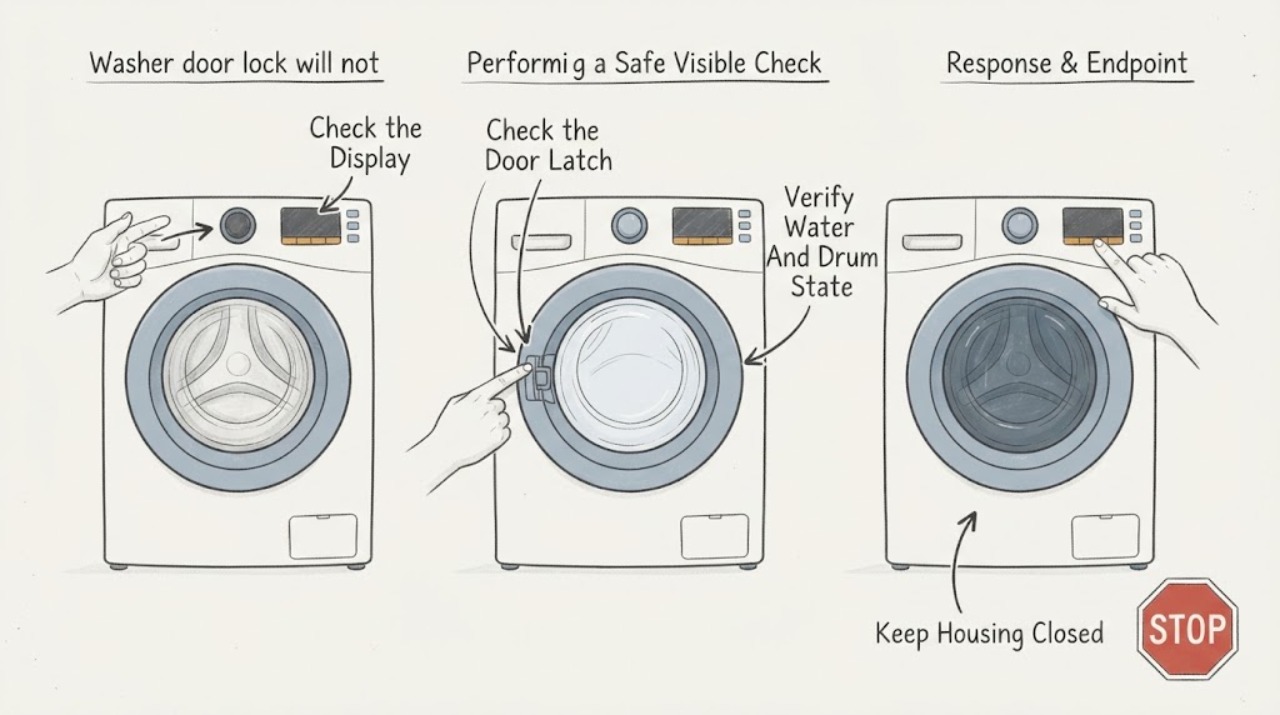
Work through in order
Diagnostic checks
Use only checks that match the exact appliance or system and its official guide.
-
Check 1
Turn the washer on and select a normal cycle without opening any panel; observe the display, control-lock indicator, door-lock indicator, error message, and response when Start or Start/Pause is pressed as the owner's guide describes.
Expected result: Record a blank display, a control-lock symbol, a door-lock error, a countdown, a normal click followed by no start, or no response to controls.
Next step: Use the exact owner's guide for the displayed message and Start-button timing; continue with the exposed door and water checks only when the appliance is stable and safe.
Stop if: Stop for smoke, burning odor, sparking, a hot plug, a repeated breaker trip, or water near electrical parts.
Why this matters
Why: A control-lock symbol can prevent input without a mechanical fault. A door-lock code or click followed by no start suggests the control did not confirm the lock. A blank display or tripped power protection needs a power or control path check, not a door adjustment.
-
Check 2
With the washer off, inspect the exposed door gasket, latch opening, door strike, and contact area for clothing, packing material, detergent residue, soil, a bent strike, or a visibly loose or damaged part.
Expected result: Record a clear and clean latch, an item caught in the gasket, residue or soil, a damaged or misaligned strike, a door that does not sit flush, or a lock opening that cannot be inspected without removing a panel.
Next step: Remove only loose clothing or debris, clean the exposed contact area with a soft damp cloth, and close the door firmly once; arrange service for a bent, loose, cracked, or misaligned part.
Stop if: Do not pry the latch, force the door, cut the gasket, insert tools into the lock opening, or operate the washer with a damaged door or gasket.
Why this matters
Why: An obstruction or poor door fit can keep the lock from reaching its position. A bent strike, damaged gasket, loose hinge, or damaged latch can prevent engagement even when the door is pushed firmly.
-
Check 3
Confirm the household hot and cold water valves are open and the inlet hoses are connected without kinks; look through the door for standing water and confirm the drum is stopped before attempting a new cycle.
Expected result: Record open valves and no water, a closed valve, kinked hose, standing water, a drain or low-flow message, or a drum that is still moving or hot.
Next step: Open a closed supply valve without force and use the exact manual's drain or cancel procedure when water remains; do not pull the door or start another cycle over standing water.
Stop if: Do not open the door while the drum moves or water is hot, disconnect a pressurized hose, or reach into standing water near electrical equipment.
Why this matters
Why: Some front-load washers require both water supplies and may not begin correctly without them. Water left in the washer can keep the door locked to prevent flooding, while a moving or hot drum is a normal safety reason not to open it.
-
Check 4
After the door area is clear and the water state is safe, select a valid cycle and hold Start for the duration specified by the owner's guide; if the guide permits, disconnect power for its stated reset interval and retry once.
Expected result: Record the lock engaging and cycle starting, a click with an error, no lock sound, a control-lock state, or a return to the same symptom after one reset.
Next step: Do not repeat resets. If the same door-lock symptom returns after one manual-approved reset, leave the washer off and arrange service with the displayed message and sounds recorded.
Stop if: Do not defeat the lock signal, use a jumper, repeatedly cycle power, or continue if the washer makes grinding, buzzing, or burning sounds.
Why this matters
Why: Some washers require a held Start command, while a control-lock state blocks touch commands. A failed lock attempt after a correct door close points toward the latch, lock switch, wiring, or control rather than user timing.
-
Check 5
From ordinary access, verify the washer is plugged into its intended outlet and check the household breaker or GFCI status only if the area is dry; do not remove the rear, top, or front panel.
Expected result: Record a powered display, a dead display, a tripped breaker or GFCI, a loose-looking plug, or protection that trips again after one safe reset.
Next step: If safe and permitted by the home's electrical setup, make one reset; if power does not return or protection trips again, leave the washer disconnected and call qualified appliance service.
Stop if: Do not use an extension cord, touch wet electrical equipment, open panels, test live wiring, or reset a device after heat, smoke, sparking, or a repeat trip.
Why this matters
Why: A dead display can explain why the lock never receives a command, but a repeat trip indicates an electrical or appliance fault. A powered display with a persistent lock error keeps the door-lock circuit in focus.
-
Check 6
After only a visible obstruction, water-valve, or manual-approved control correction, make one final normal start attempt with the door closed and the area dry; observe the lock action without touching it.
Expected result: Record a clean lock click and cycle start, repeated click attempts, no click, an error immediately after the click, or a door that unlocks while the cycle should begin.
Next step: Leave the washer off for any repeated failure and provide the technician the model, display message, door fit, water state, sound, and steps already tried.
Stop if: Stop for a door that opens during operation, an active leak, a hot or damaged plug, smoke, burning odor, or any need to bypass the lock.
Why this matters
Why: A successful start after clearing the gasket or restoring a valid control state supports that cause. Repeated attempts, no lock confirmation, or an immediate door-lock error indicate a lock, latch, switch, wiring, or control fault requiring service.
Use your observations
Decision map
Find the observation that best matches what you see, then follow the next safe action.
-
PATH 01Safety boundary
What you see
The gasket or latch contains clothing, packing material, soil, or residue, or the door does not sit flush and the lock does not engage.
Do this next
Remove loose debris, clean the exposed contact area, close the door firmly once, and make one normal start attempt; service a damaged gasket, strike, hinge, or latch.
Why this path and its safety boundary
Why it matters: A physical obstruction or door-fit problem is more likely than an electronic lock failure.
Safety stop: Do not force the door, pry the lock, or run with a damaged gasket or strike.
-
PATH 02Safety boundary
What you see
The display is active but shows a control-lock state, a countdown, or no cycle response until Start is held according to the owner's guide.
Do this next
Use the model-specific control-lock release and Start timing, then make one normal attempt without repeatedly cycling power.
Why this path and its safety boundary
Why it matters: The washer may be receiving a valid lock command only after the control state or start sequence is corrected; the door lock may not be defective.
Safety stop: Do not guess a button combination that changes service settings or defeat a control lock with a jumper.
-
PATH 03Safety boundary
What you see
Water remains in the drum, a drain or low-flow message is present, or the drum is hot or moving and the door remains locked.
Do this next
Wait for motion and heat to end and use the exact drain or cancel procedure; arrange service for retained water, drain failure, or a lock that remains held after the safe state is restored.
Why this path and its safety boundary
Why it matters: The lock may be operating as a safety hold against flooding, heat, or motion; the start failure is not necessarily a failed lock.
Safety stop: Do not pull the door, open it against pressure, reach into moving or hot water, or open panels over standing water.
-
PATH 04Safety boundary
What you see
The gasket and latch area are clear, water and controls are normal, but the lock clicks repeatedly, gives a door-lock error, never clicks, or loses confirmation immediately.
Do this next
Leave the washer off and arrange qualified appliance service for model-specific lock-circuit testing; provide the sound, code, and timing.
Why this path and its safety boundary
Why it matters: A lock assembly, latch alignment, lock switch, wiring, or control fault is more likely than a user setup issue.
Safety stop: Do not bypass the lock, test live terminals, remove panels while connected, or keep retrying the cycle.
-
PATH 05Safety boundary
What you see
The display is blank, the outlet or breaker is unstable, the washer does not respond at all, or protection trips again.
Do this next
Leave the washer disconnected after one safe household reset and arrange qualified appliance or electrical service.
Why this path and its safety boundary
Why it matters: A power, control, or wiring fault is more likely than a door-only obstruction, and the lock cannot be assessed safely without electrical diagnosis.
Safety stop: Do not use an extension cord, probe live wiring, open panels, or reset protection after smoke, heat, water, or sparking.
Helpful context
Understand the symptom
A closed-looking door is not always a locked door
The washer needs the door or lid to close and latch before it can begin a cycle. A small item caught in the rubber gasket, packing material, soil at the contact area, a misaligned latch, or a door that was not pushed firmly can prevent the lock from engaging. Clean and inspect only the exposed contact area; do not pry the latch or force the door.
Separate a control response from a mechanical lock failure
If the display responds but shows a control-lock or door-lock indication, the panel may be locked or the appliance may be waiting for a complete latch sequence. If there is no display, no response, or a breaker trips, the problem is broader than the door lock. A click followed by an error can mean the control tried to lock but did not receive the expected switch signal.
The lock is a safety device, not a part to bypass
A washer can retain the lock while water is present or while the drum is moving to prevent flooding or injury. If water remains, use only the model's normal drain or cancel procedure. Keep hands out of the drum, disconnect power before any panel-access work, and use a qualified technician when the lock, wiring, latch, or control needs testing.
Safety boundary
Stop conditions
- Do not defeat, jumper, tape, or otherwise bypass the washer door or lid lock; it protects against motion, heat, and water exposure.
- Do not force a door, latch, strike, hinge, gasket, lock, or retaining part, and do not reach into a moving or hot drum.
- Disconnect power before any panel-access service; stop for smoke, burning odor, sparking, water near electrical parts, a hot plug, or a repeat breaker trip.
- Leave the washer off and arrange service for a repeated door-lock error, repeated click attempts, no lock confirmation, a damaged door or latch, or retained water after the normal drain procedure.
Only after diagnosis
Potential parts
- washer door-lock or lid-lock assembly
Consider this category only when the door area is clear and aligned, the control issues a lock command, and qualified testing finds that the lock mechanism or switch does not engage or report locked.
Confirm the exact washer model, door or lid style, connector, mounting, and manufacturer repair information before selecting a lock assembly. - door strike, latch, hinge, or gasket
Consider this category only when inspection finds a bent strike, loose hinge, damaged latch, or torn or distorted gasket that prevents the door from reaching the lock.
Confirm the exact door geometry, gasket orientation, latch mounting, and model instructions; do not use a part to compensate for a misaligned cabinet. - washer lock wiring harness or connector
Consider this category only after qualified testing identifies an open, damaged, loose, or corroded connection between the lock and control.
Confirm the exact connector, harness routing, strain relief, and control interface; never probe or alter wiring while the washer is powered. - washer control board
Consider this category only after the door, lock assembly, wiring, power, and water or drain safety states have been tested and the control fails to issue or recognize the lock command.
Confirm the exact model, control revision, programming requirement, and diagnostic evidence before replacement; a door-lock symptom alone does not establish control-board fit.
When checks do not resolve it
Need a professional?
Arrange qualified appliance service when the door area is clear and firmly closed but the lock will not engage, a door-lock code returns, the lock clicks repeatedly or never clicks, the door or latch is damaged, water remains after the normal drain procedure, the display is dead, or power protection trips again. Service is also appropriate when the model-specific guide is unavailable or any lock, wiring, control, or panel-access test would be required.
Safety scope: This article supports display observation, exposed gasket and latch inspection, ordinary-access water and power checks, and one manual-approved start or reset attempt. A qualified person must handle lock-circuit measurements, wiring, control boards, panel access, manual door release, and repairs around water or live power.
Common questions
FAQ
Why will my washer not start when the door looks closed?
The door may not be reaching the lock because clothing or debris is caught in the gasket, the contact area is dirty, or the strike, hinge, latch, or gasket is damaged or misaligned. Inspect the exposed area, close the door firmly once, and arrange service if the lock still does not confirm.
What does a washer door-lock error mean?
It means the control did not receive the expected locked-door signal. Check for an obstruction and complete closure, then use the exact owner's guide for the code. If the error returns with a clear, aligned door, the lock assembly, switch, wiring, or control needs model-specific diagnosis.
Can a control lock make a washer appear not to start?
Yes. A control-lock feature can block button input even when the washer has power. If a control-lock symbol is displayed, use the model's documented release method rather than guessing or repeatedly cycling power, then make one normal start attempt.
Why is my washer door still locked with water inside?
The lock may remain engaged to prevent flooding while water is present. Wait for the drum to stop and use the exact model's cancel or drain procedure. Do not pull the door, reach into hot or moving water, or open panels over standing water.
Should I bypass the washer door lock to make it start?
No. The lock is a safety device. Never jumper, tape, or defeat it. If the gasket and latch are clear and the lock still will not engage, leave the washer off and arrange qualified appliance service for lock, switch, wiring, or control testing.
Read the exact guide
Official sources
- Not Starting or Not Operating - Front Load WasherWhirlpool Product Help · Official Whirlpool multi-model front-load washer guidance; the installed washer's owner's manual controls exact codes and timings.
- Front Load Washer - What are dE, dE1, and dE2 Error Codes?LG USA Support · Official LG support article used for general door-lock symptom mechanics; the installed washer's manufacturer guide controls.
- Error Codes in Front Load WashersWhirlpool Product Help · Official Whirlpool error-code reference; codes and corrective actions can differ by model and owner's manual.
- Lid Not Latching - WasherWhirlpool Product Help · Official Whirlpool top-load washer guidance used to cover lid-lock variants of the assigned washer lock topic; exact model behavior varies.
- Latching a Front Load Washer DoorWhirlpool Product Help · Official Whirlpool front-load washer door guidance; door and lock design varies by model.
Community feedback
Share a repair observation
Share a plain-text repair observation. Accepted observations are published automatically; this page may take a moment to update.