
On this page
Start here
Quick answer
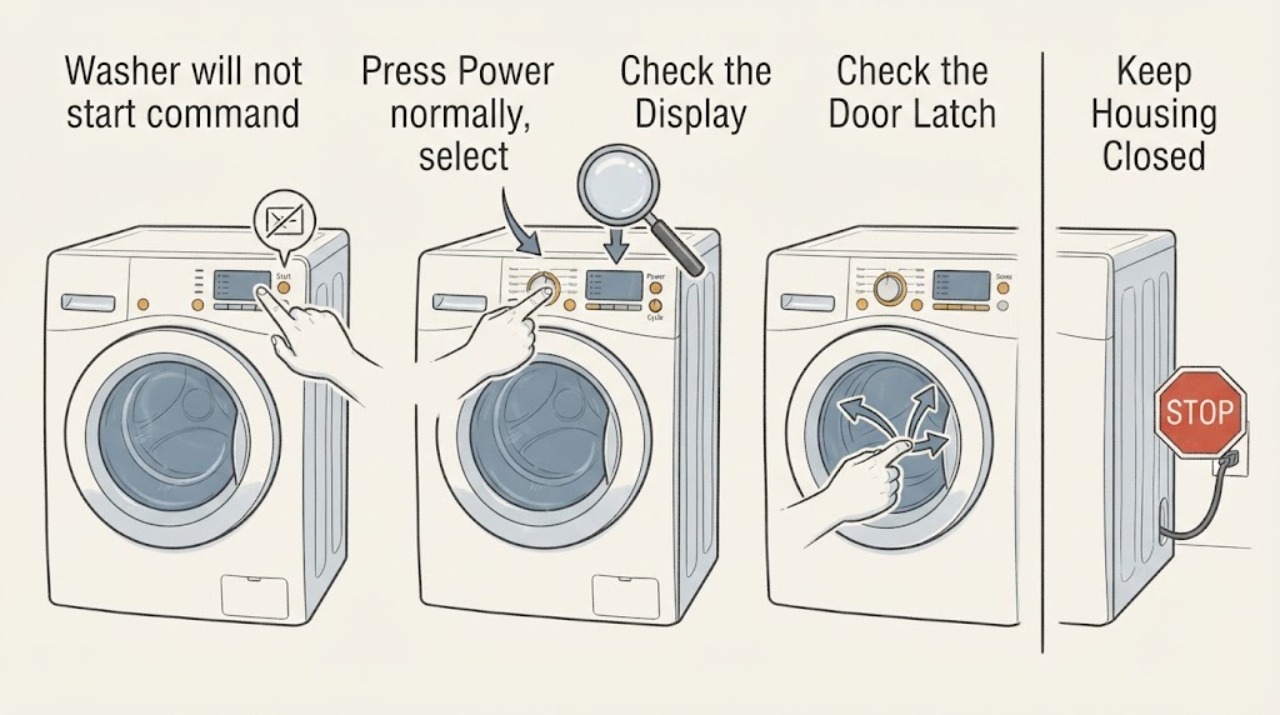
When a washer ignores Start, first distinguish a control-panel issue from a safety condition that is correctly preventing the cycle. Confirm the display is on, select a normal cycle, press Start the way the model requires—some touch panels need a deliberate one-second press—and check for Control Lock or Child Lock, Delay Start, an open door/lid, a previous cycle that has not finished draining, or an error. Dry a damp touch panel and use a direct wall outlet rather than a power strip. If the washer still ignores Start after the model-approved reset, or if the outlet, cord, door/lid lock, or control is abnormal, stop repeated attempts and arrange appliance or electrical service. Never bypass a door/lid interlock or open the console while energized.
Before you begin
Safety first
- Homeowner-safe checks are reading the display, using the model’s normal Start gesture, clearing a clearly identified lock or delay, drying the exterior panel, confirming a safe outlet and breaker/GFCI status, checking normal door/lid closure, and performing one documented reset. Interlock bypass, console access, wiring, live testing, water leaks, and electrical faults belong to qualified professionals.
Work through in order
Diagnostic checks
Use only checks that match the exact appliance or system and its official guide.
-
Check 1
Press Power normally, select a standard cycle, and press Start once using the model’s documented button method; if the panel is touch-sensitive, hold Start only for the interval specified by the manual rather than tapping repeatedly.
Expected result: The display changes, beeps but does not run, shows a delay or lock icon, or remains completely unresponsive.
Next step: Record the display symbols and exact model. Continue with lock, panel, and power checks; do not hold multiple buttons or guess at a service mode.
Why this matters
Why: A changed display or beep indicates the control is seeing some input. A delay/lock indication points to a setting or safety condition. A dark or frozen panel keeps power, moisture, or control faults in consideration.
-
Check 2
Check the display for Control Lock, Child Lock, Delay Start, paused-cycle, or error indications and use only the model manual’s button combination to clear a lock or delay; do not force the control knob or repeatedly press Start.
Expected result: A lock icon is active, Delay Start is selected, a cycle is paused or finishing, an error is shown, or no setting indicator appears.
Next step: Clear only the identified setting as the manual directs, then try Start once. For an unknown or recurring error, leave the washer off and use the model-specific error and service procedure.
Why this matters
Why: A lock can intentionally disable most controls, while Delay Start can make a valid command appear ignored. A paused or draining cycle may not accept a new start, and an error may indicate an underlying door, water, drain, or control problem.
-
Check 3
Inspect the front-load door or top-load lid for clothing, a foreign object, or misalignment preventing full closure; close it normally and observe whether the lock indicator engages, without pressing or bypassing the latch.
Expected result: The door/lid closes and locks, an object blocks it, the latch does not click, or it clicks but Start remains ignored.
Next step: Remove only an obvious obstruction and close the door/lid gently. Stop for a broken latch, misaligned hinge, repeated lock failure, or any need to bypass the interlock, and arrange service.
Why this matters
Why: The washer may withhold operation until it confirms a safe closed door or lid. A normal lock makes a simple closure issue less likely; a failed or unrecognized latch points to an interlock or control diagnosis.
-
Check 4
If the panel is lit but touch commands are inconsistent, turn the washer off, dry your hands, and wipe the control surface with a soft cloth; do not spray cleaner onto the panel or use the washer with liquid entering the controls.
Expected result: Start works after the panel dries, only some touch areas respond, the panel shows moisture, or the command remains ignored when the panel is dry.
Next step: Keep the panel dry and try the model’s documented Start press once. If buttons remain unreliable, stop repeated inputs and arrange appliance service; do not open the console.
Why this matters
Why: Moisture or residue can interfere with capacitive touch recognition. A dry panel that still ignores Start suggests a lock, software, keypad, control-board, or wiring issue rather than simple surface moisture.
-
Check 5
From a safe position, confirm the washer’s cord is fully inserted into a working grounded wall outlet, check a tripped GFCI or breaker if present, and avoid extension cords or power strips; do not pull a heavy washer out alone.
Expected result: The panel is dark, the outlet does not power a known-safe test device, the breaker/GFCI is tripped, or the washer has stable power but Start is ignored.
Next step: Restore a clearly tripped protective device only once if safe; do not reset it repeatedly. Use an electrician for an outlet or circuit fault and appliance service if the washer has power but will not start.
Why this matters
Why: No power can make every command appear ignored and points toward the outlet, GFCI, breaker, cord, or appliance supply. Stable panel power shifts attention to settings, interlocks, touch controls, or the main control.
-
Check 6
Perform one model-approved power reset: power the washer off, unplug it or switch off its circuit only when safe, wait the interval stated by the manual, and restore power; do not use a factory/service sequence unless the exact manual provides it.
Expected result: The panel recovers and accepts Start, the same symbol or error returns, or the washer remains completely unresponsive.
Next step: Try one normal cycle after the reset. If Start is still ignored, leave the washer off and arrange service with the model, display behavior, lock status, and reset result.
Why this matters
Why: A successful reset can clear a transient control state, but it does not prove the keypad, lock, control, or supply is healthy. A recurring indication or persistent ignored command needs diagnosis.
-
Check 7
After the safe checks, document whether the washer accepts other controls, locks the door/lid, fills or drains, and reacts to Start on more than one cycle; do not run repeated cycles to force a response.
Expected result: Other buttons work but Start does not, no controls work, the lock is abnormal, a cycle starts then stops, or the washer still ignores Start with normal power.
Next step: Stop troubleshooting at the external boundary and arrange qualified appliance service. Provide the model, exact response pattern, icons/errors, power check, door/lid behavior, and reset result.
Why this matters
Why: One-button failure can indicate a keypad or control input issue. A completely unresponsive panel points toward power or control. An abnormal lock or start-then-stop symptom keeps interlock, water, drain, and control faults in consideration.
Use your observations
Decision map
Find the observation that best matches what you see, then follow the next safe action.
-
PATH 01Next step
What you see
The display is on, other controls respond, but Start is ignored until a touch button is held for the model’s specified interval.
Do this next
Use the manual’s Start gesture once with a dry panel. If the same button remains intermittent, arrange control-panel service rather than pressing harder or opening the console.
Why this path and its safety boundary
Why it matters: The command method or touch recognition is more likely than a failed motor or water valve.
-
PATH 02Next step
What you see
A Control/Child Lock, Delay Start, paused-cycle, or error indicator is visible and the door/lid is otherwise closed.
Do this next
Clear only the identified setting using the exact manual and retry once. For an unknown or recurring error, leave the washer off and arrange model-specific service.
Why this path and its safety boundary
Why it matters: A setting or safety state is intentionally preventing a start command, or the error is reporting a condition that needs separate diagnosis.
-
PATH 03Next step
What you see
The panel is dark, a test device also fails at the outlet, or a GFCI/breaker trips again after one safe reset.
Do this next
Leave the circuit off if it trips again and arrange qualified electrical service. Do not use an extension cord or keep resetting the breaker to start the washer.
Why this path and its safety boundary
Why it matters: A household power, outlet, protective-device, or cord fault is more likely than a Start-button fault.
-
PATH 04Next step
What you see
The door/lid will not be recognized as closed, or the washer has stable power but ignores Start after lock, moisture, and reset checks.
Do this next
Do not bypass the interlock or open the control. Leave the machine off and arrange appliance service with the model and observed lock/control behavior.
Why this path and its safety boundary
Why it matters: A latch/sensor, keypad, control board, or wiring fault is more likely than a simple setting.
-
PATH 05Next step
What you see
The washer smells hot or burnt, has smoke, sparks, a damaged cord, water at the outlet, an active leak, or a repeated electrical trip.
Do this next
Stop using the washer, isolate power and water only when safe, keep clear of the area, and arrange qualified appliance or electrical help. Leave for active smoke, fire, or immediate danger.
Why this path and its safety boundary
Why it matters: The start symptom is accompanied by an electrical or water hazard and must not be tested further.
Helpful context
Understand the symptom
An ignored Start command can be intentional
A washer may ignore Start while Control Lock is active, the door or lid is not recognized as closed, a previous cycle is still draining, Delay Start is selected, or an error needs attention. Touch controls can also require a longer deliberate press than a mechanical button. Look for what the display does when you press Start before assuming that the control board has failed.
Separate “no power” from “power on but no start”
If the display is completely dark, check the cord, wall outlet, GFCI if present, and breaker from a safe position. If the panel lights but Start is ignored, focus on lock status, moisture, cycle availability, door/lid closure, and a controlled reset. Do not use an extension cord or power strip as a workaround for a washer that needs a direct grounded outlet.
Do not defeat the lock to make it run
Front-load washers generally need the door to lock, and top-load models may need the lid to close before a cycle can begin. A lock that clicks but is not recognized can involve the latch, sensor, wiring, or control. Bypassing it can create a moving-drum or water-spill hazard and turns a diagnosis into an unsafe repair.
Safety boundary
Stop conditions
- Do not bypass a door or lid lock, hold a latch switch, open the console, or perform live electrical tests to make the Start command work. Use the exact manual and qualified service.
- Stop after one controlled reset and one normal start attempt if the command remains ignored, the lock is abnormal, an error returns, or the washer starts and stops. Do not repeatedly cycle power or press buttons harder.
- Leave the washer unplugged or its circuit off for a damaged cord, wet outlet, burning smell, smoke, sparks, unusual heat, active leak, or a breaker/GFCI that trips again. Do not use an extension cord or power strip as a workaround.
- For active smoke, fire, arcing, flooding near electrical equipment, or immediate danger, leave the area and use emergency assistance from a safe location.
Only after diagnosis
Potential parts
- washer door or lid lock assembly
Only consider this part when the exact model fails to recognize a normally closed door or lid and service diagnosis identifies the lock or latch path.
Lock geometry, sensors, connectors, and safety behavior vary by model; never bypass the interlock and confirm fitment from the exact manufacturer information. - washer user interface or control board
Only consider a keypad or control-board part when power, lock status, settings, moisture, and one model-approved reset have been checked and a technician identifies the control input fault.
Keypad layout, firmware, connectors, and control compatibility are model-specific; do not order a board from the symptom or visual similarity alone.
When checks do not resolve it
Need a professional?
Safety scope: Homeowner-safe checks are reading the display, using the model’s normal Start gesture, clearing a clearly identified lock or delay, drying the exterior panel, confirming a safe outlet and breaker/GFCI status, checking normal door/lid closure, and performing one documented reset. Interlock bypass, console access, wiring, live testing, water leaks, and electrical faults belong to qualified professionals.
Common questions
FAQ
Why does my washer ignore the Start button?
The panel may require the model’s deliberate Start gesture, or Control/Child Lock, Delay Start, an open door/lid, a previous draining cycle, moisture, an error, or a power problem may be preventing operation. Check the display and model manual before assuming a failed control board.
How long should I hold the washer Start button?
It depends on the model. Some touch-type LG panels require Start to be pressed for one second, while a mechanical Start/Pause control may behave differently. Use the exact manual and do not press multiple buttons or force the control.
Can Child Lock make a washer Start command appear ignored?
Yes. Manufacturer guidance says a Control or Child Lock can leave most buttons unresponsive. Clear it only with the model’s documented button combination; if the lock will not clear or returns, arrange service rather than bypassing it.
Why does the washer have power but still will not start?
A lit panel only proves that some power reaches the controls. The washer may still be waiting for a door/lid lock, a delayed or paused cycle, an error reset, or a valid Start input, or it may have a keypad, control, wiring, or interlock fault.
When does an ignored Start command need service?
Arrange service after the model-specific lock, delay, door/lid, panel, outlet, and one reset check fail, or sooner for a broken latch, repeated error, damaged cord, water at the outlet, leak, burning smell, smoke, sparks, or repeated breaker trip. Do not bypass a safety interlock.
Read the exact guide
Official sources
- LG Washer - Troubleshooting Unresponsive Washer ButtonsLG USA Support · General LG washer control guidance; lock button combinations vary by model.
- Samsung Washer FAQ | Product, Shipping & SupportSamsung Support · General Samsung washer FAQ; exact controls and safety interlocks vary by model.
- Samsung washing machine buttons won't workSamsung Support · General Samsung washer guidance; Child Lock combinations and available settings vary by model.
- Samsung washing machine will not start or fill with waterSamsung Support · Samsung washer guidance; door and emergency-drain behavior varies by model.
- LG Washing Machine: The Power/Start button is not workingLG USA Support · General LG touch-control guidance; exact button behavior varies by model.
- LG Washer – Why Won’t My LG Washing Machine Power On?LG USA Support · General LG washer power guidance; outlet and circuit work may require an electrician.
Community feedback
Share a repair observation
Share a plain-text repair observation. Accepted observations are published automatically; this page may take a moment to update.