
On this page
Start here
Quick answer
A washer can have a lit display while a safety or control condition prevents the cycle from starting. First select a valid cycle, close the lid or door completely, press the model's Start or Start/Pause control as directed, and look for Child Lock, delay-start, pause, drain, or door-lock indicators. Check for an obvious latch obstruction and any displayed code, then perform only the model-approved reset with the washer empty or safe to leave. A lit panel proves that some low-voltage control power is present; it does not prove that the start input, door/lid lock, motor, drain path, or main control is healthy. Do not bypass a lock, open the cabinet, probe live wiring, or keep using a washer with burning odor, smoke, sparking, flooding, a damaged cord, or a breaker that trips. If the panel accepts commands but the washer never locks, fills, drains, or moves after these checks, arrange model-specific appliance service.
Before you begin
Safety first
- This article supports reading the display, selecting a documented cycle, checking external closure and settings, observing residual water, and performing one model-approved reset. Qualified appliance or electrical service handles lock bypass prevention, cabinet access, live testing, internal wiring, pump/valve/motor/control diagnosis, and repairs.
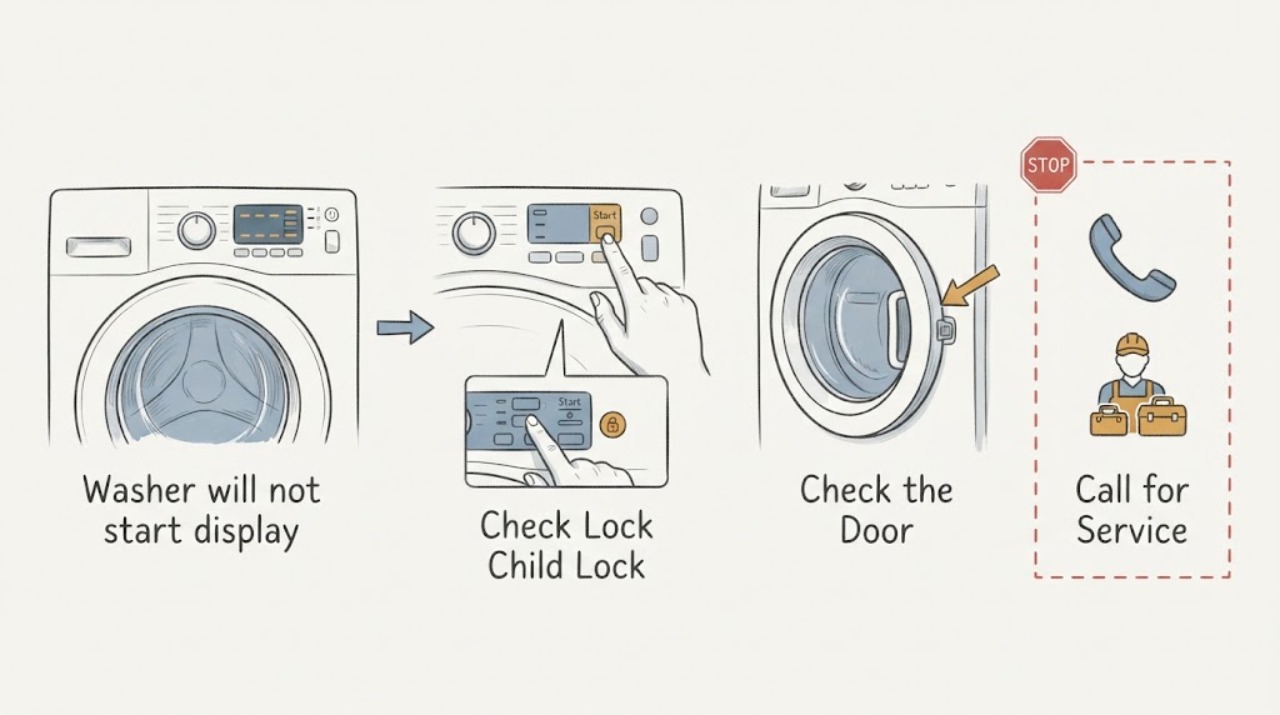
Work through in order
Diagnostic checks
Use only checks that match the exact appliance or system and its official guide.
-
Check 1
With the washer empty of loose items and the lid or door closed, select a normal cycle and press the model's Start or Start/Pause control exactly as the panel labels or manual describe; observe without reaching into the tub.
Expected result: Record whether the selected cycle stays displayed, the Start control beeps or changes state, a lock icon appears, the washer clicks or drains, an indicator flashes, a delay timer is active, or an error code appears.
Next step: Use the exact display pattern to choose the lock/settings, previous-cycle/drain, or service branch. Do not keep pressing Start or open the lid/door while the machine is trying to lock.
Stop if: Stop for smoke, sparking, burning odor, flooding, an unusual electrical smell, a hot cord or control, unexpected drum movement, or a breaker that trips.
Why this matters
Why: A changed indicator, lock click, or short drain may be the normal start sequence. A completely ignored Start input keeps Child Lock, an unavailable option, a panel fault, or a control issue in contention. A code or repeated click gives a model-specific path; a washer that accepts Start but does nothing after the normal sequence points toward lock, drain, motor, harness, or control authorization.
-
Check 2
Read the panel for Child Lock or control-lock, delay-start, pause, and door/lid-lock indicators, then follow only the exact model manual's button sequence to clear a setting or cancel a delay.
Expected result: Record a lit or flashing lock icon, a delay countdown, a pause state, a Start/Pause control that responds only after a hold, or a panel that remains unresponsive despite the correct model procedure.
Next step: Clear only the identified setting, reselect the cycle, close the lid/door, and try one start. If the lock icon persists or the panel does not accept the documented sequence, arrange model-specific service.
Stop if: Do not guess a button combination, hold a lock switch mechanically, or bypass Child Lock or the door/lid safety system.
Why this matters
Why: A control lock or delay can prevent a valid cycle from starting even though the display is powered. An unavailable option may be normal for the selected cycle. If the model-approved setting change does not restore Start, the panel, lock signal, or control path remains unresolved rather than the setting being the sole cause.
-
Check 3
Inspect the door or lid contact area from outside for clothing, packing material, detergent residue, or another obvious obstruction; close it firmly without slamming and attempt one model-approved start.
Expected result: Record a firm latch and lock indication, a visible obstruction or buildup, repeated clicking without a lock, a door/lid that springs open, or a cycle that pauses when the lid/door is opened.
Next step: Remove only an obvious item and clean the contact area as the manual permits. If the door/lid still will not register closed, leave the washer off and arrange service; do not force or defeat the lock.
Stop if: Do not insert tools into the latch, tape or hold the lid/door closed, reach into a moving washer, or continue if the door glass, hinge, lid, or strike is damaged.
Why this matters
Why: Some washers will not fill, wash, or advance until the lid/door is closed and the lock signal is accepted. Repeated clicking, a latch that cannot hold, or no lock indication keeps the lock, strike, hinge alignment, harness, or control input in contention even with a lit panel.
-
Check 4
Check the power cord, outlet, and known breaker from a dry, safe position; if the manual permits a reset and there is no water or electrical hazard, unplug or isolate the washer for the model's documented interval before trying one new cycle.
Expected result: Record a loose or damaged cord, an outlet that does not power another known-safe device, a tripped breaker, a display that recovers after the reset, or a display that remains lit but Start still does nothing.
Next step: Use one model-approved reset only, then reselect the cycle and test once. Leave the appliance off and obtain electrical or appliance service for damaged power parts, recurring trips, or a persistent no-start.
Stop if: Do not use an extension cord or surge protector contrary to the manual, touch a wet plug, remove the outlet cover, reset a tripping breaker repeatedly, or continue with a damaged cord.
Why this matters
Why: A control can retain a partial or confused state even when the display is lit, so one documented reset may clear a temporary control condition. A damaged cord, dead outlet, breaker trip, or recurring power loss is an electrical fault. A persistent lit display with ignored Start shifts attention to the panel, lock, control, or internal appliance path.
-
Check 5
Look through the door or tub opening for standing water and observe whether the washer is trying to drain or remains locked after a previous cycle; do not force the door or remove a pump filter unless the exact manual describes a safe procedure.
Expected result: Record visible water, a drain-pump hum, a drain error, a door-lock light that remains on, an empty tub with no drain attempt, or a completed cycle that still will not release the lock.
Next step: Use only the model's drain or cancel procedure. If water remains, the pump hums without draining, the lock stays engaged, or the door will not release after the manual procedure, keep the washer off and arrange service.
Stop if: Do not pull a locked door open, reach into standing water, remove a filter without a catch-container procedure, or run another cycle when flooding is possible.
Why this matters
Why: Some front-load washers keep the door locked while water is detected, and a washer may refuse a new start until a previous drain or lock state is resolved. An empty tub with no drain command makes a simple residual-water condition less likely and keeps the lock/control path in contention.
-
Check 6
If the display accepts the cycle and Start command but the washer never locks, fills, drains, or moves after the settings, closure, reset, and residual-water checks, document the pattern for qualified appliance service instead of opening the cabinet.
Expected result: Record whether a lock signal is absent, the panel shows a code or blinking lights, a valve or pump sounds, the motor is silent, or the washer starts only intermittently after power cycling.
Next step: Provide the model, panel indicators, exact cycle, Start response, lock result, prior water state, reset result, and any sound or code to a trained appliance technician. Internal testing and component replacement require the model wiring and safety procedure.
Stop if: Do not probe live terminals, bypass the door/lid lock, jump a motor or valve, open the control console with power connected, or continue repeated start attempts.
Why this matters
Why: No lock signal can implicate the latch/lock or control input; a pump or valve sound without progression can implicate the corresponding path; no sound with valid Start keeps the control, harness, sensor, or power-delivery path in contention. Intermittent recovery after resets is not proof that the control board is good.
Use your observations
Decision map
Find the observation that best matches what you see, then follow the next safe action.
-
PATH 01Safety boundary
What you see
The display is lit but shows Child Lock/control lock, delay-start, pause, an unavailable option, or a Start response that changes only after the model-specific button procedure.
Do this next
Clear the identified setting using the exact manual, reselect a valid cycle, close the lid/door, and test once. Arrange service if the lock cannot be cleared or returns without user input.
Why this path and its safety boundary
Why it matters: A settings or input lock is more likely than a failed motor, valve, or main power supply.
Safety stop: Do not guess sequences, defeat the lock, or repeatedly cycle power to mask the state.
-
PATH 02Safety boundary
What you see
The panel accepts a cycle but the door/lid does not latch, the lock indicator never appears, or the machine repeatedly clicks and refuses to proceed despite clear contacts.
Do this next
Leave the washer off and obtain model-specific service for the lock, alignment, harness, or control input; never bypass the safety lock.
Why this path and its safety boundary
Why it matters: The lock/strike/hinge signal or its wiring is more likely than a display-power problem. A lit panel does not authorize motor or fill operation.
Safety stop: Do not hold the lock closed, insert tools, or run a cycle with damaged door/lid hardware.
-
PATH 03Safety boundary
What you see
A previous cycle left water, the drain pump hums, a drain code is shown, or the door remains locked until water is removed or the manual cancel procedure completes.
Do this next
Follow the exact model's cancel, drain, and door-release instructions. If water will not drain or the lock remains engaged, keep the washer off and arrange service.
Why this path and its safety boundary
Why it matters: The washer may be protecting against opening with water inside or waiting for a drain/lock state to finish; this is different from a dead Start button.
Safety stop: Do not force the door, reach into water, or dismantle the pump area without the model's safe procedure.
-
PATH 04Safety boundary
What you see
The display flickers or resets, the outlet/cord is damaged or unreliable, a breaker is tripped or trips again, or the washer loses power during the Start attempt.
Do this next
Leave the washer disconnected and obtain qualified electrical/appliance service to assess the cord, outlet, breaker, and appliance supply.
Why this path and its safety boundary
Why it matters: The low-voltage display may not reflect a stable or safe appliance supply. An electrical fault takes priority over control or lock troubleshooting.
Safety stop: Do not use an extension cord, touch a wet plug, reset the breaker repeatedly, or operate with heat, smoke, or sparking.
-
PATH 05Safety boundary
What you see
The panel is responsive, no lock/delay/pause state remains, the lid/door closes, power is stable, and one model-approved reset does not change a complete absence of lock, fill, drain, or motor action.
Do this next
Stop repeated attempts and arrange qualified appliance diagnosis with the model and exact observation sequence; do not order a control board based on the display alone.
Why this path and its safety boundary
Why it matters: A start-input, control, lock feedback, harness, sensor, or internal power-delivery fault is more likely than a user setting.
Safety stop: Do not open the console, probe live circuits, or bypass a safety input.
-
PATH 06Safety boundary
What you see
The washer starts only after power cycling or intermittently ignores Start while the display remains lit, with no clear lock, delay, or obstruction.
Do this next
Record the cycle, timing, indicators, and reset result and arrange model-specific service before the intermittent fault worsens.
Why this path and its safety boundary
Why it matters: A temporary control state may have cleared once, but recurrence keeps the panel, harness, control, lock feedback, or supply path unresolved; a reset is not a repair.
Safety stop: Do not rely on repeated resets, leave the washer unattended, or continue if it starts unexpectedly or shows electrical symptoms.
Helpful context
Understand the symptom
A lit display is only one part of the start path
The display and buttons may be powered while the washer is waiting for a valid cycle, a held Start command, a closed door or lid, a lock signal, or the end of a previous drain. Some panels also light while Child Lock or another control lock prevents inputs. Start by reading the indicators and listening for the normal lock or drain sequence; do not assume that a blank tub or silent motor means the main control is failed.
Separate settings from a physical start authorization
A cycle can refuse to start because an option is unavailable for that cycle, delay start is selected, the panel is locked, or the door/lid is not registering closed. These are different from a washer that accepts Start and then stops during fill, drain, or tumble. Record exactly what the display does when Start is pressed and whether any lock, delay, code, or blinking indicator changes. Use only the button combination in the exact model manual for Child Lock or a reset.
Keep internal diagnosis out of the user-level checks
If the controls respond but the washer never locks, fills, drains, or moves, the remaining possibilities include a latch/lock, drain condition, inlet path, motor, harness, sensor, or control fault. A lit display does not make live testing safe. Unplug the washer or use the model's safe isolation procedure before any maintenance, and leave cabinet, lock-bypass, wiring, and component testing to qualified appliance service.
Safety boundary
Stop conditions
- Unplug or safely isolate the washer before maintenance, cabinet access, pump-filter access, or any wiring inspection; a lit display is not proof that internal parts are safe to touch.
- Do not bypass, tape, hold, or defeat a lid/door lock, pressure sensor, motor interlock, or control input.
- Do not operate the washer with flooding, a damaged cord or plug, exposed wiring, burning odor, smoke, sparking, a hot control, repeated breaker trips, or water near electrical parts.
- Do not force a locked door, reach into a moving or energized tub, open the control console, or probe live terminals.
- If the exact model procedure for Child Lock, delay, reset, drain, or door release is unknown, stop and use the owner's manual or qualified appliance service.
Only after diagnosis
Potential parts
- Washer lid or door lock assembly
Consider this category only when the lid/door fails to latch or qualified diagnosis confirms that lock feedback prevents the powered control from authorizing a cycle.
Match the exact washer model, lock style, strike/hinge arrangement, and harness; never bypass the lock and use qualified service for cabinet access. - Washer control panel or Start input
Consider this category only when the model-specific lock, settings, power, and cycle checks are normal but the panel consistently ignores a valid Start input.
Confirm the exact model, console revision, connector arrangement, and diagnostic result before ordering; a lit display does not establish panel compatibility. - Washer main control board or harness
Consider this category only after qualified testing rules out settings, lock, supply, drain, and external controls and identifies a control or harness fault.
Use the exact model wiring diagram and approved part information; do not substitute a board by appearance or install it without power isolation. - Washer drain pump assembly
Consider this category only when residual water or a drain error is present and qualified diagnosis confirms that the pump or its wiring is preventing the previous cycle from releasing.
Match the exact model, pump connector, filter/hose arrangement, and leak-control procedure; isolate power and water before service.
When checks do not resolve it
Need a professional?
Arrange qualified appliance service when the display is powered but Start remains unresponsive after the exact cycle, control-lock, door/lid-closure, one model-approved reset, and residual-water checks, or when the washer accepts Start but never locks, fills, drains, or moves. Service is also needed for repeated codes, intermittent recovery after resets, suspected lock, harness, sensor, motor, or control faults, or cabinet access. Use electrical service for a damaged cord, unreliable outlet, absent supply, or breaker that trips again. Stop immediately for flooding, smoke, sparking, burning odor, exposed wiring, or unsafe isolation.
Safety scope: This article supports reading the display, selecting a documented cycle, checking external closure and settings, observing residual water, and performing one model-approved reset. Qualified appliance or electrical service handles lock bypass prevention, cabinet access, live testing, internal wiring, pump/valve/motor/control diagnosis, and repairs.
Common questions
FAQ
Why does my washer have power but not start?
A lit display can coexist with Child Lock, delay-start, an unavailable setting, an unaccepted Start input, a door/lid that is not registering closed, residual water, or an internal control fault. Read the indicators and observe the Start response before replacing a part.
Can Child Lock stop a washer from starting when the display is on?
Yes, on models that provide Child Lock or a control lock. If its icon is lit or flashing, use only the exact model manual's button sequence to clear it. Do not guess the sequence or bypass the lock.
What should I check when the washer Start button does nothing?
Confirm a valid cycle is selected, clear any documented delay or pause, check the lid or door closure and lock indication, look for codes or blinking lights, and perform one model-approved reset. If Start remains ignored, service is needed.
Why is my washer door locked even though the cycle will not start?
The washer may detect water from a previous cycle, be waiting for a drain, or have a lock/control fault. Follow the model's cancel and drain procedure; never force the door or reach into standing water.
Will unplugging reset a washer that has a powered display?
A model-approved power cycle can clear a temporary control state, but it is not a repair. Use the exact manual's procedure once and stop if the washer still ignores Start, returns to the fault, or shows electrical or water hazards.
When should I call for washer no-start service?
Call when the display is powered but Start remains unresponsive after the model-specific settings, closure, reset, and drain checks, or when the washer accepts Start but never locks, fills, drains, or moves. Seek urgent help for flooding, smoke, sparking, burning odor, exposed wiring, or repeated breaker trips.
Read the exact guide
Official sources
- Samsung washing machine buttons won't workSamsung Support US · Official Samsung guidance used for general powered-panel decision points; the installed washer's model manual controls the exact button sequence.
- Power issues with Samsung washing machineSamsung Support US · Official Samsung power guidance used for general washer supply distinctions; local electrical requirements and the appliance manual control the installation.
- Front Load Washer - No FillGE Appliances · Official GE Appliances no-fill guidance used for general appliance safety and service boundaries; the installed washer's manual controls.
- Cycles, settings, and features on your Samsung washing machineSamsung Support US · Official Samsung panel guidance used as a general control-state reference; features and button combinations vary by model.
- Lid Not Latching - Washer - Product HelpWhirlpool Product Help · Official Whirlpool top-load guidance used for general lid-lock distinctions; front-load doors and other models use different mechanisms and instructions.
- Samsung washing machine will not start or fill with waterSamsung Support US · Official Samsung guidance used for general door-lock and previous-cycle distinctions; exact washer model procedures take precedence.
Community feedback
Share a repair observation
Share a plain-text repair observation. Accepted observations are published automatically; this page may take a moment to update.