
On this page
Start here
Quick answer
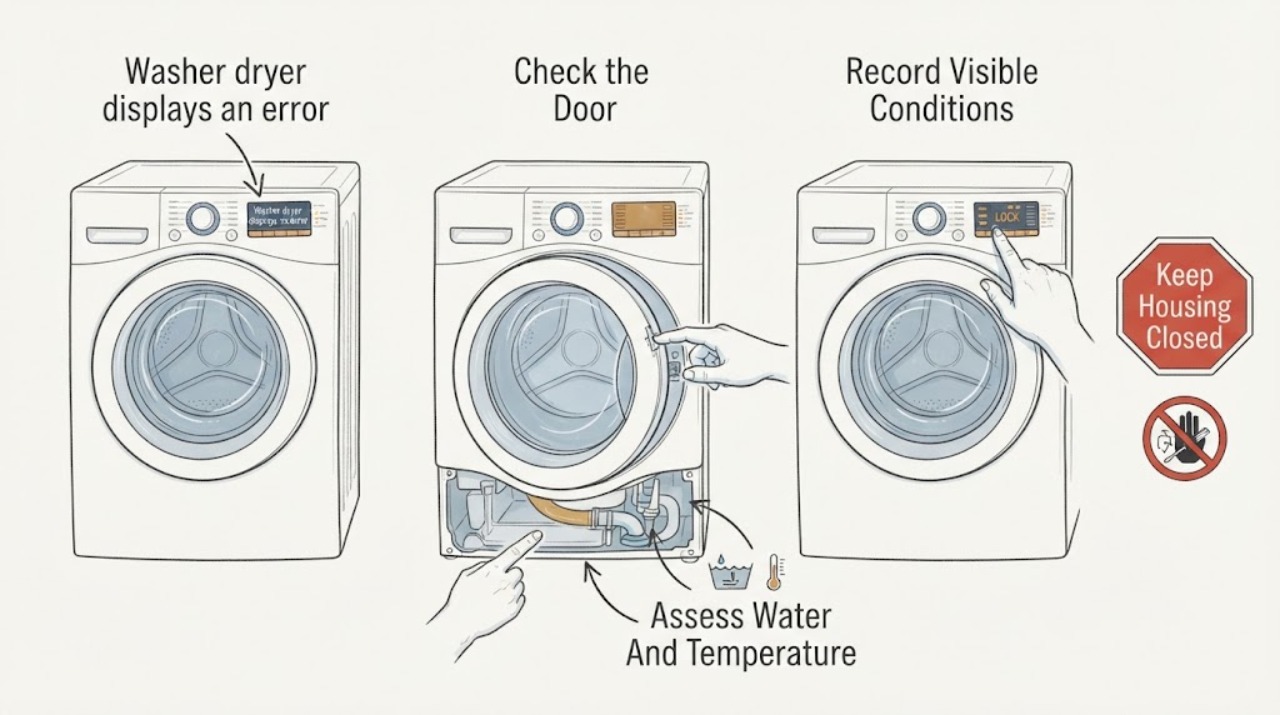
A washer dryer can display an error while keeping the door locked because the drum may still contain water, be hot, or be moving; some errors instead indicate that the door is not closed or the lock cannot engage. Do not force the door. First record the exact code or message and whether the washer-dryer is a front-load or other design, then pause or cancel the cycle using the model instructions. Check from the outside for clothing or debris caught at the door, gasket, latch, or lock area. If water remains, use only the model's documented drain or spin procedure and stop if water cannot drain, is hot, or may spill. After the machine is cool, empty, and safe, perform one model-specific reset if the manual permits it. If the code returns, the lock will not release, the latch or gasket is damaged, there is a leak, burning smell, smoke, exposed wiring, or the drum is still moving, leave the appliance out of service and arrange qualified service.
Before you begin
Safety first
- This article supports code recording, safe pause, cool visible door-area inspection, manual-directed draining, and one model-specific reset only. Do not force or bypass the lock, reach into motion or hot water, remove panels, or work on internal electrical, drain, or control components.
Work through in order
Diagnostic checks
Use only checks that match the exact appliance or system and its official guide.
-
Check 1
From a safe position, photograph or write down the exact display message, which part of the washer-dryer was running, whether the door-lock indicator is on, and whether the drum has stopped; do not open a locked door or reach inside.
Expected result: The message is a door or lock code, drain or water-level code, temperature or movement code, power interruption, control lock indication, a dryer-side message, or an unknown code.
Next step: Look up the exact code in the model manual or manufacturer's support page and follow only that procedure; keep the door closed while water, heat, or drum movement may be present.
Stop if: Stop for smoke, burning odor, sparking, a leak onto electrical parts, exposed wiring, a moving drum with abnormal noise, or any immediate hazard.
Why this matters
Why: The exact code and operating state determine whether the lock is a normal protective state, a closure or obstruction issue, a drain or temperature condition, or a component fault. A generic error label is not enough to identify a part.
-
Check 2
Use the model's Start or Pause control to stop the cycle when safe, wait for motion to cease, and inspect only the visible door edge, gasket, latch opening, and load for clothing or a loose object preventing the door from closing.
Expected result: The door closes fully after a loose obstruction is removed, the gasket or latch is bent or torn, the door appears closed but the error remains, or the drum is still moving or hot.
Next step: If the area is clear and the machine is cool, close the door as the manual shows and try the documented pause or restart once. If the error returns or hardware is damaged, leave the unit out of service and request service.
Stop if: Do not pull on the locked door, push against the latch, reach into a moving drum, or use a tool to release the lock.
Why this matters
Why: A trapped item or incomplete closure can prevent the lock from engaging. A damaged gasket, latch, or lock points to service; heat or movement means the protective lock may be operating normally for the moment.
-
Check 3
Without opening the locked door, check through the window or from the control display whether water remains in the drum, the drum or door is hot, or a drain or temperature message is present; allow the machine to cool before any further check.
Expected result: No water is visible and the unit is cool, water is visible or the drain did not finish, the door or drum is hot, or the drum is still spinning.
Next step: When the manual permits it, run the documented drain-only or spin-only procedure after motion has stopped. If the water is hot, the drain fails, or the machine leaks, stop and arrange service.
Stop if: Do not force the door, handle hot water or steam, or remove a filter or hose unless the exact manual provides a safe procedure and you can contain the water without reaching energized parts.
Why this matters
Why: Water, high temperature, and motion are safety reasons a washer may keep its door locked. An incomplete drain can point to a blocked filter, hose, pump, or related fault; heat requires cooling rather than force.
-
Check 4
After the cycle is stopped, the machine is cool, and any water has been safely drained according to the model manual, use one documented power reset or control reset; do not improvise a door-release sequence.
Expected result: The display clears and the door unlocks after the documented reset, the same error returns, the door remains locked with no water or heat, or the controls do not respond normally.
Next step: If the error or lock remains, stop using the washer-dryer and arrange qualified service. Provide the exact code, model, cycle, water and temperature observations, and the reset result.
Stop if: Do not repeat resets, bypass the door lock, remove panels, or disconnect internal wiring to force an unlock.
Why this matters
Why: A one-time reset can clear a temporary control state, but a returning error or locked door after safe conditions points toward the latch, lock switch, drain, sensor, wiring, or control system.
-
Check 5
Only after the exact model procedure indicates the door should be released and the machine is cool, empty of standing water, and stopped, observe whether the latch releases normally and whether a brief no-load test is allowed by the manual.
Expected result: The door releases and the error stays cleared, the door still will not release, the code returns immediately, the lock clicks repeatedly, or a leak, abnormal noise, heat, or smell appears.
Next step: Leave the appliance out of service for any persistent or abnormal result and request qualified appliance service; do not resume a loaded wash or dry cycle to see whether the fault worsens.
Stop if: Stop immediately for smoke, burning odor, sparking, leaking water near electrical parts, a damaged door or lock, or a drum that moves unexpectedly.
Why this matters
Why: A stable release and cleared message support a temporary closure, drain, temperature, or control state. A persistent lock, repeated code, repeated lock cycling, or physical symptom indicates a fault requiring diagnosis.
Use your observations
Decision map
Find the observation that best matches what you see, then follow the next safe action.
-
PATH 01Safety boundary
What you see
The door is locked during or just after a cycle, water or heat is present, and the drum has not fully stopped or cooled.
Do this next
Pause or end the cycle using the model controls, wait for motion and heat to subside, and use the manual's drain procedure if water remains.
Why this path and its safety boundary
Why it matters: The lock is likely performing its protective function rather than proving that the latch is broken.
Safety stop: Do not force the door or handle hot water, steam, or a moving drum.
-
PATH 02Safety boundary
What you see
A door or lock error appears, and clothing, a coin, a bulky load, gasket material, or another visible object prevents full closure.
Do this next
After motion stops and the machine is cool, remove only a loose visible obstruction, close the door as specified, and follow one model-documented retry or reset.
Why this path and its safety boundary
Why it matters: The lock may be unable to engage because the door area is obstructed or the load is holding the door open.
Safety stop: Do not pry the latch, pull a locked door, or continue if the gasket or latch is damaged.
-
PATH 03Safety boundary
What you see
Water remains in the drum, a drain or outlet error is displayed, or the documented spin or drain procedure does not empty the machine.
Do this next
Use only the model's accessible emergency-drain or filter procedure when water is safe to contain; otherwise leave the machine off and arrange service.
Why this path and its safety boundary
Why it matters: The lock may be preventing a spill while a drain hose, filter, pump, water-level sensor, or related system needs attention.
Safety stop: Do not open a filter or hose with hot water, uncontrolled flow, or nearby energized equipment, and do not force the door.
-
PATH 04Safety boundary
What you see
The machine is cool, stopped, and drained, and the exact model reset clears the message and releases the door without an abnormal symptom.
Do this next
Record the code and conditions, then follow the manual's return-to-use guidance. Stop if the code returns or the lock behaves inconsistently.
Why this path and its safety boundary
Why it matters: A temporary control, closure, or cycle state may have caused the error, but the result is not proof that a recurring fault is repaired.
Safety stop: Do not repeat resets to keep operating a machine whose error or lock returns.
-
PATH 05Safety boundary
What you see
The door remains locked after the machine is cool and drained, or the same message returns after the documented closure and reset checks.
Do this next
Leave the appliance out of service and request qualified appliance service with the model, code, cycle, water state, and reset result.
Why this path and its safety boundary
Why it matters: A faulty lock switch, latch, wiring, sensor, drain system, or control is more likely than a temporary protective lock.
Safety stop: Do not bypass or manually defeat the lock, remove panels, or pull the door open.
-
PATH 06Safety boundary
What you see
The error comes from the drying function or the unit shows smoke, burning odor, sparking, exposed wiring, a leak near electrical parts, unexpected drum motion, or a damaged door or lock.
Do this next
Stop the cycle, leave the appliance out of service, and arrange qualified appliance service. For smoke or fire risk, leave the area when safe and follow local emergency guidance.
Why this path and its safety boundary
Why it matters: The symptom may involve a dryer-side sensor or heating/control fault, or an active electrical, heat, mechanical, or water hazard; a washer-door procedure is not sufficient.
Safety stop: Do not restart the dryer, touch damaged wiring, open panels, or continue testing an appliance with smoke, sparking, or burning odor.
Helpful context
Understand the symptom
Treat the code and the locked door as one symptom set
The words on a washer-dryer display are more useful than a guess based on the locked door alone. Write down the exact letters, numbers, symbols, and when the message appeared. A door can remain locked for a protective reason while water is in the drum, the drum is hot, or motion has not stopped. Other messages point to a door that is not closed, an obstruction, a drain problem, or a lock that cannot engage. Error-code meanings and button sequences vary by model.
Check the door area without forcing the latch
When the machine is cool and stopped, inspect the visible gasket, latch opening, and door edge for clothing, a coin, or another object that prevents full closure. A bulky load can also hold the door away from the lock. Remove only a loose, visible obstruction without pulling on a locked door or reaching into a moving drum. A bent latch, torn gasket, damaged lock, or recurring door error needs service rather than a stronger pull.
Water and heat change the safe next step
If water is visible or suspected in the drum, the lock may be protecting against a spill. If the door or drum is hot, wait for cooling; hot water or steam can burn. Use an emergency drain hose, pump-filter procedure, or spin-only cycle only when the exact manual provides it and the water is safe to contain. If the machine cannot drain, leaks, or the lock remains engaged after the documented procedure, stop and arrange qualified appliance service.
Safety boundary
Stop conditions
- Do not force, pry, pull, or bypass a locked washer-dryer door or latch; water, heat, or drum motion may still be present.
- Do not handle hot water or steam, remove a drain filter or hose with uncontrolled water, or reach into a moving drum.
- Do not remove panels, touch wiring, defeat the lock, or improvise a manual release or repeated reset sequence.
- Stop for smoke, burning odor, sparking, exposed wiring, a leak near electrical parts, a damaged gasket or latch, abnormal drum motion, or a door that will not reliably release.
- Leave recurring error codes or a persistent locked door to qualified appliance service after the model-specific, ordinary-access checks are exhausted.
Only after diagnosis
Potential parts
- washer-dryer door lock or interlock assembly
Consider this part class only when the machine is cool and drained, the door area is unobstructed, the exact code or test points to the lock, and qualified diagnosis confirms a failed lock assembly.
Confirm the exact model, door design, connector, and manufacturer fit information; do not bypass or substitute a lock based only on appearance. - washer-dryer door latch or strike
Consider this part class only when the latch or strike is visibly damaged or misaligned and model-specific diagnosis identifies it as the reason the door cannot close or lock.
Confirm the exact model, door orientation, latch geometry, and manufacturer fit information; a latch replacement must preserve reliable locking and release. - washer-dryer door gasket
Consider this part class only when the gasket is torn, displaced, or trapping clothing and qualified diagnosis links it to the error, closure problem, or leak.
Confirm the exact model and gasket design; do not stretch, cut, or modify the seal to make a damaged door close. - washer-dryer drain pump or filter assembly
Consider this part class only when water remains, a drain error persists, and qualified diagnosis identifies a blocked or failed drain component after the model-approved accessible checks.
Confirm the exact model, pump or filter configuration, electrical connection, and manufacturer fit information; drain and electrical replacement work may require qualified service.
When checks do not resolve it
Need a professional?
Arrange qualified washer-dryer service when the exact error returns after the model's documented closure, drain, cooling, and one-time reset checks; when the door remains locked with no water, heat, or drum motion; when the latch, lock, gasket, wiring, drain, sensor, or control may be damaged; or when the error belongs to the drying function. Stop immediately for smoke, burning odor, sparking, exposed wiring, a leak near electrical parts, unexpected drum motion, or a damaged door or lock, and follow local emergency guidance for an immediate hazard.
Safety scope: This article supports code recording, safe pause, cool visible door-area inspection, manual-directed draining, and one model-specific reset only. Do not force or bypass the lock, reach into motion or hot water, remove panels, or work on internal electrical, drain, or control components.
Common questions
FAQ
Why is my washer-dryer door locked when an error appears?
The lock may be protecting against water in the drum, high temperature, or drum motion. The error may also indicate that the door is obstructed, not fully closed, or that the lock cannot engage. Record the exact code, wait for safe cooling and stopped motion, and follow the model manual rather than forcing the door.
Can I force open a washer-dryer door that is locked?
No. Forcing the door can damage the latch and expose you to hot water, steam, or a spill. Use only the model's documented pause, cooling, drain, or emergency-release procedure; if the door remains locked after safe conditions, request service.
What should I do if water remains inside and the door will not unlock?
Keep the door closed and let the machine stop. If the water is cool and the exact manual provides an accessible drain hose, pump-filter, or spin-only procedure, follow that procedure while containing the water. If water is hot, the machine will not drain, or a leak appears, stop and arrange qualified service.
Does a reset fix a washer-dryer error and locked door?
A model-documented reset may clear a temporary control or closure state after the machine is stopped, cool, and safely drained. A recurring code, persistent lock, abnormal clicking, damaged latch, or other symptom means the underlying fault still needs diagnosis; do not keep repeating resets.
Read the exact guide
Official sources
- Why won't my LG front-load washer door open?LG USA Support · Official LG support guidance used for general safety around a locked front-load washer-dryer door; the assigned appliance has no brand or model, so its exact manual controls.
- Samsung washer door is lockedSamsung Support · Official Samsung support guidance used as a cross-manufacturer reference for normal locked-door conditions and safe drain escalation; the assigned washer-dryer is unbranded, so the exact model manual controls.
- [LG Top Load Washer] Error Code ListLG USA Support · Official LG error-list reference used to show that code meanings vary by model and that door, drain, power, and control-lock messages require distinct paths; it is not a code assignment for this unbranded washer-dryer.
- Front Load Washer - What are dE, dE1, and dE2 Error Codes?LG USA Support · Official LG error-code guidance used to explain why exact display text and model-specific procedures matter; the article does not assign the unbranded washer-dryer an LG code.
Community feedback
Share a repair observation
Share a plain-text repair observation. Accepted observations are published automatically; this page may take a moment to update.