
On this page
Start here
Quick answer
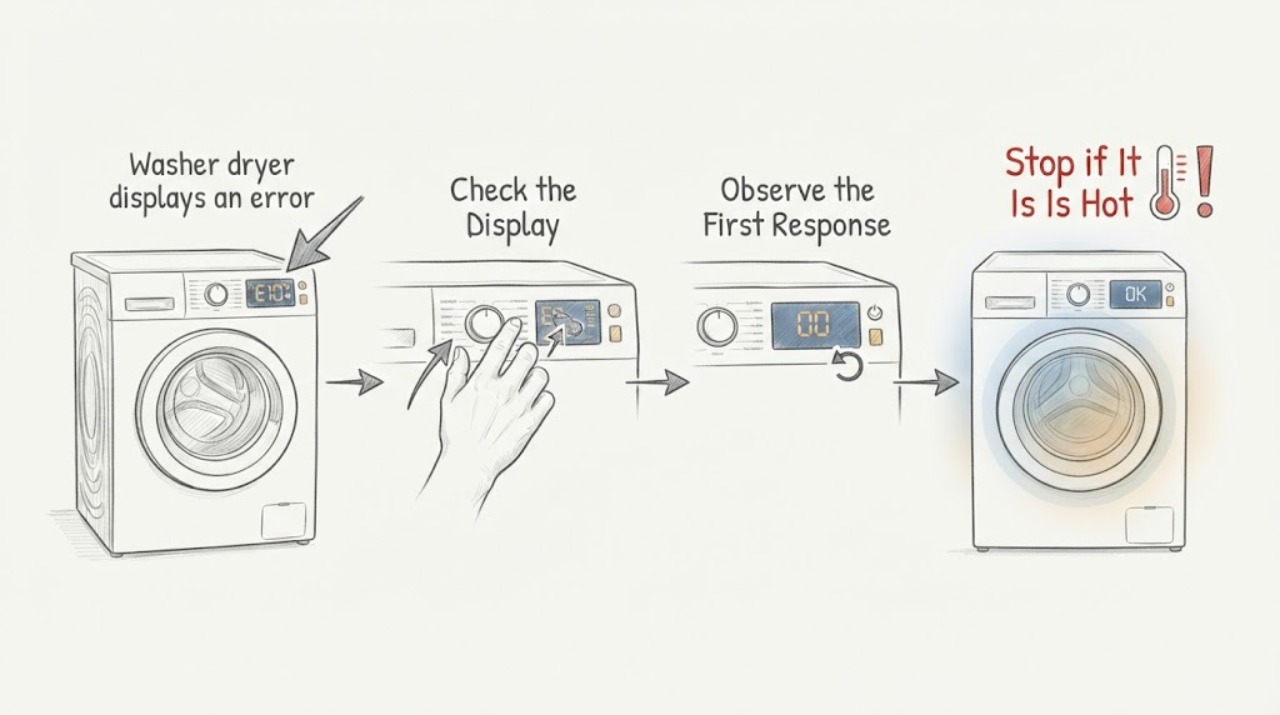
A reset that clears a washer-dryer error only temporarily has not proved the machine is repaired; it may have cleared the display or a transient control state while the underlying condition remains. Before resetting, photograph the exact code or flashing pattern, record whether it appeared during filling, draining, spinning, heating, or the door/lid operation, and note any water, leak, odor, noise, or physical damage. Check the model's own error-code guidance and perform only the user-safe check it names. If the code returns, do not keep resetting to erase the history: leave the machine out of service when the fault is persistent, the unit leaks, the door or lid is unsafe, or there is smoke, burning odor, unusual heat, or electrical damage, and arrange qualified appliance service.
Work through in order
Diagnostic checks
Use only checks that match the exact appliance or system and its official guide.
-
Check 1
Before resetting, photograph the exact error code, letters, numbers, or flashing-light pattern and note the selected cycle, load, door or lid state, and the point at which the washer-dryer stopped.
Expected result: Record whether the code appeared during filling, washing, draining, spinning, drying or heating, door/lid locking, startup, or immediately after a power interruption.
Next step: Search the exact model manual or manufacturer support page using the recorded code and phase before clearing the display; do not guess a part from the code alone.
Stop if: Stop and leave the appliance out of service for a leak, standing water near electricity, smoke, burning odor, unusual heat, sparking, damaged cord, or a door/lid that is unsafe to operate.
Why this matters
Why: The code and operating phase narrow the relevant manual guidance; the same symptom label can represent different monitored systems on different models. A code that appears only at one phase is more useful evidence than a code seen after an unrecorded reset.
-
Check 2
Follow only the external, user-safe check named for that exact code and model, such as confirming a closed door or lid, an evenly distributed load, accessible water supply, or an accessible drain path; do not remove panels or reach into moving or energized parts.
Expected result: Note whether the named condition is clearly present, whether the check changes the display without a reset, and whether the same code or a different code remains.
Next step: Use the manual's next step for the exact code. If no user-safe step is given, preserve the code and arrange service rather than improvising a repair.
Stop if: Do not bypass a door or lid lock, remove a filter or hose with water present unless the manual gives a safe method, open the cabinet, or test live wiring.
Why this matters
Why: Some codes describe a correctable operating condition such as a door/lid state, imbalance, overload, fill supply, or drain condition; others indicate a system fault. A code that remains after its documented external check needs more than a generic reset.
-
Check 3
If the appliance is dry, intact, not leaking, and the exact manual permits a reset, perform one model-approved power cycle using the accessible controls and power connection; preserve the photographed code before doing so.
Expected result: After power returns, note whether the code stays cleared, whether the machine completes a short normal operation, or whether the same code returns immediately or at the same cycle phase.
Next step: Do not repeat the reset if the code returns. Leave the machine out of service as appropriate and provide the photo, code, phase, and reset result to qualified service.
Stop if: Do not reset a leaking, physically damaged, smoking, overheated, sparking, or otherwise unsafe appliance, and do not handle a hardwired supply or exposed connection.
Why this matters
Why: A code that stays gone after the documented cause was corrected may have been a transient interruption. A code that returns is evidence that the underlying condition remains; repeated resets can erase useful diagnostic history rather than fix it.
-
Check 4
If the washer-dryer operates again after the single reset, observe one normal cycle without adding unusual load, repeatedly changing settings, or clearing the history again; stop if the code or unsafe symptom returns.
Expected result: Record whether the machine completes the cycle, returns the code at the same phase, returns a different code, stops with water or a locked door, or shows a physical symptom even without a code.
Next step: Stop using the machine for any recurrence or abnormal physical symptom and give service the complete sequence rather than performing more resets.
Stop if: Stop immediately for leaks, smoke, burning odor, unusual heat, electrical noise, a door/lid fault, or a drum that moves unexpectedly or makes damaging noise.
Why this matters
Why: A repeat at the same phase makes a monitored subsystem or its operating condition more likely than a one-time display glitch. A different code or physical symptom can indicate a related condition, and no code does not rule out a developing mechanical, water, heating, or electrical problem.
-
Check 5
Prepare the model and serial information, the original code photo, cycle and load details, water or drain observations, reset timing, recurrence phase, and any leak, odor, noise, heat, or door/lid symptom; do not open the washer-dryer to collect more data.
Expected result: The record should show a one-time code that stayed cleared after the documented check, or a persistent/recurring code or physical symptom that needs diagnosis.
Next step: Arrange qualified appliance service for a recurring or unexplained code, a code that returns after one approved reset, or any unsafe symptom; keep the machine out of service until advised.
Stop if: There is no safe user path through cabinet removal, live tests, bypassing locks, defeating safety controls, or dismantling a water or electrical connection.
Why this matters
Why: A complete timeline lets service distinguish a transient control event from a repeatable fill, drain, lock, motor, heating, sensor, or control fault. It does not justify replacing a board or other part without diagnosis.
Use your observations
Decision map
Find the observation that best matches what you see, then follow the next safe action.
-
PATH 01Next step
What you see
The code was captured, the manual's external check was completed, one approved reset was performed, and the washer-dryer completes a normal cycle without a physical symptom.
Do this next
Keep the code photo and timeline; do not repeatedly reset or erase history if the error returns.
-
PATH 02Next step
What you see
The same code returns immediately or at the same point in the cycle after one approved reset.
Do this next
Stop clearing the code, leave the appliance out of service as needed, and arrange qualified service with the original code and recurrence phase.
-
PATH 03Next step
What you see
The code or stop recurs during filling, draining, spinning, drying/heating, or door/lid operation, or the machine has water, vibration, noise, or a lock problem even when the code clears.
Do this next
Follow only the model-specific user checks that match that phase, then stop and request service if the condition recurs or requires access inside the appliance.
-
PATH 04Next step
What you see
The washer-dryer is leaking, physically damaged, smoking, sparking, unusually hot, has a burning odor, or has a door/lid or power connection that is unsafe.
Do this next
Do not reset or operate it. Keep clear, leave the appliance out of service, and obtain qualified help; use emergency assistance for active fire or immediate danger.
Helpful context
Understand the symptom
A cleared display is not the same as a cleared fault
Washer-dryers monitor different systems during fill, wash, drain, spin, drying, door or lid locking, and temperature control. A reset can make the display look normal after a temporary interruption, but it does not unblock a drain, correct an installation issue, repair a lock, or fix a sensor, motor, heater, pump, valve, or control fault. Because codes differ by model, the exact code and the phase where it appeared are more useful than a generic reset sequence.
Capture the evidence before clearing it
Take a photo of the display or flashing lights before pressing reset, and write down the selected cycle, load condition, water level, door or lid state, and what the machine was doing when the error appeared. If the code disappears after a reset, keep the photo. It preserves a symptom that may not be visible when service arrives and avoids guessing from a code remembered incorrectly.
Use reset as a bounded test
A single reset can be reasonable only when the appliance is dry, intact, not leaking, and the model instructions allow it. If the code returns at the same stage or the appliance remains unable to complete a cycle, stop treating reset as a solution. LG also distinguishes ordinary control recovery from a displayed error or a physically damaged or leaking washer, situations that require targeted troubleshooting rather than an automatic reset.
Safety boundary
Stop conditions
- Stop and do not reset a washer-dryer that is leaking, physically damaged, smoking, sparking, unusually hot, producing a burning odor, or has an unsafe door, lid, cord, or outlet.
- Do not clear a recurring code repeatedly, bypass a door or lid lock, open the cabinet, reach into moving parts, test live wiring, or disconnect internal hoses or conductors.
- Do not assume a cleared display means the underlying fault is fixed; preserve the original code and cycle phase for service.
Only after diagnosis
Potential parts
- washer-dryer control board
Only consider this if service testing identifies a control failure after the code and connected systems have been evaluated; clearing an error does not establish a board fault.
Confirm the exact appliance model and manufacturer-approved fit after diagnosis; do not order from a code label alone. - door or lid lock assembly
Only relevant when the documented code and testing identify a failed lock or latch circuit, rather than an obstruction or control-state issue.
Match the exact model, door or lid configuration, and manufacturer fit information. - drain pump or drain component
Only consider this when a recurring drain-stage error and professional testing show that the pump or related drain component is the cause.
Confirm the exact model and manufacturer-approved component; a generic drain error does not prove a pump failure. - water inlet valve or fill component
Only relevant when a recurring fill-stage code and service diagnosis identify restricted or failed inlet control rather than a supply or hose condition.
Verify the exact model, inlet configuration, and manufacturer fit before replacement.
When checks do not resolve it
Need a professional?
Arrange qualified appliance service when the same error returns after one model-approved reset, the error returns at a repeatable cycle phase, no code-specific user check resolves it, or the machine has a physical symptom such as leaking, abnormal heat, damaging noise, or a door/lid problem. Use emergency help for active fire, smoke, shock, or immediate danger. Do not open the washer-dryer or bypass its safety controls.
Common questions
FAQ
Why did the washer-dryer work after a reset but show the error again?
The reset may have cleared a temporary control state or the display history without removing the condition that triggered the code. Capture the code and cycle phase, follow the exact manual's check, and request service if it returns rather than resetting repeatedly.
Should I reset a washer-dryer before looking up the error code?
No. Photograph or write down the code and what the machine was doing first. Manufacturer guidance is model-specific, and Samsung advises troubleshooting before reset because repeated clearing can remove useful history.
How many times can I reset the washer-dryer?
Treat a reset as a single, model-approved test after safe troubleshooting, not a recurring workaround. If the error returns, stop clearing it and arrange service with the original code and recurrence details.
What information helps a technician diagnose a recurring error?
Provide the exact model, code or flashing pattern, selected cycle, load and water state, the stage where it stopped, checks attempted, reset result, and any leak, noise, heat, odor, or door/lid symptom. A photo taken before reset is especially useful.
When should I not reset a washer-dryer?
Do not reset a leaking, physically damaged, smoking, sparking, overheated, or otherwise unsafe machine, or one with a door/lid that is not safe. Leave it out of service and obtain qualified help; do not bypass the lock or open the cabinet.
Read the exact guide
Official sources
- LG Washer - Troubleshooting Unresponsive Washer ButtonsLG USA Support · LG washer error-code lookup and model-specific control reset guidance
- Error Codes in Top Load HE WashersWhirlpool · Whirlpool washer error-code variability and phase-specific checks
- How to Reset a Washing Machine: Step-by-Step Guide to Fix Common IssuesLG UK · LG washer reset exclusions for displayed errors, leaks, and physical damage
- How to reset your Samsung dryerSamsung · Samsung dryer error-code reset limits and recurrence guidance
- How to Reset a WasherWhirlpool · Whirlpool washer control reset, control-lock, and manual-specific reset guidance
Community feedback
Share a repair observation
Share a plain-text repair observation. Accepted observations are published automatically; this page may take a moment to update.