
On this page
Start here
Quick answer
A door-lock error on a washer or washer-dryer usually means the door is not fully closed, laundry or residue is caught in the gasket or latch, the lock cannot sense the closed position, or the control needs a model-specific reset. Stop the cycle, keep hands clear of the latch, inspect the door and gasket, remove only visible obstructions, close the door firmly, and use the owner manual's reset procedure. Do not force a locked door or bypass the interlock. If the error returns with an empty, clean door area, if water remains inside, or if the latch, hinge, gasket, wiring, or lock appears damaged, disconnect power as the manual permits and arrange qualified appliance service.
Before you begin
Safety first
- A technician can test the door lock and sensor, latch and hook alignment, hinge and gasket, harness, drain-related interlock, and control without defeating the appliance's safety system. Keep homeowner work to normal controls, visible obstruction removal, permitted surface cleaning, and the exact manual's reset procedure.
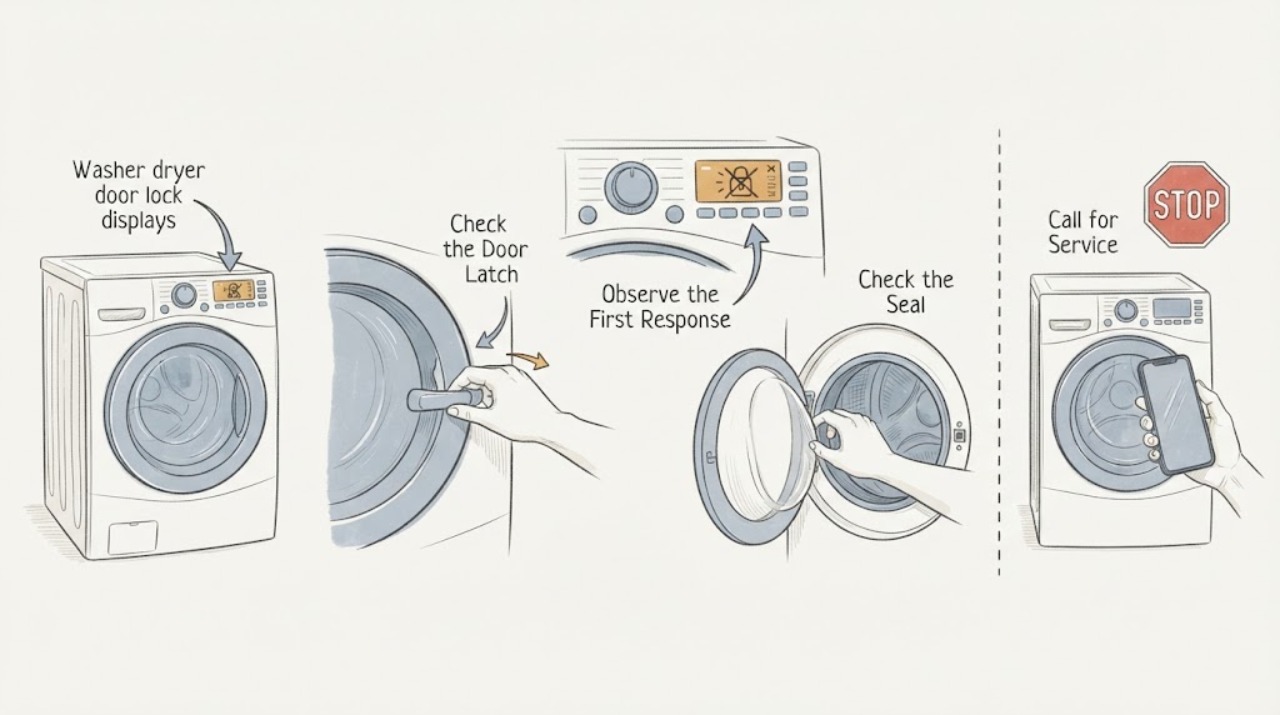
Work through in order
Diagnostic checks
Use only checks that match the exact appliance or system and its official guide.
-
Check 1
Cancel the active cycle with the normal control and keep hands, tools, and clothing away from the latch and drum while the appliance completes any normal stop or unlock sequence.
Expected result: The door unlocks normally, the door remains locked, the drum is moving or hot, or water is visibly present inside.
Next step: Wait and follow the model manual's cancel, cool-down, or drain instruction. If the door remains locked with water inside, the appliance is hot, or the cycle cannot stop normally, leave it closed and arrange qualified appliance service.
Why this matters
Why: A normal unlock suggests the interlock is responding and the message may have been a temporary sequence or closing issue. A locked door with motion, heat, or water is a safety state, not permission to pry it open.
-
Check 2
With the appliance stopped, inspect the door edge, latch opening, hinge side, glass, gasket, and strike or hook for visible clothing, packaging, detergent residue, lint, or an object preventing full closure.
Expected result: Laundry is caught in the gasket, residue or debris surrounds the lock, the door sits out of alignment, the latch or hook is bent or broken, or the area is clear.
Next step: Remove only visible loose material and wipe accessible residue with a soft damp cloth if the manual permits. Do not pry, bend, remove the gasket, or force the latch; arrange service for damage or persistent misalignment.
Why this matters
Why: An obstruction, buildup, or misalignment can prevent the lock from reaching its closed position. A damaged latch, hook, hinge, or gasket can cause a repeat error even when the door looks shut. A clear area shifts suspicion toward the lock sensor, wiring, or control.
-
Check 3
Redistribute or remove any item protruding through the gasket and close the door firmly using its normal handle; do not slam it or push on the glass.
Expected result: The door now latches, the door looks closed but will not latch, the error appears only with a full load, or the same error appears with an empty drum.
Next step: Run the model's permitted empty or small-load test only after the door closes without force. If the error persists with the door clear and empty, stop repeated starts and use service rather than holding the door shut.
Why this matters
Why: A trapped item or overloaded drum can prevent the latch from engaging. A door that cannot latch when empty suggests alignment, latch, hook, or interlock trouble rather than load placement alone.
-
Check 4
Record the exact displayed message, selected program, whether this is a washer or combo cycle, and whether the error appears at start, during operation, or while unlocking at the end.
Expected result: The message matches the model manual's door-closed, door-locked, or door-unlock explanation, appears only in one program, or does not match the manual.
Next step: Use only the manual for the exact model and retain a photo of the display for service. Do not substitute a code meaning from another brand or enter service diagnostics to bypass the interlock.
Why this matters
Why: Timing and program context distinguish a door that never locks from a door that is safely held locked because the drum is moving, hot, or still contains water. An unmatched message should not be decoded from a different model.
-
Check 5
If the door area is clear and the appliance is cool and empty of visible standing water, perform the owner's manual's normal power reset with the appliance disconnected as instructed; do not open covers or touch internal wiring.
Expected result: The error clears and the door locks on a normal test, the error returns immediately, or the control remains unresponsive.
Next step: Stop after the manual-directed reset and one controlled retest. If the error returns, leave the appliance out of service and arrange qualified appliance repair; do not keep cycling power or bypass the lock.
Why this matters
Why: A one-time recovery supports a transient control state. A repeat error or unresponsive control is more consistent with a lock, latch, sensor, harness, drain-related interlock, or control fault that a reset cannot repair.
-
Check 6
Check the visible drum or door window for standing water and note whether the appliance has completed its drain routine before attempting any unlock command.
Expected result: Water remains, the drain-and-spin option is unavailable or fails, the door unlocks after draining, or no water is present and the lock error remains.
Next step: Follow only the model's documented drain procedure. Do not open the pump filter or remove hoses with water uncontrolled; if draining fails or the door stays locked, arrange service.
Why this matters
Why: A water level can intentionally keep the door locked to prevent flooding. Successful draining makes the lock state less likely to be caused by residual water; an empty drum with a repeat error points back to the latch, lock, sensor, or control.
-
Check 7
After the accessible checks, try no more than one normal start with the door clear and firmly latched, and note whether the lock engages without unusual clicking, grinding, repeated attempts, or a new error.
Expected result: The lock engages and the cycle starts, the lock clicks repeatedly without engaging, the door or hinge shifts, or the same error returns.
Next step: Stop operating the appliance for repeated lock attempts. Disconnect power only as the manual permits and arrange qualified service for the lock, latch, hinge, gasket, wiring, sensor, or control diagnosis.
Why this matters
Why: A successful start suggests the obstruction or control state was temporary. Repeated attempts, movement, or a persistent message can indicate a failing interlock, misaligned door, damaged hook, harness, or control fault.
Use your observations
Decision map
Find the observation that best matches what you see, then follow the next safe action.
-
PATH 01Next step
What you see
Laundry, packaging, residue, or a gasket obstruction is found and the door latches after it is removed.
Do this next
Run one model-permitted test with the load distributed and the gasket clear. If the error recurs, stop using the appliance and have the latch and interlock checked.
Why this path and its safety boundary
Why it matters: A closing obstruction is more likely than a failed door-lock assembly, although a damaged gasket or latch can remain if the error returns.
-
PATH 02Next step
What you see
The door is clear and aligned but the message appears with an empty drum or after a single manual-directed reset.
Do this next
Do not hold the door shut, enter service diagnostics, or bypass the interlock. Leave the appliance out of service and arrange qualified appliance repair with the exact display and model.
Why this path and its safety boundary
Why it matters: A lock sensor, interlock, latch hook, harness, or control fault is more likely than a clothing obstruction or load size.
-
PATH 03Next step
What you see
The door remains locked while water is visible, draining fails, or the appliance is in a hot or protected part of a cycle.
Do this next
Keep the door closed and use only the documented drain or cool-down routine. If water remains, the appliance is hot, or the lock never releases, arrange service rather than forcing it.
Why this path and its safety boundary
Why it matters: The interlock may be correctly preventing an unsafe opening, with a drain, temperature, or cycle-state issue still active.
-
PATH 04Next step
What you see
The error occurs only with a full or tightly packed load, but an empty or small load latches and starts normally.
Do this next
Reduce or redistribute the load according to the manual and keep fabric away from the gasket. If a normal load later triggers the error, stop repeated attempts and have the door alignment and lock checked.
Why this path and its safety boundary
Why it matters: Load placement, clothing caught in the seal, or an overloaded drum is more likely, while a marginal latch should still be monitored.
-
PATH 05Next step
What you see
The latch, hook, hinge, gasket, or door frame is bent or broken, the lock makes repeated harsh sounds, the appliance trips power, smells hot, or the error returns after safe checks.
Do this next
Stop operation, keep the door closed or the appliance disconnected as the manual permits, and arrange qualified appliance service. Do not remove covers, probe wiring, or defeat the safety interlock.
Why this path and its safety boundary
Why it matters: The condition exceeds a cleaning or reset check and may involve mechanical damage or an electrical/control fault.
Helpful context
Understand the symptom
The displayed error is a symptom, not a universal part diagnosis
Door-lock messages are not interchangeable across brands or models. The same broad symptom can mean the door is not latched, the gasket or latch area is obstructed, the lock is dirty, a drawer or door is closed but not sensed as locked, or the control has not completed its safety sequence. Record the exact message and model before using a code-specific instruction. Do not infer that the lock assembly has failed just because the display names the door.
Inspect the door without defeating the interlock
Cancel the cycle using the normal control and wait for the appliance to reach a safe state. Look around the latch, hinge side, glass, and rubber gasket for a sock, drawstring, paper, packaging, detergent residue, or a bent hook. A large or tightly packed load can keep a front door from closing fully. Remove only what is visible and accessible; do not pry the door, pull the gasket away from its retaining ring, or reach toward a moving drum.
A reset is a control check, not a repair
If the door closes normally and the area is clear, follow the owner's manual for canceling and resetting the appliance. Manufacturer instructions differ: some use a power cycle, while others require a drain or spin routine before the door can release. A reset that clears the message once points toward a transient control state; a repeated error with an empty drum and clear latch area needs diagnosis of the lock, sensor, harness, or control.
Water in the drum changes the safe next step
A washer may keep the door locked when water has not drained, because opening it could release water. Check the display and visible water level without opening panels. Do not force the door or reach into standing water. Use the manual's drain or drain-and-spin procedure only if it is available for that model; if water remains or the pump and drain path are abnormal, arrange service.
Washer-dryer combinations need the exact appliance context
A washer-dryer combo can report a door condition during wash, drying, cooling, or a protected unlock sequence. A separate tumble dryer may use a different door switch and code meaning. Note which program was selected, whether the drum was wet or hot, whether the error appeared at start or end, and whether the door is locked or merely refuses to start. Use the model manual rather than importing a code meaning from another appliance.
Safety boundary
Stop conditions
- Do not force, pry, or bypass a locked washer or washer-dryer door, especially when the drum is moving, hot, or contains water. Keep the interlock functional.
- Stop if the latch, hook, hinge, gasket, door frame, or lock is bent, broken, loose, or repeatedly clicking; do not hold the door closed to make a cycle start.
- Do not remove covers, touch internal wiring, enter service diagnostics to defeat the lock, open a pump filter, or disconnect a hose while water is uncontrolled. Follow the model manual or use qualified service.
- Arrange appliance repair when the exact error returns with an empty clear door area after one model-directed reset, when water will not drain, or when power trips, burning odor, leaks, or unusual heat appears.
Only after diagnosis
Potential parts
- door lock or interlock assembly
Consider this only when the door area is clear and aligned but the exact error returns, or a qualified diagnosis confirms the lock cannot sense or hold the closed position.
Match the exact appliance model, lock style, connector, and manufacturer service information; do not infer compatibility from a similar-looking lock. - door latch, hook, or strike
Consider this only when the hook or strike is visibly damaged, misaligned, or confirmed by service testing to prevent the interlock from engaging.
Confirm the exact door, hinge orientation, mounting arrangement, and model-specific fit before selecting a part. - door gasket or seal
Consider this only when the gasket is torn, displaced, or trapping laundry in a way that prevents closure; a clean intact gasket does not justify replacement for an error alone.
Match the exact model and gasket design, and use service when retaining rings or the front panel must be removed.
When checks do not resolve it
Need a professional?
Safety scope: A technician can test the door lock and sensor, latch and hook alignment, hinge and gasket, harness, drain-related interlock, and control without defeating the appliance's safety system. Keep homeowner work to normal controls, visible obstruction removal, permitted surface cleaning, and the exact manual's reset procedure.
Common questions
FAQ
Why does my washer dryer show a door-lock error when the door looks closed?
The latch may not be fully engaged because fabric, residue, packaging, a crowded load, or misalignment is in the way. A lock sensor or control fault can also make a closed door fail the safety check. Inspect the gasket and latch area without forcing the door, then use only the exact model's instructions.
Can I reset a washer door-lock error?
A model-directed cancel or power reset can clear a temporary control state, but it cannot repair a damaged latch, lock, gasket, wiring, or control. Perform one reset only when the appliance is stopped, cool, and not holding standing water, following the owner's manual.
Why will the washer door not unlock after the error?
The appliance may keep the interlock engaged while the drum is moving, hot, or contains water. Follow the documented cancel, cool-down, drain, or drain-and-spin procedure and do not pry the door. If it remains locked or water will not drain, arrange service.
Should I replace the door lock as soon as an error appears?
No. First check the exact model code, door closure, gasket, latch area, load placement, and permitted reset. Replace a lock only when the model-specific diagnosis supports it; a bent hook, hinge, harness, control, or drain-related interlock can produce a similar message.
When should I call appliance repair for a door-lock error?
Call when the error returns with an empty clear door area, the latch or gasket is damaged, water remains, the door is locked after the documented drain or reset path, the appliance makes repeated harsh lock sounds, or power trips or a hot smell appears. Do not bypass the interlock or open panels.
Read the exact guide
Official sources
- Front Load Washer - What are dE, dE1, and dE2 Error Codes?LG USA Support · LG front-load washers and selected washer-dryer products; exact code meanings differ by model
- Door Will Not Lock or Unlock - Front Load WasherWhirlpool · Whirlpool front-load washers; cycle behavior and reset timing vary by model
- F22 - Front Load Washer - Product HelpWhirlpool · Whirlpool front-load washers reporting F22; other brands and models use different codes and mechanisms
Community feedback
Share a repair observation
Share a plain-text repair observation. Accepted observations are published automatically; this page may take a moment to update.